Ryan Christoffel

981 posts on MacStories since November 2016

Ryan is an editor for MacStories and co-hosts the [Adapt](https://www.relay.fm/adapt) podcast on Relay FM. He most commonly works and plays on his iPad Pro and bears no regrets about moving on from the Mac. He and his wife live in New York City.

NapBot: Simple Sleep Tracking Powered by CoreML

Sleep tracking is an area of health that Apple hasn’t yet formally moved into, but all signs point to that changing soon. iOS 13 saw the company build more advanced wellness tracking features into the Health app, Beddit was acquired by Apple a couple years ago, and very recently the App Store leaked evidence of a Sleep app that is (or was) in development for Apple Watch. But for the time being, anyone interested in sleep tracking with a Watch or iPhone needs a third-party app.

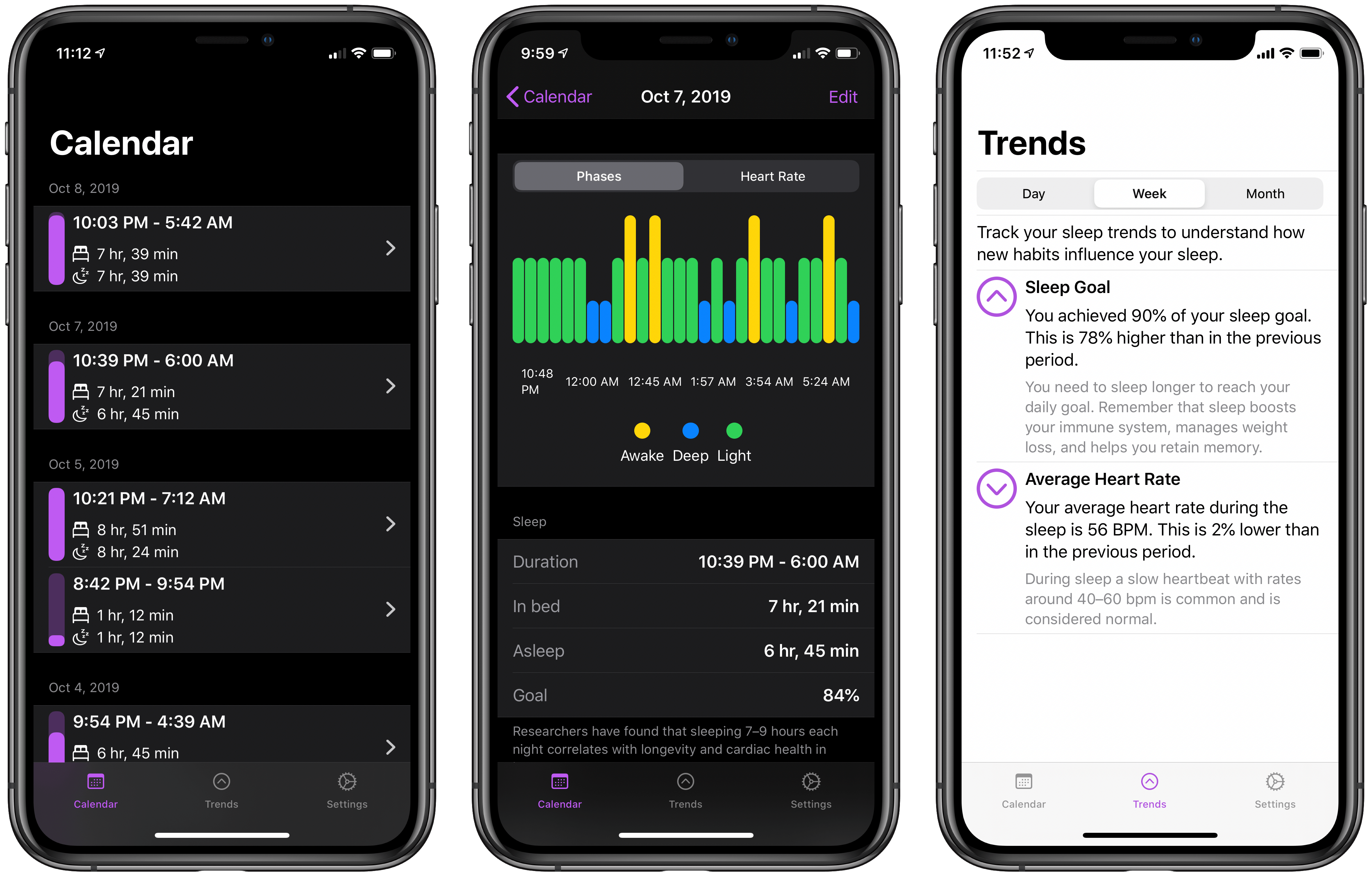
NapBot is one such app, a new debut from the maker of CardioBot that launched in recent weeks. NapBot applies CoreML to perform automatic sleep tracking when you’re wearing an Apple Watch to bed, the results of which you can then view in either the iPhone or Watch apps.

Read more


Project Geneva: David Smith’s New Approach to Third-Party Watch Faces

Developer David Smith has often expressed a desire to design third-party faces for the Apple Watch, a feature that many users wish Apple offered. But recently, after launching his latest Watch app Geneva Moon (formerly known as Moon++), Smith realized he could take a different view of face customization, inspired by his newest app.

Geneva Moon exists mainly to provide a complication which displays an astronomically accurate representation of the moon. It takes advantage of the new ability in watchOS 6 for Watch apps to be offered independently of iOS counterparts, so you can download Geneva Moon directly from the Watch’s App Store and then install its complication on your watch face. Smith’s experience with this app inspired him to shift his focus from the aspects of watch faces that Apple doesn’t let developers customize, to the extensive areas that they can. He writes:

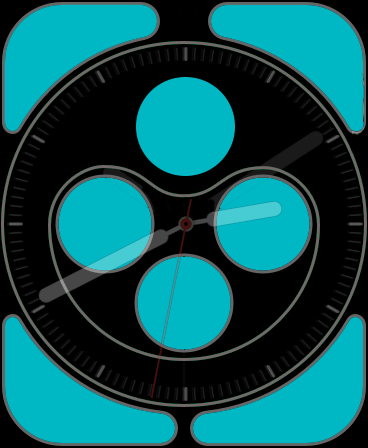
The Infograph face's customizable areas. (Source: david-smith.org)

The Infograph face’s customizable areas. (Source: david-smith.org)

I have extensive control over what is shown here and for many of the watch faces, this area makes up the vast majority of the screen. Other than the design of the watch hands or appearance of the digital time numerals, I can do a whole lot with the complication tools I already have.

To that end, I’m starting a journey I’m calling Project Geneva, in which I’m going to see just how far I can push customizability and design of complications for the Apple Watch.

Though Apple doesn’t permit the distribution of third-party watch faces, by focusing on creating new complications that can be used across a variety of different first-party faces, Smith will provide users more flexibility in crafting each existing face to their own preferences and needs.

To a degree, third-party faces are already here. An entire watch face can’t be customized, but for those faces which are largely populated by complications – which many are – there exists enormous freedom for developers and users alike to craft their ideal watch face.

I can’t wait to see what new complications are spawned by Project Geneva, and hope other developers may take inspiration from Smith’s new initiative themselves.

Permalink

The Future of Apple Music

Sophie Charara interviewed Apple’s Zane Lowe for Wired about where Apple Music is heading next. One answer, interestingly enough, is a greater focus on radio:

Apple doesn’t break out Beats 1 monthly listening figures; various commentators have speculated they are relatively low, the official line is “tens of millions”. What we do know is that one of Lowe’s priorities is to merge the two elements of Apple’s £9.99 a month Music offering: its Spotify-style streaming service and the Beats 1 radio shows.

“I want more people to listen and discover this stuff,” says Lowe. “And I want to integrate what we do at Beats 1 into Apple Music more thoroughly. I would guess there are still subscribers who don’t realise Elton John has done over 200 shows. Those shows are works of art in their own right.”

Apple Music for years has been producing quality radio work, yet the way that’s been surfaced hasn’t been the most discoverable. Promoting existing radio shows in more places sounds like a positive step forward, and I hope another addition would be an option for push notifications when there’s a show you want to listen to live. Apple could put a little bell icon, YouTube-style, on a show’s artwork in the app for enabling such notifications, because unless you schedule a show into your normal routine, you’ll almost certainly never think to listen to it at the right time.

Another potential content area for greater exposure would be the interviews Zane Lowe and his colleagues do with artists regularly, which Apple Music often features in both audio and video forms. To me those interviews feel like a perfect fit for highlighting in Apple Podcasts as well as the Music app. Apple has actually dabbled in that, such as with a Billie Eilish interview earlier this year, but I think it’s an area ripe for expansion.

One other change Apple’s pursuing, according to Lowe, will bring about increased initiatives around live music:

There’s also the matter of how livestreams fit into the picture. After events with Shawn Mendes, French rap group PNL and Tyler the Creator, who did a live performance of his album IGOR, streamed on Apple Music the night before it came out, Lowe says “live music is definitely on the horizon” for the service. It’s all part of the team’s bid to “eventise” – his word – album launches. In the case of Tyler the Creator, “fans can tune in, then after watching it maybe you go to the album.”

Making album launches more of an event could be an effective way to compel a switch to Apple Music over Spotify. If Apple can arrange live content with a wide appeal timed with an album launch, then people will tweet about that live content as it’s being shared, and anyone not on Apple Music will feel like they’re missing out.

Permalink

14-Year-Old Developer Created Game for Apple Arcade’s Launch

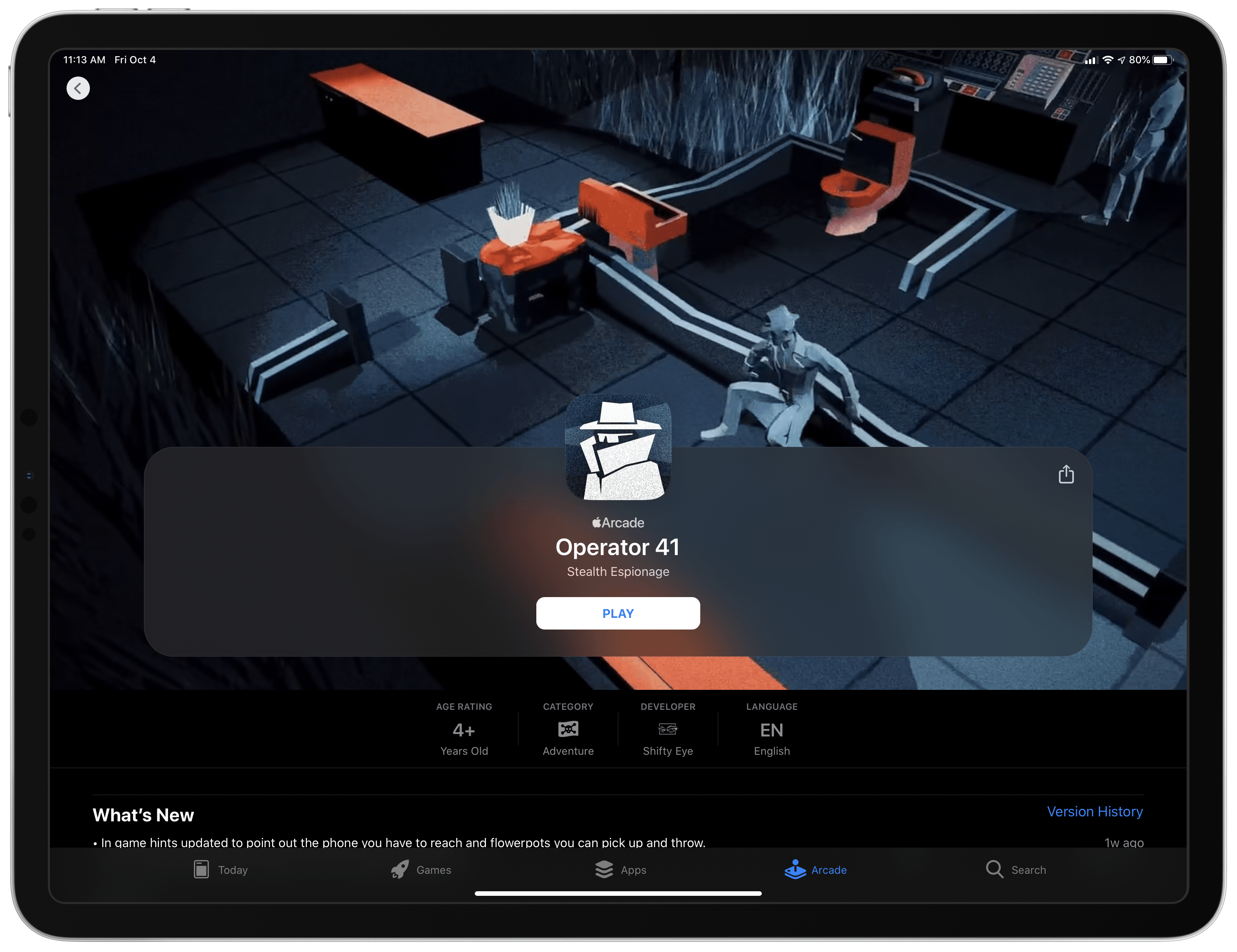
Patrick Klepek writes for VICE about the 14-year-old developer, Spruce Campbell, whose game Operator 41 was part of the Apple Arcade launch:

“When I saw the Apple Arcade announcement in March I dropped everything and decided to build a whole new game for Arcade,” [Campbell] told VICE via email. “I thought that the games that really fit Apple Arcade will probably be designed for it from the ground up, so I came up with a stealth game that would work on all the Arcade platforms.”

Campbell has quite a personal story. As Klepek notes, the young developer taught himself to code starting at the age of 8, and when he was 12 he designed a game, CyberPNK, that netted him a BAFTA award. He also received a scholarship to attend WWDC this June, which is where he was able to personally pitch Operator 41 to Apple for Arcade inclusion. Campbell says following that pitch:

“I went back to the dorms, and over the next week I was accepted onto the service,” he said. “I’d say that was the luckiest moment of production—so many stars had to align for me to be accepted onto the service and everything went so well.”

Klepek’s concluding words put into perfect context what this story means for the potential of Arcade’s future.

Operator 41 doesn’t have many reviews. It didn’t get a big marketing push, and wasn’t on Apple’s big stage…But what’s remarkable is that Operator 41 exists at all, and shows Apple having a willingness to give people a shot. Apple Arcade isn’t a place where, like the App Store, anything can get published. There is a curation element. Campbell wasn’t signed because he made a hit that Apple thinks will bring new people into Apple Arcade. In this case, Apple decided it was worth including a game by a mostly unknown 14-year-old designer.

Arcade’s launch has been fantastic, and with the near-certainty of more stories like Campbell’s moving forward, the service’s future looks bright.

Permalink

Dark Noise

It’s not often that I find an app that puts a smile on my face upon first use, and it’s even rarer for an app to continue instilling that level of delight on subsequent uses. One exception that comes to mind is Castro, the podcast client, due to the breadth of thoughtful design flourishes...


Tripsy Review: The Ultimate Trip Planner for iPhone and iPad

Summer may be over, but there’s never really an offseason for planning future vacations or business trips. We all have our own methods of trip planning – where we store important documents, how to set an agenda and share that agenda with family or friends – but I’d guess most of us aren’t entirely satisfied with our current planning systems. Important information can be scattered across different apps, services, or analog files, which is fine but not ideal. Tripsy aims to solve that problem.

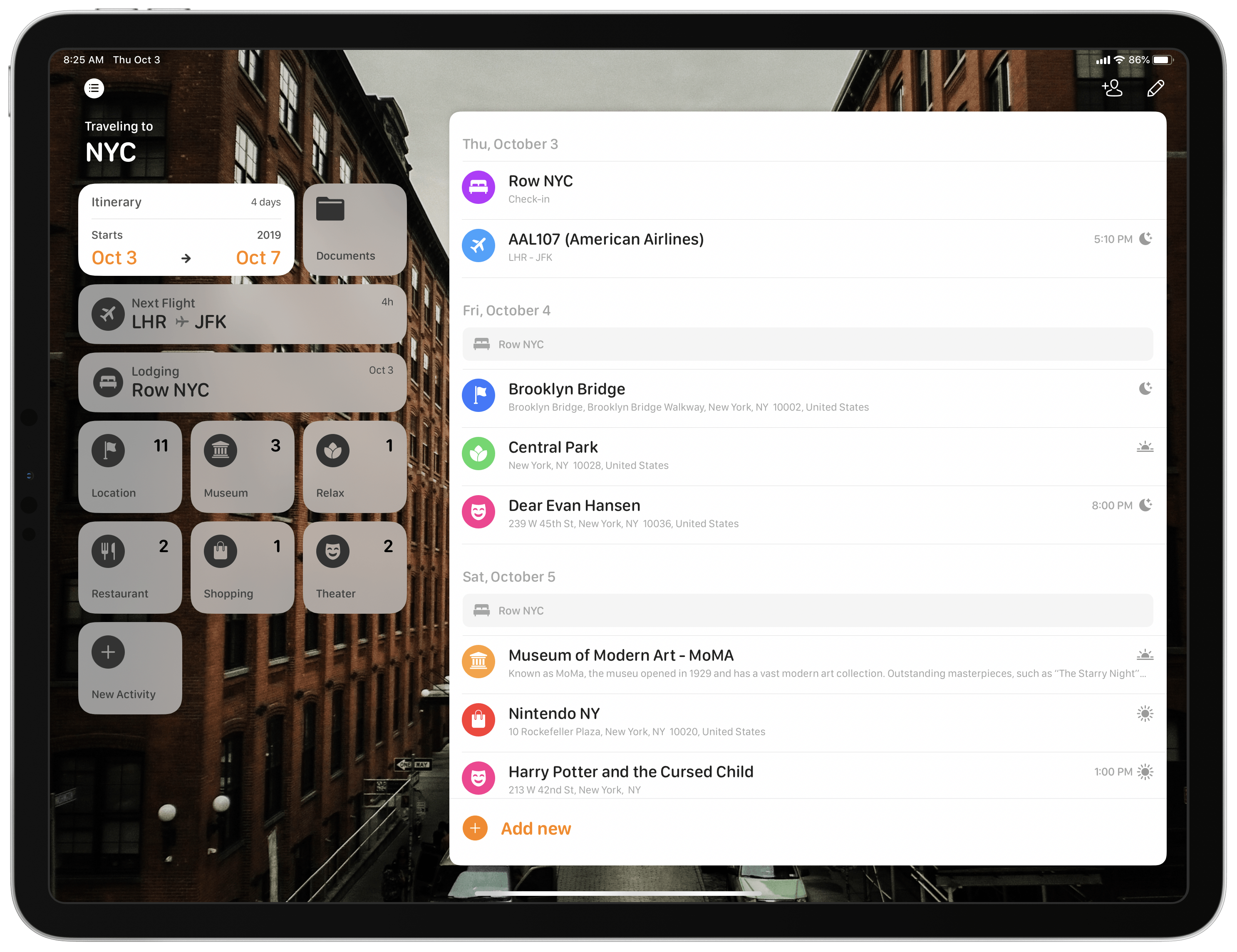
Tripsy isn’t entirely new to the App Store, having first launched almost a year ago, but it recently received a major 2.0 update alongside iOS 13’s debut. While I never used the previous version, the new Tripsy is exactly the tool I’ve wanted for trip planning for a long time. The app serves as a one-stop shop for organizing all of your trip-related information: you can add Apple Maps points of interest to your agenda, scheduling them to specific times and days, add notes to each saved location, store important travel documents in the app, and share your full trip data with fellow travelers. All of this functionality is enhanced by a strong app experience thanks to system features like multiwindow on iPad, Sign In with Apple, dark mode, and more.

Read more


Apple Maps’ Northeast Expansion Visualized

Yesterday Apple began the full rollout of its new maps for the Northeastern United States. And right on the heels of that release, Justin O’Beirne has meticulously documented and compared Apple’s new work with the mapping data that it replaces. He begins by highlighting Apple’s progress toward launching its new maps throughout the U.S.:

With this latest expansion, Apple’s new map now covers 27.5% of the U.S.’s land area and almost half of its population (47.2%).

Apple has promised that its new maps would be available to all U.S. users by the end of 2019, so the rollout – which began last September with iOS 12 – will need to significantly accelerate from now through December.

The bulk of O’Beirne’s post lets the new maps speak for themselves. Pulling from significant locations all throughout the Northeast, O’Beirne showcases direct comparisons between the old and new maps. As has been seen in other parts of the U.S., Apple’s new maps feature significant expansions of vegetation, new details for features like ball fields and small parks and rivers, and even road enhancements. Apple’s Look Around feature, which competes with Google Street View, is also now available in some of these Northeastern locations, such as in New York City.

Maps in iOS 13 is a big update, particularly if you’re in an area that has the new Apple-designed maps. I’m excited to have the new maps arrive in New York City, and look forward to getting some hands-on time with them over the coming weeks.

Permalink

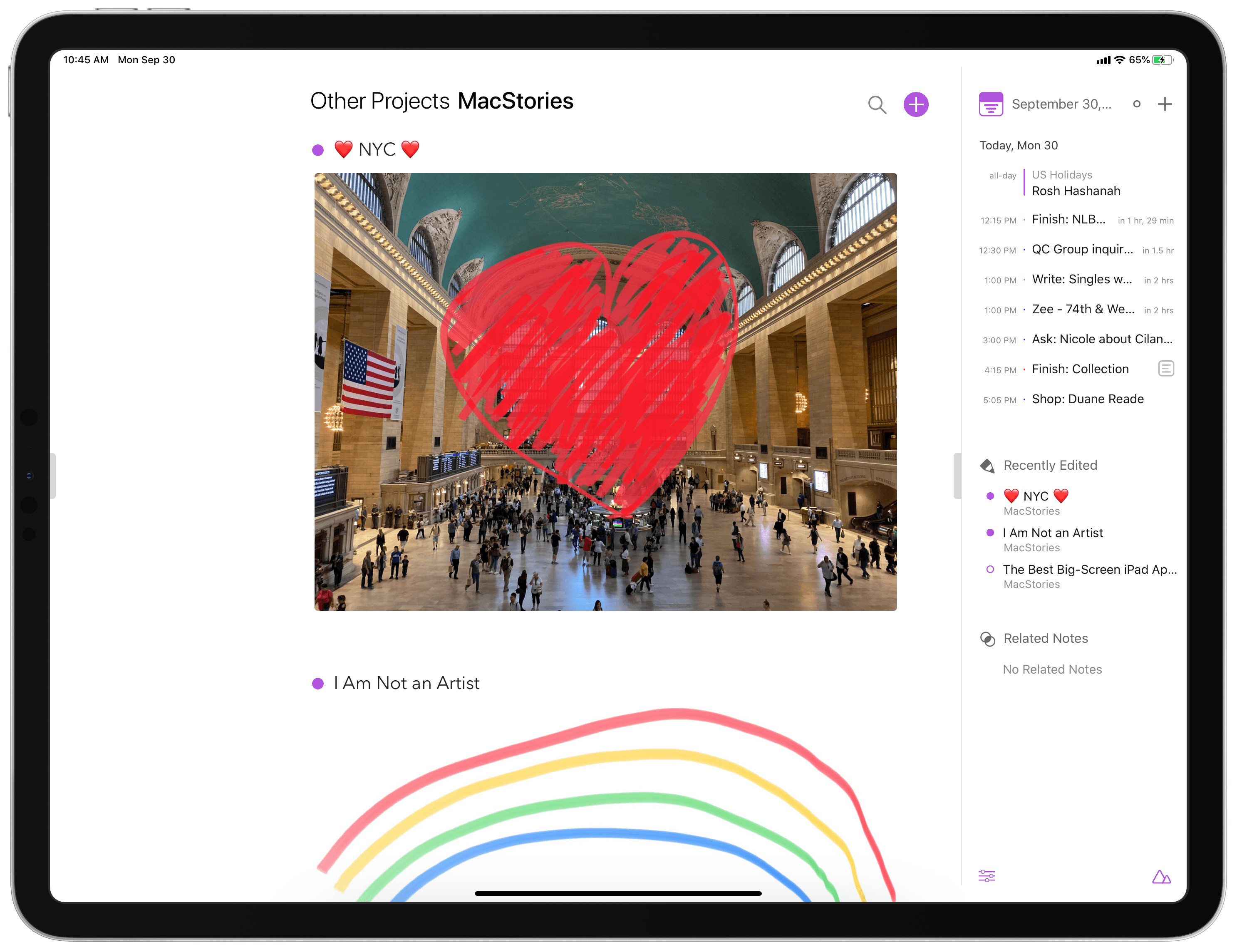
Agenda Gains Drawing and Handwriting Features, Plus Document Scanning and Dark Mode Enhancements

Once upon a time, in the early days of iOS’ life, note-taking apps on the iPhone and iPad were, strictly speaking, for text-based notes. The original Notes app, pre-iOS 9 makeover, was designed for text alone, and yet despite that limitation it remained the most popular notes app on iOS.

Times have changed. Today Apple Notes is a powerhouse tool for not just typed notes, but also images, document scans, checklists, sketches, rich links, and much more. Apple’s aggressive development of Notes forces third-party contenders to up their games as well, and that’s exactly what Agenda has been doing over the last year.

Agenda is a note-taking client that integrates with your calendar in a way unlike any other app, enabling tying your notes to specific calendar events so they’re easy to keep track of. Recent updates have meaningfully complemented that core purpose, adding Reminders integration, extensive keyboard shortcuts, and file attachments. Over the last couple weeks the app has also launched not one, but two more significant updates, versions 7 and 8, which expand Agenda’s capabilities further with drawing and handwriting features, alongside iOS 13 enhancements such as dark mode integration and document scanning.

Read more


Apple Arcade: It’s Everything I’d Hoped For

It’s been a busy few weeks, both in the world of Apple news and apps to cover and also in my personal life with a variety of things keeping me very busy. Due to all this busyness, it wasn’t until this past weekend that I was able to start my Apple Arcade trial and test...