Ryan Christoffel

984 posts on MacStories since November 2016

Ryan is an editor for MacStories and co-hosts the [Adapt](https://www.relay.fm/adapt) podcast on Relay FM. He most commonly works and plays on his iPad Pro and bears no regrets about moving on from the Mac. He and his wife live in New York City.

Upcoming watchOS 3.2 Includes New Theater Mode and Siri Improvements

Alongside beta versions of iOS, macOS, and tvOS, Apple today announced the release of the first beta of watchOS 3.2. The beta has yet to appear on Apple’s developer portal, but it should be available soon. Besides the standard bug fixes and performance improvements, this update includes a couple new features, one of which is called Theater Mode. From Apple’s developer release notes:

Theater Mode lets users quickly mute the sound on their Apple Watch and avoid waking the screen on wrist raise. Users still receive notifications (including haptics) while in Theater Mode, which they can view by tapping the screen or pressing the Digital Crown.

This sounds like an interesting new option that could be useful in scenarios besides being at the movie theater. Personally, I’m likely to use Theater Mode when I wear my Apple Watch overnight for sleep tracking. My normal practice is to turn off Raise to Wake in the Settings app before going to bed, but this could prove an easier method.

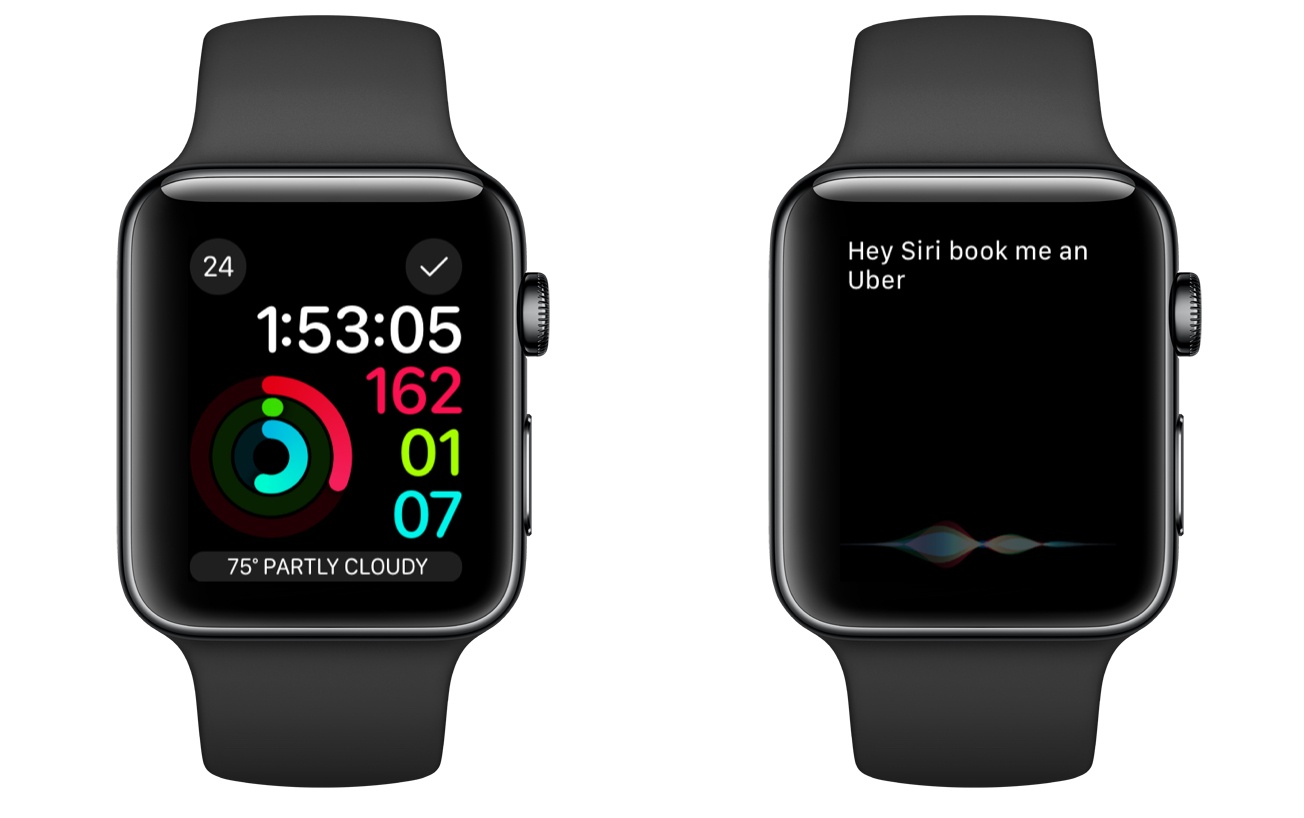
Besides Theater Mode, the most significant update in 3.2 is enhancements to Siri. Last year iOS 10 improved Siri by enabling it to handle queries from third-party apps that fit into specific categories:

  • Messaging
  • Payments
  • Ride booking
  • Workouts
  • Calling
  • Searching photos

Though all of those areas could be handled by Siri on iOS 10, Siri on Apple Watch was previously only able to direct you to your iPhone to perform those actions. But with watchOS 3.2, that is longer the case, as Siri on the Watch is now able to perform these third-party requests.

watchOS 3.2 will likely see a public release this spring, after a couple months of beta testing is complete.


Night Shift Coming in macOS 10.12.4

Today Apple introduced new betas for several of its operating systems. Among those is the first beta of macOS 10.12.4, which brings Night Shift to the Mac for the first time.

Night Shift is a feature that first came to iOS in version 9.3 last spring. At the time, Apple published an informational page about the iOS update that included the following description:

Many studies have shown that exposure to bright blue light in the evening can affect your circadian rhythms and make it harder to fall asleep. Night Shift uses your…device’s clock and geolocation to determine when it’s sunset in your location. Then it automatically shifts the colors in your display to the warmer end of the spectrum, making it easier on your eyes. In the morning, it returns the display to its regular settings. Pleasant dreams.

The Sierra beta includes a toggle switch in Notification Center for quickly turning Night Shift on similar to the way you can turn Night Shift on from the Control Center on iOS. If Apple follows past practice, macOS 10.12.4 with Night Shift will likely be released to the public in early spring. For now, the beta is available only to members of Apple’s developer program, though it is possible that a public beta may be released in the coming days.


Logic Pro X and GarageBand for iOS Get Significant Updates

Today Apple launched the latest versions of two of its apps aimed at music creators: Logic Pro X 10.3 for macOS and GarageBand 2.2 for iOS. Each update brings a number of improvements that offer additional tools to users and increased integration between the two apps.

Logic Pro X 10.3 adds Touch Bar support to the app for the first time, implementing it in a number of ways. The Touch Bar can serve as an instrument, allowing users to tap out a drum beat or play a piano keyboard. Power users will appreciate the ability to keep some of their favorite controls on the Touch Bar, as it can be configured with different keyboard shortcuts to suit each person’s needs. There is also the option to navigate audio waveforms using the Touch Bar.

For those who may not have a Touch Bar-equipped device, the latest update to Logic still has several things to offer. In addition to minor design changes, new features include Track Alternatives, which allows creating and sorting through different edits of any individual track. Increased ties with iOS is another major addition, as you can now upload a project to iCloud in a version compatible with GarageBand on iOS. This allows changes to be made to the file while on the go, straight from an iPhone or iPad. Other features include Selection-Based Processing, which makes it possible to apply a combination of effects to any selection of audio, and beefed up internals driving the app including a 64-bit summing engine.

GarageBand 2.2 for iOS brings the compatibility features necessary to edit an exported Logic file, as mentioned above. Though there seems to be no sign of Logic making its way to iOS, this addition helps mitigate the issue slightly for occasions when your Mac isn’t nearby but an iPhone or iPad is.

The latest update also comes with a new synthesizer called Alchemy, which includes a collection of over 150 patches designed by Apple and covering a wide range of genres. Anyone who regularly records in GarageBand should also appreciate the new Multi-Take Recording feature. New tools for adding one-tap vocal effects to a recording such as distortion or pitch correction were added too.

Logic Pro X 10.3 and GarageBand 2.2 are both available as free updates to existing customers. Logic Pro X is available on the Mac App Store for $199.99, and GarageBand is available on the iOS App Store for $4.99.


AirPods: Ushering in a Wireless Future

AirPods were announced at Apple’s September keynote, accompanied by a video introduction in which Jony Ive proclaimed: “We believe in a wireless future, a future where all of your devices intuitively connect.” In other words, a future that goes beyond getting wires out of the way by creating experiences that are only possible with smarter inter-device connections.

AirPods entered the world on the heels of a controversial decision to remove the standard headphone jack from the iPhone. Connecting wired headphones to an audio source is a decades-old practice we’ve all grown used to, and while this type of connection is still possible on the iPhone via a Lightning connector, AirPods represent Apple’s efforts to move forward into a wireless future.

Though wired headphones are dead simple to use, no one can deny that they do get in the way in a material sense. We’ve all experienced the frustration of cords that tangle, tug, and keep us tethered to our devices. Even the most passionate wire-supporters among us are familiar with these challenges. Wireless AirPods were designed to make such issues ancient history, while simultaneously mitigating the negative trade-offs that are typically associated with Bluetooth headphones.

Technology is at its best when its net gains make you forget about any net losses. Traditional Bluetooth headphones have done a relatively poor job at this, plagued by poor battery life, unstable connections, and often, high cost. So Apple’s challenge with AirPods was to achieve what its competition had not: create a device whose benefits over wired earbuds greatly outweighed its drawbacks.

After nearly a month with AirPods under my belt, I believe the company succeeded.

Read more


Astropad Studio Enters the Professional iPad App Market

Astropad originally launched on the iPad in February 2015 as a drawing tool that pairs with your Mac. It serves as a second screen, allowing you to interact with Mac apps using multitouch on the iPad. The standard Astropad app remains available for a one-time payment of $29.99.

The iPad has changed a lot since February 2015. The introduction of two iPad Pro models, paired with multitasking features in iOS 9, enables more professionals than ever before to get their work done with an iPad. To better address the pro segment of the iPad market, today the makers of Astropad launched a new app called Astropad Studio.

Astropad Studio is a separate app from the original Astropad Standard.

Astropad Studio is a separate app from the original Astropad Standard.

Astropad Studio is focused on providing artists with customization options that tailor the app to their preferences and workflows. Central to this greater flexibility is the ability to perform special gestures that are customizable. This makes possible an assortment of two-handed workflows that are similar to what can be done with Microsoft’s Surface Studio. One hand can use touch gestures for things like erasers and right-clicks, while the other hand can continue drawing with an Apple Pencil. Pencil use is also improved due to the option to customize pressure sensitivity to fit your preferences. The transfer speed from iPad to Mac has been bumped to a 40 MB/s max speed versus the 5 MB/s supported by the original Astropad app, helping create a more seamless iPad-to-Mac drawing experience. Another exclusive feature in Studio is its support for keyboard use, which adds to the workflow options available to users.

Two-handed workflows made possible by customizable gestures.

Two-handed workflows made possible by customizable gestures.

Astropad Studio follows a different business model than the original Astropad app, now dubbed Astropad Standard. It is a free download, but using it beyond the 7-day free trial requires a subscription: $7.99 monthly or $64.99 annually.

Though Astropad Studio isn’t made for a casual Apple Pencil user like me, I’m always excited to see developers address professional users with their iPad apps. Because paid up front apps still can’t offer free trials of any kind, my hope is that Apple’s opening of subscription options to apps of all types will continue to expand options for pro users in the iOS App Store.


3D Touch for Power Users

If you read and listen to enough opinions in the Apple-sphere, you know that there are widely varying views of 3D Touch. Some quickly gave up on it, others found it indispensable, and there seem to be plenty of people in between. When Apple first announced the feature alongside the iPhone 6s, I was intrigued by the potential of 3D Touch to add a new dimension of depth to an otherwise flat slate of glass.

When I got an iPhone 6s, I immediately found that some uses of 3D Touch were handy, but those uses were overshadowed by Apple’s marketing message that focused on peek and pop, distracting from the more valuable benefits the feature offers. However, when I pushed aside the Apple-marketing-infused expectations of how 3D Touch should be used, I quickly discovered how valuable it can be in many cases.

It has been over fifteen months since I began using 3D Touch, and I’m convinced that the true value of it only becomes evident through dedicated practice. If you just use 3D Touch now and then, you may find yourself frustrated by not knowing or remembering what all it can be used for. The lack of iPad support doesn’t help here.

The start of a new year is a perfect time to learn new habits. As we reflect on the year gone by, it is a good time to consider changes for the year ahead – new habits to form, improved practices to follow – with an aim to make our lives better. Train yourself to use 3D Touch, and you’ll benefit in the long run. The closest analogy to 3D Touch I can think of is keyboard shortcuts. Nobody has to learn keyboard shortcuts, but if you’re a power user, you learn them because you know they’ll make your life and work easier and more efficient. 3D Touch can do the same; it improves interactions with my iPhone on a daily basis.

Read more