
We’re on the cusp of WWDC, which means we’ll be ramping up our coverage of the event here at MacStories. We’re going to start off with a special live episode of AppStories recorded Thursday, June 1st at 10:00 am Eastern US time in our Club MacStories+ and Club Premier Discord Town Hall audio channel. Swing...
 In This Issue
John recommends ElevationLab’s DraftTable V2, Federico on the Logitech MX Keys Mini for Mac keyboard and Lift mouse, the benefits of rebuilding a longstanding workflow, plus the usual Links, App Debuts, the latest happenings in the Club MacStories+ Discord community, a recap of MacStories articles, and a preview of next week’s episode of AppStories....
Previously, On MacStories
Stories Mimestream: The Perfect Email App for Gmail Users on the Mac Last Week, on Club MacStories: Task Manager Overload, a Things Web Clipper, and the Need for Migration Assistant for Apps 2023 ADA Finalists Announced First Impressions: Final Cut Pro for iPad MacStories Hands-On: Podcast Editing with Logic Pro for iPad Ivory for Mac...
Up Next on AppStories
Next week on AppStories, Federico and John share their wishes for xrOS....
SaneBox: Clean up Your Inbox Today and Keep It That Way Forever [Sponsor]

SaneBox is the all-in-one solution to email clutter and overload, so you can spend less time managing email and more time on what matters. It works with any email client or service, and any device - literally anywhere you check your email. Oh, and there’s nothing to download or install. It just works.
SaneBox is like having a personal email assistant that automatically organizes your inbox, so you don’t have to, saving valuable time. SaneBox works in the background, so your most important messages always reach your inbox. The rest of your messages are carefully organized into designated folders like SaneLater and SaneNews for later. You can snooze emails, too, setting them aside to deal with when you have the time.
Better yet, if there’s something you never want to see again, drag in into the SaneBlackHole folder. It’s far easier than the hit or miss process of unsubscribing from email lists.
Recently, SaneBox added Deep Clean, the perfect tool for cleaning out old emails from your inbox, which will keep you more organized than ever before. The feature will clean out the old messages automatically, so you won’t need to pay your email provider for more stoarage and can enjoy a completely unclutterred inbox. Just run Deep Clean and review messages, which are organized by sender, making it easy to decide which to delete and which to keep.
Sign up today and save $25 on any subscription. You’ll see big benefits immediately as the message count in your inbox drops, and you’ll be able to maintain control going forward with SaneBox’s help.
Our thanks to SaneBox for sponsoring MacStories this week.
Previously, On MacStories
Stories A Conversation with David Niemeijer of AssistiveWare About Personal Voice, Assistive Access, and Developing Apps for Accessibility Introducing the 2023 Automation April Shortcuts Contest Winners Apple Adds Live Music Features to Maps and Music Apple Marks Global Accessibility Awareness Day with Features Coming to iOS, iPadOS, and macOS Later This Year FitnessView Teams: A...
In This Issue
A plain-text task management system for when you’re super busy, a web clipper shortcut for Things that turns webpages into tasks, a proposal for an App Migration Assistant utility, plus the usual Links, App Debuts, the latest happenings in the Club MacStories+ Discord community, a recap of MacStories articles, and a preview of next week’s...
Up Next on AppStories
Next week on AppStories, Federico and John dig into their wishes for macOS 14....
SugarBot: Health Insights Through Sugar and Nutrition Tracking [Sponsor]
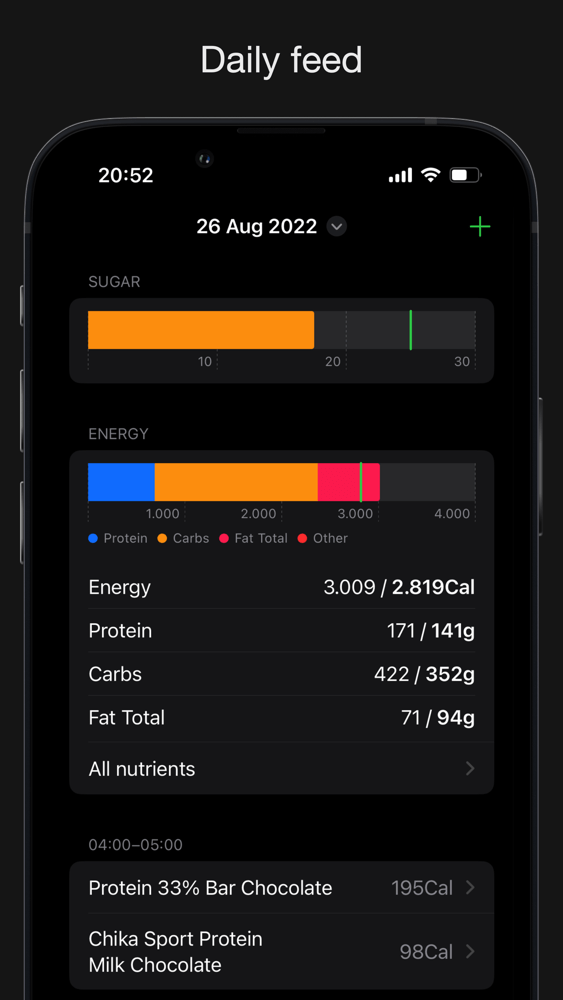
SugarBot is an easy-to-use way to maintain a healthy diet by tracking sugar intake and other nutritional data from the maker of CardioBot. With SugarBot for the iPhone and Apple Watch, you can track your data and gain insights into trends from its in-depth graphs and recommendations to form healthier habits.
Getting started with SugarBot’s elegantly designed interface couldn’t be easier. The app comes with an extensive database of foods. Log your meals, and SugarBot does the rest, recording sugar and other information, including protein, carbohydrates, fiber, and fat for each meal. Everything tracked is measured against your goals, which can be set up in the app’s Settings. You can set up SugarBot according to a Keto diet or to lose, maintain, or gain weight. Individual nutrient goals can be set as well.
Each data point logged is immediately accessible from the app’s main screen giving you a quick view of today’s nutritional intake and the option to navigate back to prior days. There’s also an ‘All nutrients’ view for daily tracking your nutritional intake by category.
For longer-term trend analysis, SugarBot has a dedicated Insights tab that displays graphs of your intake of nutrients over time. It’s a fantastic way to ensure you’re on track with your goals and understand how your food consumption affects other areas of your health.
Download SugarBot today to start your journey to better health through tracking what you eat.
Our thanks to SugarBot for sponsoring MacStories this week.