John Voorhees

5773 posts on MacStories since November 2015

John is MacStories' Managing Editor, has been writing about Apple and apps since joining the team in 2015, and today, runs the site alongside Federico. John also co-hosts four MacStories podcasts: AppStories, which covers the world of apps, MacStories Unwind, which explores the fun differences between American and Italian culture and recommends media to listeners, Ruminate, a show about the weird web and unusual snacks, and NPC: Next Portable Console, a show about the games we take with us.

This Week's Sponsor:

LookAway

It helps you take regular breaks from your Mac to rest your eyes, without breaking your flow.


The Latest from AppStories and NPC: Next Portable Console

Enjoy the latest episodes from MacStories’ family of podcasts:

AppStories

This week on AppStories, Federico and John predict what we’ll see from Apple in 2025. From agentic AI to App Intents and Siri, they explore what will shape the year ahead and the implications to users and developers.

This episode is sponsored by:

  • Memberful – Easy-to-Use Reliable Membership Software

NPC: Next Portable Console

In the first NPC episode of 2025, Brendon and John recap their CES experience with Federico, highlighting AMD’s new Z2 chips, the SteamOS-powered Legion Go S, and more. Together, they explore the technologies and trends poised to define the next generation of portable consoles.

This episode is sponsored by:

Pika – Sign up today to start telling your story and use code NPC20 for 20% off your first year of Pika Pro

Read more


Apple Prophecies and Predictions for 2025

AppStories+ Deeper into the world of apps

AppStories Episode 418 - Apple Prophecies and Predictions for 2025

0:00
28:46

AppStories+ Deeper into the world of apps

This week on AppStories, Federico and John predict what we’ll see from Apple in 2025. From agentic AI to App Intents and Siri, they explore what will shape the year ahead and the implications to users and developers.

Read more


Interesting Links

Cupertino is a new Obsidian theme designed to give the app a native and minimal experience on Apple platforms. I may consider switching to it if they ever add Minimal Theme-like cards for Dataview tables. (Link) After years of using Raindrop.io to save shopping links, HeyDingus’ Jarrod Blundy writes about his decision to switch...


App Debuts

Gazzetta This new app by indie developer Oliver White wants to simplify the process of finding trending links on Mastodon. You can either follow servers and individual accounts or log in with your own account to find links from your timeline. Then, you can add those links to your favorites, bookmarks, or a built-in...


Call Me Crazy, But I Loved CES

Before I left for CES, a lot of people told me I’d hate it. I can see why: it’s like trying to fit 10 pounds of potatoes into a five-pound sack. There are too many people crammed into too tight a space. That makes everything difficult. It’s hard to get from one place to another,...


The Latest from Comfort Zone, Ruminate, Magic Rays of Light, and MacStories Unwind

Enjoy the latest episodes from MacStories’ family of podcasts:

Comfort Zone

Niléane is out, so Chris and Matt are left to fend on their own. Chris steals like an artist and Matt defends a new purchase.


Ruminate

Some snack reviews from the festive period, Robb was on another podcast, and John is on his way to CES.

Sponsored by Pika: Use code RUMINATE20 for 20% off your first year of Pika Pro


Magic Rays of Light

Sigmund and Devon share one Apple TV wish each for 2025 and recap season two of Shrinking. Devon also reviews Sigmund’s Christmas gift to him, A Real Pain.


MacStories Unwind

This week, John fills in Federico about pod people, creepy robots, light masks, AI BBQ, and other weird and wonderful sights from CES 2025.

Read more


MacStories Won’t Stand for Meta’s Dehumanizing and Harmful Moderation Policies

Just over two years ago, MacStories left Twitter behind. We left when Elon Musk began dismantling the company’s trust and safety infrastructure, allowing hateful speech and harassment on the platform. Meta is now doing the same thing with Threads and Instagram, so we’re leaving them behind, too.

We were initially optimistic about Threads because of its support for federation and interoperability with Mastodon. The relatively young service has never done as much as it should to protect its users from hateful content, as Niléane documented last year. Yet as bad as it already was for LGBT people and others, things took a much darker turn this week when Meta announced a series of new policies that significantly scaled back moderation on Threads and Instagram.

Meta has abandoned its relationships with third-party fact-checking organizations in favor of a “community notes” approach similar to X. The company has also eliminated filters it had in place to protect users from a wide variety of harmful speech. As Casey Newton reported yesterday, the internal Meta documents that implement these new policies now allow for posts like:

“There’s no such thing as trans children.”
“God created two genders, ‘transgender’ people are not a real thing.”
“This whole nonbinary thing is made up. Those people don’t exist, they’re just in need of some therapy.”
“A trans woman isn’t a woman, it’s a pathetic confused man.”
“A trans person isn’t a he or she, it’s an it.”

Newton also reports:

So in addition to being able to call gay people insane on Facebook, you can now also say that gay people don’t belong in the military, or that trans people shouldn’t be able to use the bathroom of their choice, or blame COVID-19 on Chinese people, according to this round-up in Wired. (You can also now call women household objects and property, per CNN.) The company also (why not?!) removed a sentence from its policy explaining that hateful speech can “promote offline violence.”

For more on Meta’s new policies and their impact, we encourage MacStories readers to read both of Casey Newton’s excellent Platformer articles linked above.

This is ugly, dehumanizing stuff that has no place on the Internet or anywhere else and runs counter to everything we believe in at MacStories. We believe that platforms should protect all of their users from harm and harassment. Technology should bring people together not divide and dehumanize them, which is why we’re finished with Threads and Instagram.

I’d like to think other media companies will join us in taking similar action, but we understand why many won’t. Meta’s social networks drive a significant amount of traffic to websites like MacStories, and walking away from that isn’t easy in an economy where media companies are under a lot of financial pressure. We’ll be okay thanks to the support of our readers who subscribe to Club MacStories, but many others don’t have that, which is why it’s important for individuals to do what they can to help too.

We know that in times like these, it’s often hard to know what to do because we’ve felt that way ourselves. One way you can help is to make a donation to groups that are working to support the rights of LGBT people who increasingly find themselves threatened by the actions of companies, governments, and others. With Niléane’s assistance, we have identified organizations you can donate in the U.S., E.U., and U.K. that are working to protect the rights of LGBT people:

Thanks to all of you who donate. The world of tech is not immune from the troubles facing our world, but with your help, we can make MacStories a bright spot on the tech landscape where people feel safe and welcome.

– Federico and John


Razer Launches PC Remote Play for Streaming PC Games to the iPhone, iPad, and Other Devices

Source: Razer.

Source: Razer.

Yesterday, Brendon and I wandered into a ballroom where Razer was showing off its latest hardware. We weren’t expecting much beyond super-powerful gaming laptops (✅) and lots of RGB lights (also ✅). However, just as our guided booth tour was ending, we asked about an iPhone, iPad mini, and Windows PC setup on a nearby table, which it turns out was a demo of Razer’s new PC Remote Play app.

There are a lot of ways to stream games from a Windows PC to iPhones, iPads, and other devices, but Razer PC Remote Play looks like it could be one of the easiest and nicest of the bunch. What was impressive about the demo was that Razer’s app automatically adjusts to the device to which you’re streaming, matching its screen’s refresh rate and aspect ratio. That ensures you’ll get the most out of the device to which you’re streaming, and you won’t see letterboxing or pillarboxing, which is caused by a mismatch between the aspect ratio of your PC remote device. According to a Reddit user who says they are a Product Developer for Razer PC Remote Play, the app is built on the open source Moonlight/Sunshine projects, with the goal of simplifying setup and configuration.

Razer PC Remote Play is currently in beta and requires that you run Razer Cortex on your Windows PC and install the Razer PC Remote Play and Razer Nexus apps on your iPhone, iPad, or other devices. I haven’t had a chance to set this up yet because I don’t have a PC with me at CES, but judging from the iOS app I set up it looks as simple as opening Razer PC Remote Play, which detects if there is a PC on your network running Razer Cortex. Once paired, Razer says your PC games will show up in its Nexus game launcher app alongside your other games.

I’m excited to try Razer PC Remote Play myself. The Moonlight/Sunshine project is a great way to stream PC games, but it can take some fiddling to work well with any given setup. What Razer is promising is a simplified version that just works out of the box. We’ll see how well it works in practice, but the demo I saw was promising.


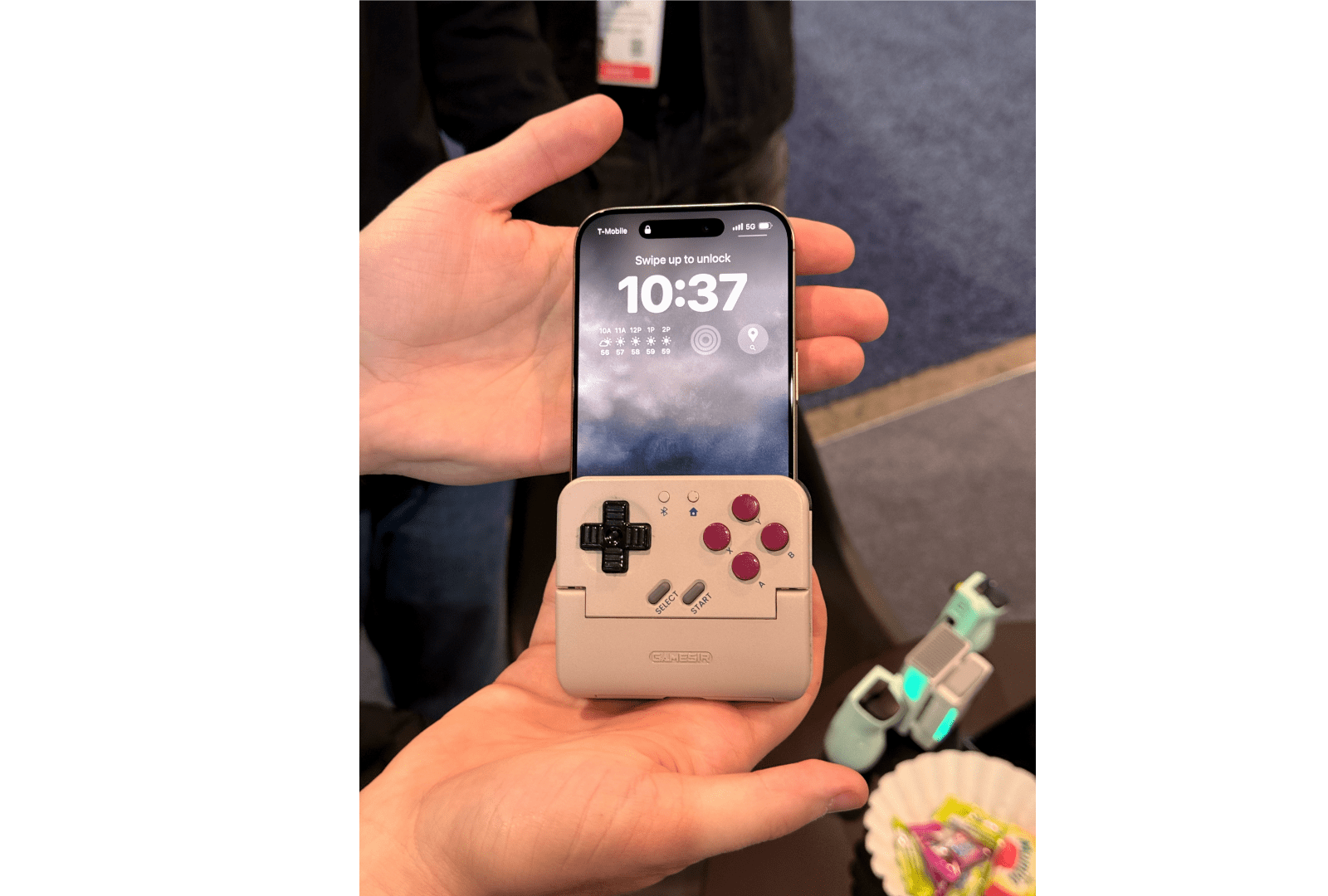
A Tiny But Exciting CES Smartphone Controller Discovery

One of my favorite surprises during CES 2025 so far was when Brendon pointed to a small device sitting on a table at the GameSir booth and asked ‘What’s that?’ It turns out it was a prototype Game Boy-style smartphone controller that doubles as a battery pack. As Brendon explained on Wavelengths yesterday:

GameSir’s concept is brilliant in that it’s a completely new form-factor for a mobile controllers, but also (though I didn’t confirm this) appears to be the kind of design that could work across both iPhone and Android devices. Even in my brief time messing around with it, the buttons and d-pad felt great, the shoulder buttons allowed for a pretty natural shelf for resting your hand on top of (similar to the Trim-UI Brick), and overall I left the booth blown away by it.

From our conversations with GameSir, it looks like a Kickstarter campaign is in the works and the device could be shipped in the first half of 2025. With emulators available on the iPhone since last summer, we’ve begun seeing more innovative controller solutions on smartphones, which I love. Be sure to check out Brendon’s story on Wavelengths for more photos of the GameSir prototype and his thoughts on it.

Permalink