John Voorhees

5390 posts on MacStories since November 2015

John is MacStories' Managing Editor, has been writing about Apple and apps since joining the team in 2015, and today, runs the site alongside Federico. John also co-hosts four MacStories podcasts: AppStories, which covers the world of apps, MacStories Unwind, which explores the fun differences between American and Italian culture and recommends media to listeners, Ruminate, a show about the weird web and unusual snacks, and NPC: Next Portable Console, a show about the games we take with us.

This Week's Sponsor:

Dropzone 5

Improve your Drag-and-Drop Workflow


The Latest from Comfort Zone, Magic Rays of Light, and MacStories Unwind

Enjoy the latest episodes from MacStories’ family of podcasts:

Comfort Zone

Chris breaks down Apple Intelligence, and while Matt is under the weather, he brings the good Nintendo vibes. Then we all do our best to speak a different language, with delightful results.


Magic Rays of Light

Sigmund and Devon dive into 21:9 support and the other aspect ratio options in the tvOS 18.2 beta, grade their M4 Mac predictions, and share relaxing Up Next picks.


MacStories Unwind

This week, Federico attempts to make audio unboxings a trend, plus he recommends a TV show and videogame, while I encourage listeners to try a decade-old cartoon.

Read more

Access Extra Content and Perks

Founded in 2015, Club MacStories has delivered exclusive content every week for nearly a decade.

What started with weekly and monthly email newsletters has blossomed into a family of memberships designed for every MacStories fan.

Learn more here and from our Club FAQs.

Club MacStories: Weekly and monthly newsletters via email and the web that are brimming with apps, tips, automation workflows, longform writing, early access to the MacStories Unwind podcast, periodic giveaways, and more;

Club MacStories+: Everything that Club MacStories offers, plus an active Discord community, advanced search and custom RSS features for exploring the Club’s entire back catalog, bonus columns, and dozens of app discounts;

Club Premier: All of the above and AppStories+, an extended version of our flagship podcast that’s delivered early, ad-free, and in high-bitrate audio.

Learn more here and from our Club FAQs.


Building a Downtime Home Screen Featuring Louie Mantia’s Retro Gaming Icons

Louie Mantia has been making beautiful icons for many years, both as one of the owners of icon design studio Parakeet and as personal side projects. Recently, two of Mantia’s personal projects caught my eye because they combine my love of classic games with the technology I use every day.

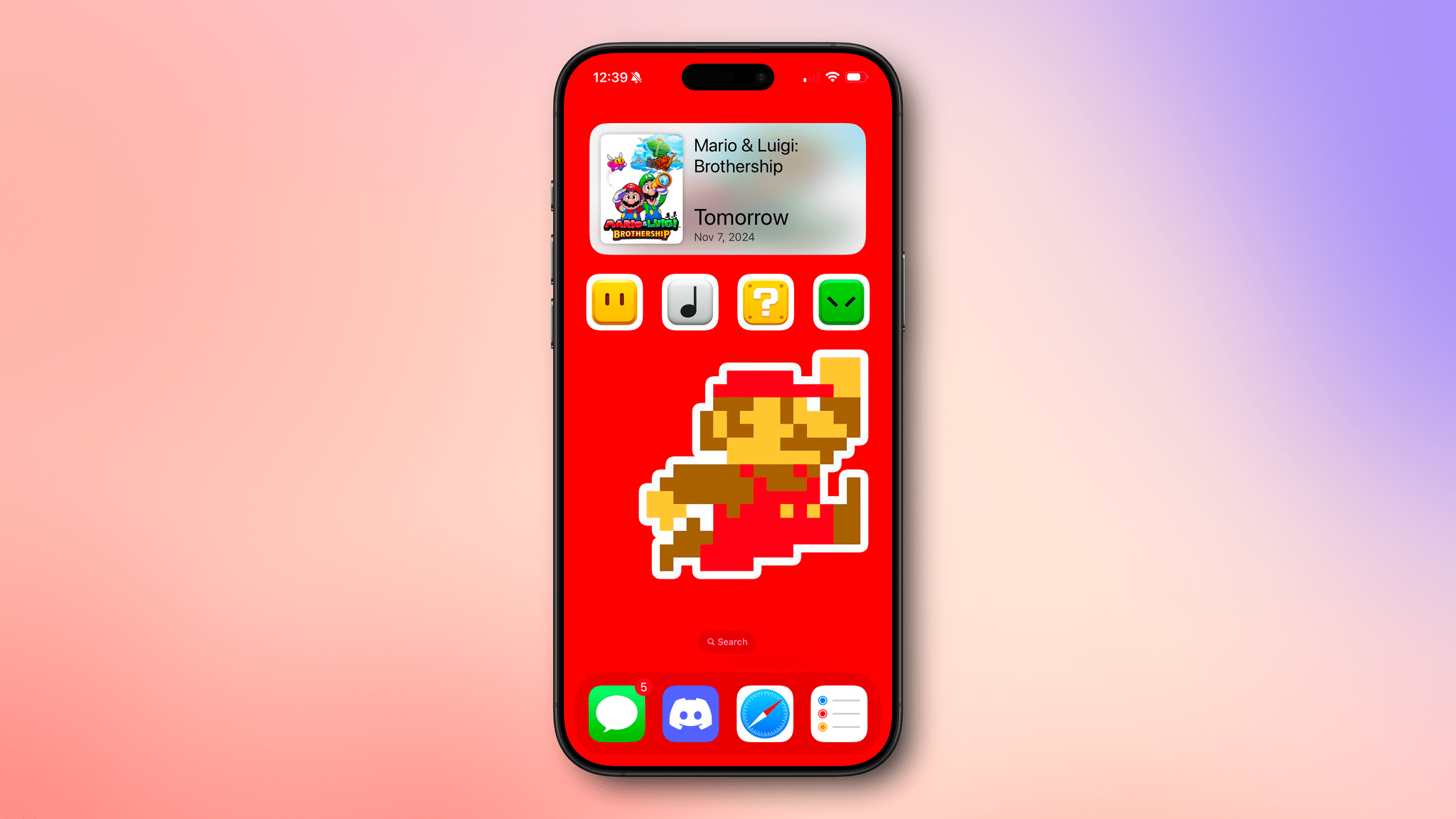
The first set of icons includes eight Super Mario blocks. When these were released in October, I remembered I had an 8-bit Mario wallpaper tucked away somewhere that would work perfectly with the icons on my iPhone. I dug the wallpaper out (sorry, I don’t recall where I got it), set up four single-action shortcuts using the ‘Open App’ action, and assigned Mantia’s icons to them using ‘Add to Home Screen’ and the Files option for the images. I set the four shortcuts to open Lire, Apple Music, Play, and Readwise Reader. Then, I lined up the wallpaper to make it look like Mario was jumping to hit the last block in the row. I also added a large GameBuddy widget at the top of the screen to count down the days until the release of Mario and Luigi: Brothership.

I think the result, which you can see in the screenshot above, looks great. Mantia’s icons were designed for the Mac, which means they each have a white border around them on the iPhone, but it fits well with the wallpaper, so it worked out without any tweaking.

The second set of icons is based on Nintendo controllers, another of my obsessions. I was chatting with Federico about Mantia’s latest icon set, and he had a great idea: why not take advantage of Delta’s deep linking feature (also used by GameTrack) to create shortcuts that use Mantia’s icons to open individual classic games?

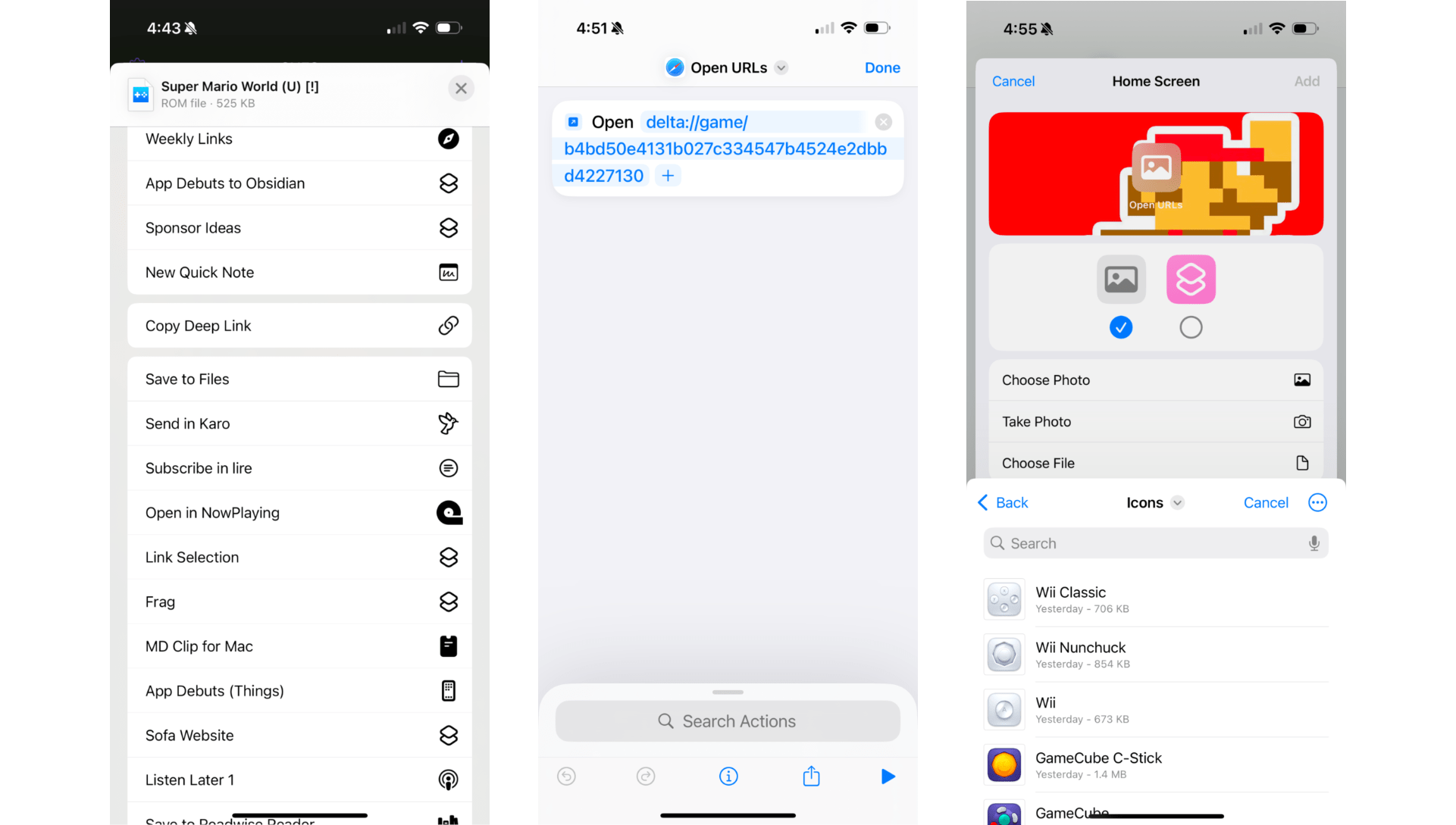
Retrieving a Delta deep link and setting up a simple shortcut with a Home Screen bookmark.

Retrieving a Delta deep link and setting up a simple shortcut with a Home Screen bookmark.

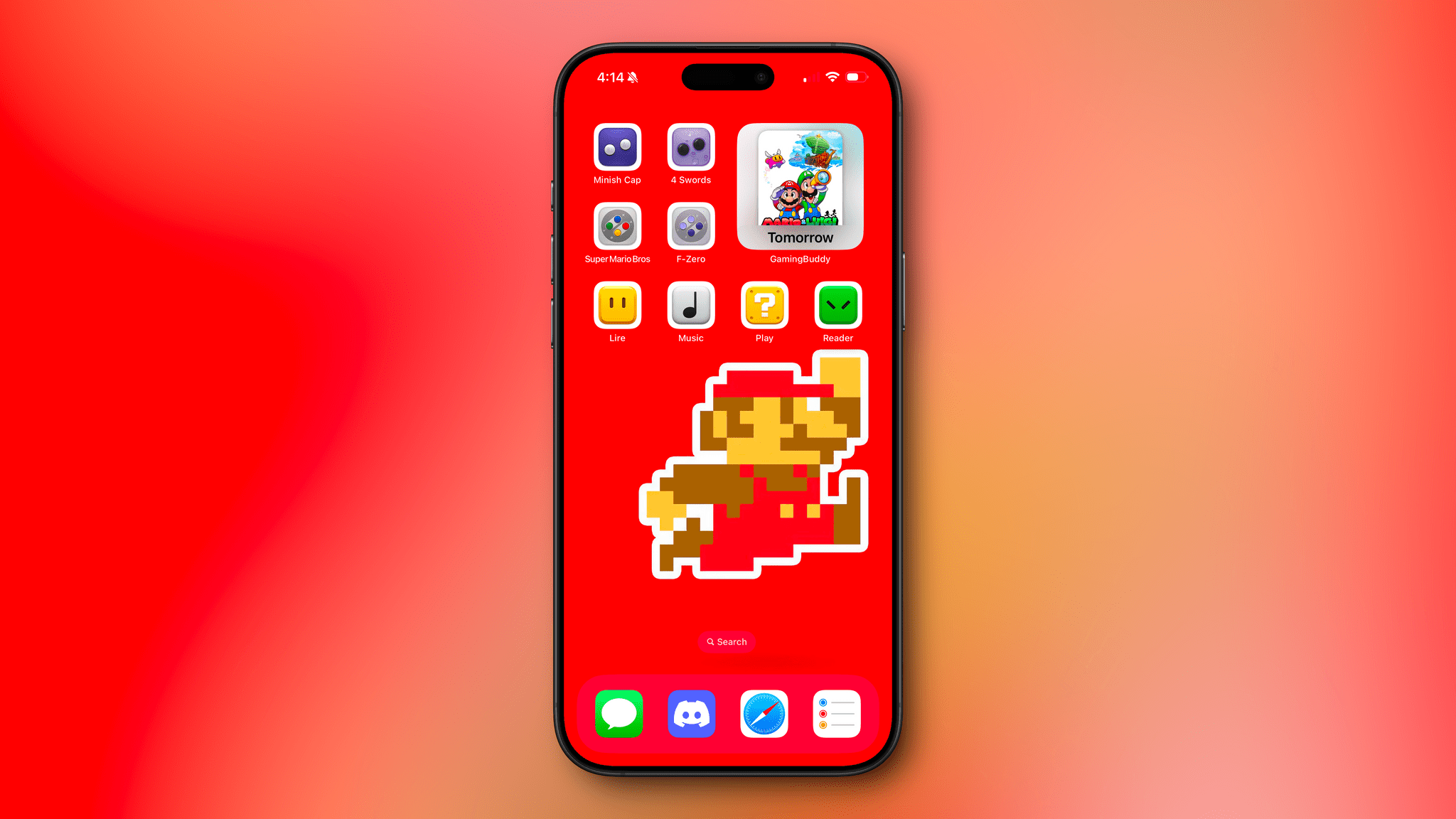
The process is simple. You can copy a deep link to a game in Delta by long-pressing it, selecting ‘Share,’ and picking ‘Copy Deep Link’ from the list of action extensions. After I did that, I set up more single-action shortcuts using the ‘Open URL’ action and again assigned Mantia’s icons to the shortcuts using the ‘Add to Home Screen’ option, adding The Legend of Zelda: The Minish Cap, The Legend of Zelda: Four Swords, Super Mario World, and F-Zero to my Home Screen. Then, so I could tell everything apart, I switched my Home Screen to use small icons so the labels I’d added to my shortcuts would be visible.

I’m pleased with the result and plan to tie this Home Screen to a Focus mode that activates in the evening for some downtime activities. I can always access other apps as needed via Spotlight Search or the App Library, but it’s sometimes nice to end the day with a simpler setup that invites me to play a game, listen to some music, read, or watch a video.

Louie Mantia’s icons are free to download, but there’s an option to make a name-your-own-price donation, which I highly recommend you do if you download these wonderful icons.

Access Extra Content and Perks

Founded in 2015, Club MacStories has delivered exclusive content every week for nearly a decade.

What started with weekly and monthly email newsletters has blossomed into a family of memberships designed for every MacStories fan.

Learn more here and from our Club FAQs.

Club MacStories: Weekly and monthly newsletters via email and the web that are brimming with apps, tips, automation workflows, longform writing, early access to the MacStories Unwind podcast, periodic giveaways, and more;

Club MacStories+: Everything that Club MacStories offers, plus an active Discord community, advanced search and custom RSS features for exploring the Club’s entire back catalog, bonus columns, and dozens of app discounts;

Club Premier: All of the above and AppStories+, an extended version of our flagship podcast that’s delivered early, ad-free, and in high-bitrate audio.

Learn more here and from our Club FAQs.


Raycast Overhauls Its Notes Feature

Raycast has always been more than an app launcher. From the start, it has included a multitude of other handy utilities, including Floating Notes. I’ve used Floating Notes now and then to park a bit of text where I knew I’d be able to find it later. Because the note floated above other windows, it was easy to access, but Floating Notes always felt a little too rudimentary to use for much more than that.

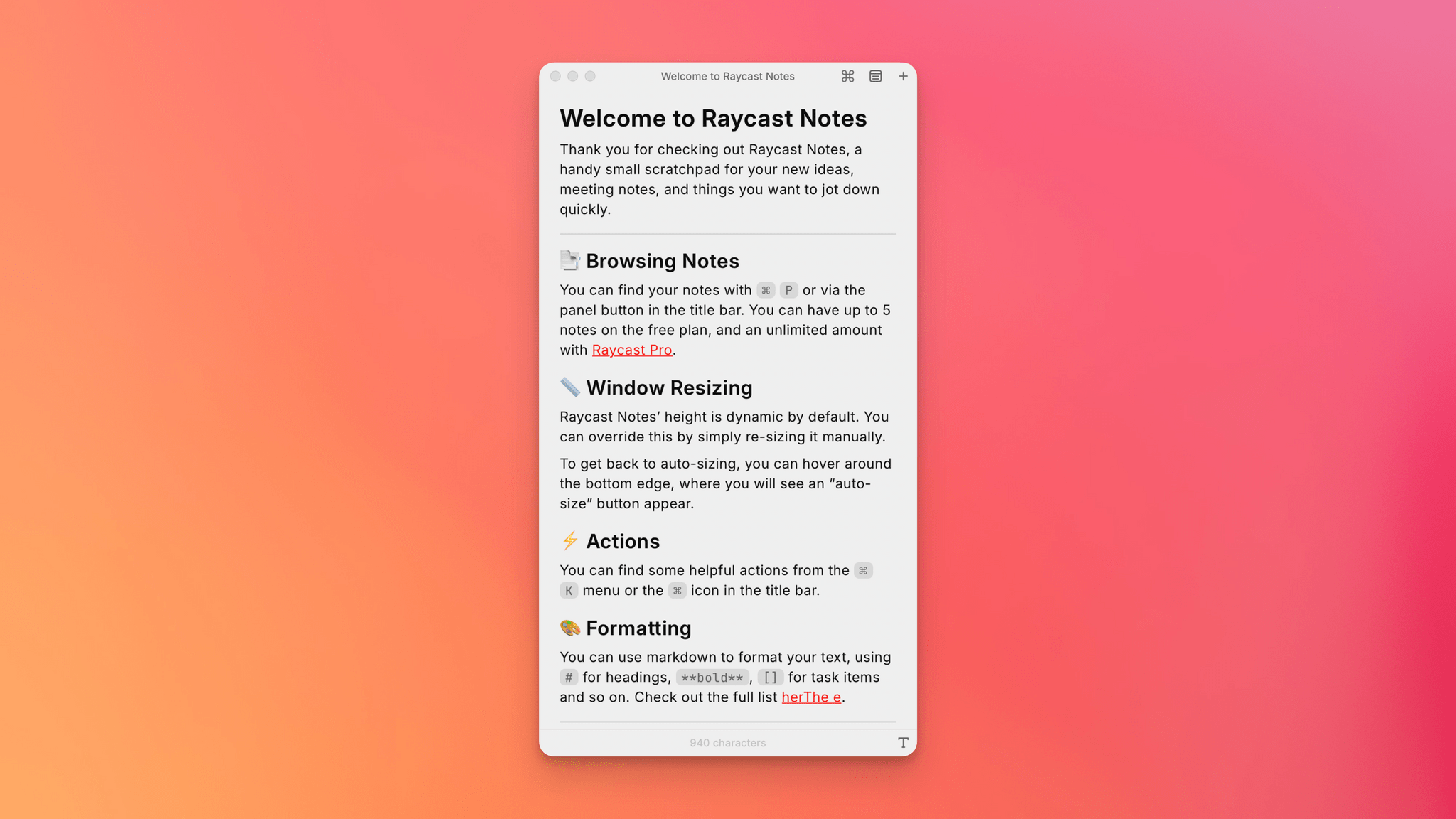
Today, Raycast released an extensive update to the feature and renamed it Raycast Notes. Your notes still occupy a floating window, but now, the window auto-resizes to fit the content by default. The window’s width is fixed, but you can always resize its height to adjust how much space it occupies on your screen.

Read more

Access Extra Content and Perks

Founded in 2015, Club MacStories has delivered exclusive content every week for nearly a decade.

What started with weekly and monthly email newsletters has blossomed into a family of memberships designed for every MacStories fan.

Learn more here and from our Club FAQs.

Club MacStories: Weekly and monthly newsletters via email and the web that are brimming with apps, tips, automation workflows, longform writing, early access to the MacStories Unwind podcast, periodic giveaways, and more;

Club MacStories+: Everything that Club MacStories offers, plus an active Discord community, advanced search and custom RSS features for exploring the Club’s entire back catalog, bonus columns, and dozens of app discounts;

Club Premier: All of the above and AppStories+, an extended version of our flagship podcast that’s delivered early, ad-free, and in high-bitrate audio.

Learn more here and from our Club FAQs.


The Latest from NPC: Next Portable Console and AppStories

Enjoy the latest episodes from MacStories’ family of podcasts:

AppStories

This week, Federico and I are joined by Jonathan Reed to check in on the parts of watchOS 11 that he’s still using, talk about browsing the web from an Apple Watch, and dig into the apps he uses day-to-day.


NPC: Next Portable Console

On NPC’s latest episode, we have lots of smartphone gaming news, console mods, a first peek at the future of Windows handheld gaming, and more. Plus, I share my first impressions of the Ayaneo Pocket Micro, and Brendon digs into OG hardware with the Nintendo DSi and Sony PSP.

Read more

Access Extra Content and Perks

Founded in 2015, Club MacStories has delivered exclusive content every week for nearly a decade.

What started with weekly and monthly email newsletters has blossomed into a family of memberships designed for every MacStories fan.

Learn more here and from our Club FAQs.

Club MacStories: Weekly and monthly newsletters via email and the web that are brimming with apps, tips, automation workflows, longform writing, early access to the MacStories Unwind podcast, periodic giveaways, and more;

Club MacStories+: Everything that Club MacStories offers, plus an active Discord community, advanced search and custom RSS features for exploring the Club’s entire back catalog, bonus columns, and dozens of app discounts;

Club Premier: All of the above and AppStories+, an extended version of our flagship podcast that’s delivered early, ad-free, and in high-bitrate audio.

Learn more here and from our Club FAQs.


Mac Hacks: Everyday Tailscale Uses for People Who Aren’t Network Administrators

During our Club MacStories Fall Membership Drive, I published my Mac Hacks column, an exclusive perk of Club MacStories+ and Club Premier. Mac Hacks is about exploring new ways of using the Mac and integrating it with other devices and novel workflows.

My latest column is all about Tailscale. As I explain in the story:

I’m a big fan of Tailscale, but it has two big problems that can make it confusing. The first issue is also one of Tailscale’s greatest strengths: its flexibility. The service has several built-in features that are useful as standalone tools, which is a good place to start. However, the ability to connect a disparate collection of devices without regard for their operating systems opens up a vastly larger universe of possibilities that’s only limited by your imagination. That makes it incredibly powerful – but a lot to wrap your head around, too.

So, to make Tailscale a little more accessible, I walked readers through how I’m using it to:

  • Share large files across my home network
  • Provide an added layer of security when using an unfamiliar Wi-Fi network
  • Move files from the Mac, iPhone, and iPad to Windows and Android devices
  • Remotely log into Macs
  • Directly access files on multiple Macs from my iPhone and iPad

Plus I cover using Tailscale to manage an over-the-air TV DVR, Plex server, and more.

Mac Hacks is just one of the many perks of Club MacStories.

Mac Hacks is just one of the many perks of Club MacStories.

Automation Academy is just one of many perks that Club MacStories+ and Club Premier members enjoy including:

  • Weekly and monthly newsletters 
  • A sophisticated web app with search and filtering tools to navigate eight years of content
  • Customizable RSS feeds
  • Bonus columns
  • An early and ad-free version of our Internet culture and media podcast, MacStories Unwind
  • A vibrant Discord community of smart app and automation fans who trade a wealth of tips and discoveries every day
  • Live Discord audio events after Apple events and at other times of the year

On top of that, Club Premier members get AppStories+, an extended, ad-free version of our flagship podcast that we deliver early every week in high-bitrate audio.

Use the buttons below to learn more and sign up for Club MacStories+ or Club Premier.

Join Club MacStories+:

Join Club Premier:

Permalink

Wrist Browsing

AppStories+ Deeper into the world of apps

AppStories Episode 410 - Wrist Browsing

0:00
32:18

AppStories+ Deeper into the world of apps

This week, Federico and John are joined by Jonathan Reed to check in on the parts of watchOS 11 that he’s still using, talk about browsing the web from an Apple Watch, and dig into the apps he uses day-to-day.

Read more


Interesting Links

Apple is adding support for spatial photos and videos to Safari in an upcoming update, giving users the ability to more easily experience content from other users in a spatial format. (Link) Azad Balabanian published a fascinating, in-depth look at the movie formats supported on the Vision Pro. (Link)

This story about Russ...


Obsidian Web Clipper

Today, I thought I’d take a closer look at Obsidian Web Clipper, a browser extension that I linked in App Debuts last week. I’ve been playing around with it ever since, and it’s excellent, which is why I was surprised it has flown under the radar. As it turns out, that’s because even though the...


App Debuts

PastePal One of the most powerful clipboard managers for iPhone and iPad (which works within the limitations of those respective platforms) was recently updated with a “background monitor” feature that lets the app automatically save whatever you copy to the clipboard using a Picture in Picture-based workaround. This is the sort of technique we...