John Voorhees

5389 posts on MacStories since November 2015

John is MacStories' Managing Editor, has been writing about Apple and apps since joining the team in 2015, and today, runs the site alongside Federico. John also co-hosts four MacStories podcasts: AppStories, which covers the world of apps, MacStories Unwind, which explores the fun differences between American and Italian culture and recommends media to listeners, Ruminate, a show about the weird web and unusual snacks, and NPC: Next Portable Console, a show about the games we take with us.

This Week's Sponsor:

Dropzone 5

Improve your Drag-and-Drop Workflow


Our MacStories Setups: Updates Covering Video Production, Gaming, and More

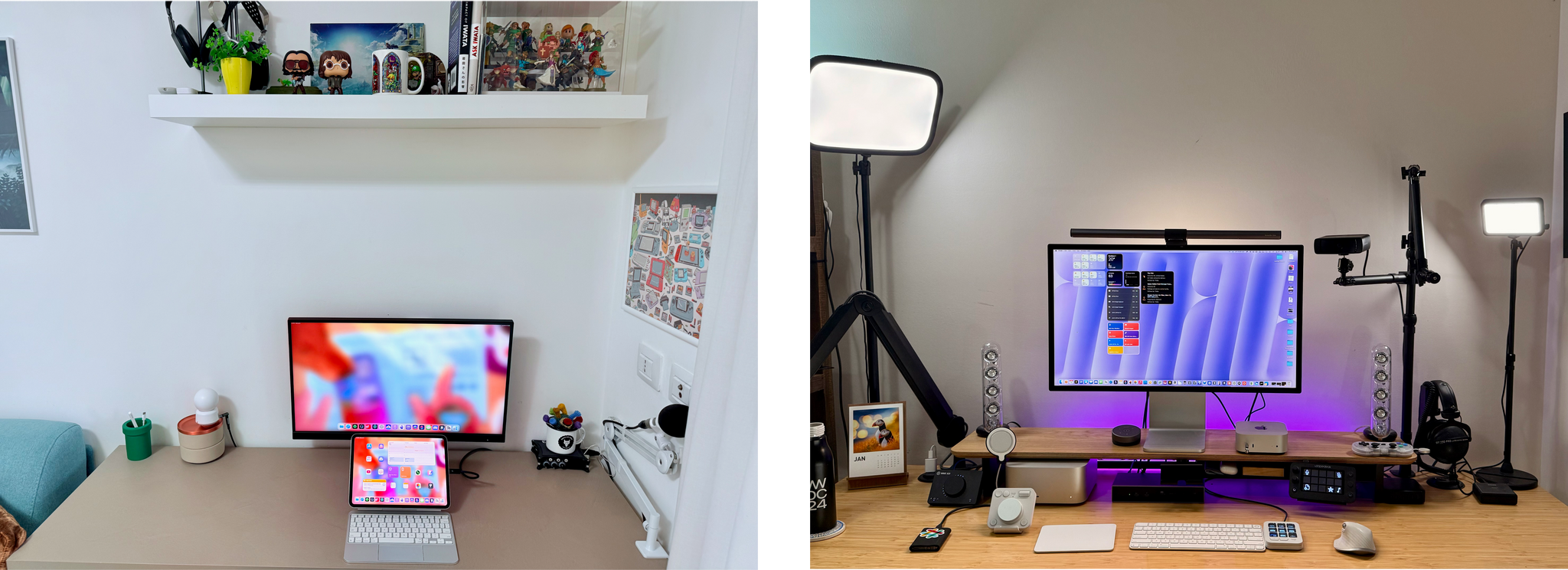
The second half of 2024 saw a lot of change to my setup and Federico’s. We launched the MacStories YouTube channel, expanded our family of podcasts, and spent time chasing the ultimate portable gaming setup for NPC: Next Portable Console. The result was that our setups have evolved rapidly. So, today, we thought we’d catch folks up on what’s changed.

Our Setups page has all the details, but you’ll notice a couple of trends from the changes we’ve made recently. As Federico recounted in iPad Pro for Everything: How I Rethought My Entire Workflow Around the New 11” iPad Pro, the linchpin to ditching his Mac altogether was recording audio and video to SD cards. He already had a solution for audio in place, but video required additional hardware, including the Sony ZV-E10 II camera.
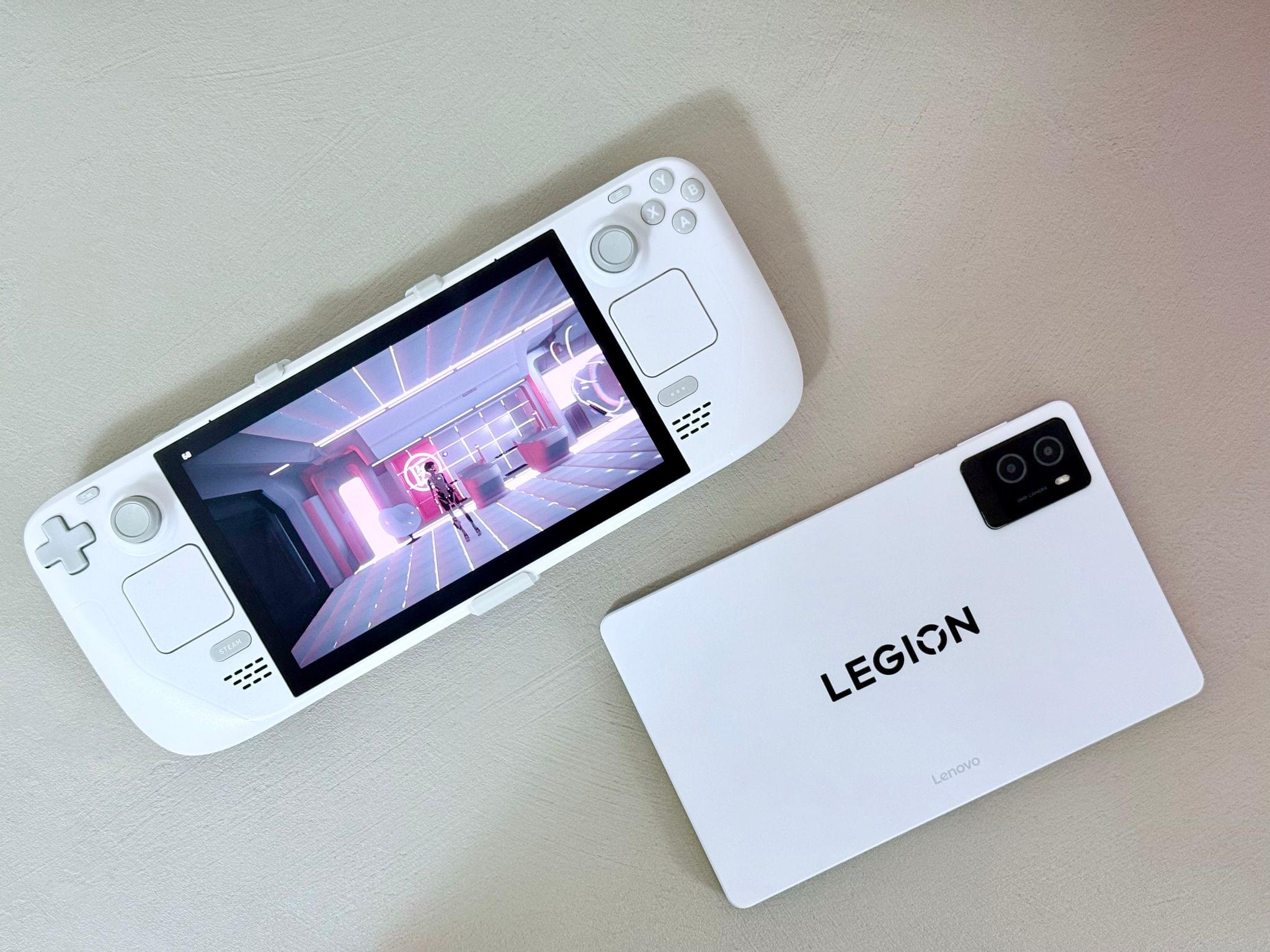
Federico's White OLED Steam Deck and Lenovo Legion y700 tablet.

Federico’s White OLED Steam Deck and Lenovo Legion y700 tablet.

Federico’s gaming setup has evolved, too. The Sony PS5 Pro replaced the original PS5, and he swapped the limited edition white Steam Deck in for the standard OLED version. He also revealed on NPC: Next Portable Console this week that he’s using a Lenovo y700 2024 gaming tablet imported from China to emulate Nintendo DS and 3DS games, which will be available worldwide later this year as the Lenovo Legion Tab Gen 3. Other upgrades to existing hardware Federico uses include a move from the iPhone 16 Plus to the iPhone 16 Pro Max and an upgrade of the XREAL Airs to the XREAL One glasses.
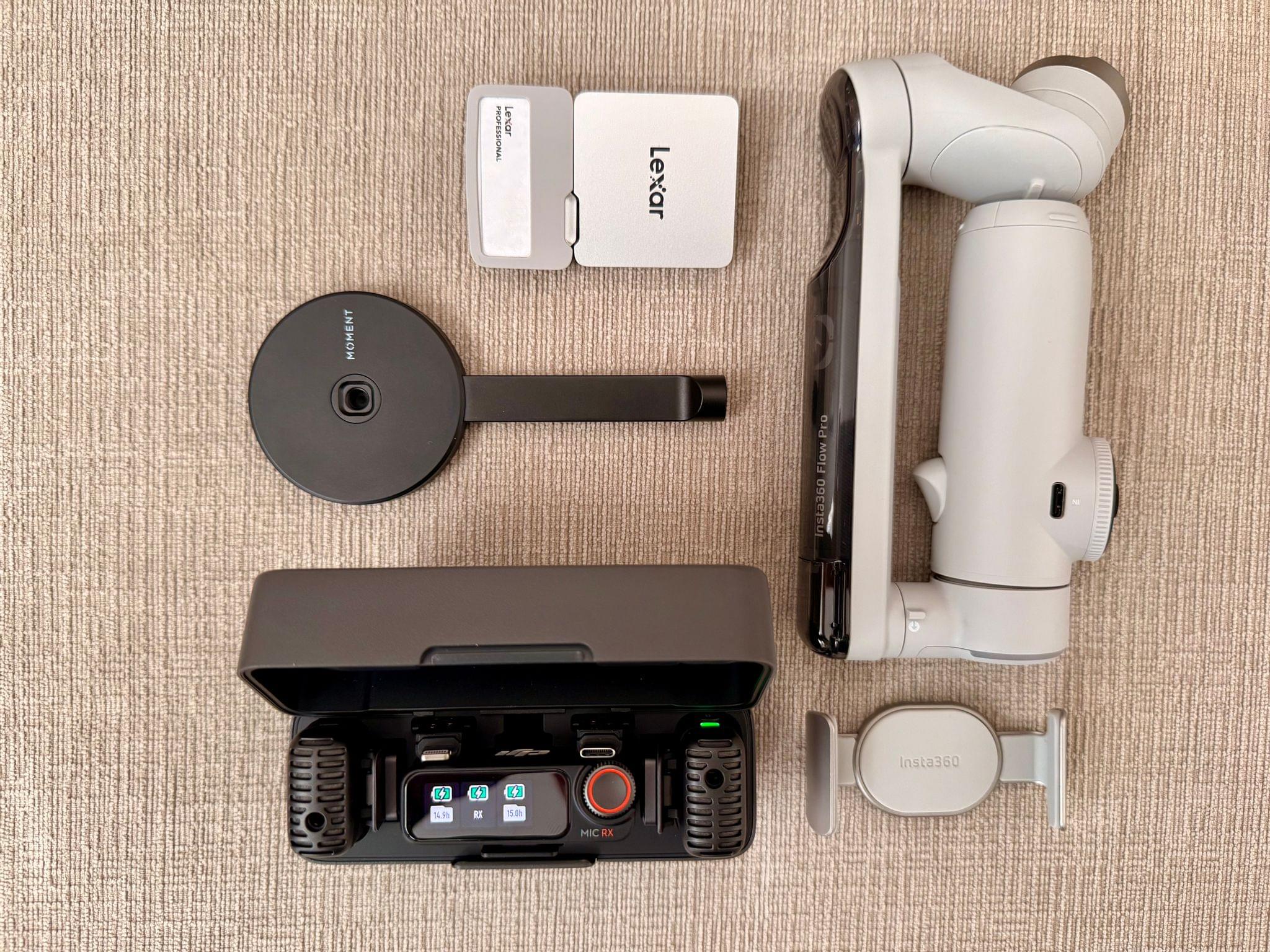
My portable video recording setup

My portable video recording setup

As for myself, CES and its bag size limitations pushed me to rethink my portable video and audio recording setups. For recording when I’m away from home I added several items to my kit that I detailed in What’s in My CES Bag?, including:

On the gaming side of things I added a white TrimUI Brick and GameCube-inspired Retroid Pocket 5.

2024 was a big year for setup updates for both of us. We already have new hardware incoming for testing, so keep an eye on the Setups page. I expect we’ll update it several times in 2025 too.
Permalink

Default Browser: A Mac Menu Bar Utility for Quickly Switching Browsers

Sindre Sorhus has released more apps than most indie developers I’ve covered, and many are among my favorite utilities. I suspect that a big part of Sorhus’ success is the tight focus of most of those apps, which are designed to eliminate specific points of friction for users.

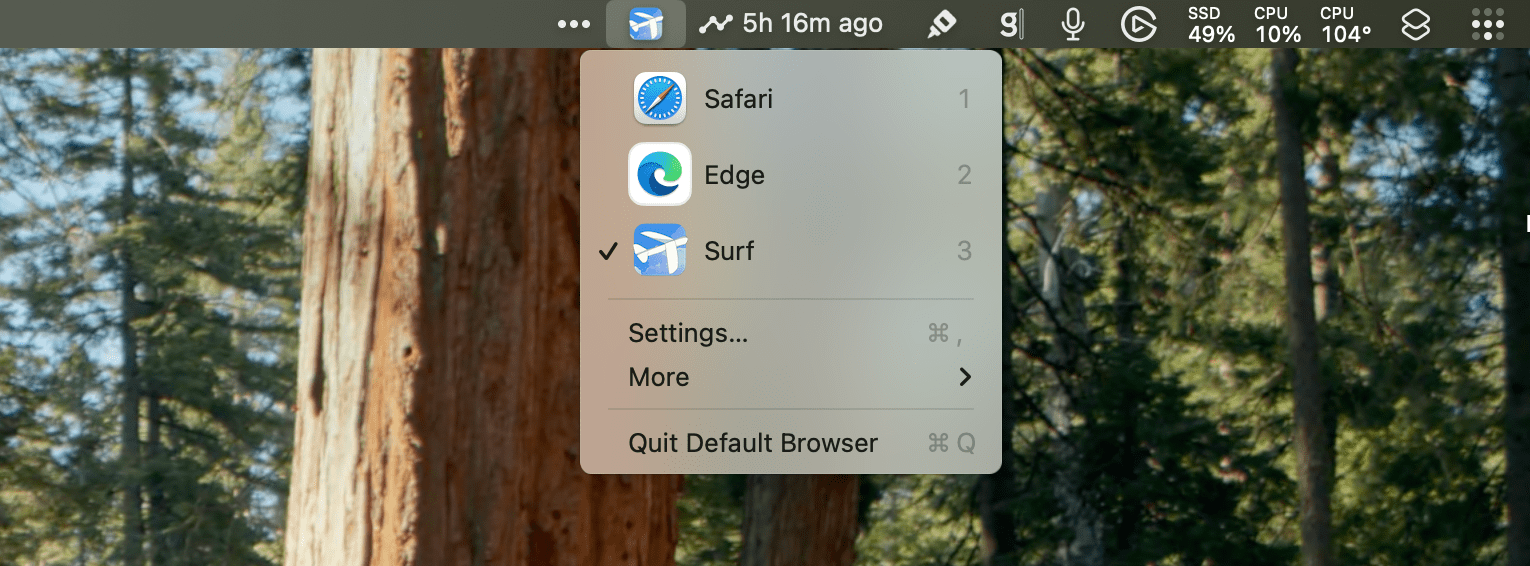
Sorhus’ latest utility is called Default Browser. It’s a Mac menu bar app that, as the name suggests, lets you change your Mac’s default browser on demand. Just head to the menu bar, and with a couple of clicks, you can switch between any browsers you have installed.

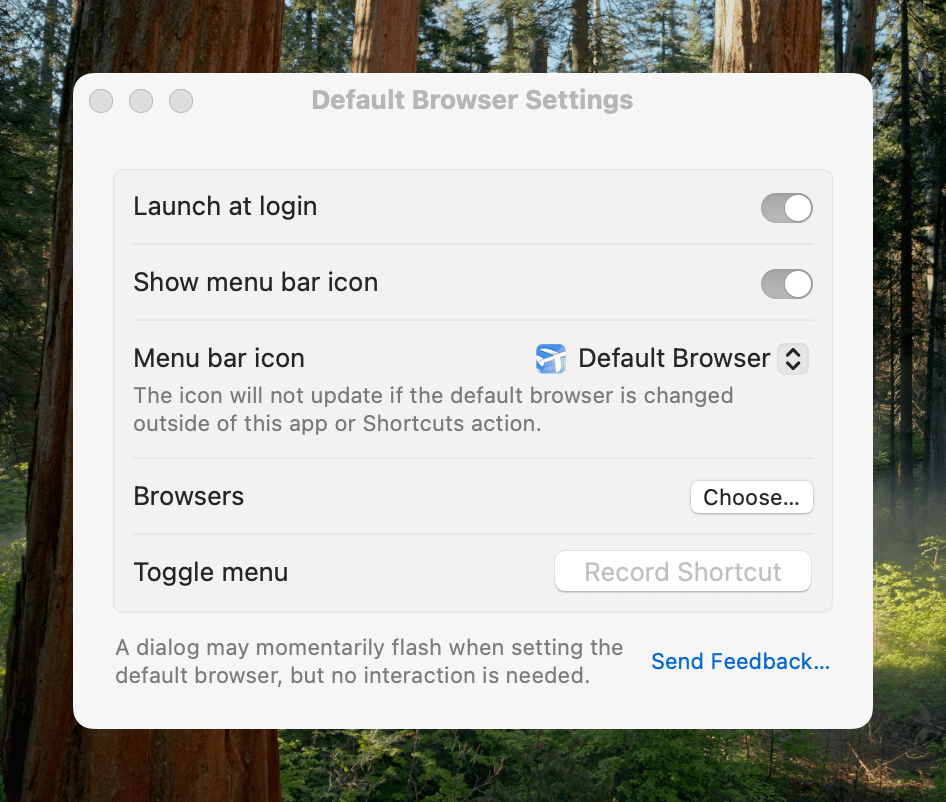
Switching default browsers can be simplified even further by setting a hotkey to reveal the app’s menu and then hitting the number associated with the desired browser. Alternatively, holding down Option as you click on a browser opens it without making it the default. Another nice touch is that, among the multiple menu bar icon options in the app’s settings, there’s an option to use the icon of the currently active default browser, a great reminder of which is active.

Default Browser includes several handy settings.

Default Browser includes several handy settings.

Default Browser works with Shortcuts, too, with actions to get and set your default browser programmatically with actions. That makes it easy to assign browsers to a device like a Stream Deck or Logitech Creative Console for push-button convenience. As Sorhus suggests in the app’s documentation, combining Default Browser with an app like Shortery, which has shortcut triggers for Mac events like connecting to a Wi-Fi network or launching a particular app, opens up a wide array of possibilities as well.

Default Browser also offers a Focus filter, giving you the ability to associate a particular browser with a Focus mode. I don’t have Focus modes for contexts where using a different browser would be useful, but I can imagine it working well for separating web browsing at home from browsing at your workplace or school, for example.

I primarily use Safari, but I’ve been experimenting with Microsoft Edge more, and I’m testing Surf, a browser fused with an AI assistant. I expect we’ll see many more browsers like Surf that aim to combine traditional search and web browsing with the best of what AI can do to organize and provide insights into data. That’s why I purchased Default Browser. The app is available directly from Sorhus for $4, and it makes it easy to quickly switch between browsers whether you’re testing them like me, you’re a developer testing code in different browsers, or you simply prefer certain browsers for certain tasks.

Access Extra Content and Perks

Founded in 2015, Club MacStories has delivered exclusive content every week for nearly a decade.

What started with weekly and monthly email newsletters has blossomed into a family of memberships designed for every MacStories fan.

Learn more here and from our Club FAQs.

Club MacStories: Weekly and monthly newsletters via email and the web that are brimming with apps, tips, automation workflows, longform writing, early access to the MacStories Unwind podcast, periodic giveaways, and more;

Club MacStories+: Everything that Club MacStories offers, plus an active Discord community, advanced search and custom RSS features for exploring the Club’s entire back catalog, bonus columns, and dozens of app discounts;

Club Premier: All of the above and AppStories+, an extended version of our flagship podcast that’s delivered early, ad-free, and in high-bitrate audio.

Learn more here and from our Club FAQs.


A Bluesky-Based Photo-Sharing App Is Coming

Sebastian Vogelsang, the Berlin-based developer of Skeets, an alternative to Bluesky’s official client, is working on a new photo-sharing app called Flashes that is built on the same codebase as Skeets. As reported by Sarah Perez at TechCrunch:

When launched, Flashes could tap into growing consumer demand for alternatives to Big Tech’s social media monopoly. This trend has led to the adoption of open source, decentralized apps like Mastodon and Bluesky, among others, including the recently launched Pixelfed mobile apps, built on Mastodon’s ActivityPub protocol. It’s also, in part, what’s fueling TikTok users’ shift to the Chinese app RedNote ahead of the U.S. TikTok ban — that is, U.S. users are signaling that they would rather use a foreign adversary’s app than return to Meta at this point.

The idea behind Flashes is fundamentally different from Instagram. Whereas Instagram is a standalone product that allows users to cross-post to Threads automatically, Flashes is being built on top of the same social graph as Bluesky. That means Flashes will act as a Bluesky filter focused on photo and video content instead of your entire Bluesky feed. It’s an interesting approach that sidesteps the messiness of cross-posting entirely and allows Vogelsang to focus Flashes’ feature set on photos and video.

I’m looking forward to giving Flashes a try. Instagram is more deeply embedded in many people’s lives than Threads, which makes it harder to replace. However, I’m glad to see Vogelsang and Pixelfed trying. There are enough people like us who are fed up with Meta’s policies that these sorts of alternatives may have a shot at gaining traction with users.

Permalink

The Latest from AppStories and NPC: Next Portable Console

Enjoy the latest episodes from MacStories’ family of podcasts:

AppStories

This week on AppStories, Federico and John predict what we’ll see from Apple in 2025. From agentic AI to App Intents and Siri, they explore what will shape the year ahead and the implications to users and developers.

This episode is sponsored by:

  • Memberful – Easy-to-Use Reliable Membership Software

NPC: Next Portable Console

In the first NPC episode of 2025, Brendon and John recap their CES experience with Federico, highlighting AMD’s new Z2 chips, the SteamOS-powered Legion Go S, and more. Together, they explore the technologies and trends poised to define the next generation of portable consoles.

This episode is sponsored by:

Pika – Sign up today to start telling your story and use code NPC20 for 20% off your first year of Pika Pro

Read more

Access Extra Content and Perks

Founded in 2015, Club MacStories has delivered exclusive content every week for nearly a decade.

What started with weekly and monthly email newsletters has blossomed into a family of memberships designed for every MacStories fan.

Learn more here and from our Club FAQs.

Club MacStories: Weekly and monthly newsletters via email and the web that are brimming with apps, tips, automation workflows, longform writing, early access to the MacStories Unwind podcast, periodic giveaways, and more;

Club MacStories+: Everything that Club MacStories offers, plus an active Discord community, advanced search and custom RSS features for exploring the Club’s entire back catalog, bonus columns, and dozens of app discounts;

Club Premier: All of the above and AppStories+, an extended version of our flagship podcast that’s delivered early, ad-free, and in high-bitrate audio.

Learn more here and from our Club FAQs.


Apple Prophecies and Predictions for 2025

AppStories+ Deeper into the world of apps

AppStories Episode 418 - Apple Prophecies and Predictions for 2025

0:00
28:46

AppStories+ Deeper into the world of apps

This week on AppStories, Federico and John predict what we’ll see from Apple in 2025. From agentic AI to App Intents and Siri, they explore what will shape the year ahead and the implications to users and developers.

Read more


Interesting Links

Cupertino is a new Obsidian theme designed to give the app a native and minimal experience on Apple platforms. I may consider switching to it if they ever add Minimal Theme-like cards for Dataview tables. (Link) After years of using Raindrop.io to save shopping links, HeyDingus’ Jarrod Blundy writes about his decision to switch...


App Debuts

Gazzetta This new app by indie developer Oliver White wants to simplify the process of finding trending links on Mastodon. You can either follow servers and individual accounts or log in with your own account to find links from your timeline. Then, you can add those links to your favorites, bookmarks, or a built-in...


Call Me Crazy, But I Loved CES

Before I left for CES, a lot of people told me I’d hate it. I can see why: it’s like trying to fit 10 pounds of potatoes into a five-pound sack. There are too many people crammed into too tight a space. That makes everything difficult. It’s hard to get from one place to another,...


The Latest from Comfort Zone, Ruminate, Magic Rays of Light, and MacStories Unwind

Enjoy the latest episodes from MacStories’ family of podcasts:

Comfort Zone

Niléane is out, so Chris and Matt are left to fend on their own. Chris steals like an artist and Matt defends a new purchase.


Ruminate

Some snack reviews from the festive period, Robb was on another podcast, and John is on his way to CES.

Sponsored by Pika: Use code RUMINATE20 for 20% off your first year of Pika Pro


Magic Rays of Light

Sigmund and Devon share one Apple TV wish each for 2025 and recap season two of Shrinking. Devon also reviews Sigmund’s Christmas gift to him, A Real Pain.


MacStories Unwind

This week, John fills in Federico about pod people, creepy robots, light masks, AI BBQ, and other weird and wonderful sights from CES 2025.

Read more

Access Extra Content and Perks

Founded in 2015, Club MacStories has delivered exclusive content every week for nearly a decade.

What started with weekly and monthly email newsletters has blossomed into a family of memberships designed for every MacStories fan.

Learn more here and from our Club FAQs.

Club MacStories: Weekly and monthly newsletters via email and the web that are brimming with apps, tips, automation workflows, longform writing, early access to the MacStories Unwind podcast, periodic giveaways, and more;

Club MacStories+: Everything that Club MacStories offers, plus an active Discord community, advanced search and custom RSS features for exploring the Club’s entire back catalog, bonus columns, and dozens of app discounts;

Club Premier: All of the above and AppStories+, an extended version of our flagship podcast that’s delivered early, ad-free, and in high-bitrate audio.

Learn more here and from our Club FAQs.