
NewsBlur NewsBlur has been around for a long time. It’s one of the best RSS readers out there and continues to get useful updates. With the most recent update, version 7 supports real-time push notifications from any website. If your job requires you to know what’s happening as soon as it occurs or you...
 Using SaneBox Reminders to Automate Follow-Up
I’ve been using SaneBox for about a year. It’s a powerful email service that has a lot to commend it, but it wasn’t until recently that I started using SaneReminders to automate following up with someone after I send an email message. A typical scenario where I use SaneReminders is when someone emails me...
Google Earth Gets a Big iOS Update→

Google Earth got a big update on the web and Android earlier this year. Today, Google released the same features for the iOS version of the app.
The update features four major additions to Google Earth. ‘Voyager’ is designed to help you plan your next trip with over 140 stories organized by topic like ‘Museums Around the World,’ ‘Mexico City Street Food,’ and ‘Beautiful Hiking Destinations in Canada.’ When you pick a location, Google Earth offers ‘Knowledge Cards’ that you can pull up from the bottom of the map. Cards include galleries of photos for your chosen locale as well as basic facts and links to Knowledge Cards for points of interest and related searches. If you’re at a loss of where to go, tap the ‘I’m Feeling Lucky’ icon in the toolbar and Google Earth will whisk you off to a random destination to explore.
Finally, ‘Postcards’ is a basic screenshot utility built into Google Earth. If you find a map angle you like, tap the camera icon to create a link and screenshot and share it with the iOS share sheet. Oddly though, you cannot share Postcards via Messages.
Google Earth is available on the App Store.
AppStories, Episode 16 – Evolving the iMessage App Store→
On this week’s episode of AppStories, we discuss the current shortcomings of the iMessage App Store and what Apple is changing in iOS 11 to address some of its problems.
Sponsored by:
- Timing - Stop worrying about time and focus on doing your best work instead.
- Redox - a modern API for accessing and sharing data across healthcare organizations.

AppStories Episode 16 - Evolving the iMessage App Store
0:00
28:19
28:19






Spark for macOS Adds Improved Email Search
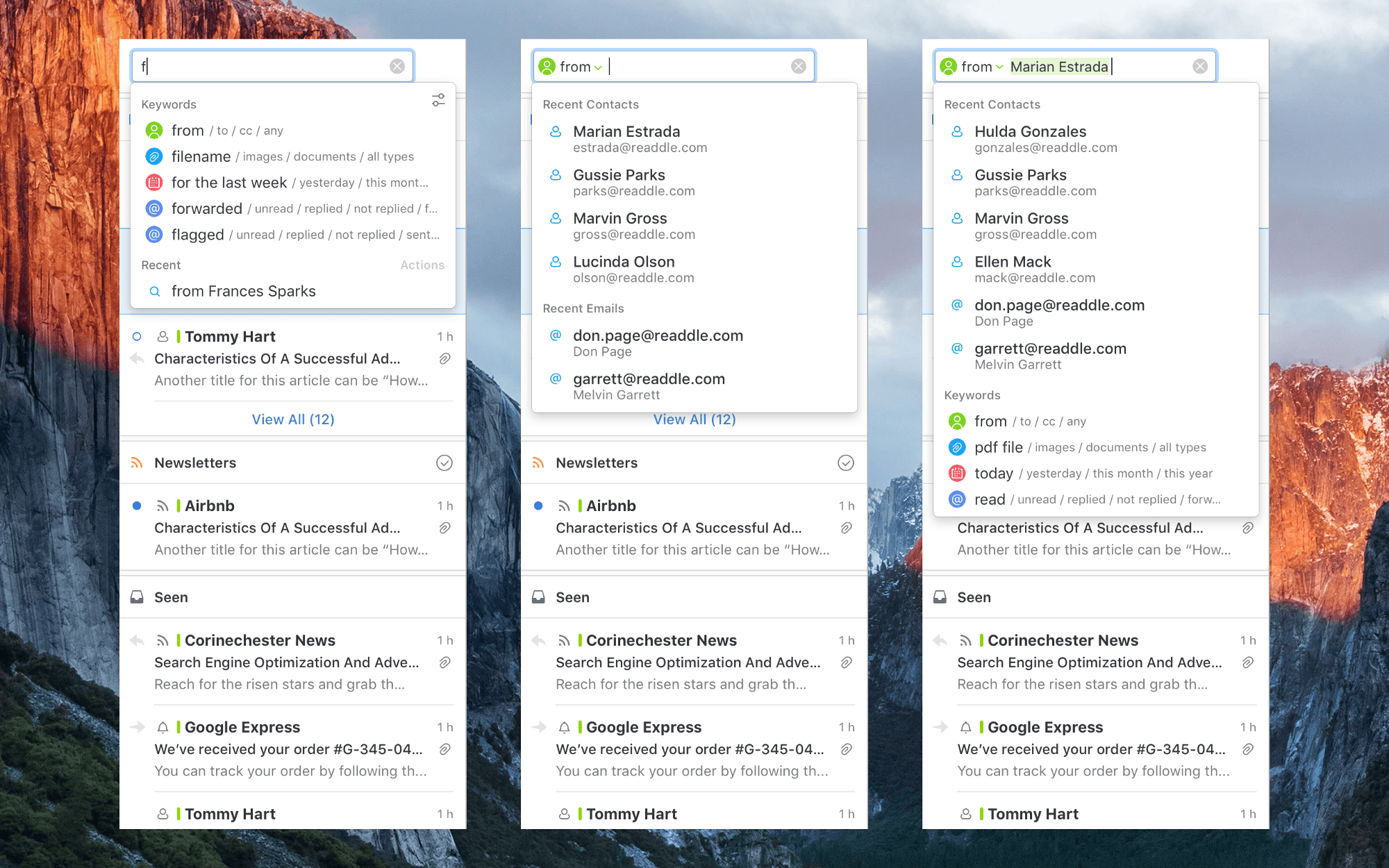
Search isn’t the forte of many email clients. Too often I find myself resorting to gmail.com or the Gmail app on iOS to find a message because Google’s search is so good. However, a downside of Google’s approach is that it requires you to recall or look up special syntax to narrow your search using date, attachment, sender, and other parameters. An update to Readdle’s Spark for macOS avoids that pitfall with improvements to its search functionality that detect keywords in your searches as you type queries in plain English.
I haven’t used Spark’s improved search enough yet to give it a thorough review, but I like what I’ve seen so far. As you type a search query, Spark looks for keywords. For example, start typing ‘att…’ and Spark will suggest searching for attachments. Smart keywords include things like ‘to,’ ‘from,’ ‘attachment,’ ‘flagged,’ ‘forwarded,’ and dates. The parameters can be batched in plain English too, so I can type ‘emails from Federico from yesterday with PDF attachments’, and Spark knows to apply the sender, date, and attachment filters returning results almost instantly.
Spark is already a popular email client with a host of modern features, but the improvements to search have the potential to make a lot of new converts to the app.
Spark for macOS is available on the Mac App Store.
Apple Q3 2017 Results: $45.4 Billion Revenue, 41 Million iPhones, 11.4 Million iPads Sold

Apple has just published its financial results for Q3 2017. The company posted revenue of $45.4 billion. Apple sold 11.4 million iPads, 41 million iPhones, and 4.3 million Macs during the quarter.
“With revenue up 7 percent year-over-year, we’re happy to report our third consecutive quarter of accelerating growth and an all-time quarterly record for Services revenue,” said Tim Cook, Apple’s CEO. “We hosted an incredibly successful Worldwide Developers Conference in June, and we’re very excited about the advances in iOS, macOS, watchOS and tvOS coming this fall.”
Evolving the iMessage App Store
 Federico
Making Peace with a Little Clutter
I’m not a neat person by nature. I don’t care that cables snake all over the floor under my desk. I can’t see them, and they’re not in my way. I also have hundreds of apps on my iPhone even if you don’t count the iMessage sticker packs. However, if an app isn’t on...
1Blocker: Make Safari Browsing Fast, Safe, and Productive [Sponsor]
Advertising and trackers have gotten out of hand on many sites. Pages load slowly wasting your time, draining your battery, and using up your mobile data. Even worse, ads sometimes serve up malware to unsuspecting users. To take back control, you need 1Blocker.
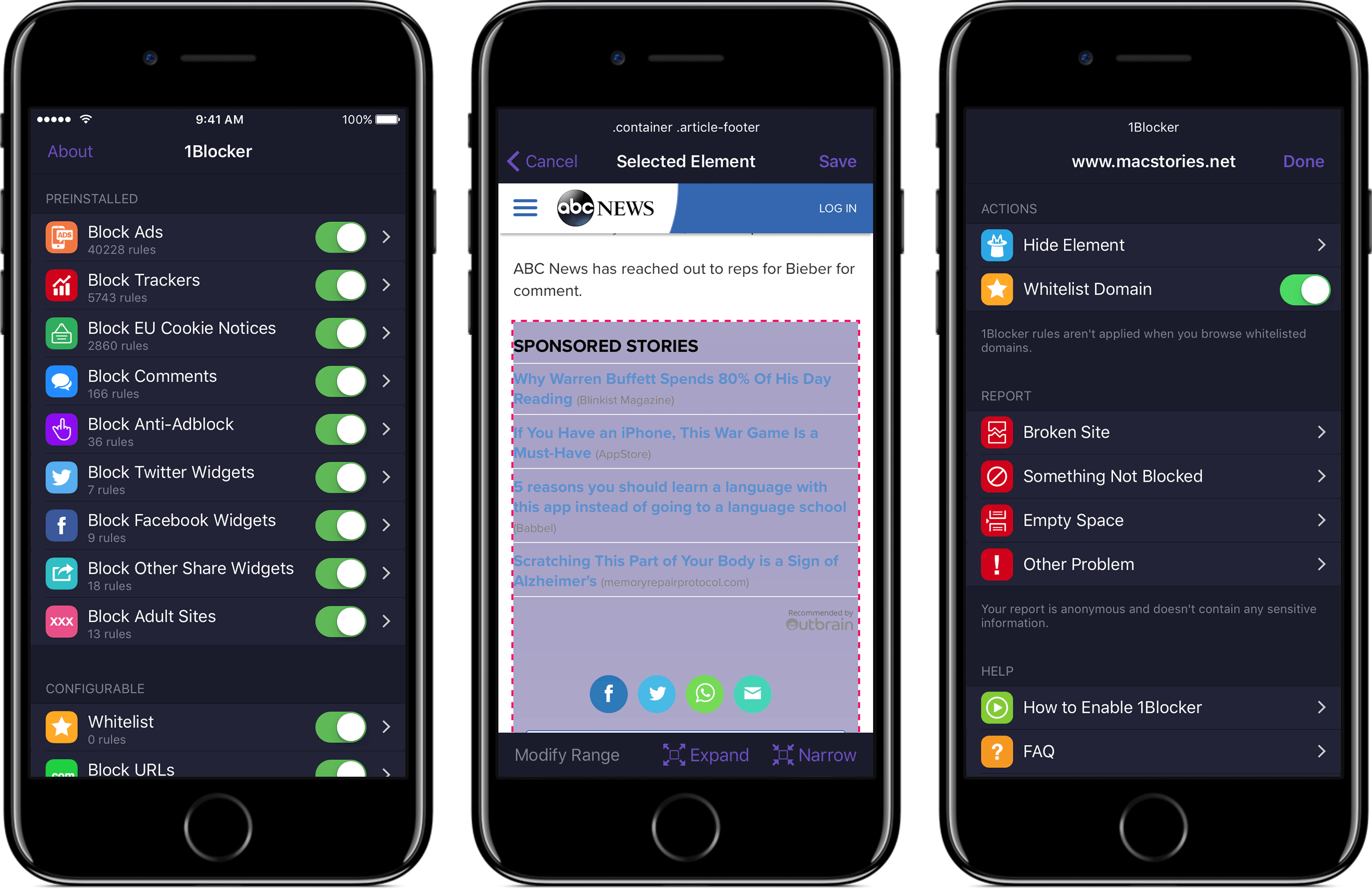
1Blocker fights back by putting fine-grained controls in the hands of its users. The app has rules that block tens of thousands of common ads, trackers, social buttons, and other junk. The ad blocking category alone includes over 40,000 rules. On top of that, there are eight other categories with thousands of additional rules that will make you more productive online by reducing distractions. In the unlikely event that 1Blocker doesn’t have a rule you need, you can add your own too.
You can even hide individual elements on a webpage with 1Blocker’s powerful action extension on iOS. All you have to do is invoke the extension, tap what you want to hide, and then save. It’s incredibly simple and effective for page elements that aren’t already blocked by 1Blocker’s extensive built-in rules.
1Blocker is available on macOS too and syncs with the iOS version via iCloud to keep your blocking rules up-to-date across both platforms. Head on over to 1Blocker’s website for more information about how it can make your browsing better.
Our thanks to 1Blocker for sponsoring MacStories this week.