
Fantastical Flexibits added support to Fantastical for opening directions in Transit, one of my favorite apps for finding public transportation routes. Also, the app’s Infograph complication for the Apple Watch has been updated so it no longer shows any data if you have no events or reminders for the day. A new Siri shortcut...
 The iPhone Should Be a Better Apple Watch Companion
I’m very happy with my Series 4 Apple Watch. The slightly bigger screen makes a bigger difference than I expected and the battery life is excellent. Moreover, the changes to the watchOS 5 APIs that allowed Overcast to implement podcast playback without an iPhone nearby has had a bigger impact on the way I...
Q&A
Question: By default, the Smart Keyboard Folio puts a capital letter as the first letter of the word you type. It doesn’t let you type “iPhone”, for instance – it types “Iphone”. Yes, we can disable this in Settings, but I’m also writing articles and fiction where automatic capitalization of the first letter of my...
Apple Heavily Promotes the Amazon Echo’s Apple Music Integration
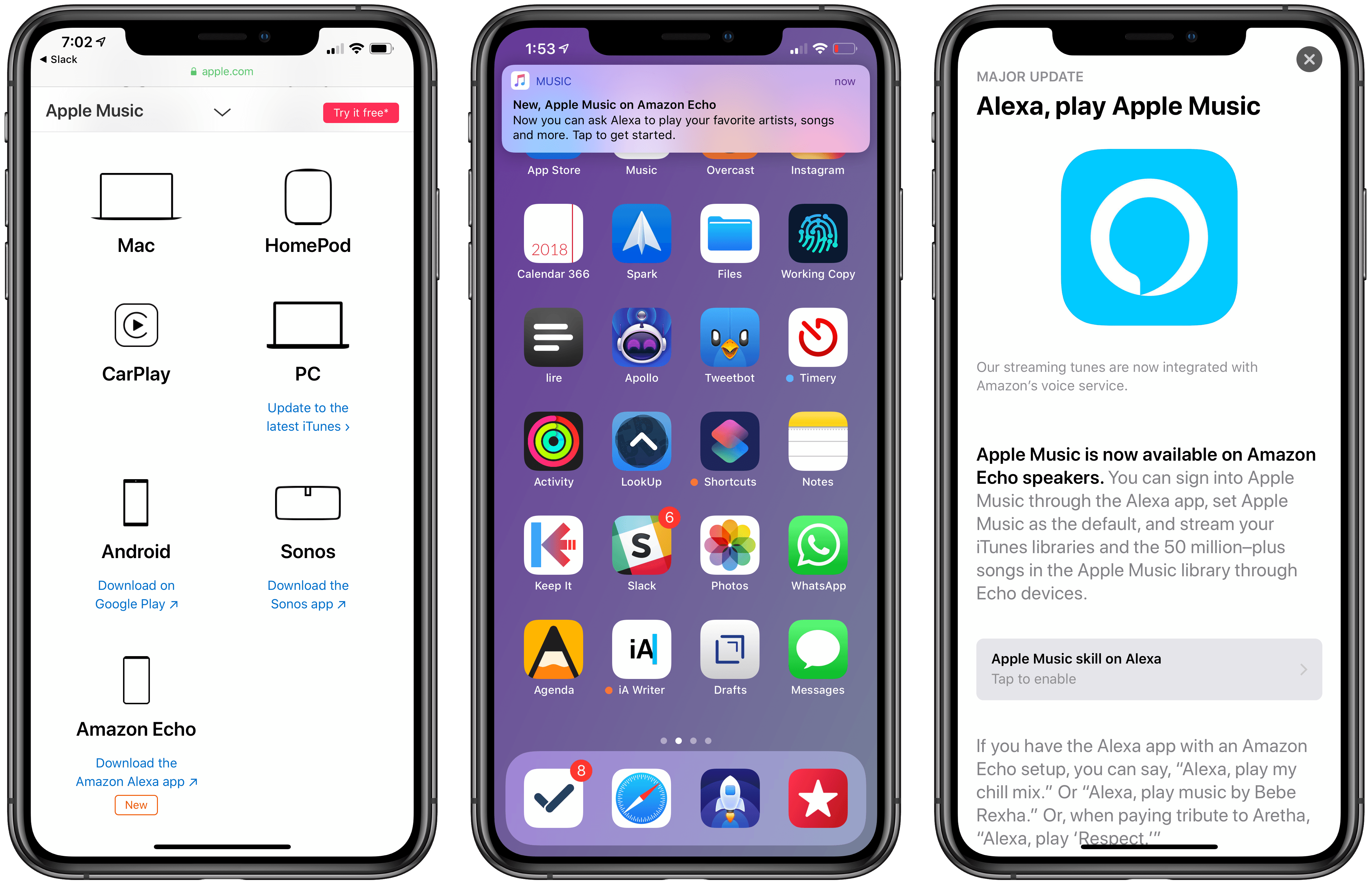
At the end of November, Amazon announced on its blog that Apple Music would be coming to Echo devices the week of December 17th. The music streaming service showed up on Echos a little earlier than expected last Friday, December 14th.
Today, Apple began promoting Apple Music’s availability on Echo devices through three different channels. The Echo integration first appeared on the App Store, which gave the Alexa app top billing in a Today tab story that highlights the new feature. Apple is also promoting the Echo integration on the Apple Music features page of its website along with other third-party devices like PCs, Android devices, and Sonos music players. Finally, late in the day US time, the Apple Music app began delivering push notifications highlighting the Echo feature.1
Amazon’s Echo devices aren’t the first third-party hardware to get Apple Music support as the Apple Music website demonstrates, but it is unusual for Apple to promote another company’s hardware alongside Apple Music to this degree. It’s also surprising because, in the two weeks that followed Amazon’s announcement, Apple said nothing. Nor did it acknowledge the change four days ago when the Alexa app was updated.
I wouldn’t be surprised if promoting the Echo was part of a bigger deal that got Apple products back on Amazon shelves in early November. Whether or not that’s the case, it’s still interesting to see Apple, which offers the competing HomePod, put so much promotional weight behind Amazon’s smart home speaker.
- I’m not a fan of promotional push notifications like these, which violate App Review Guideline 4.5.4 against using push notifications for advertising and promotional purposes. Unfortunately, that’s a rule that Apple has violated itself before and one that it has never meaningfully enforced against third parties. ↩
Darkroom 4.0: The MacStories Review
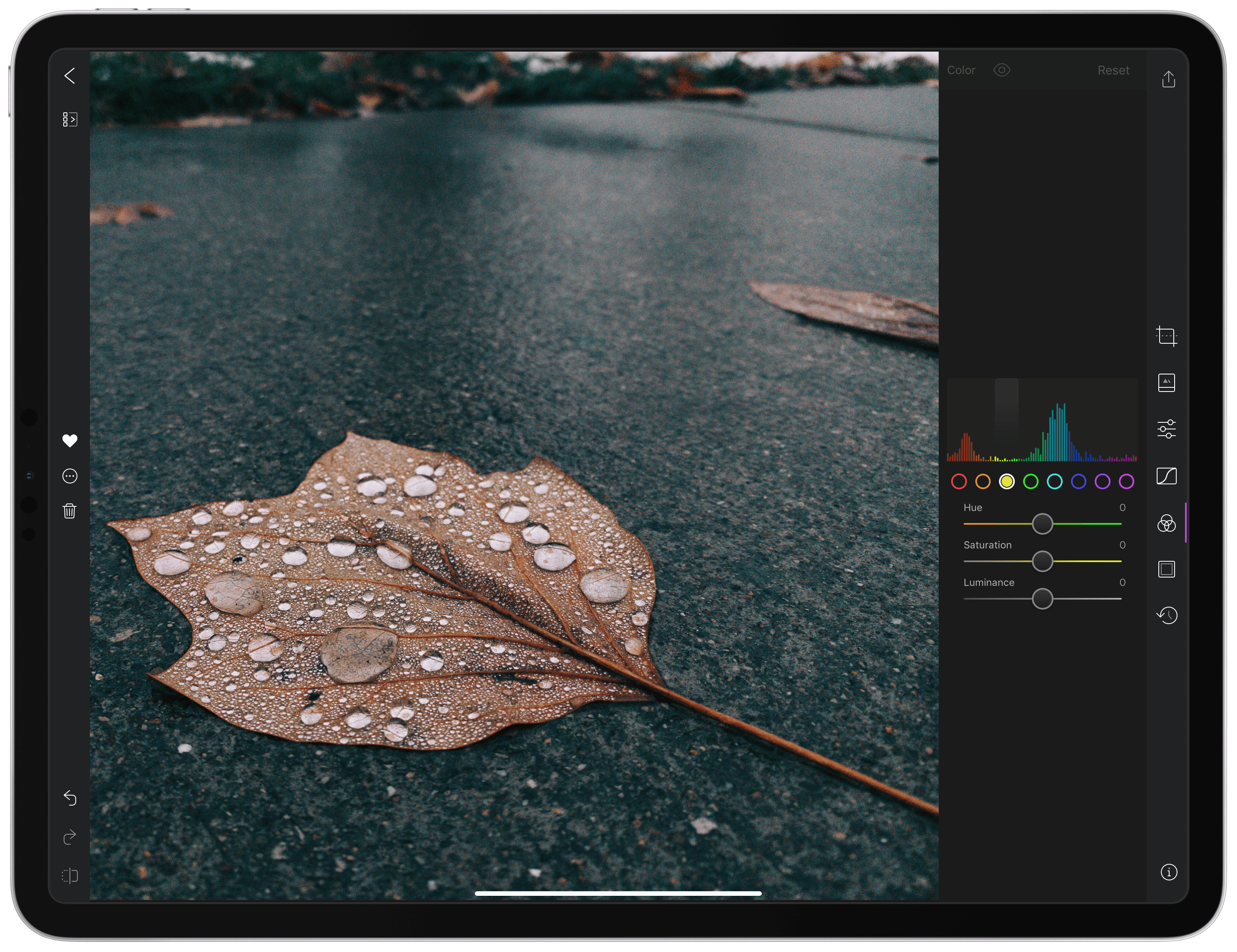
With version 4.0 released today, Darkroom has emerged as a photo editing force to be reckoned with on iOS. The highlight of the release is a brand-new iPad app, which is the version I’ll focus on in this review. I ran into a couple of bugs and would like to see Darkroom push its photo management and a few other tools even further in the future. However, the app’s combination of thoughtful design and platform-aware functionality together enable Darkroom to scale its full suite of tools gracefully from iPhone to iPad, which makes it an excellent choice for mobile photo editing.
AppStories, Episode 92 – Introducing the 2018 MacStories Selects→
On this week’s episode of AppStories, we unveil the MacStories team’s 2018 MacStories Selects for Best New App, Best New Game, and Best App Update.
Sponsored by:
- Outcast – The best standalone podcast player for Apple Watch.
- Luna Display – The only hardware solution that turns your iPad into a wireless display for your Mac. Use promo code APPSTORIES at checkout for 10% off.

AppStories Episode 92 - Introducing the 2018 MacStories Selects
0:00
37:52
37:52






Game Day: Tropico for iPad

Tropico is a franchise that’s been around since 2001, but today marks its first time on an iOS device courtesy of Feral Interactive. Ruling a banana republic in the Caribbean as El Presidente is a natural fit for the iPad’s touch interface. Whether you’re navigating around your island nation or building out its infrastructure, touch makes the interaction with the game’s environment feel natural and tactile in a way that pointing and clicking with a mouse or trackpad can’t. Add a steady pace of challenges to overcome as a leader, and the results are terrific.
 Introducing the 2018 MacStories Selects
 Federico
Apple Music Is Now Available on the Amazon Echo
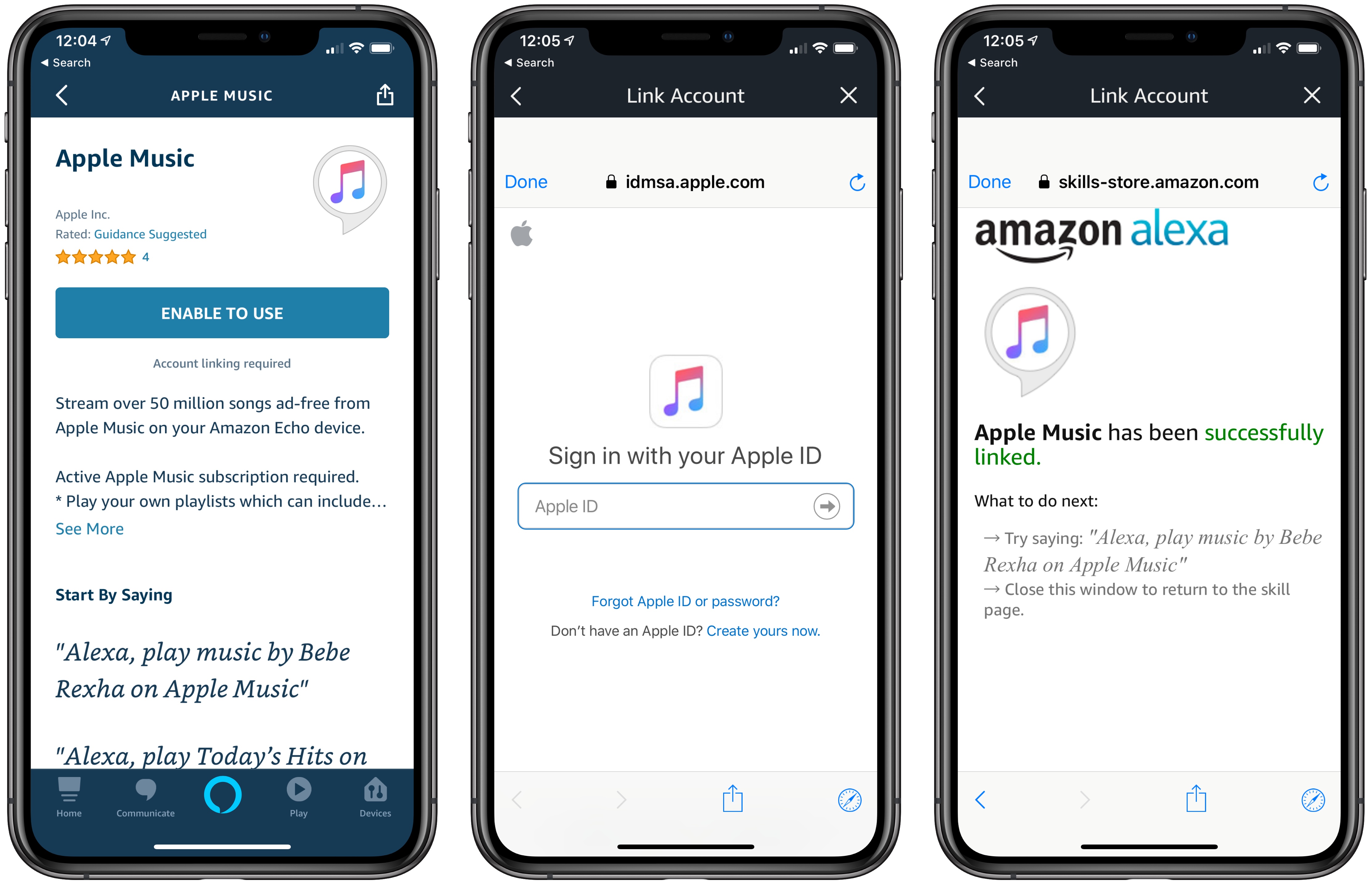
Although Amazon initially indicated that it would be out the week of December 17th, Apple Music support has begun to roll out on Amazon Echo devices today in the US.
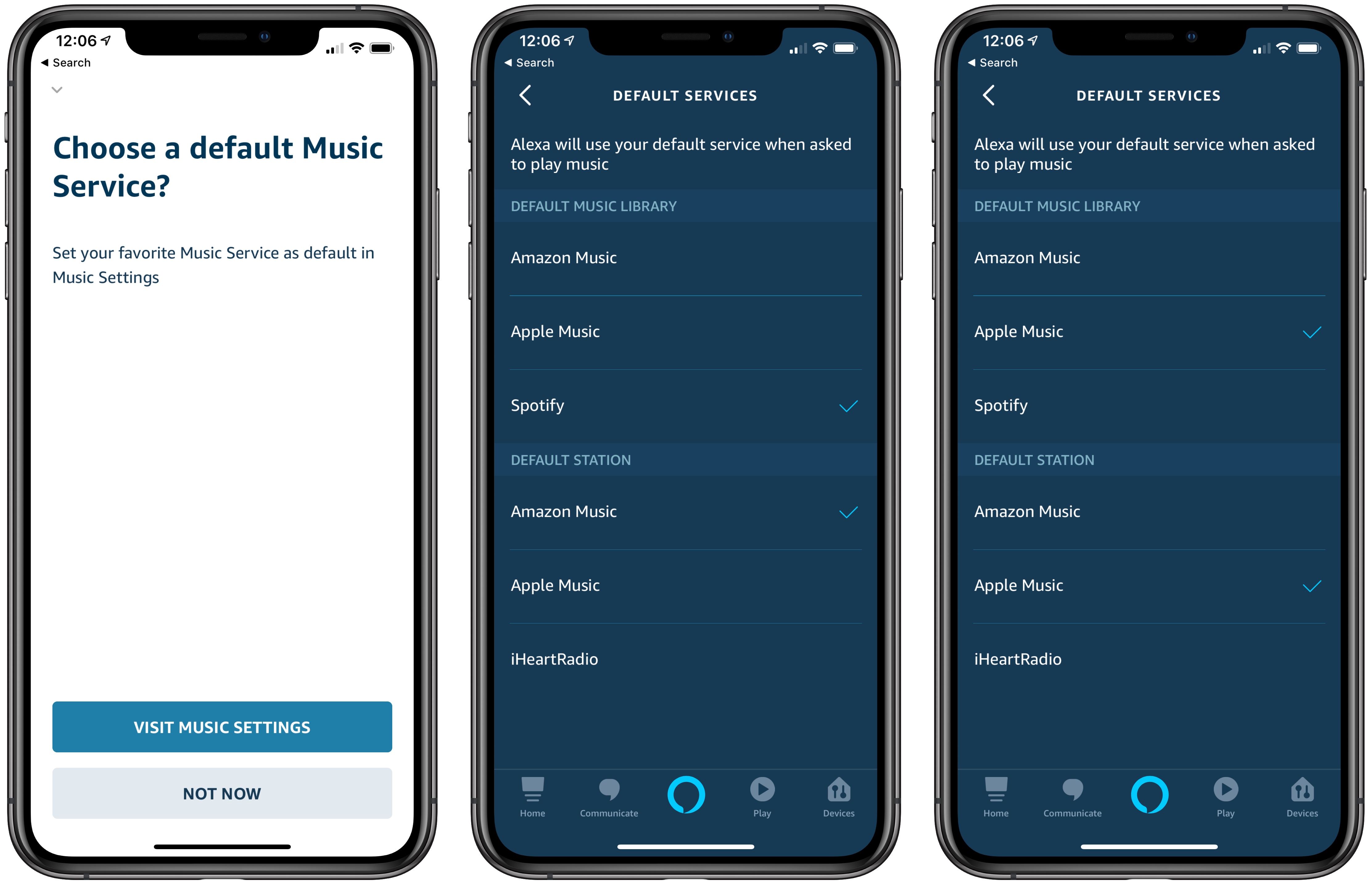
To set up Apple Music on the Echo, open the Alexa iOS app and go to the Music section of the app’s Settings. You won’t see Apple Music listed as an existing service, so tap the ‘Link New Service’ button, which will list Apple Music along with several other services.
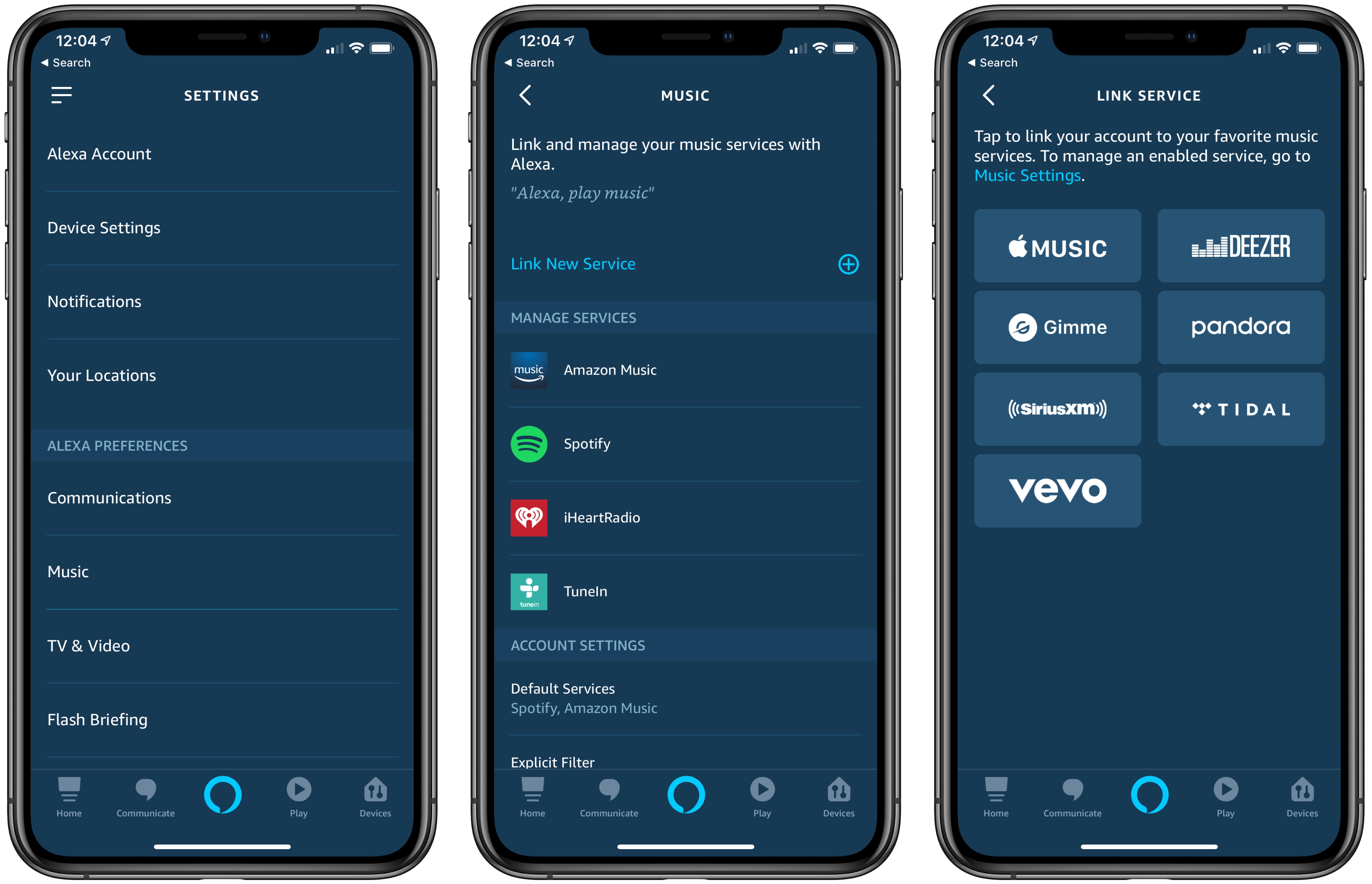
Once you’ve logged in with your Apple Music credentials, the Apple Music Skill is enabled, which allows you to say things like ‘Alexa, play my New Music Mix on Apple Music.’ You can separately set Apple Music as your default music service, which lets you use Alexa to request music without specifying ‘on Apple Music.’ When you make a request for music Alexa will let you know that playback is coming from Apple Music with a response like ‘Playing New Music Mix from Apple Music.’
Not all of the Apple Music features that work on a HomePod work with an Echo. For example, although Alexa will acknowledge your feedback if you say you like a song, that does not result in the songs being marked as ‘liked’ in Apple Music or iTunes. Nor can Apple Music be triggered through third-party Alexa apps like Astra. However, for basic playback of playlists, albums, and songs, the new integration works well.
At least one thing you cannot do with a HomePod is available on the Echo. With Apple Music activated, you can set alarms to play specific playlists as Zac Hall demonstrates on 9to5Mac, which is handy.
Overall, Apple Music’s integration with the Amazon Echo is about what you would expect. If you’re an Apple Music subscriber and use Echo devices, the option of using your Apple Music subscription is a nice addition, but it’s also a development that has the potential to help drive consumer adoption of the Echo and Apple Music.