
 Federico
LaunchCuts Adam Tow’s utility to organize and launch shortcuts (which I originally reviewed here) was updated earlier this week with new customization options, deeper keyboard navigation, and various UI improvements. Folders – perhaps LaunchCuts’ most popular feature – can now be customized with icons and colors, which should help in recognizing specific ones at...
 Exploring Image Compositing Apps and Workflows on the iPad and Mac for Shortcuts Rewind

I’ve been on a long image compositing journey the past couple of weeks looking for the right tools and workflows for Shortcuts Rewind, a new series that goes in-depth on the shortcuts in the MacStories Shortcuts Archive. My needs for this project are fairly narrow as you’ll soon discover, so I don’t consider this a...
Shortcuts Rewind: Linking Tricks Using Markdown and Rich Text
Editor’s Note
Over the past several years, Federico has built hundreds of shortcuts that are sprinkled throughout the stories he’s written. Last spring we debuted the MacStories Shortcuts Archive, a one-stop destination that collects all of those shortcuts organized by topic, so readers can find them easily.
There’s no better way to learn how to build your own shortcuts than by downloading someone else’s, which is what makes the Archive such a valuable resource to readers and one of MacStories’ most popular features. Still, it can be hard to pick up best practices and patterns or other tips and tricks from experimentation and tinkering.
That’s why today we are introducing a new series on MacStories called Shortcuts Rewind to add context to the shortcuts in the Archive. Periodically throughout the year, we will pick a few shortcuts from the Archive that we think would benefit from a further explanation, whether that’s to help new Shortcuts users learn the basics, to illustrate a particular technique that can be used across multiple shortcuts, or to automate a task that you might not have thought was possible.
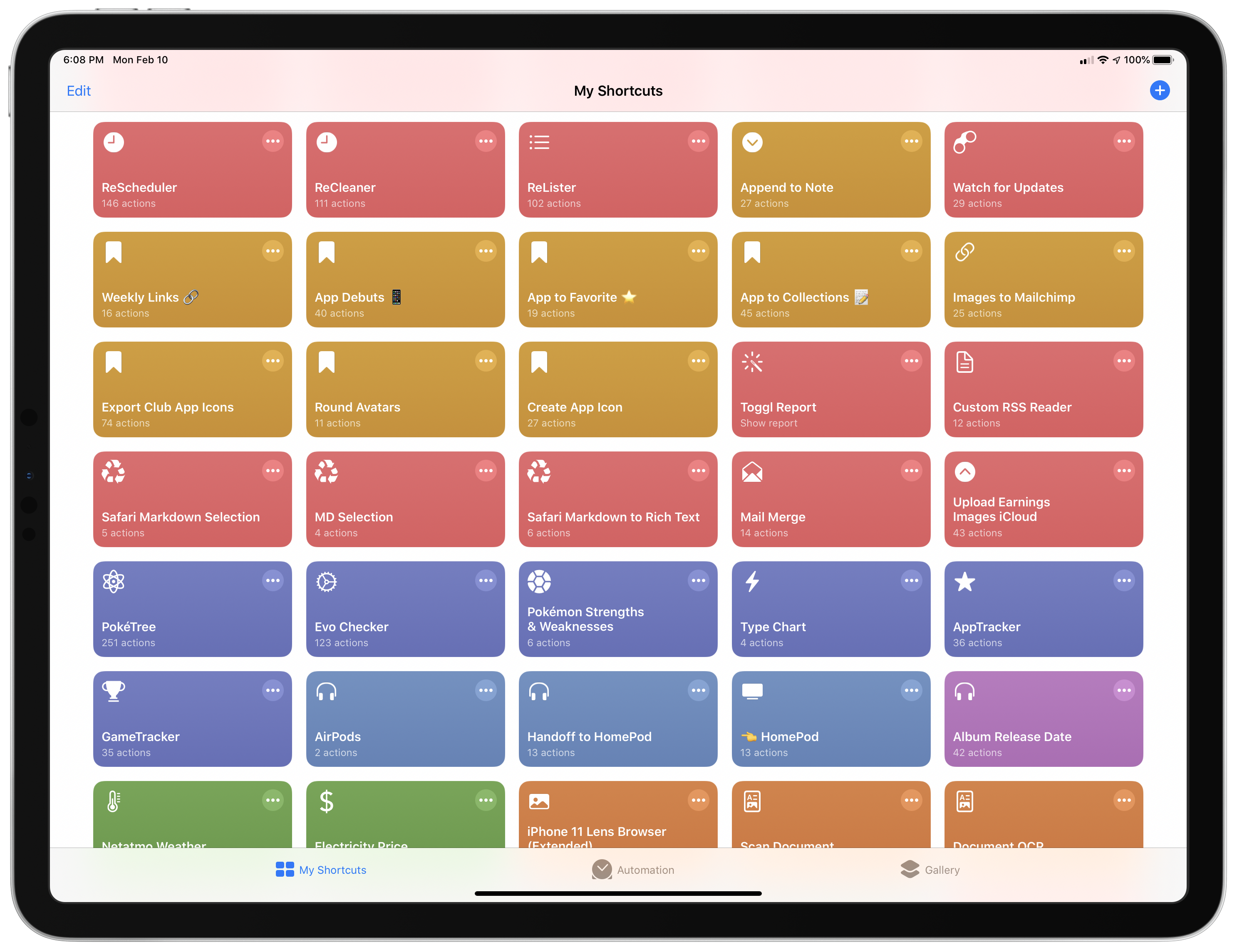
Tying Shortcuts Rewind together is a new graphical approach to explaining shortcuts. As you’ll see, we’ve created a system that dispenses with distracting UI elements and breaks shortcuts into logical sets of actions. The approach allows us to simultaneously provide step-by-step instructions alongside commentary that we hope will help readers achieve a deeper understanding of Shortcuts and assist them in building their own automations.
Let’s get started.
For this first installment of Rewind, I wanted to start with a trio of relatively simple shortcuts that illustrate the power of Shortcuts’ ability to streamline the transformation of one type of content into another. All three shortcuts can be found in the Text section of the Shortcuts Archive, but there are also links to them below. The foundation of this process is the Content Graph, a core part of Shortcuts dating back to its origins as Workflow. The idea is a simple but powerful one that eliminates complexity for the user, handling much of the data compatibility and conversion chores behind the scenes with little or no effort on the part of the user.
At the heart of the three shortcuts discussed below are transformations between plain text, rich text, and URLs. Thanks to the Content Graph, Shortcuts has the flexibility to create powerful text and link handling functionality.
Jason Snell on Editing Podcasts with Ferrite on an iPad with the Apple Pencil→
Jason Snell has edited a lot of podcasts. In fact, The Incomparable, the flagship show of his media and pop culture podcast network of the same name, just reached episode 500.
Since last summer, Snell has been using Ferrite by Wooji Juice to edit nearly every episode of The Incomparable on his iPad with the Apple Pencil. I’ve heard him describe his iPad and Apple Pencil workflow on podcasts before, but there’s nothing like seeing it in action, which you can now do on the Six Colors YouTube channel.
What struck me most about Snell’s video is how natural direct manipulation of multiple audio tracks looks. I’ve always done all of my podcast editing on a Mac with Logic Pro X, but after watching Snell edit an episode with multiple guests, I look forward to trying this myself.
Apple Introduces Mac Catalyst Version of Swift Playgrounds
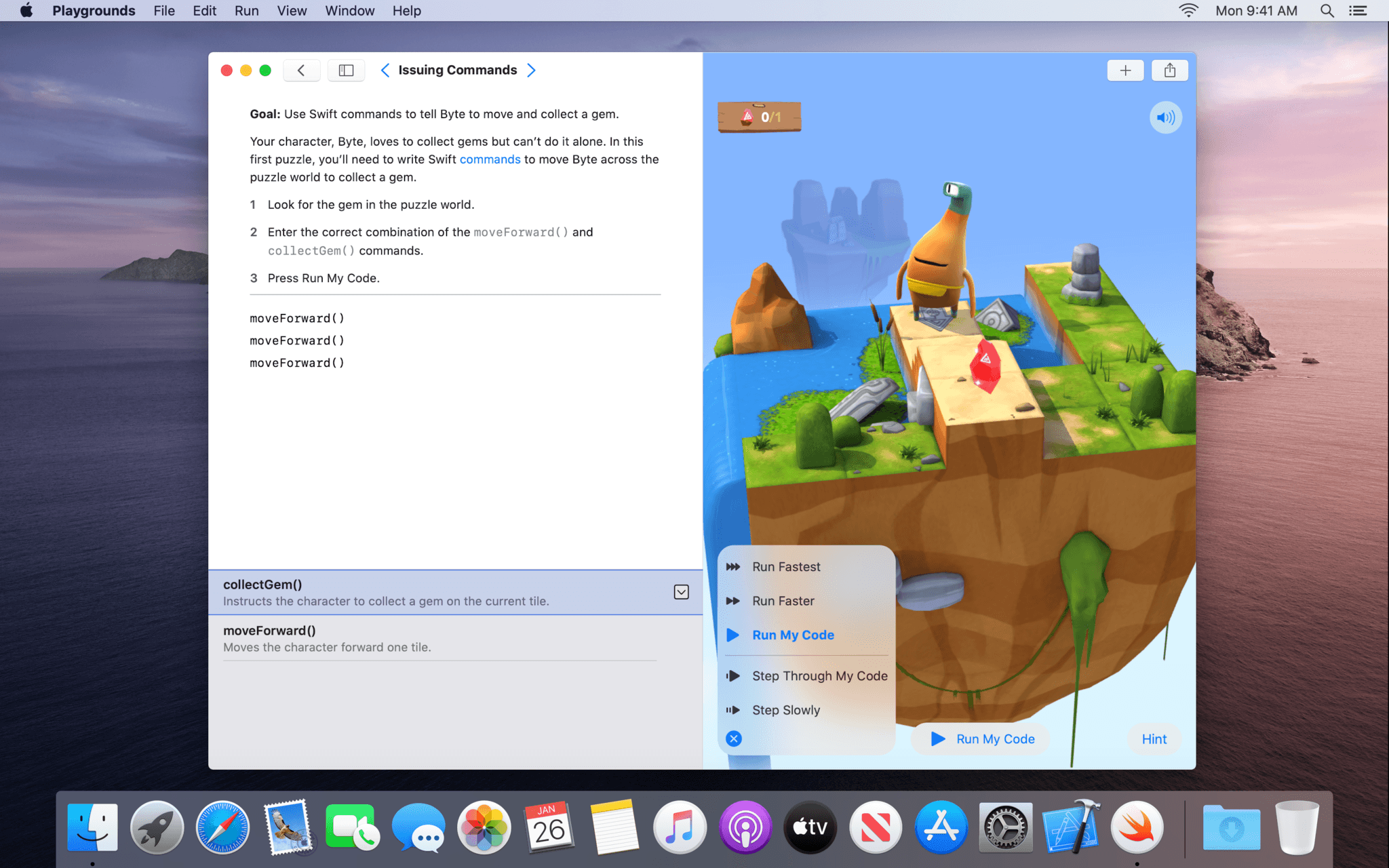
Swift Playgrounds has been around for quite a while on the iPad, but now, it’s on the Mac too as a Mac Catalyst app.
Swift Playgrounds teaches coding concepts and the Swift programming language. Until today, the app, which includes lessons designed to teach Swift alongside a coding environment, was an iPad exclusive. Now, however, anyone interested in learning Swift can move from the iPad to the Mac and back again.
I’ve been a fan of Swift Playgrounds since it debuted. It’s a friendly, easy-to-use environment for experimenting with Swift ideas and concepts, and the lessons available are excellent. With the addition of a native Catalyst app on the Mac, anyone who wants to learn Swift can do so whether they are in front of their Mac or using an iPad. What’s more, the additional space afforded by most Macs there’s more room to navigate playground books and files. Playgrounds on the Mac includes expanded code completion functionality that allows you to navigate code suggestions with the arrow keys on your keyboard or trackpad too.
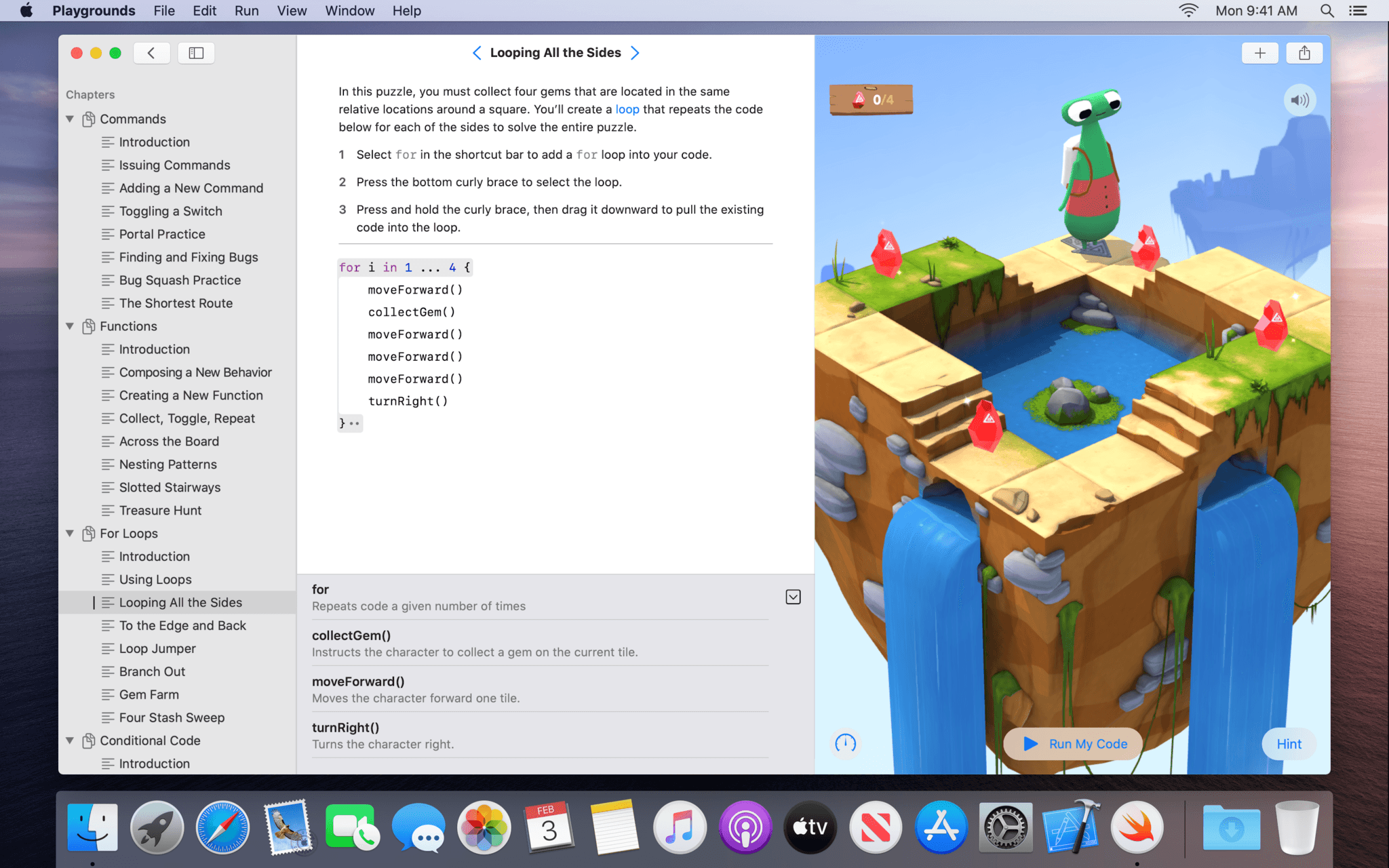
I haven’t had a chance to spend more than a few minutes with the new Swift Playgrounds yet, but it’s clear from even a cursory review of the app that a lot of thought and care has gone into it. The sidebar and Touch Bar support stand out as terrific Mac-centric additions that take advantage of the Mac’s bigger screen and keyboard and trackpad. I’m looking forward to diving spending more time with Swift Playgrounds on my Mac mini in the coming weeks.
Swift Playgrounds is available as a free download on the Mac App Store and requires macOS Catalina 10.15.3.
AppStories, Episode 149 – The Beta Releases that Will Change the App Economy→
This week on AppStories, we discuss the updates to Apple’s OSes and developer tools, the changes to the app economy they signal, and the impact they’ll have on users and developers.
Sponsored by:
- Health IQ – Insurance for the Health Conscious. Save up to 41%. Take the quiz now to see if you qualify.

AppStories Episode 149 - The Beta Releases that Will Change the App Economy
0:00
39:41
39:41






 The Beta Releases that Will Change the App Economy
AppStories Episode 149 - The Beta Releases that Will Change the App Economy
0:00
39:41
39:41
This week, Federico and John discuss the updates to Apple’s OSes and developer tools, the changes to the app economy they signal, and the impact they’ll have on users and developers.
Q&A
Question: Could you recommend an app for saving web content that has a good web clipper? I’ve used Notes before, but I’d like to save the images of an article too. Currently, I’m using Bear’s web clipper, but I was wondering what my alternatives are. (Robert)
Bear has one of the best web clippers...
iOS Apps for Extending the Non-iOS Gaming Experience
There are two types of apps in today’s collection: those for streaming games from non-iOS platforms to iOS and console companion apps. Each has its own set of limitations and compromises, but notwithstanding the room for improvement, I find these five apps each add to the gaming experience in their own ways, making...