John is MacStories' Managing Editor, has been writing about Apple and apps since joining the team in 2015, and today, runs the site alongside Federico.
John also co-hosts four MacStories podcasts: AppStories, which covers the world of apps, MacStories Unwind, which explores the fun differences between American and Italian culture and recommends media to listeners, Ruminate, a show about the weird web and unusual snacks, and NPC: Next Portable Console, a show about the games we take with us.
Question: I find that listening to music is a bit distracting while I’m reading or writing. Do you listen to music when you are preoccupied with reading or writing? If so, what do you like to listen to (artist, genre, etc.)? (P.W.)
Hey is a new approach to email that was launched earlier this week by Basecamp. The service, which comes with its own hey.com email address, has a number of unique features for managing messages with an emphasis on screening tools. Hey does not, however, allow you to use its client app with other email services like Gmail, which is important to keep in mind.
Equally important to this story as it unfolded over the past several days is the fact that Hey does not offer an In-App Purchase for its service. The service is available from Basecamp only. As a result, if you download Hey’s iOS app, but have not yet purchased a license from Basecamp, the app doesn’t do anything except request your Hey login credentials.
The service launched on Monday with access provided via the web and native Windows, Android, Linux, Mac, and iOS apps. At the same time, Hey was being launched, an update to its iOS app, which fixed bugs, was rejected by Apple. The timing is unclear, but TechCrunch reports that Hey’s Mac app was rejected too.
It’s just about time for WWDC to start, and the MacStories team has been busy preparing for a lineup of expanded coverage next week.
As in past years, our coverage will begin with Apple’s keynote presentation. On MacStories, you’ll find in-depth coverage of Apple’s announcements, overviews of OS updates and any new hardware, and roundups of everything happening throughout the week. You’ll also get the kind of details that aren’t widely reported as the team combs through session videos, social media, and other sources.
AppStories is playing an expanded role in our coverage this year, and we’re bringing our new weekly show, MacStories Unwind, along for the ride too. Federico and I will record special episodes of AppStories that we’ll release Tuesday though Friday covering the WWDC keynote, State of the Union presentation, session videos, and more, plus we’ll publish usual Friday episode of Unwind where we’ll wrap up the week’s most important stories and discuss what it all means.
You can follow along with all of the MacStories, AppStories, and Unwind coverage on our WWDC 2020 hub, or subscribe to the dedicated WWDC 2020 RSS feed.
Finally, we’ll send a special issue of MacStories Weekly to Club MacStories members one day later than usual on Saturday, June 27th. The issue will be packed with WWDC-themed features and our thoughts on everything revealed. The same day we’ll also release a special episode of MacStories Unplugged, our Club-only podcast, with an inside look at the week gone by.
If you’re not a member of Club MacStories, you can join here.
To recap, stay tuned to MacStories, our shows, and the Club for a full week of WWDC coverage:
Monday - Friday
Continuous Keynote, State of the Union, and session coverage on MacStories
Tuesday - Friday
Daily episodes of AppStories covering all of Apple’s announcements big and small
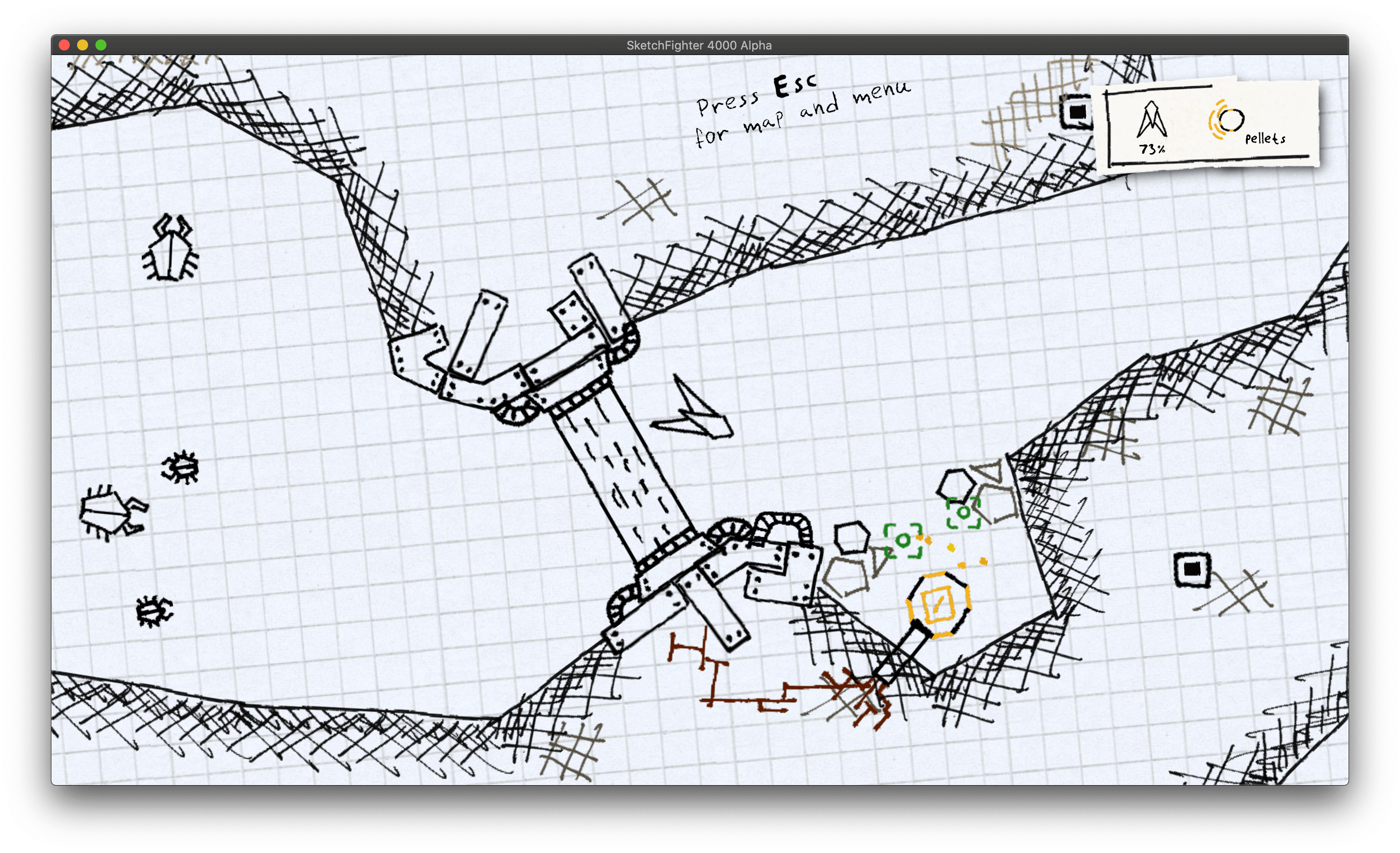
One of the first Mac games I ever played has made a comeback on the Mac App Store. Sketchfighter 4000 Alpha is a space-themed shooter that adds an exploratory twist on Asteroids-like controls. The game is a terrific riff on a classic arcade genre, but what holds the experience together and elevates it is the hand-drawn art and soundtrack.
Sketchfigher, by developer Lost Minds, was originally published in 2006 by Ambrosia Software, a Mac game publisher with roots in the early 90s that faded from the Mac gaming scene and finally went completely offline last year. That left fans with no way to download the app or activate existing licenses.
It’s been years since I played Sketchfighter, but as you can see from my tweet, I never forgot it. So, when I stumbled across a preview trailer for a reboot of the game, I was excited. As it turns out, Lost Minds was able to get the original source code for the game, update it for modern Macs, and release it on the Mac App Store.
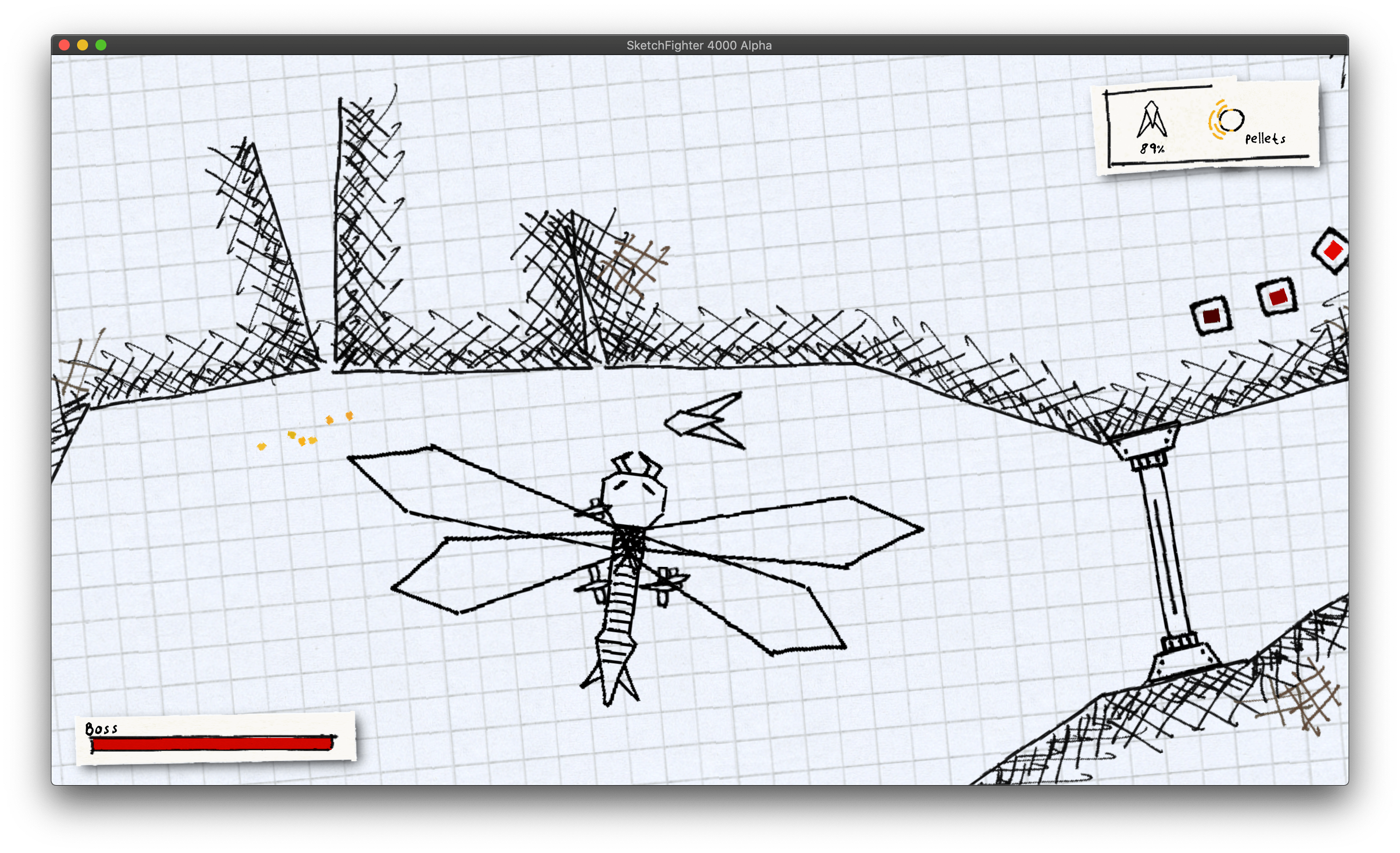
If you played the original game as I did, part of the reboot’s fun is the nostalgia factor. Even if you’ve never played Sketchfighter, though, it’s a wonderful classic arcade experience. The game takes the sort of doodles so many students have scribbled in notebooks as teenagers and brings them to life on the same graph paper you’d find in backpacks.
Your goal is to maneuver a spaceship through a series of zones, avoiding obstacles and weaponry, collecting items, eliminating enemies, and fighting bosses. The controls are simple. The arrow keys control the direction your ship flies, and the space bar fires your weapons. That doesn’t mean your ship is easy to control, though. Both the flight physics and ship itself reminded me of Asteroids, which works well in this context. As you fly your ship, it drifts, carried by momentum towards walls, enemies, and other obstacles that can inflict damage, eventually leading to your demise. Along your route, there are also spots to refresh your health, which are a great place to visit before a big boss fight because once your health runs out, your ship explodes.
Sketchfighter features three save slots, so dying doesn’t mean starting over from scratch every time. Also, although I’ve only played in single-player mission mode, there are also two-player co-op and competitive modes.
There isn’t too much more I can say about Sketchfighter without giving away some of the surprises in later levels, but it’s worth emphasizing that the game’s relative simplicity is elevated above other straightforward arcade shooters by its nostalgia-evoking graphics and soundtrack. The music is a relatively short loop, but it’s incredibly catchy and the sort of tune that will stick in your head for days.
With so many games gone with the transition to 64-bit apps, I was happy to see Lost Minds take the time and effort to revitalize this small but fun corner of Mac gaming history. Updating older games isn’t trivial, which is why reboots like Sketchfighter are sadly the exception rather than the rule.
The Mac is lacking as a gaming platform in a lot of ways, but it’s perfect for quirky arcade-style fun like Sketchfighter. The game runs well on my 2018 Mac mini and has never sounded better than through my Harmon Kardon Soundsticks. What’s more, Sketchfighter is a terrific diversion when you’re sitting at your Mac and need a break. I hope it’s wildly successful and gets ported to the iPad eventually, too. It would be great fun to play with an iPad Pro attached to the Magic Keyboard with Trackpad.
A group of indie iOS and iPadOS developers have joined forces to offer a pack of over 100 stickers of many of our favorite apps, the proceeds of which will benefit two great causes. According to the sticker pack’s purchase page:
All proceeds will be split 50/50 between the World Health Organization’s COVID-19 Solidity Response Fund and the Equal Justice Initiative for combatting racial and economic injustice.
It’s terrific to see the developer community come together to offer such a wide array of stickers for two excellent charities. Ever since I started attending WWDC, I’ve collected stickers of my favorite apps from the developers I meet. With WWDC online this year, I didn’t think I’d be able to add to my collection anytime soon. However, thanks to the Indie Sticker Pack, I’ll have more stickers at once than I could ever have collected at one WWDC and contribute to two great causes.
This week on AppStories, we cover the latest news about WWDC and conclude our WWDC wishes series with a look at iOS, including Messages, Files, Shortcuts, the share sheet, the App Store, and more.
Adobe’s Lightroom and Photoshop are complementary tools that a lot of creative professionals use together on the desktop, moving images back and forth. Until now, however, that wasn’t possible on the iPad, which has made it a frequently-requested feature ever since Photoshop debuted on the iPad late last year.
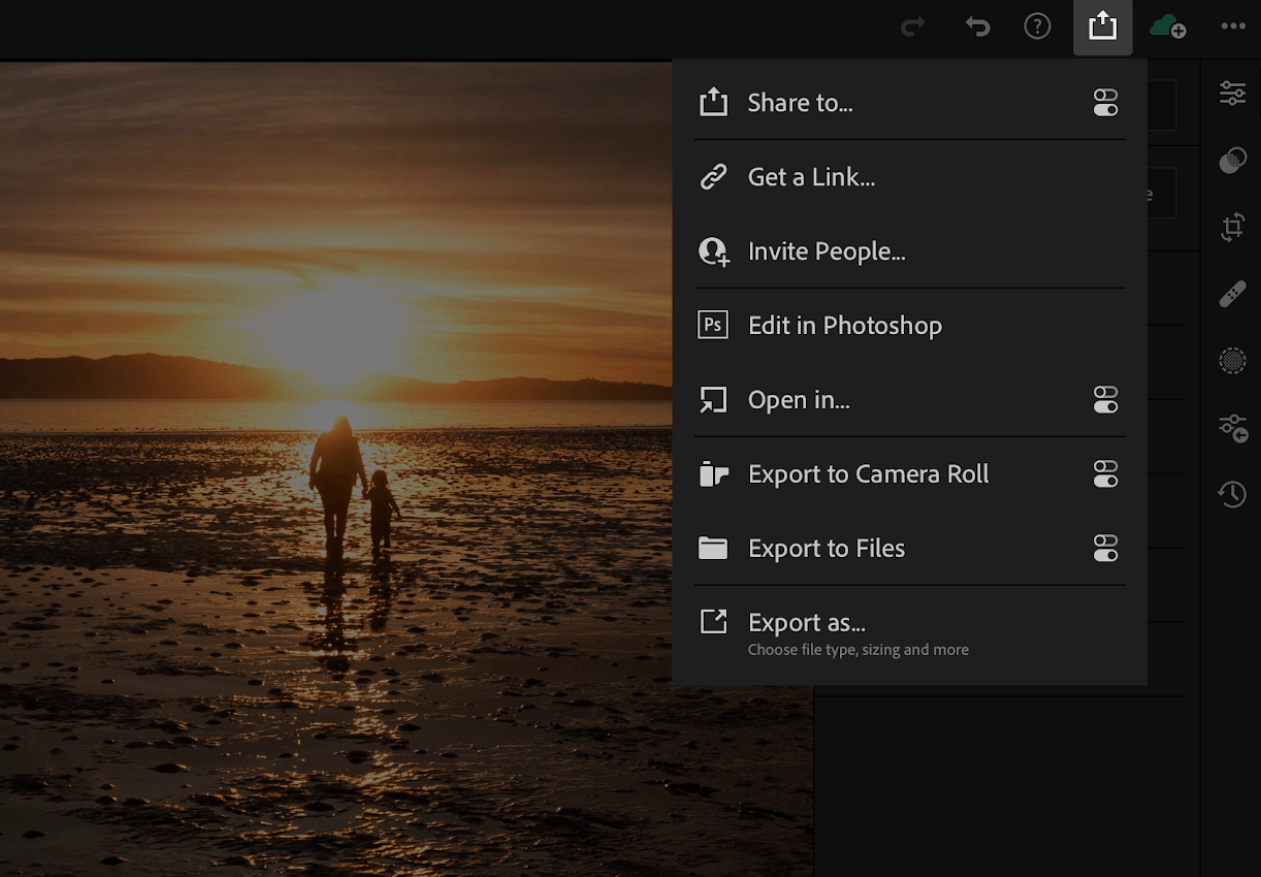
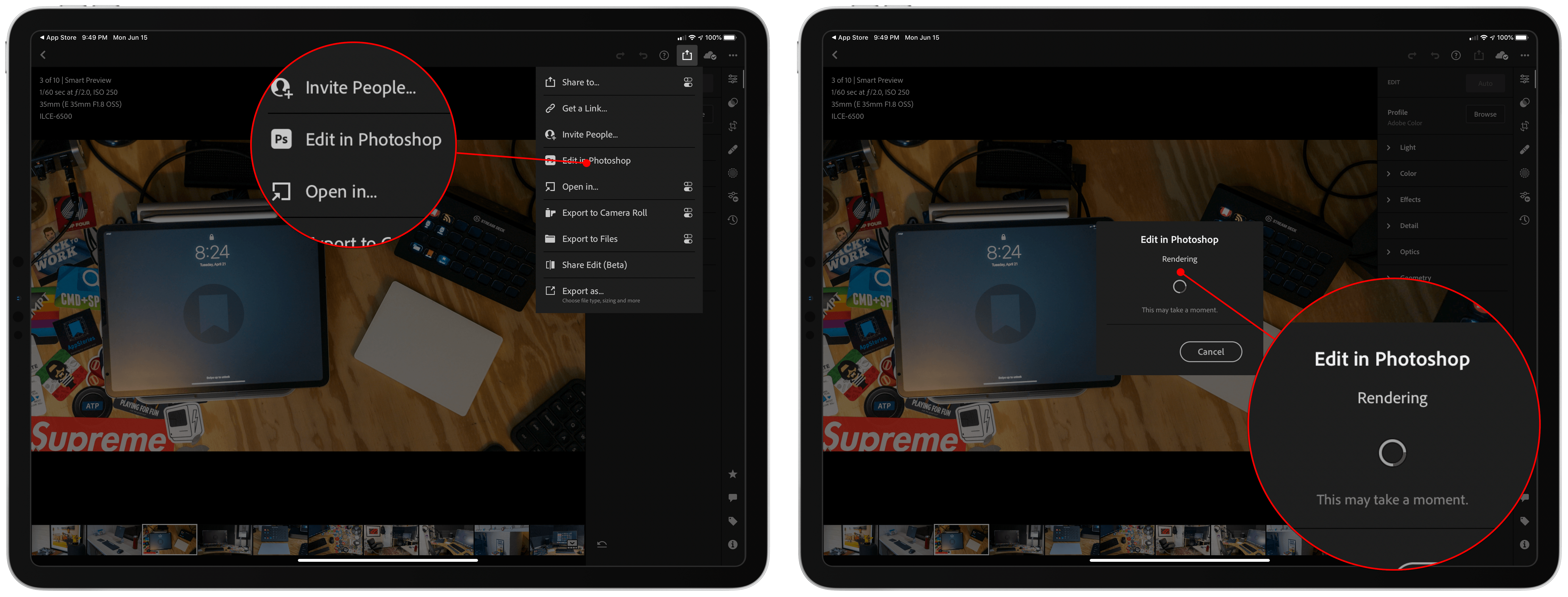
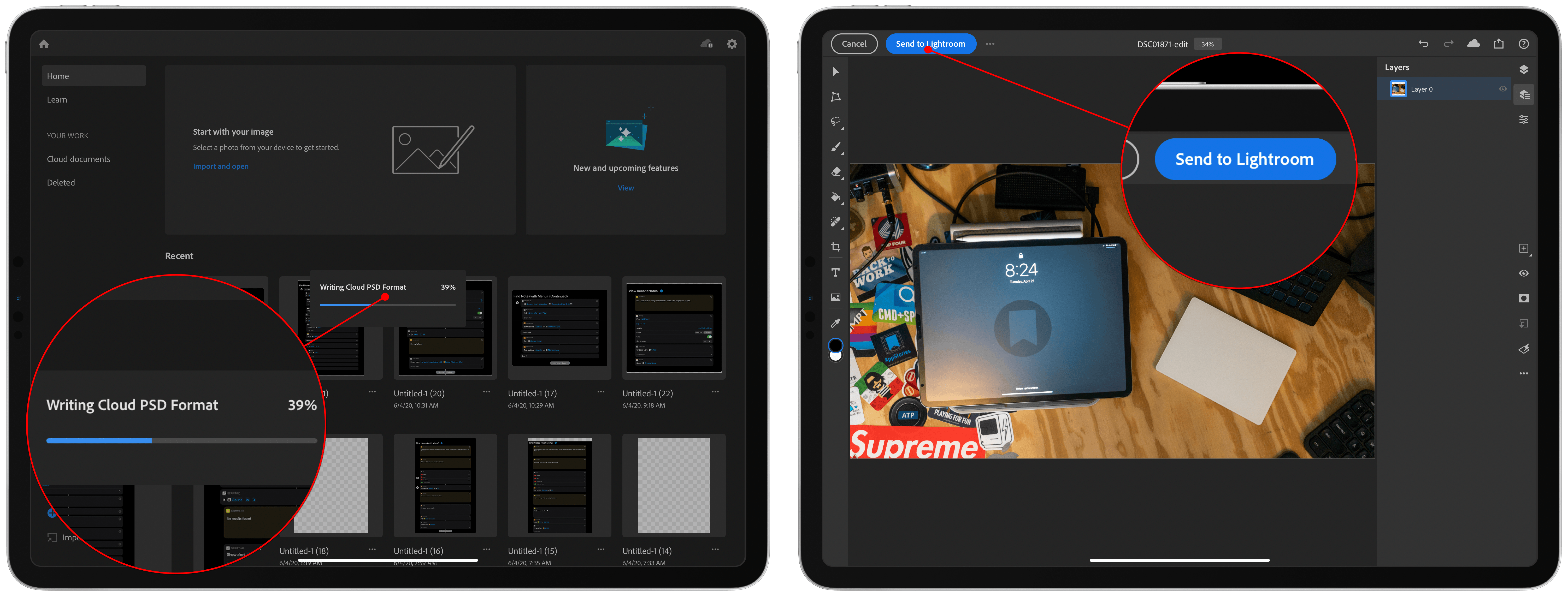
With today’s update to Lightroom, there’s a new option in the share menu called ‘Edit in Photoshop.’ When you select that option, Lightroom converts your image for Photoshop and uploads it to Adobe’s cloud service. As soon as that process is complete, Lightroom automatically launches Photoshop and loads the image. When you’re finished making edits, tap the big, blue button at the top of the screen that says ‘Send to Lightroom,’ and a PSD version of the image is returned to Lightroom where you’ll also find the original image you sent to Photoshop. Alternatively, you can save the PSD file as a cloud-based document without sending it back to Lightroom.
Sending a RAW image to Photoshop, which is first converted to a cloud-based PSD file.
Finalizing the import into Photoshop, which now includes a big blue button for sending the image back to Lightroom.
Adobe debuted several other updates to Lightroom on the iPhone, iPad, and Mac too. The company is expanding the learning experiences available in the app with more guided tutorials and interactive edits that demonstrate the steps needed to achieve certain results. Lightroom also includes a new versioning system that permits users to experiment by applying different edits to the same image as different versions and compare them without creating multiple files. All users can also add watermarks to images now, which are synced across devices.
Users who upgrade to Lightroom’s premium service get several other features as well. Hues can be adjusted locally, allowing users to change hues in one area of an image without affecting other parts of it. Premium users can also share edits in the app’s Discover section, a community for sharing images, drawing inspiration, and learning.
With every major update of Adobe’s flagship apps on the iPad, I’m impressed by the progress that has been made. Lightroom is a terrific photo editor that’s made all the more powerful by the additional option of exporting images into Photoshop for iPad, which has been advancing itself quickly. Adobe announced updates to many of its desktop apps today too, but what’s striking about the announcements is just how quickly its mobile apps have begun playing a central role in Adobe’s pro product lineup.
Lightroom and Photoshop are available as free downloads on the App Store, with certain features requiring an In-App Purchase.
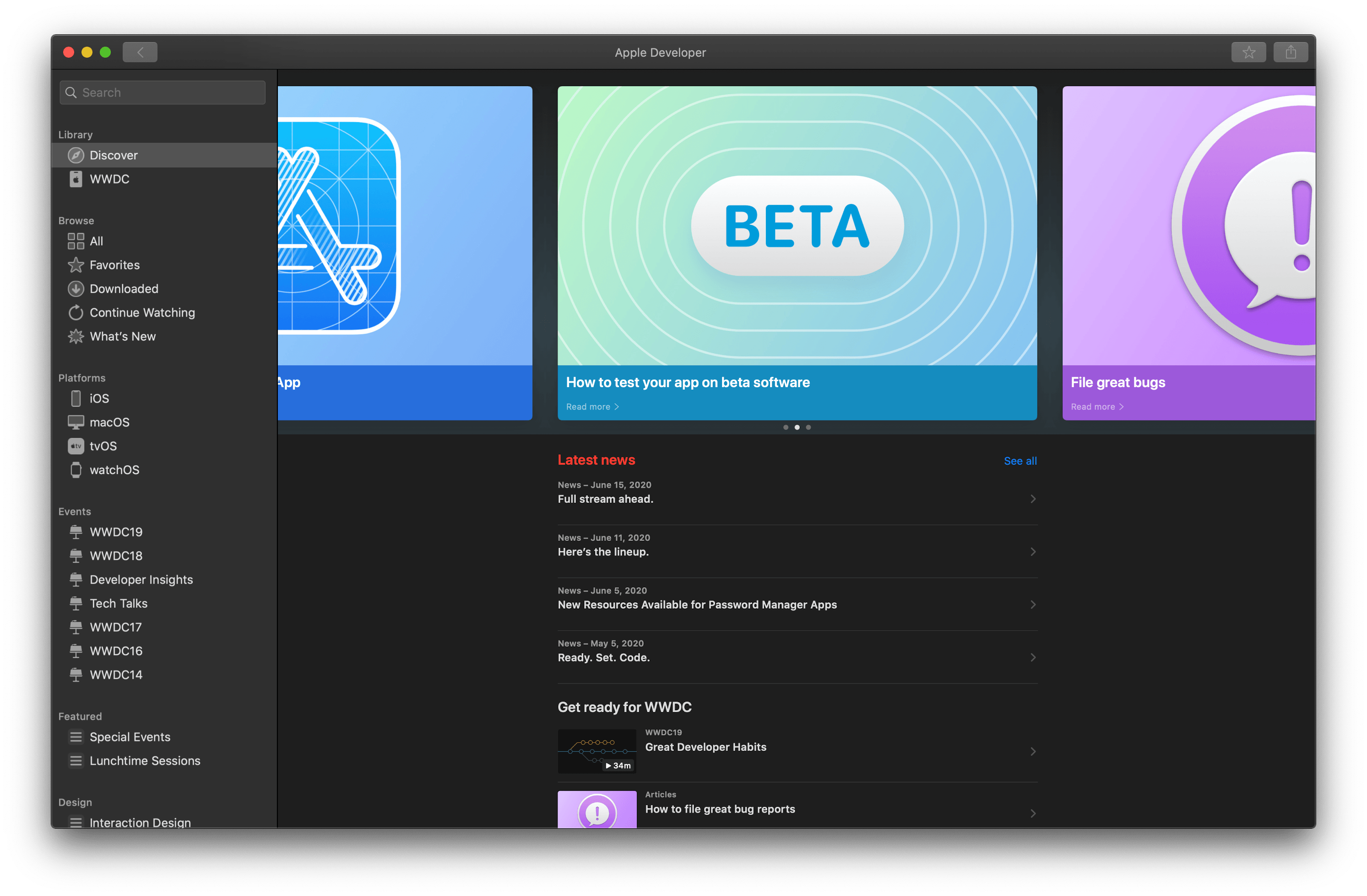
Apple has updated its Developer app, which serves as a companion to developers for WWDC and a way to access past years’ session videos and other content year-round.
For the first time, there is now a Mac version of the Developer app, which appears based on Apple’s Mac Catalyst technology. The new app includes a left-hand sidebar that presents the same written and video content found in the iOS and iPadOS versions of the app. The iPhone and iPad versions of the Developer app have also been updated with a redesign of the Discover, Browse, and WWDC tabs and the option to mark Discover articles as favorites.
Apple’s developer website has new information about Labs and the Apple Design Awards too. Next week, one-on-one developer labs can be requested on Monday from 3:30 pm to 6:00 pm Pacific and Tuesday through Thursday from 6:00 am to 6:00 pm. According to Apple, “Requests will be reviewed and you’ll receive an email with your status within several hours.” Lab appointments will range from 10-55 minutes in length via a Webex audio call with an Apple engineer. Apple’s developer portal also says that the Apple Design Awards will be held on June 29th, the Monday after the online conference concludes.
It’s fantastic to have a dedicated Developer app on the Mac for the first time. The change will make it easier than ever to pick up where you left off with videos no matter what platform you’re using. The labs are about what I expected Apple would do. I’m not sure what to make of the ADAs coming the week after the conference. Perhaps Apple simply wasn’t ready in time.
This week Federico and John cover the latest news about WWDC and conclude their WWDC wishes series with a look at iOS, including Messages, Files, Shortcuts, the share sheet, the App Store, and more.










 Federico