

John Voorhees

5432 posts on MacStories since November 2015

John is MacStories' Managing Editor, has been writing about Apple and apps since joining the team in 2015, and today, runs the site alongside Federico. John also co-hosts four MacStories podcasts: AppStories, which covers the world of apps, MacStories Unwind, which explores the fun differences between American and Italian culture and recommends media to listeners, Ruminate, a show about the weird web and unusual snacks, and NPC: Next Portable Console, a show about the games we take with us.

Federico Shares a Starter Pack of Shortcuts on Apple’s App Store

Source: App Store.

Source: App Store.

Today, the App Store published an interview with our very own Federico Viticci, who shared seven shortcuts for users who want to learn more about what Apple’s automation app enables on the Mac. Federico explains his interest in Shortcuts in the interview:

It’s all about removing friction from everyday tasks.

As the story recounts, Shortcuts has been Federico’s obsession for years and the tool that permeates every aspect of what we do at MacStories.

To help newcomers get started exploring and building their own shortcuts, Federico shared seven shortcuts that work on the Mac, iPhone, and iPad that are linked in the App Store’s article and can also be found in the MacStories Shortcuts Archive:

Create Reminder

Quickly create a new reminder from anywhere on your Mac, iPhone, or iPad. Optionally, the shortcut can also attach a URL previously copied to the clipboard as a rich link to the reminder.

Get the shortcut here.

Quickly open a link previously copied to the clipboard with Safari. The shortcut works on iOS, iPadOS, and macOS.

Get the shortcut here.

Get Image Resolution

Get the resolution of any image passed as input. This shortcut supports images copied to the clipboard, the iOS and iPadOS share sheet, picking images from Files, or images selected in Finder on macOS. The shortcut can also run as a Quick Action on macOS.

Get the shortcut here.

Load Calendar Set

This shortcut lets you reopen one of your existing calendar sets in Fantastical. Optionally, you can also pair a specific set with a specific calendar view in Fantastical.

The shortcut works on iOS, iPadOS, and macOS, and it uses Fantastical’s native Shortcuts integration.

Get the shortcut here.

LookUp Definition

Look up a word definition using LookUp. The shortcut lets you choose among different definition types, and it can also add a word to a collection.

Get the shortcut here.

Things Checklist Template

Create a task with a checklist in Things based on a fixed template that is stored in the Shortcuts app.

Get the shortcut here.

Get Articles from Reeder

View articles saved for later in Reeder. You can choose a specific article from your read-later account in Reeder, or open a random article in the app.

Get the shortcut here.

These and many more shortcuts are available for free on the MacStories Shortcuts Archive, a collection that has grown to over 200 shortcuts, that run the gamut from simple, single-purpose utility shortcuts to complex shortcuts comprised of hundreds of actions like MusicBot.


Mac Widgets Need a Dashboard

On 512 Pixels, Stephen Hackett argues that Apple should bring back Dashboard, a macOS feature that disappeared with Catalina. Dashboard gave users access to Apple and third-party widgets: single-purpose utilities that were a lot like the widgets on the iPhone, iPad, and Mac today, except they were better because they were also interactive.

Widgets’ lack of interactivity on the Mac is compounded by the fact that they share a panel with notifications and are hidden behind a click on the menu bar’s clock. I couldn’t agree more with Stephen’s conclusion:

Apple needs to rethink this and let this new class of widgets breathe, being able to use the entire screen like the widgets of yore could. Bringing back Dashboard is an obvious solution here, and I’d love to see it make a return.

The Dashboard metaphor worked for widgets before and it could work again, but I’d love to see Apple make the desktop the Dashboard, letting users mix files, folders, and widgets the same way I can mix apps and widgets on my iPhone or iPad.

Permalink

AirBuddy 2.5: A Refined Experience That Adds Shortcuts Integration and Other New Features

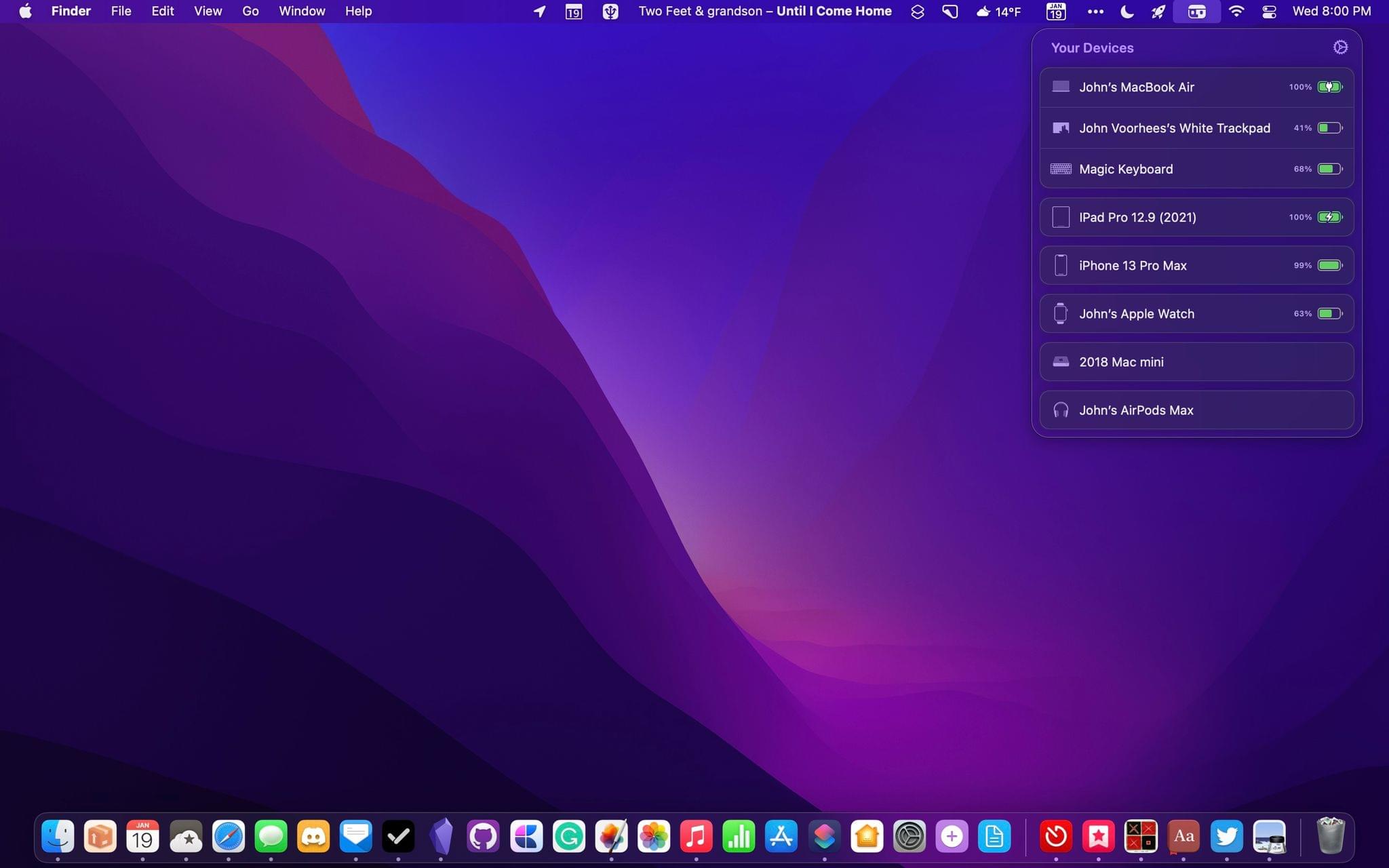
Today, Gui Rambo released version 2.5 of AirBuddy, his Mac menu bar app for connecting and managing wireless headphones and other devices. AirBuddy has come a long way from its origins as an app that simply connected AirPods and some Beats headphones with your Mac. The app still does that well, but as I wrote about AirBuddy 2.0, the app is a fantastic way to monitor the charge status of a wide variety of devices and hand their connections off from one Mac to another. With the latest version, the app’s core features are faster and more reliable, the UI has been refreshed with a Monterey-friendly design, and there are some excellent new features, too, so let’s dig in.

Read more


Obsidian In-Depth: More Third-Party Plugins (Part 4)

AppStories+ Deeper into the world of apps

AppStories Episode 256 - Obsidian In-Depth: More Third-Party Plugins (Part 4)

0:00
40:32

AppStories+ Deeper into the world of apps

Federico and John continue their coverage of third-party Obsidian plugins and how they use them to customize the app’s functionality.

if [appstories]
On AppStories+, John lays out the signs that change is afoot for Apple’s Music app for Federico and they consider what might be next for the app on the iPhone, iPad, and Mac.

Read more


Wordle! Developer to Donate Game Proceeds to Charity

Wordle is the web-only daily word game that has taken the Internet by storm. The simple, free game by Josh Wardle struck a nerve, quickly spreading thanks to its social-media-friendly score sharing and a New York Times profile of the game’s backstory.

The game also spawned a legion of rip-off versions that appeared on the App Store and were ultimately taken down by Apple. However, one of the App Store apps that saw a spike in downloads last week wasn’t a Wordle clone. It was an entirely different game called Wordle! that was first published five years ago by Steven Cravotta.

Emma Roth, writing for The Verge reports that Cravotta has decided to donate the proceeds of Wordle! to charity at the end of January. According to Roth:

Cravotta says that downloads for Wordle! slowed to around one to two per day, but when the browser-based Wordle started taking off, so did his app. The app racked up 200,000 downloads in a single week, albeit from confused users who mistook it for the browser-based Wordle. Cravotta reached out to Wordle app developer, Josh Wardle, and let him know about his plans to donate the proceeds from his app to charity — Wardle sent out a tweet of his own to acknowledge the gesture.

Cravotta told The Verge that the earnings from Wordle!, which stand at just over $2,000 so far, will be donated to BoostOakland, a charity that supports tutoring and mentoring young people in Oakland, California. After the gleeful tweets by one Wordle clone developer, it’s refreshing to read about Cravotta’s plans for the windfall he received from the similarity between his game and Wardle’s.

If you’re a Wordle fan, be sure to check out WordleBot, Federico’s shortcut inspired by Wordle’s score sharing feature. The shortcut preserves the game’s iconic score-sharing graphic but adds text labels to each row to improve the accessibility of scores on services like Twitter and provide additional context to the results.

Permalink



