John is MacStories' Managing Editor, has been writing about Apple and apps since joining the team in 2015, and today, runs the site alongside Federico.
John also co-hosts four MacStories podcasts: AppStories, which covers the world of apps, MacStories Unwind, which explores the fun differences between American and Italian culture and recommends media to listeners, Ruminate, a show about the weird web and unusual snacks, and NPC: Next Portable Console, a show about the games we take with us.
This week on MacStories Unwind, I unleash a tech gripe about an otherwise excellent product and recommend The Beth’s latest album, Expert in a Dying Field. Plus, Federico has finished Better Call Saul, so he revisits the show which he originally covered last month.
This week on AppStories, we are joined by Widgetsmith developer David Smith to talk about the history of his app, Widgetsmith, iOS 16 Lock Screen Widgets, and his recent hike through the Scottish Highlands where he tested the iPhone 14 Pro’s camera and the Apple Watch.
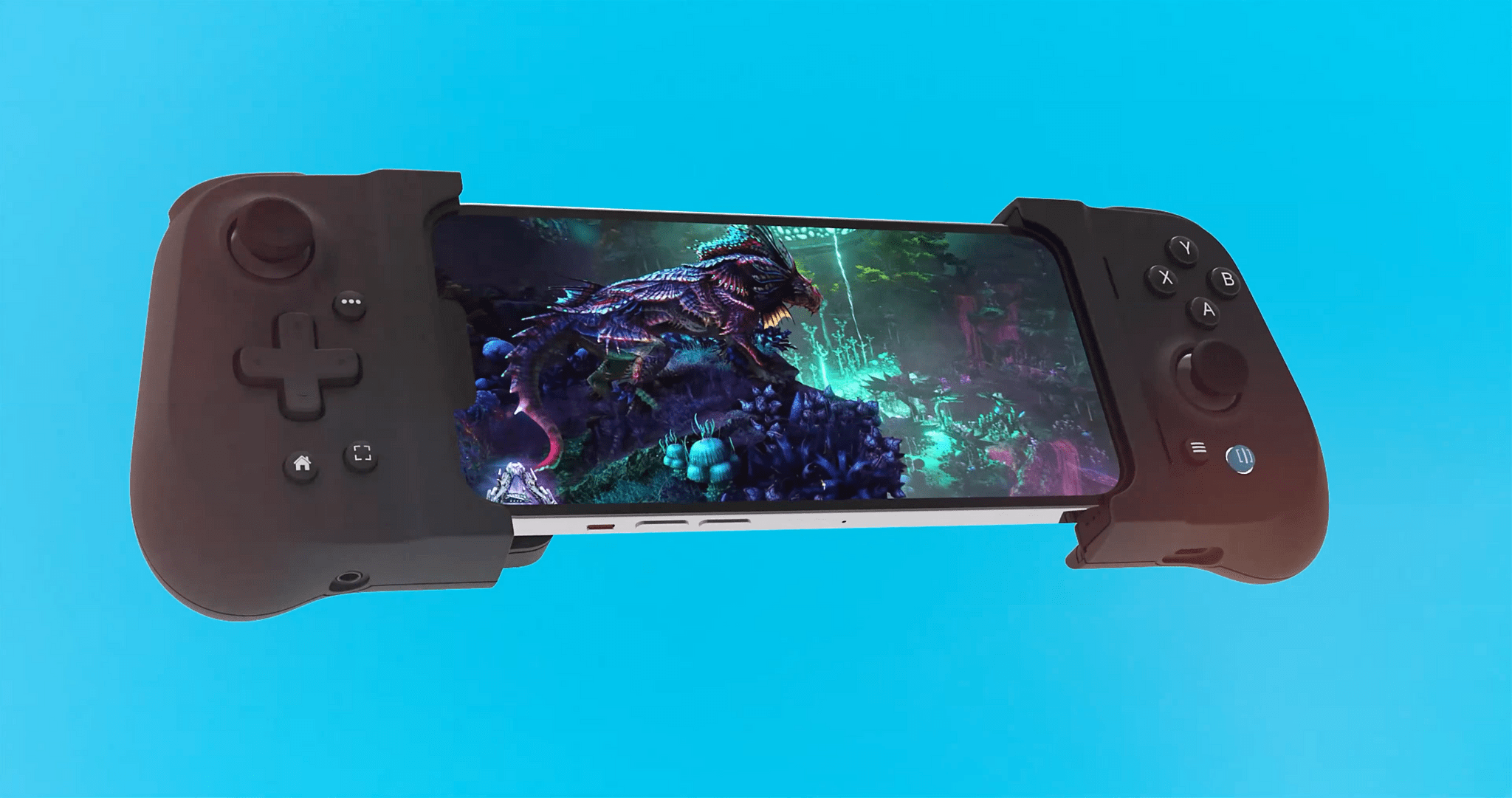
Today, Gameviceannounced pre-orders for the Flex, a new MFi-certified, case-compatible game controller for the iPhone. Like the Backbone One and Razer Kishi V2, the Flex separates an Xbox-style controller into two halves that connect to the ends of your iPhone for playing controller-compatible iOS games. I haven’t had a chance to try the Gamevice Flex, but based on the company’s announcement video, there are a handful of features that set it apart from the Backbone One and Razer Kishi V2 that are worth considering if you’re shopping for an iPhone game controller.
Like the Razer Kishi V2, the Gamevice Flex uses spacers to accommodate a long list of Apple and third-party cases, an advantage over the Backbone One, which requires you to remove your case before using it. The downside, of course, is keeping track of the collection of spacers to allow for moving to a different case in the future.
Gamevice says that the Flex uses Hall effect triggers, a technology that uses magnetic field sensors instead of mechanical parts to cut down on the wear and tear on components. The company hasn’t said if the Flex’s thumbsticks use the same technology or not.
Like the Backbone One, the Flex includes passthrough charging via a Lightning port on the end of one of the controller’s grips and a headphone jack on the other grip. The Razer Kishi V2 includes a Lightning port for charging but not a headphone jack. Although you can never be sure about how a controller will feel to use until you have it in your hands, I like the look of Flex’s grips too.
Because Club MacStories now encompasses more than just newsletters, we’ve created a guide to the past week’s happenings along with a look at what’s coming up next:
We released an all-new episode of MacStories Unplugged about bench advertising, the controversy surrounding a giant American flag, buzzards, and how Federico social-engineered his way to unlimited 5G data
This week, Federico and John are joined by Widgetsmith developer David Smith to talk about the history of his app, Widgetsmith, iOS 16 Lock Screen Widgets, and his recent hike through the Scottish Highlands, where he tested the iPhone 14 Pro’s camera and the Apple Watch
WhiteOut WhiteOut is a new image text redaction and highlighting tool for the iPhone. The app takes advantage of iOS’s image text recognition technology combined with the system color picker to create precise redactions and highlights. Open an image in WhiteOut, click a color and opacity from the color picker and then select text...
[[unplugged_artwork]] This month, John’s got follow-up about bench advertising and explains the controversy surrounding a giant American flag before diving into the topic of buzzards, which is followed by the story of how Federico social-engineered his way to unlimited 5G data. Show Notes Bench advertising The controversy surrounding a giant American flag In Statesville,...
Focused Work is a timer utility from Michael Tigas that’s designed to help you stay on task throughout the day by creating a series of custom timers tailored to your tasks. You can use Focused Work to set up traditional Pomodoro timers of focused work sessions followed by breaks or something completely different. It’s that...
The long-rumored Sonos Sub Mini has finally arrived, and looks like it could be a good option for anyone looking to bring the bass to a small or medium-sized room. (Link) Google has started rolling out its ‘Results About You’ feature that allows users to manage their appearance in the company’s search results. (Link)...









](https://cdn.macstories.net/banneras-1629219199428.png)

 Federico