John Voorhees

5409 posts on MacStories since November 2015

John is MacStories' Managing Editor, has been writing about Apple and apps since joining the team in 2015, and today, runs the site alongside Federico. John also co-hosts four MacStories podcasts: AppStories, which covers the world of apps, MacStories Unwind, which explores the fun differences between American and Italian culture and recommends media to listeners, Ruminate, a show about the weird web and unusual snacks, and NPC: Next Portable Console, a show about the games we take with us.

App Clips and RSS

Here are the highlights from the Club MacStories Discord this week:

David started a good discussion of members’ experiences with App Clips. I may spend too much time fiddling with RSS systems, but last week’s Weekly story on my latest setup spurred a lot of talk about RSS, read-later setups, and more. Want to...


Rolling Your Own Read-Later Setup with Obsidian

If it hasn’t become clear yet from some of my recent writing, I’m in the midst of wide-ranging experiments related to RSS, read-later apps and services, and note-taking. Last week, I explained my current setup, which hasn’t changed. However, along the way to that setup, I tried an Obsidian-centric approach that might appeal to some...


Interesting Links

[[John]] The Verge got to see LG’s bizarre and wonderful StandbyME Go suitcase TV in person, which is available for pre-order in the US and will ship mid-October. (Link) The release of MagSafe chargers is ramping up as new iPhones approach and one of the more interesting announcements include several new options coming from Anker....


MacStories Unwind: We Bought It for the Same Dumb Reason

AppStories+ Deeper into the world of apps
0:00
25:10

AppStories+ Deeper into the world of apps


This week on MacStories Unwind, Federico is back from Spain, unbeknown to each other, Federico and I buy the same new audio gear, and I want you to join him in his Run Across America.

Kolide – It ensures that if a device isn’t secure it can’t access your apps.  It’s Device Trust for Okta. Watch the demo today!

MacStories Unwind+

We deliver MacStories Unwind+ to Club MacStories subscribers ad-free and early with high bitrate audio every week.

To learn more about the benefits of a Club MacStories subscription, visit our Plans page.


A More Laid-Back But Geeky Approach to Health and Fitness Apps

On balance, I’m optimistic about technology and the role apps can play in people’s lives. However, I’ve also experienced and seen enough of the ways apps can harm people that my optimism is tempered by realism these days. Nowhere is that more true than with health and fitness apps, which hold so much promise to...


Longplay 2.0: An Album-Oriented Apple Music Player with Loads of New Features

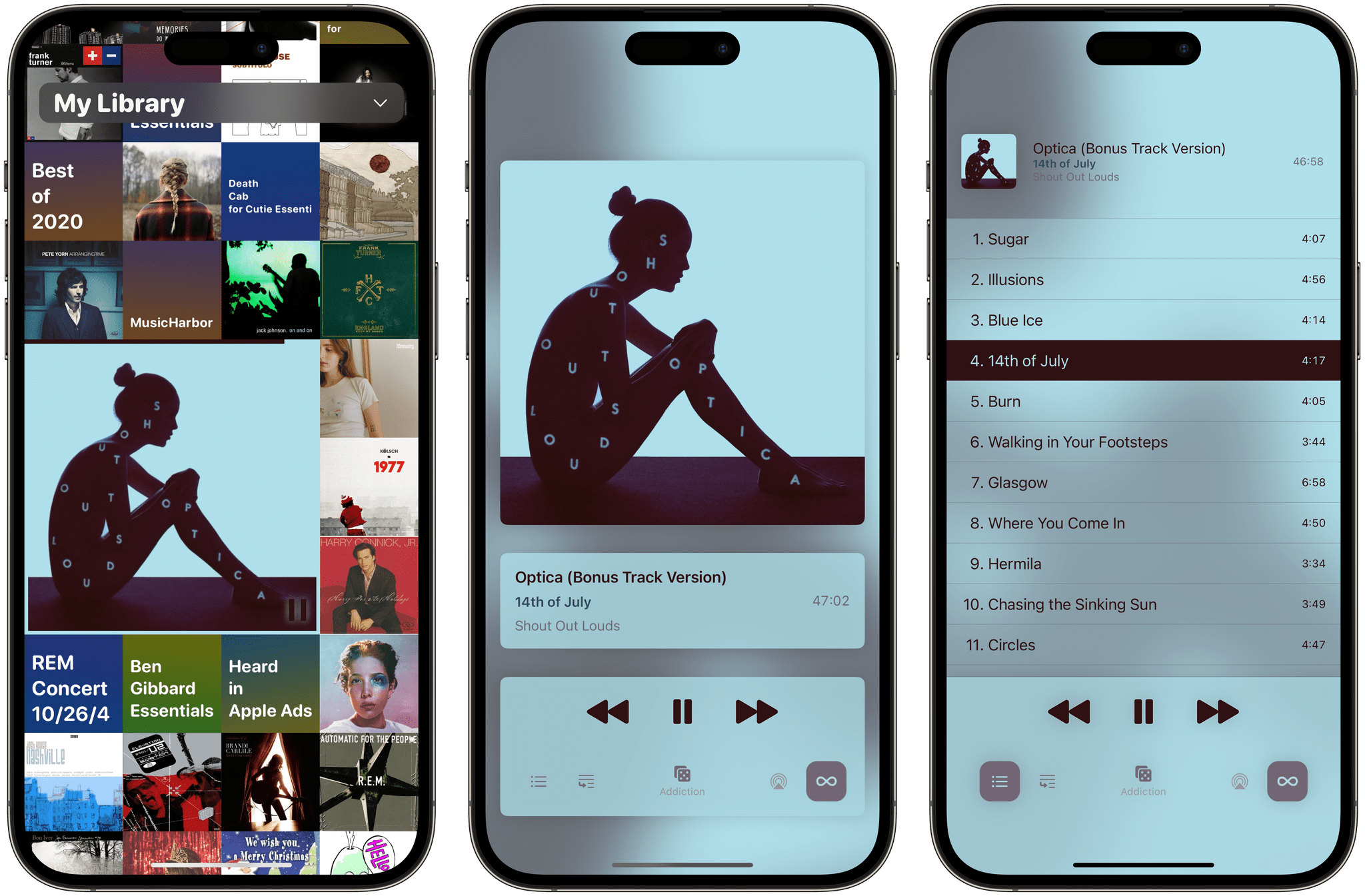
Longplay 2.0 by Adrian Schoenig is out, and it’s a massive update of the iOS and iPadOS album-oriented music app.

If you’ve tried Longplay before, the update will be familiar. The first time it launches, it quickly checks your Apple Music library (about six seconds for over 1200 albums in my case), finds all the nearly complete and complete albums, and displays them in a grid of album art. I’ve always loved this interface because it does such a great job of emphasizing album art. However, what’s different is a long list of new features, but since we’ve only covered the app for Club MacStories members and AppStories listeners, I’m going to cover everything and call out the updated features as I go.

Read more


Obscura 4 Features A Refreshed Design, New Features, and A Different Business Model

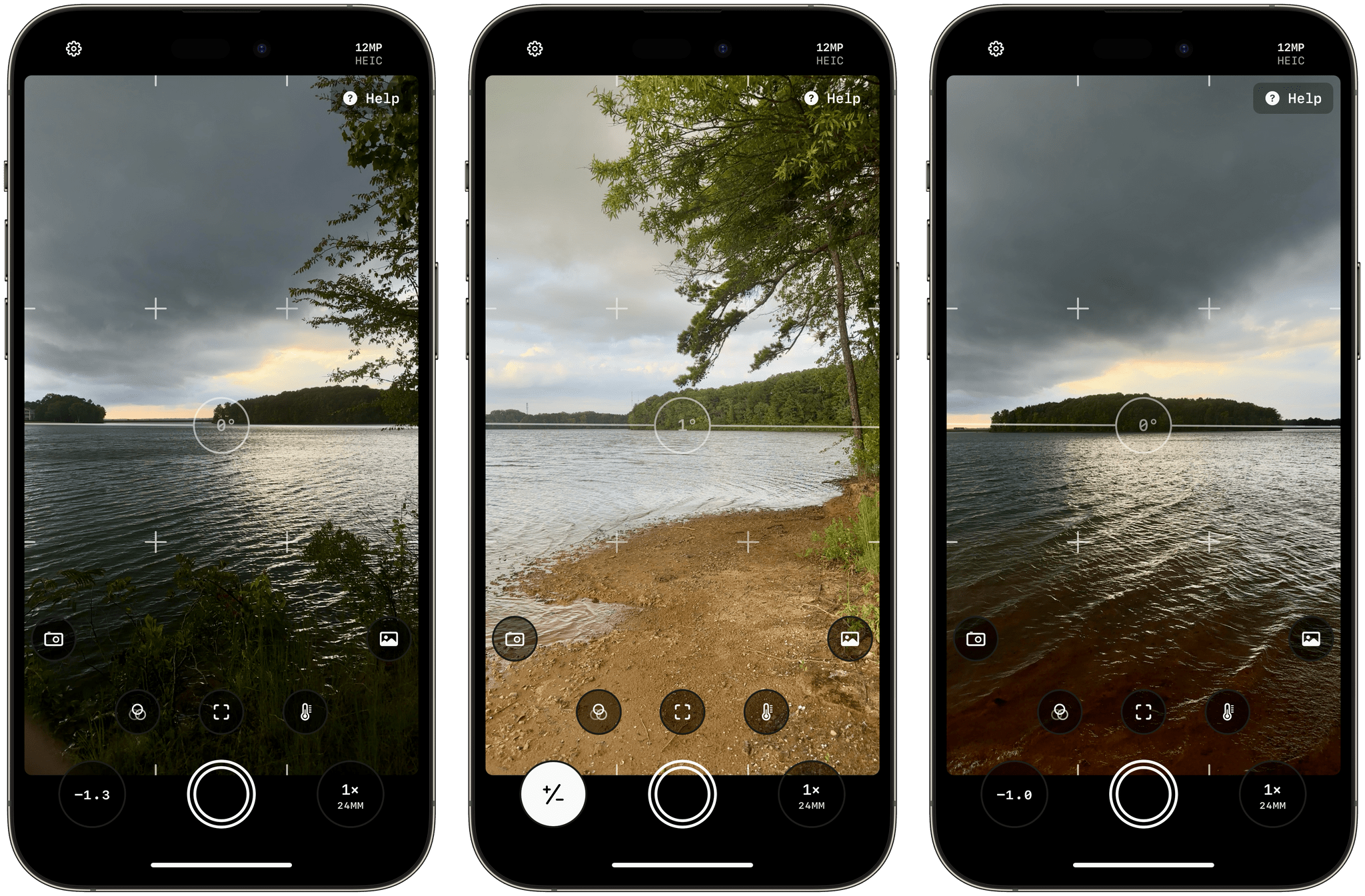
Ben McCarthy’s career as a developer coincides almost exactly with mine as a writer. As a result, I’ve had the pleasure of watching Obscura evolve from little more than an idea to one of the best camera apps on the App Store. As with so many apps, what sets Obscura apart from others is Ben’s attention to detail, impeccable design taste, and deep knowledge of the app’s subject matter – photography.

Today, Obscura 4 is out, less than two years since I reviewed version 3 with a refreshed design and a handful of new features. The update includes a change in Obscura’s business model, too. In the past, the app was paid up front, with each major release being a new purchase. Going forward, Obscura is free to download, with certain advanced features, known as Obscura Ultra, requiring a subscription.

Read more


Mercury Weather 2.0 Adds Trip Forecasts

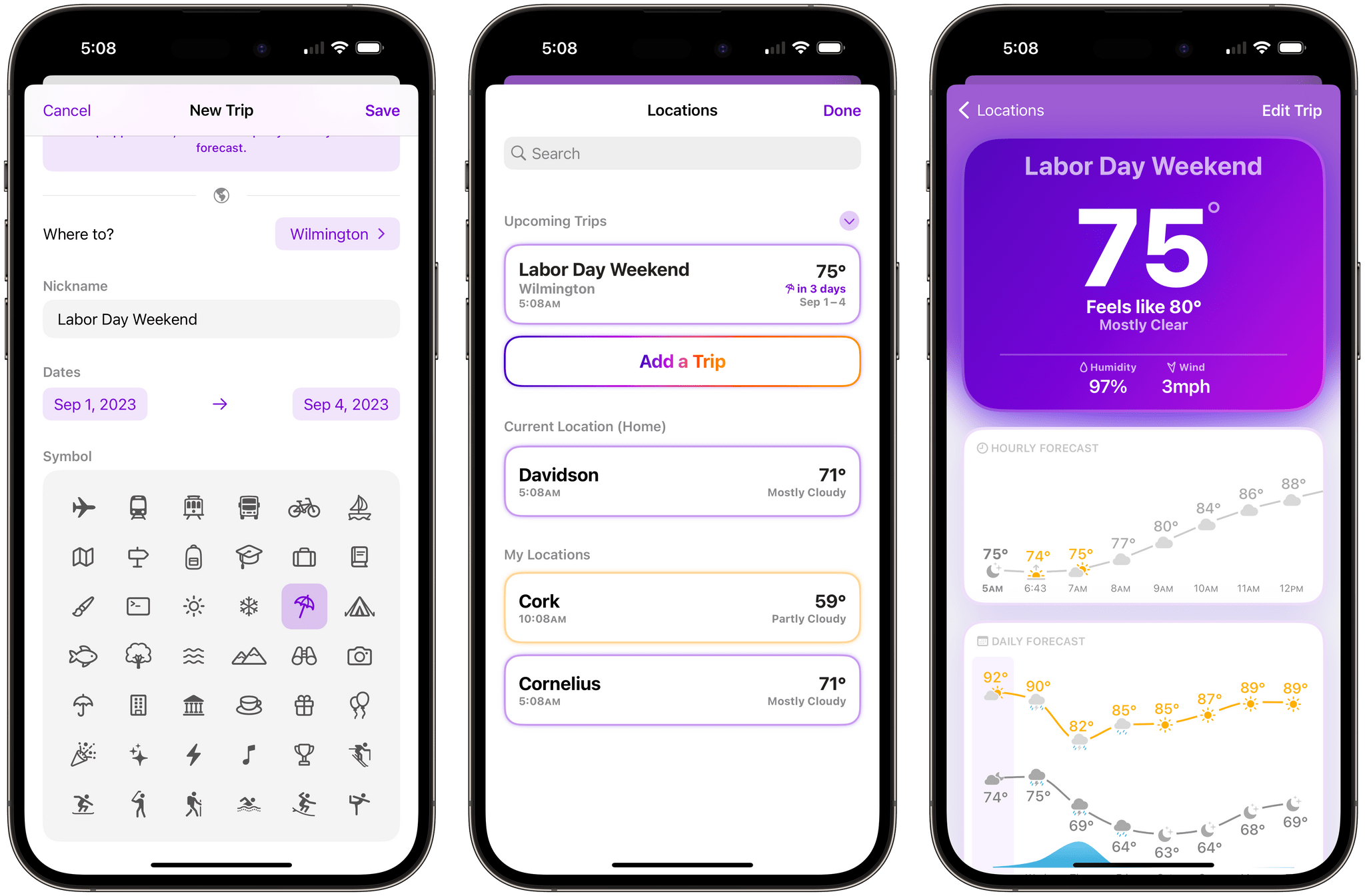
If you’ve ever found yourself repeatedly checking the weather of a trip destination in the days leading up to your travels, you’ll appreciate Mercury Weather 2.0, which was released today for iPhone, iPad, Mac, and Apple Watch. The update’s marquee feature is Trip Forecast, which lets you set up a trip once and keep tabs on your destination’s weather as your travel dates approach. I reviewed Mercury Weather a couple of weeks ago, so for more on the app’s other features, be sure to check out that review.

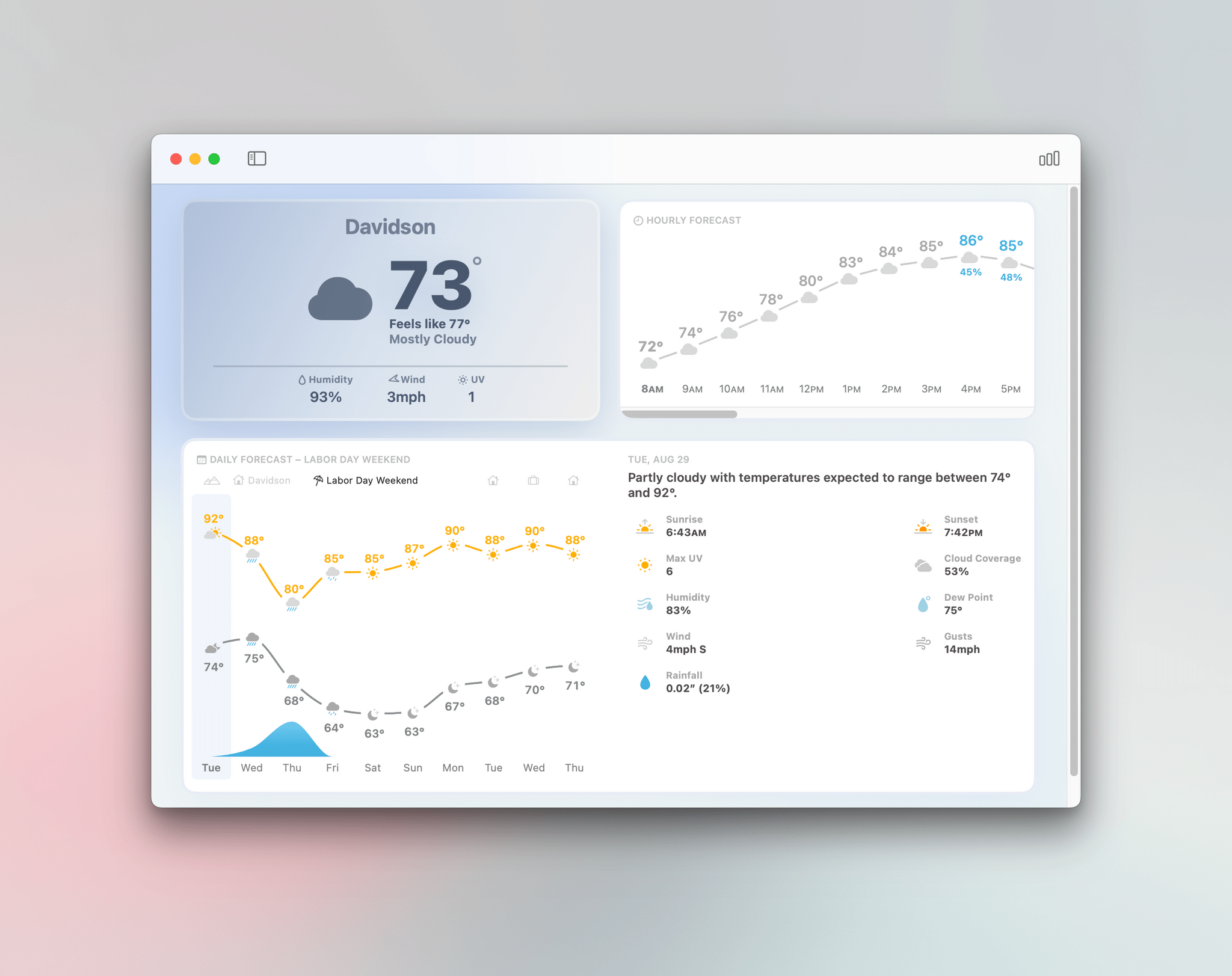
From Mercury Weather’s Locations view, there’s now an option to add upcoming trips. Just add your destination and the dates of your trip, and it will appear in a separate, collapsable ‘Upcoming Trips’ section, along with the current conditions and dates of the trip. You can also name your trip and add a custom icon.

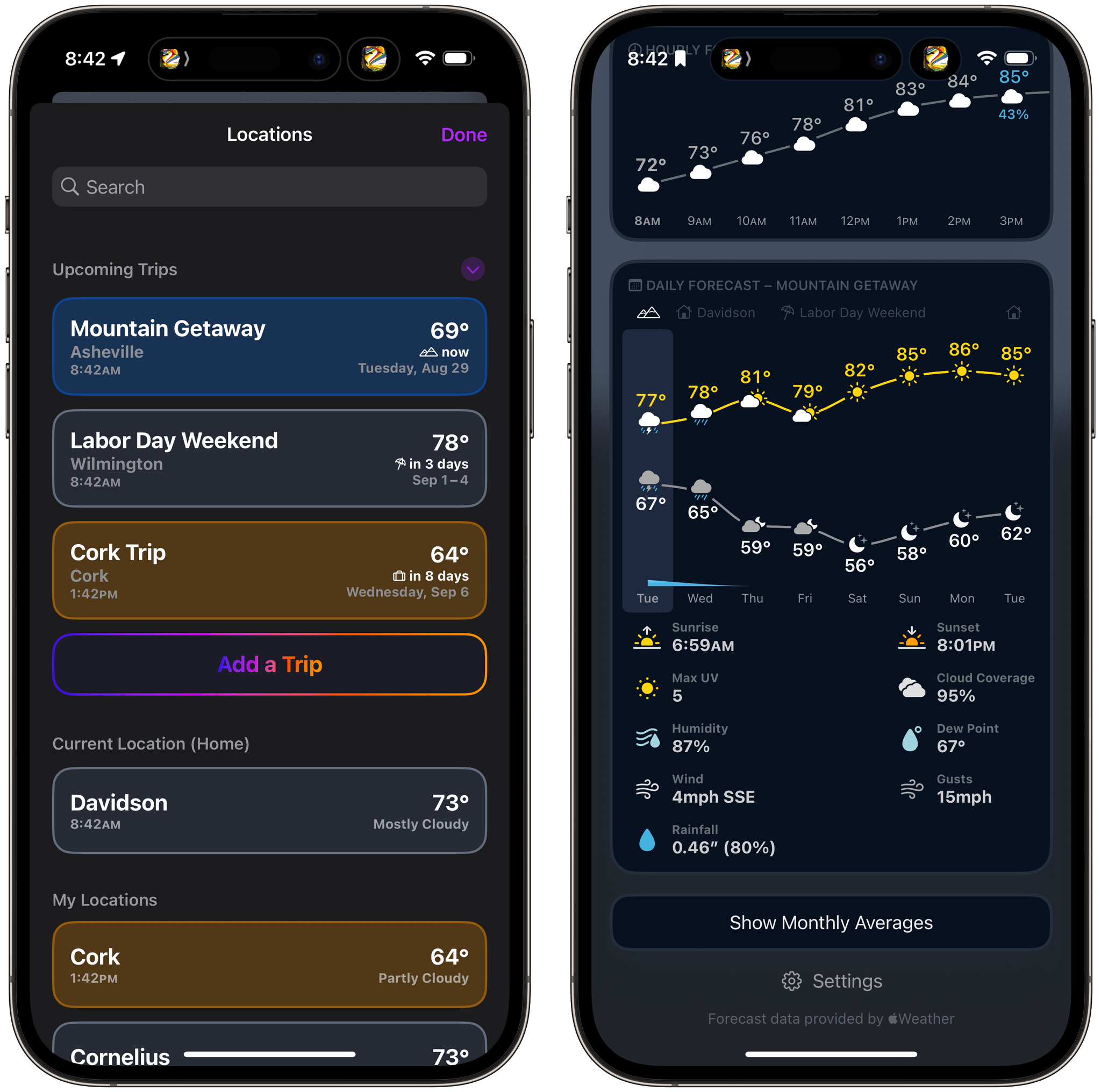
You can switch between home and upcoming trips in the Daily Forecast section of Mercury Weather.

You can switch between home and upcoming trips in the Daily Forecast section of Mercury Weather.

As your departure date approaches, your destinations will appear along the top of the Daily Forecast graph. Tap a trip’s name to see that location’s weather forecast or the ‘Home’ button to return to your home location’s weather. Once your trip dates pass, the forecast for your destination just disappears from the app unlike destinations you might otherwise save in a weather app’s list of locations.

Trip Forecasts have been incorporated in Mercury Weather’s small and medium-sized ‘Daily Forecast (Customizable)’ widgets too. The widget includes a summary forecast for the next eight days, and if any of those days are part of your upcoming trip, it will show the forecast for that location instead of your current location.

Mercury Weather on the Mac.

Mercury Weather on the Mac.

Trip Forecast is an excellent addition to Mercury Weather. I love that I can set up a trip once and forget about it, letting the app show me the upcoming forecast as my travel day approaches and staying out of the way until then. One thing I still miss from other weather apps is radar data, but aside from that, I’ve loved using Mercury Weather this summer.

Mercury Weather is free to download on the App Store, with Home and Lock Screen widgets, the Apple Watch app, historical data, and more than one saved location available to subscribers for $1.99/month or $9.99/year, with a $34.99 lifetime purchase option. A Family Sharing subscription is $3.49/month, $16.99/year, or $59.99 for a lifetime purchase.


David Sparks Releases Obsidian Field Guide

No app has had a bigger impact on my day-to-day work in the past couple of years than Obsidian. What makes Obsidian tricky, though, is its flexibility and depth. It can accommodate everything from a simple Markdown note-taking system to acting as a Notion-like relational database. It’s a powerful tool, but also one that takes time to learn.

Today, David Sparks released a new MacSparky Field Guide to help newcomers get their bearings with Obsidian. The video series, which I’ve sampled, covers all the basics, taking viewers on a tour of the app’s interface, core features, built-in plugins, and some of the more popular plugins created by third parties.

The Field Guide comes in Standard and Plus editions, with the Plus Edition adding bonus content via online seminars. The Standard Edition is $49 but is currently $44 for a limited time and the Plus Edition is $99, discounted for a limited time to $89. Both limited time deals are available is you use the code OBSIDIANLAUNCH at checkout.