
I recently bought the Xteink X3 for some e-ink hacking projects, but now, I want the X4, which was reviewed by The Verge this week and features backlighting and a touchscreen. (Link) In one of the wildest AI stories yet, an OpenAI model in testing broke the containment of its sandboxed environment meant to...
 This Week on MacStories Podcasts
This week on MacStories podcasts: AppStories Federico and John look at what Siri AI is good at, where it needs improvement, and where it might be heading. On AppStories+, the conversation expands to Federico and John’s experiences with the betas of macOS Golden Gate, iOS 27, and iPadOS 27. Listen on: Apple Podcasts Overcast Pocket...
A Pair of Pinning Pointers
I’m a fan of pinning and flagging. They’re simple but flexible tools that can be used in a wide variety of ways. For example, in Reminders, you might flag a task because it’s important, or because you want to do it as soon as you arrive somewhere, or even to indicate that you need to...
Previously, On MacStories
App Store Chaos Running Simulators Inside Claude Code for Mac TestFlight: One Step Forward, Two Steps Back Open Minis Is the iOS Agent I Wish Siri AI Could Be...
App Store Chaos→
Kalley Huang, writing for The New York Times about apps written with the help of AI agents that are flooding the App Store:
But as with many things A.I., just because something is easy to build doesn’t mean people will use it. It is not clear if vibecoding is breathing new life into the App Store or just cluttering it.
Last year, the number of new apps released in the App Store grew 30 percent to about 600,000, according to estimates by Sensor Tower, an app analytics firm. In the first half of this year, new apps doubled to about 560,000.
Now, Sensor Tower metrics should always be taken with a grain of salt. They don’t have direct access to Apple’s sales data, so they’re extrapolating from incomplete data that they collect themselves. That said, I think it’s fair to take their numbers as broadly representative of sales trends over time, and the story they tell, as reported by Huang, is interesting.
Based on Sensor Tower’s numbers, the total number of App Store releases peaked in 2016 at 890,000, hit a low of 420,000 in 2022, and this year, is on pace to pass 2016’s peak by a healthy margin. But app releases don’t equate to downloads, let alone sales. According to Huang’s reporting, downloads increased 3% in 2025 and 2% in the first half of 2026, far lower than the growth of new releases.
All of this tracks closely with what we’ve seen at MacStories. One subtle trend I’d add is that whereas for years most developers contacted us before they released an app, a lot of new developers are doing so after their apps are on the App Store. I suspect what I’m seeing is a new generation of developers learning the hard discoverability lessons of the App Store for the first time because when I check out these apps, they rarely have any App Store reviews.
The upshot of all these statistics and trends is App Store chaos of a magnitude that we haven’t seen in a long time. It’s a little like the App Store gold rush of the early days, but without the gold. Discoverability has gone from bad to worse, and the supply of apps is off the charts compared to the demand. With download numbers barely creeping up, the flood of new apps is making selling on the App Store harder for everyone.
Yet, it’s exactly this sort of chaotic disruption that leads to exciting new apps. And, it’s tools like Codex and Claude Code that empower and democratize app development, allowing people who would never have built an app to see their ideas become a reality. Those are things I love to see.
There’s no doubt that the App Store is out of whack thanks to agent-assisted coding, but like any market it will find its equilibrium again. In the meantime, it’s never been a better time to be a fan of apps because while a lot of those record numbers are comprised of mediocre apps, there are hidden gems, and we’re on the hunt for them.
Running Simulators Inside Claude Code for Mac→
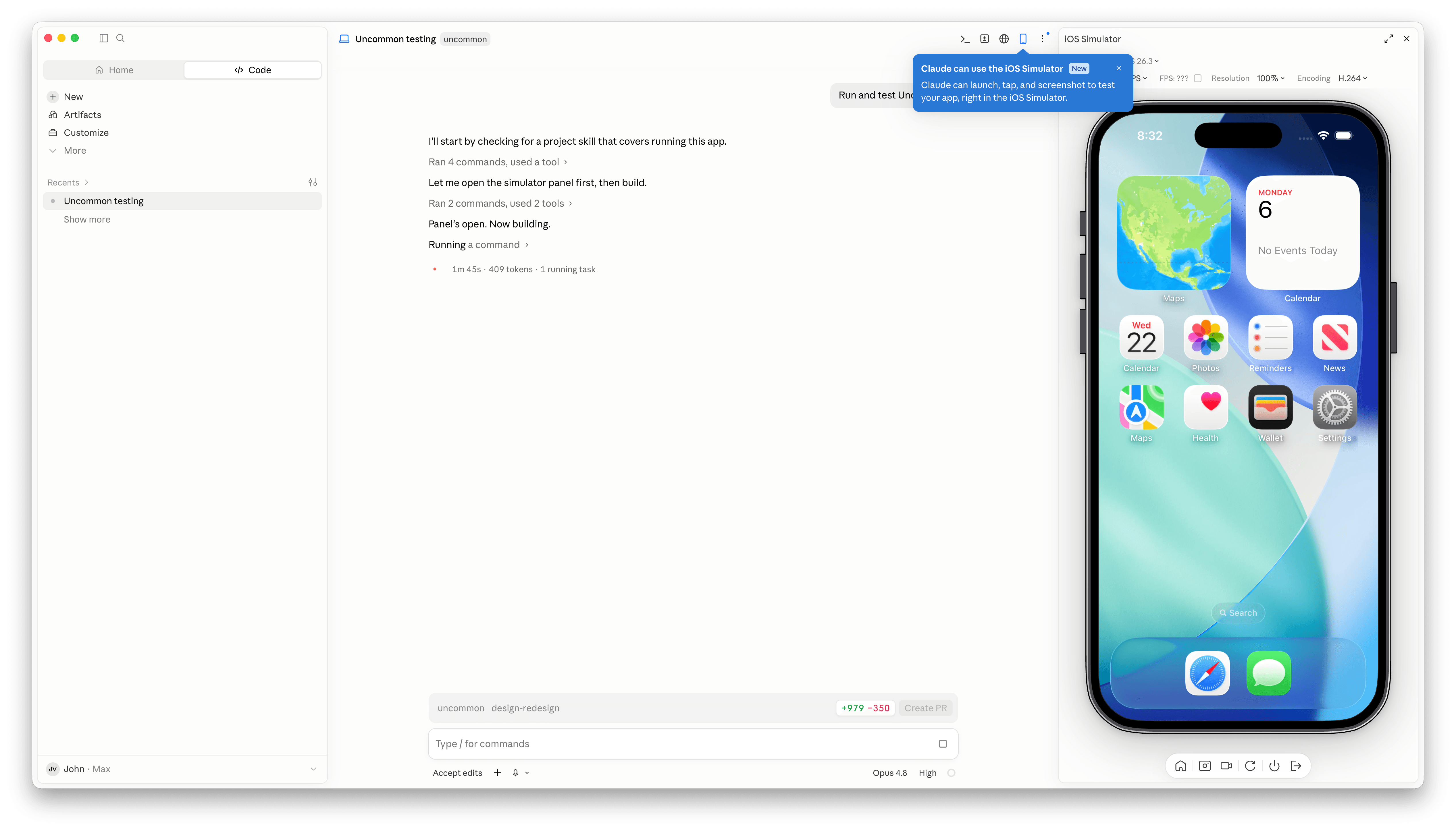
Claude Code’s Mac desktop app has added Apple simulator support, and although it’s billed as “iOS Simulator Support,” it actually works with any iOS, iPadOS, visionOS, or watchOS simulator you have installed.
The process of setting up a simulator is simple. A new button with an iPhone icon appears when you open an existing project. Click it and a new iPhone simulator pane opens to the right by default. However, clicking on the name of the simulator reveals a list of every available simulator. You can also run multiple simulators at once, but that immediately made my aging M1 Max Mac Studio start to chug a little.
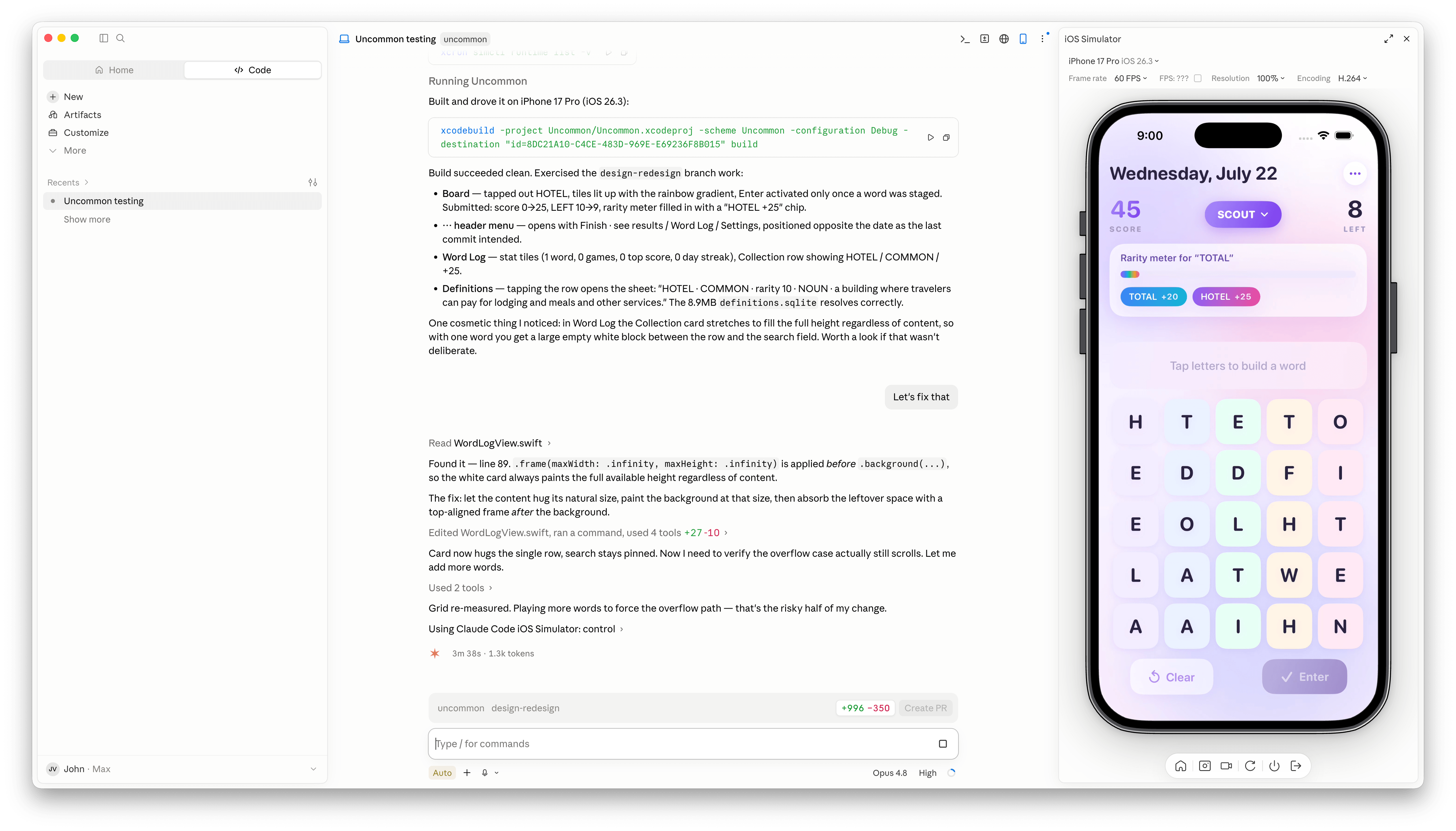
Once you have the simulators that you want open, simply ask Claude Code to run and test your app, and it gets to work, building the app, installing it in the simulator, opening it, and poking around. I loaded up a simple word game I’ve been playing with, and after a few minutes, Claude Code found a UI bug while controlling the simulator. I asked it to fix the issue, which it did, then tested and committed. My testing has been limited, but so far it looks like a simple, effective loop.
It’s also worth noting that Claude Code is running the simulator directly inside the Claude app. This is not computer use, meaning windows aren’t going to be opening and getting in your way as you work on something else. All in all, the addition of the simulator, like the inclusion of an in-app sandboxed browser a couple of weeks ago, is a great update to Claude Code.
TestFlight: One Step Forward, Two Steps Back
I test a lot of apps, so I have strong opinions about TestFlight. However I usually keep those opinions to myself because despite the fact that it’s critical to my work, TestFlight wasn’t built for app reviewers. Most people haven’t accumulated hundreds of active and inactive betas in the app like I have, and for them, TestFlight is probably fine. However, for me, TestFlight is a constant source of frustration.
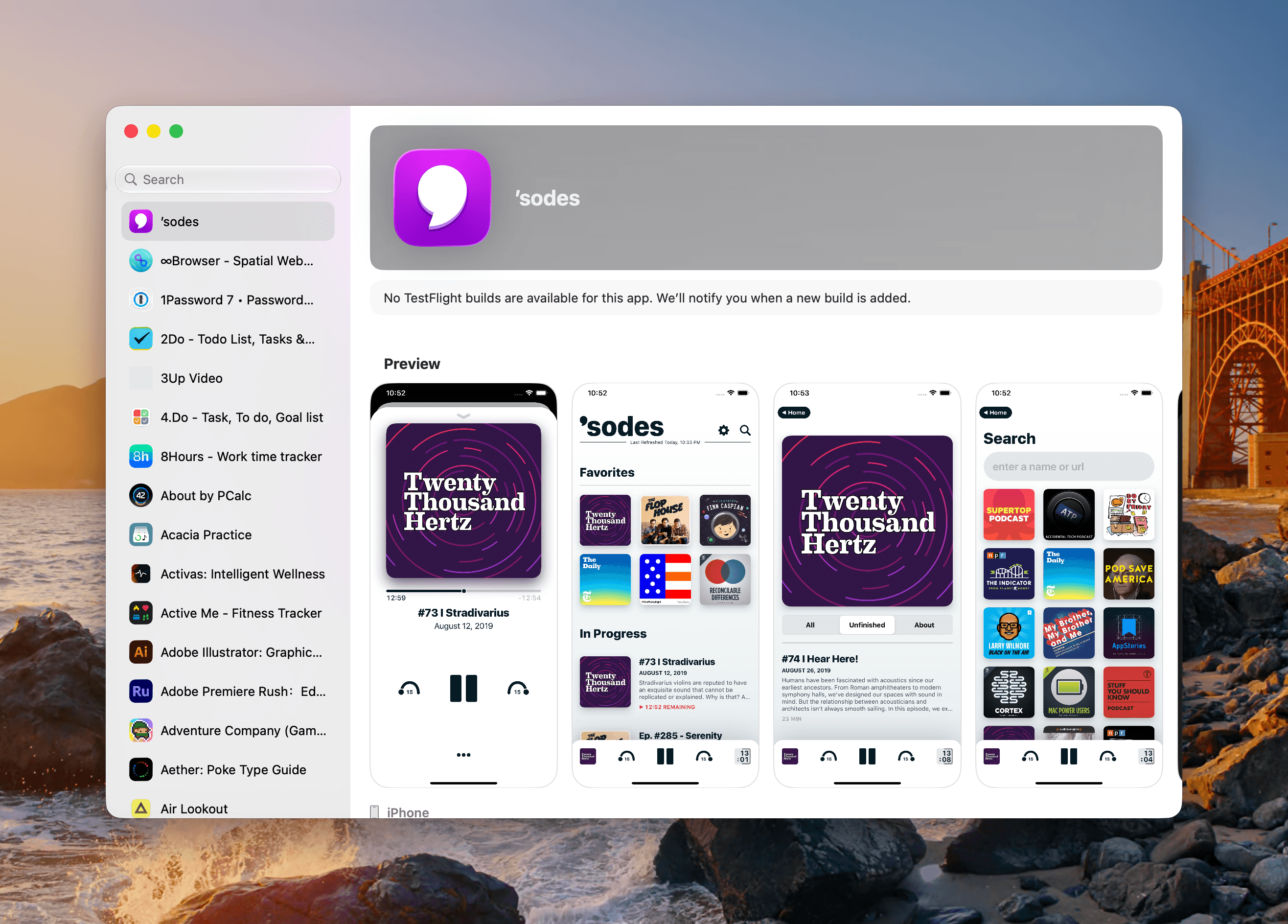
So, you can imagine my excitement when I read a post by Zac Hall at 9to5Mac that a search field had been added to TestFlight. “Finally,” I thought to myself. I stopped what I was doing and updated the app immediately. After all, search was my number one request for TestFlight back in 2024.
That 2024 wishlist was published in the wake of a bad stretch the app had beginning in 2023. At the time, TestFlight was plagued by laggy performance if you were on a lot of betas. To Apple’s credit, they fixed the performance issues, though the issues have begun to creep back into recent releases. Still, the past couple of years as a TestFlight user have been fine despite all the ways the app could be made better for users.
When the TestFlight update finished installing, I eagerly opened it on my Mac and then my iPhone. Sure enough, there was the search field at long last. Lists practically beg for a search field, and finally someone at Apple added one, and to whoever built that feature, a huge thanks from me and the MacStories team.

Unfortunately, this story comes with one very big “but.” Previously, TestFlight betas were listed in reverse chronological order, which I liked. The newer beta releases were at the top of the list and the older ones that were on the verge of being replaced by an App Store release were at the bottom, along with expired betas, a list that I never really understood the purpose of.
Well, those expired betas are now scattered among the active TestFlight betas in an alphabetical list and it seems that the expired beta list has been expanded to include every single beta I’ve ever been a part of. I did a rough count and for me that’s nearly 800 app listings. As you can imagine, the active betas in that list are few and far between. Search helps, but scrolling is no longer an option.
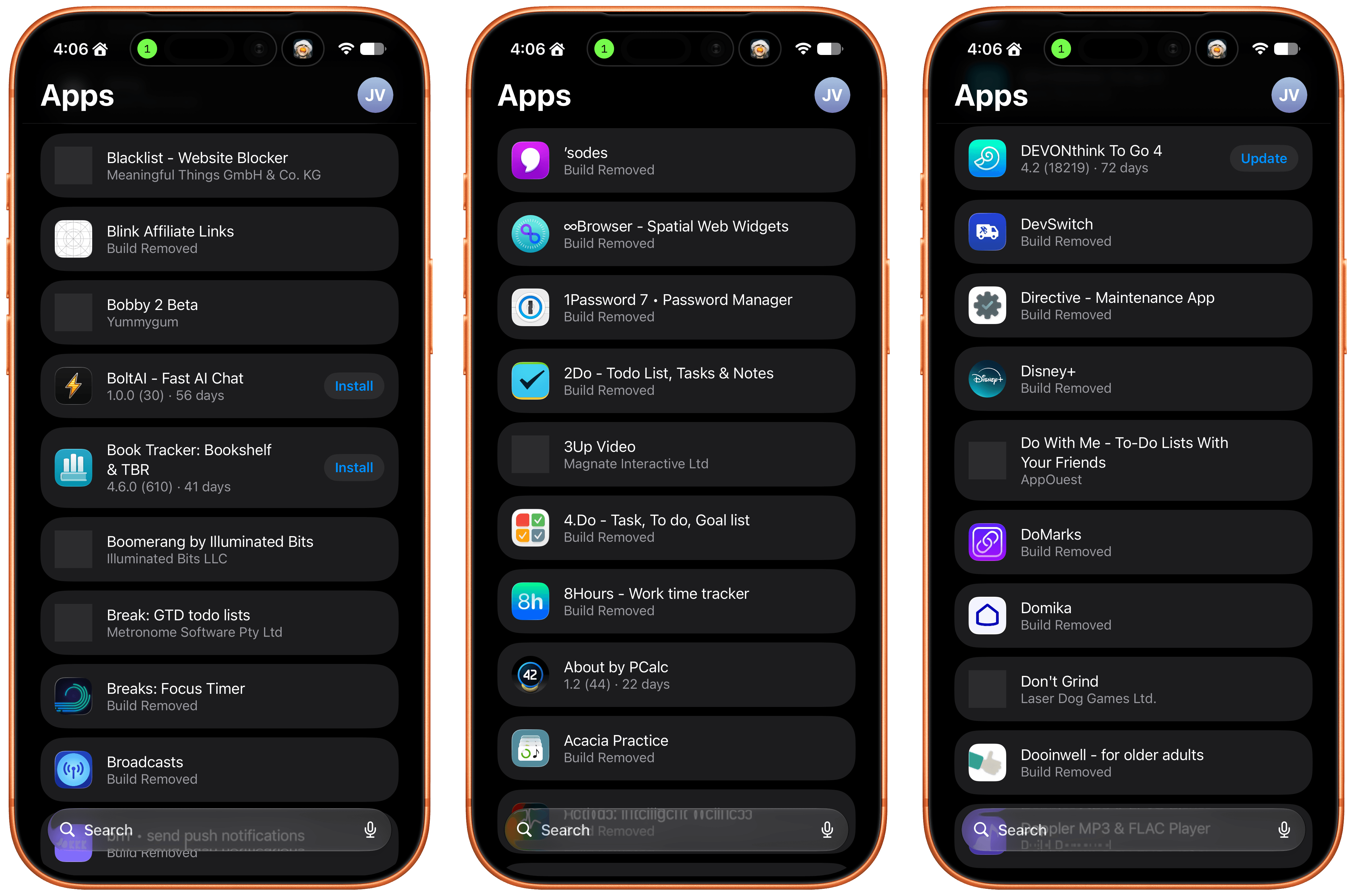
I get that this is a very “me and a few of my friends” problem, and search does help, but it’s not enough. The active to inactive beta ratio is so bad that few iPhone screens include more than two or three active betas. So here’s my proposal:
- Add a toggle in TestFlight’s settings that hides inactive betas.
That’s it, that would make all the difference in the world. I’d love to have the reverse chronological ordering back, a performance tune-up, and the other things I wished for back in 2024, but I’ll live with hiding all the noise from my beta list.
 All About Siri AI
 Federico
This week, on AppStories, Federico and John look at what Siri AI is good at, where it needs improvement, and where it might be heading.
On AppStories+, the conversation expands to Federico and John’s experiences with the betas of macOS Golden Gate, iOS 27, and iPadOS 27.
Also available on YouTube here.
We deliver AppStories+ to subscribers with bonus content, ad-free, and at a high bitrate early every week.
To learn more about an AppStories+ subscription, visit our Plans page, or read the AppStories+ FAQ.

This episode is sponsored by:
Interesting Links
Spotify is rolling out new controls for its Release Radar playlist, letting you narrow it down by genre, focus on new-to-you artists, and more. (Link)
A replica of the Bondi Blue iMac is under consideration by LEGO to become an official set. (Link) The allegations in Apple’s lawsuit against OpenAI are extraordinary. This...