
Coding agents have upended the automation calculus for many people by reducing the friction of creating complex workflows, and soon, Describe a Shortcut will do the same for simpler automations. Both are big wins for anyone who can’t stand the drudgery of repetitive tasks, but they come with potential downsides, too. I love to tinker...
 Previously, On MacStories
Apple Reports Q3 2026 Earnings Indie App Sales Event Begins Today with Over 200 Apps Apple Upgrade Trades Ownership for Lower Monthly Payments Pastebot 3 Doubles Down on Mac Clipboard Automation and Introduces Two New Business Models Lock Launcher Introduces “No Redirect” Launchers, XL Widgets for iOS 27...
Apple Reports Q3 2026 Earnings

Today, Apple reported its 2026 Q3 earnings, posting quarterly revenue of $109.4 billion. Here are the highlights:
- Revenue was $109.4B, up 16.4% from Q3 FY25.
- iPhone revenue was $54.3B, up 21.7%, and represented 49.6% of Apple’s total revenue.
- Services revenue was $30.7B, up 12.1%, and represented 28.1% of Apple’s total revenue.
- Gross margin was $54.8B, up 25.3%, with an overall gross margin rate of 50.1%.
- Net income was $29.8B, up 27.1%.
- Operating cash flow was $34.4B, up 23.3%.
- Diluted EPS was $2.02, up 28.7%.
Apple CEO Tim Cook had this to say about the results:
Today, Apple is proud to report our strongest June quarter ever, with double-digit revenue growth across iPhone, Mac and Services, and in every geographic segment. At WWDC26, we were thrilled to introduce the all-new Siri AI, alongside all of Apple’s latest software innovations and important new child safety features.
For additional context, here’s how the results break down:
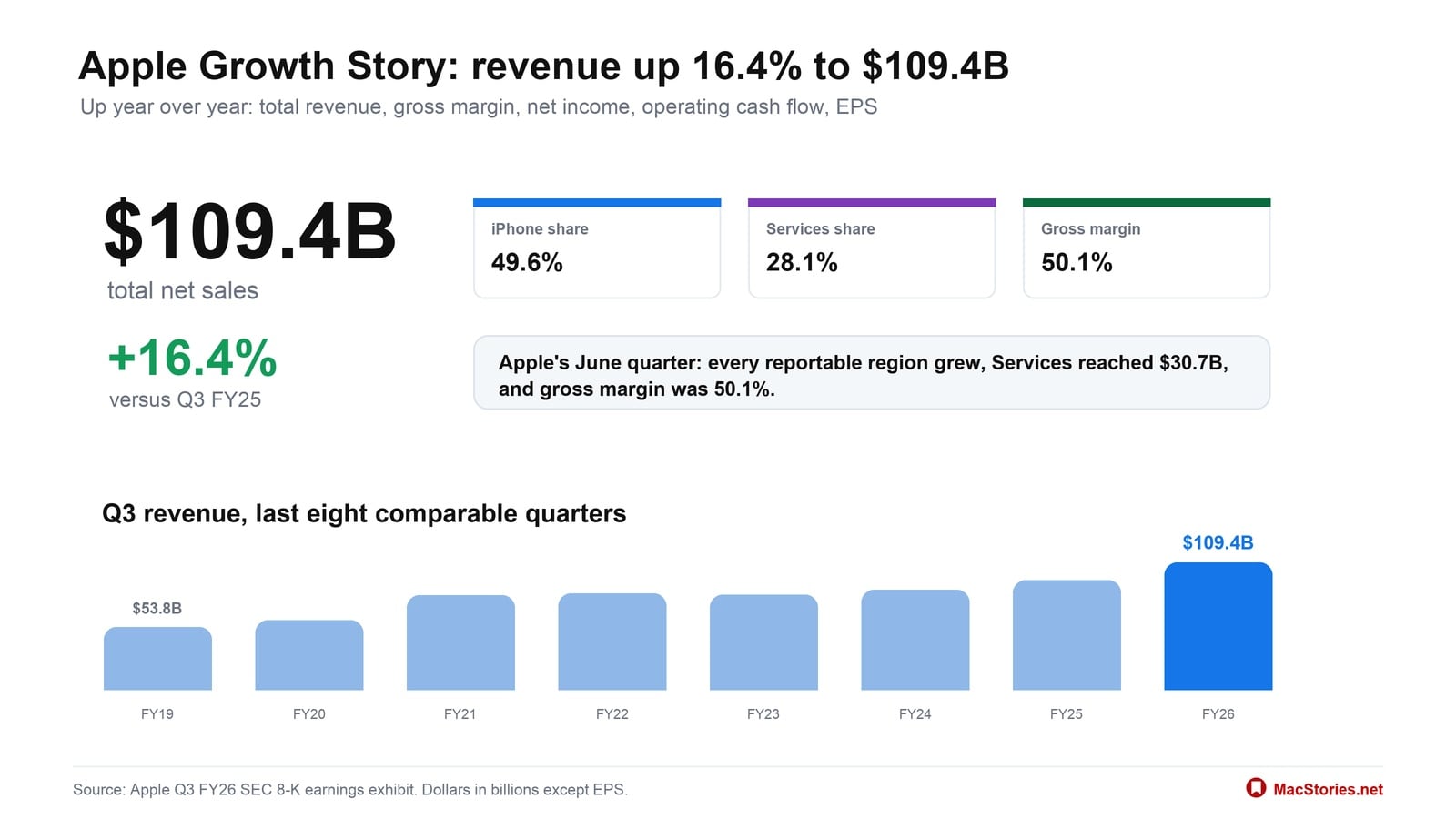
In Apple’s latest quarter: every region grew, Services reached $30.7B, and gross margin was 50.1%.
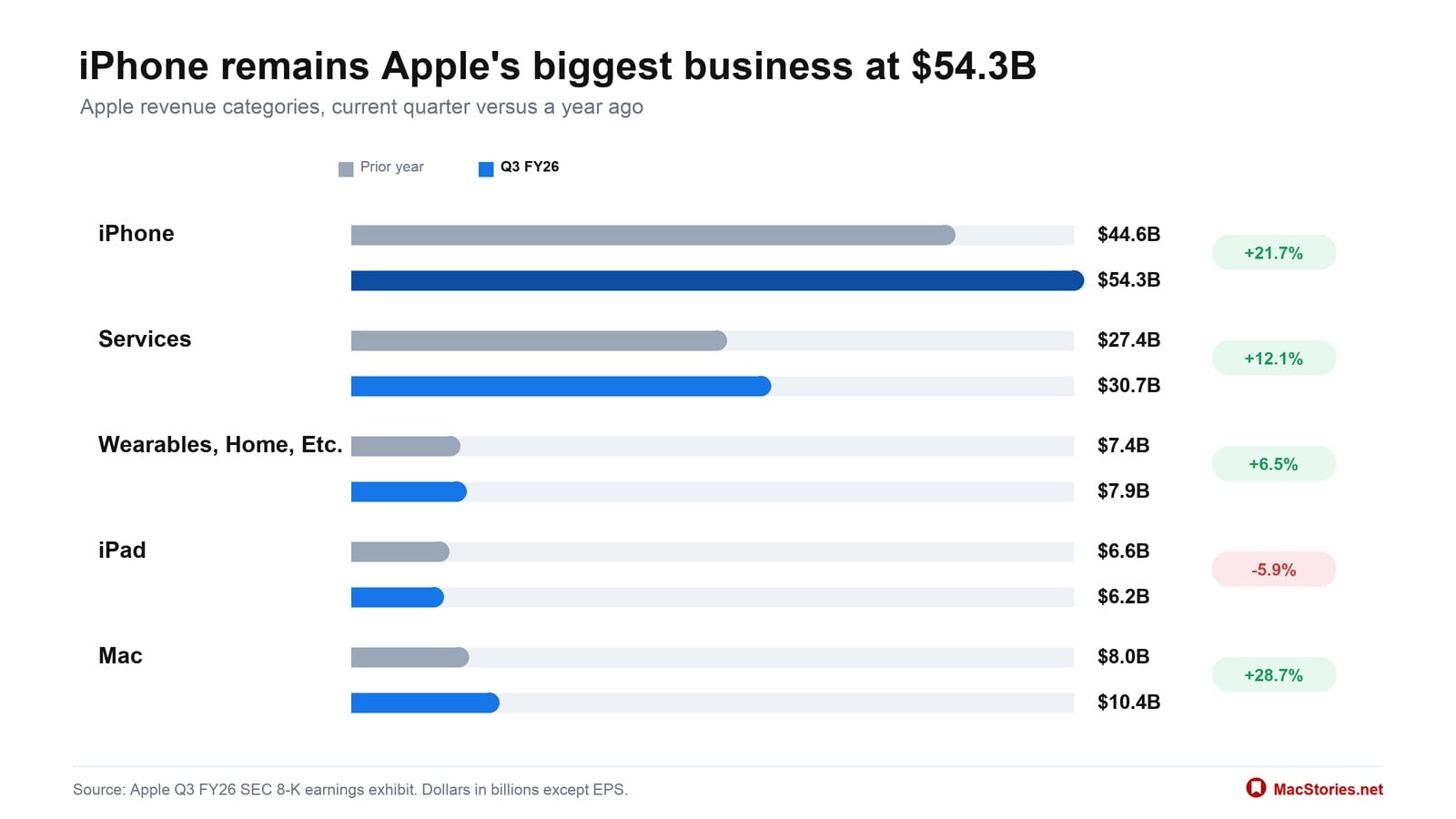
iPhone remained Apple’s largest business at $54.3B, and four of five categories grew year over year. Together, iPhone and Services accounted for 77.7% of Apple’s $109.4B in net sales.
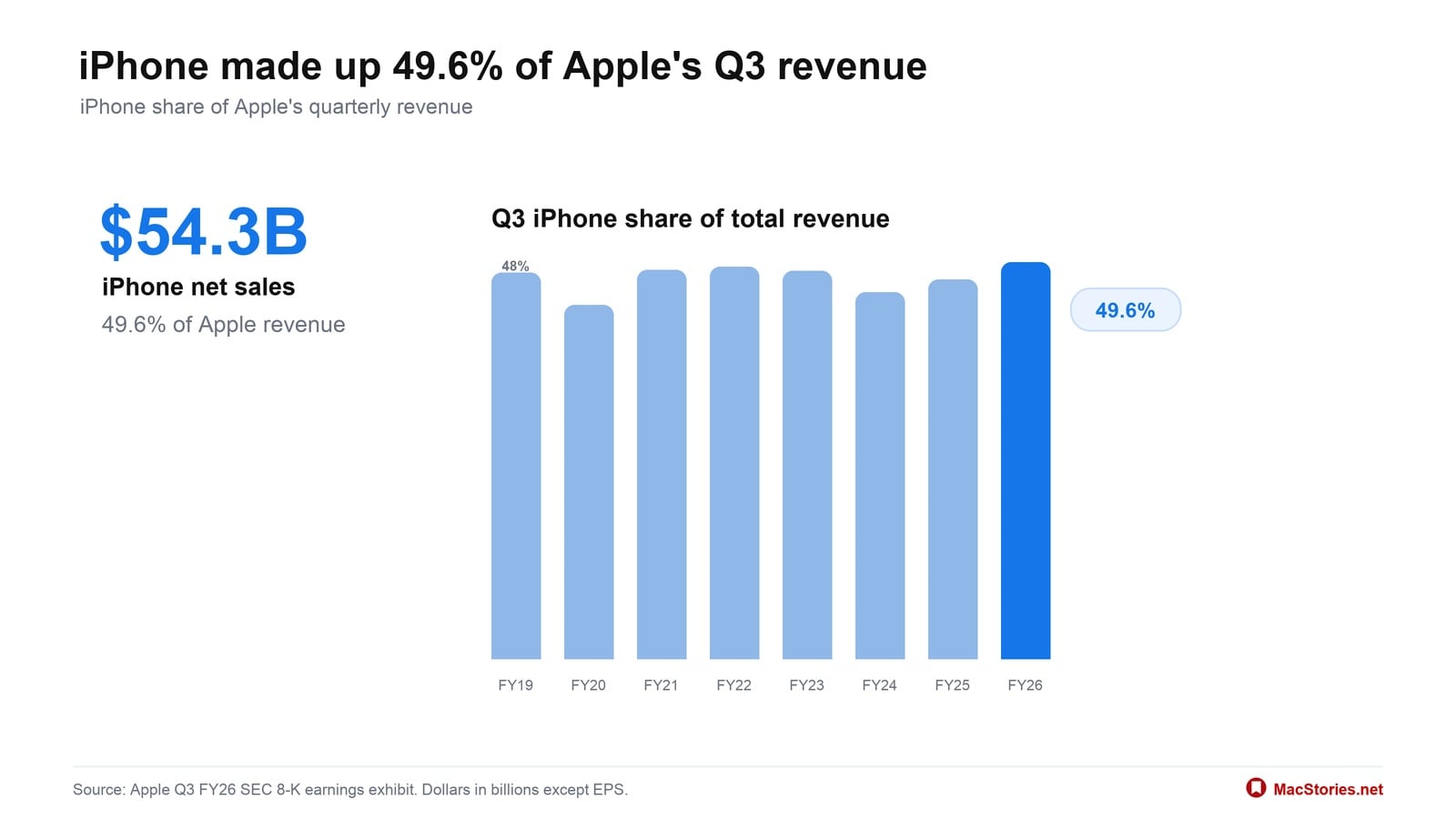
iPhone revenue reached $54.3B, or 49.6% of Apple’s total revenue, keeping it the company’s largest consumer business.
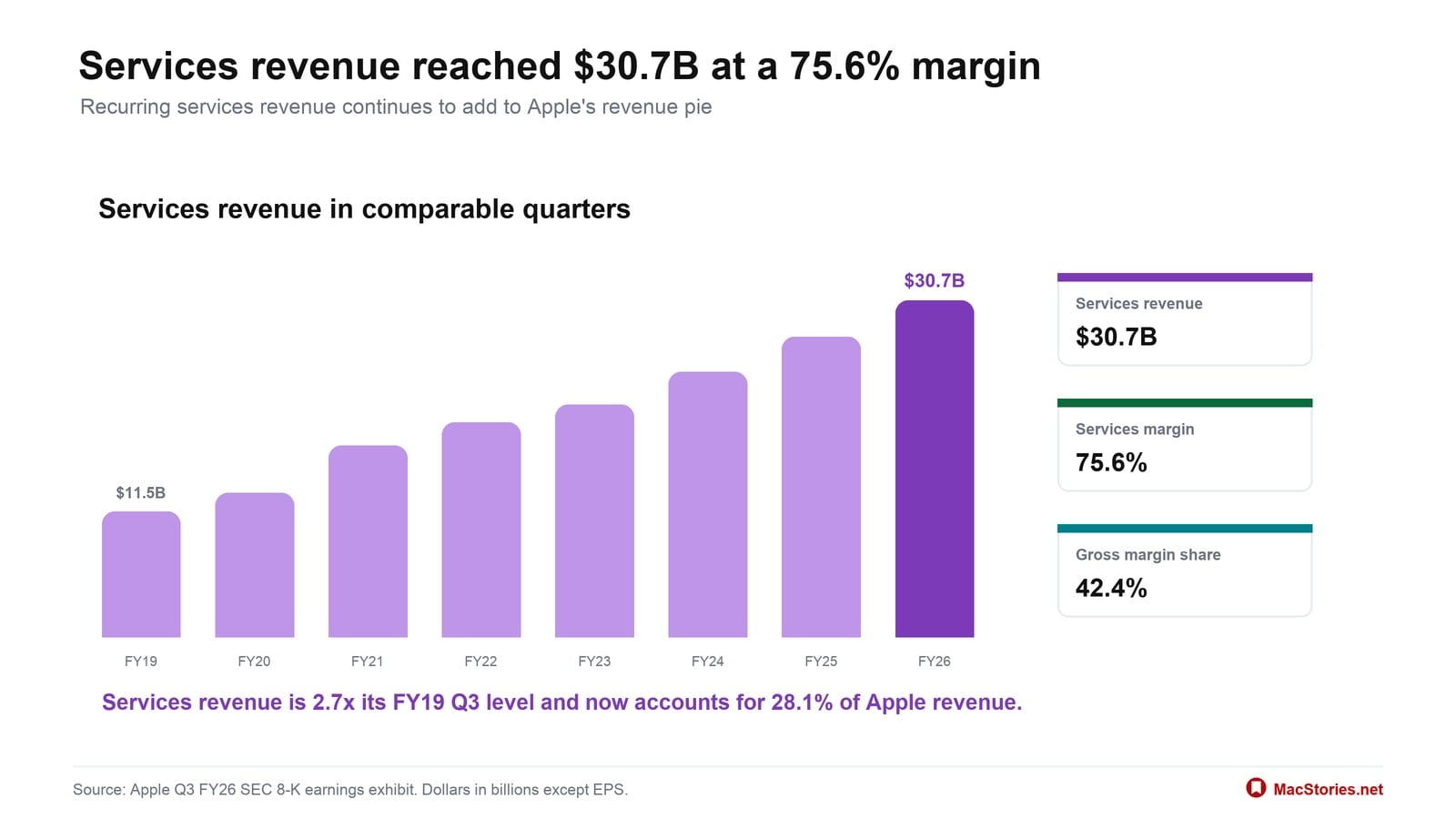
Services reached $30.7B at a 75.6% gross margin, accounting for 28.1% of revenue but 42.4% of gross margin.
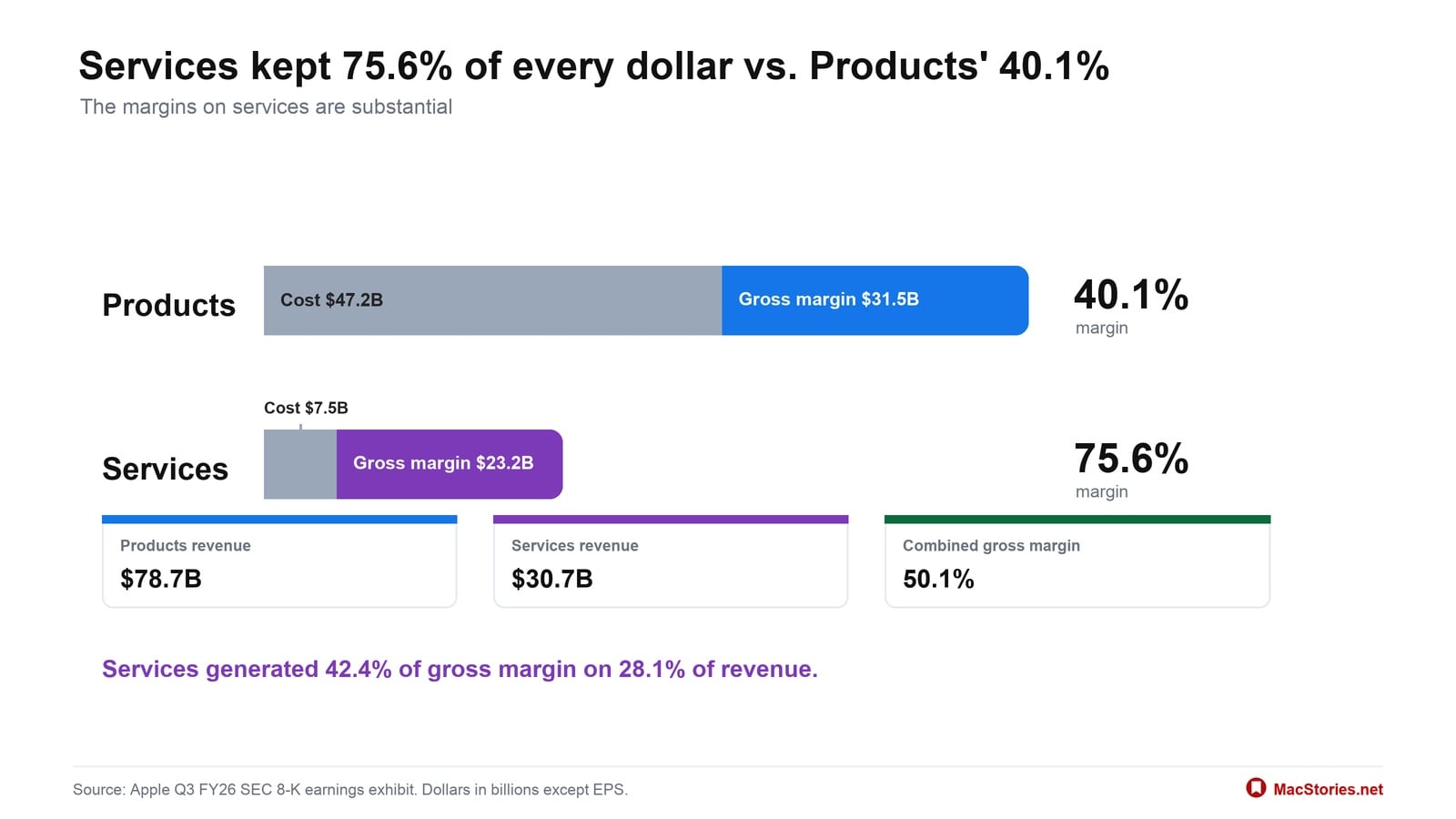
Products carried most of the revenue at $78.7B, but Services kept 75.6% of every dollar against Products’ 40.1%.
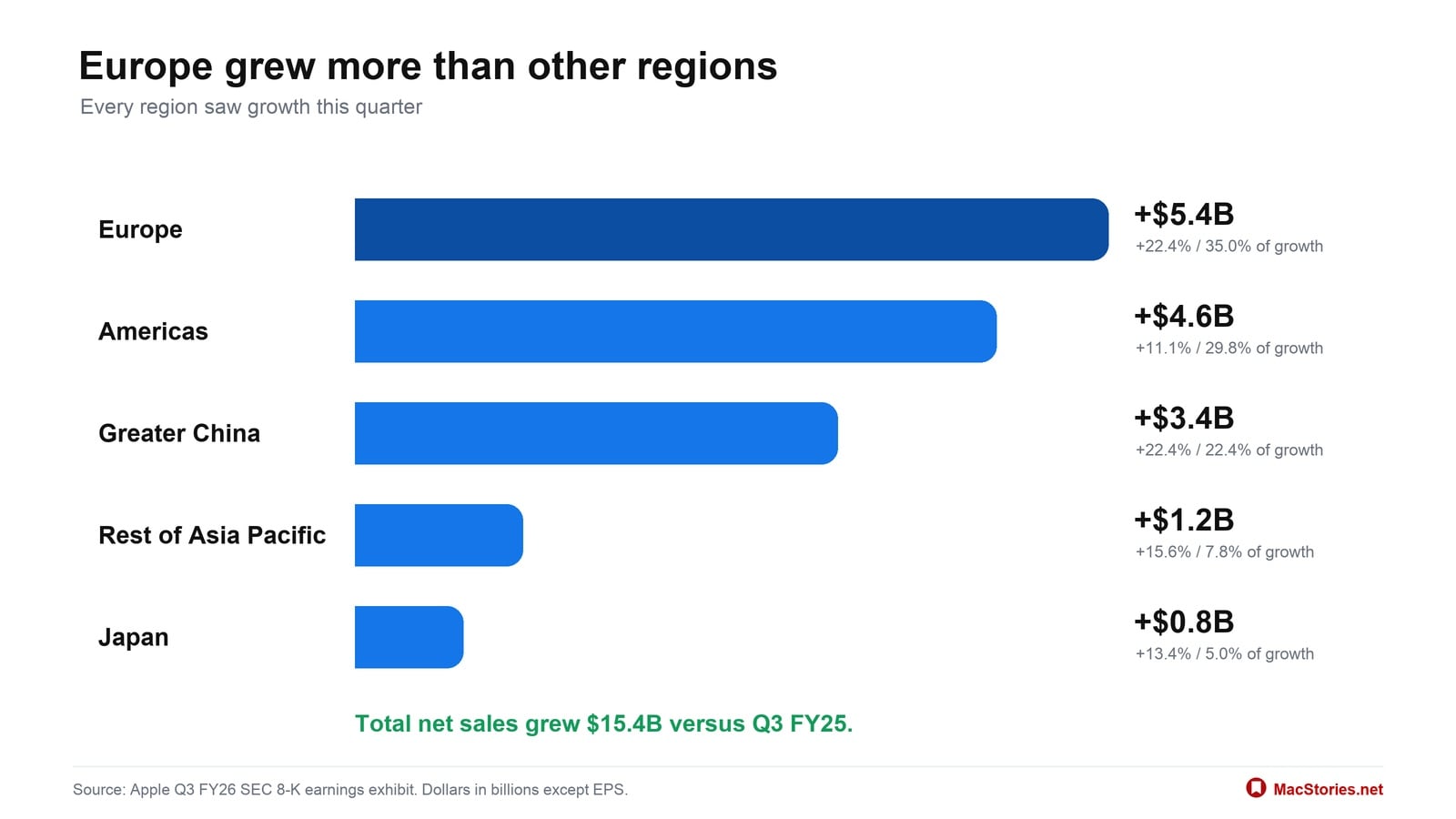
Every reported region grew, and Europe contributed the most new revenue at $5.4B, or 35.0% of Apple’s $15.4B in growth.
Going into today’s earnings call, expectations were high among analysts, who anticipated revenue of $108–109 billion and diluted earnings per share of $1.89. Apple’s results landed at the high end of the expected revenue range and exceeded expectations for earnings per share.
The Rise of the Designer-Developer
](https://cdn.macstories.net/images/uploads/2026/07/30/07ckvhzgh4itusglb-1785431121508-a248147eed.webp)
iOS 6 examples via uxdesign.cc
I began building my first app in the wake of iOS 7, the controversial update that swung the iPhone design pendulum from the skeuomorphism of iOS 6 to a very flat UI. Like Liquid Glass, a lot of people disliked iOS 7’s design, but it had a couple of practical advantages: iOS 7 was easier...
Indie App Sales Event Begins Today with Over 200 Apps
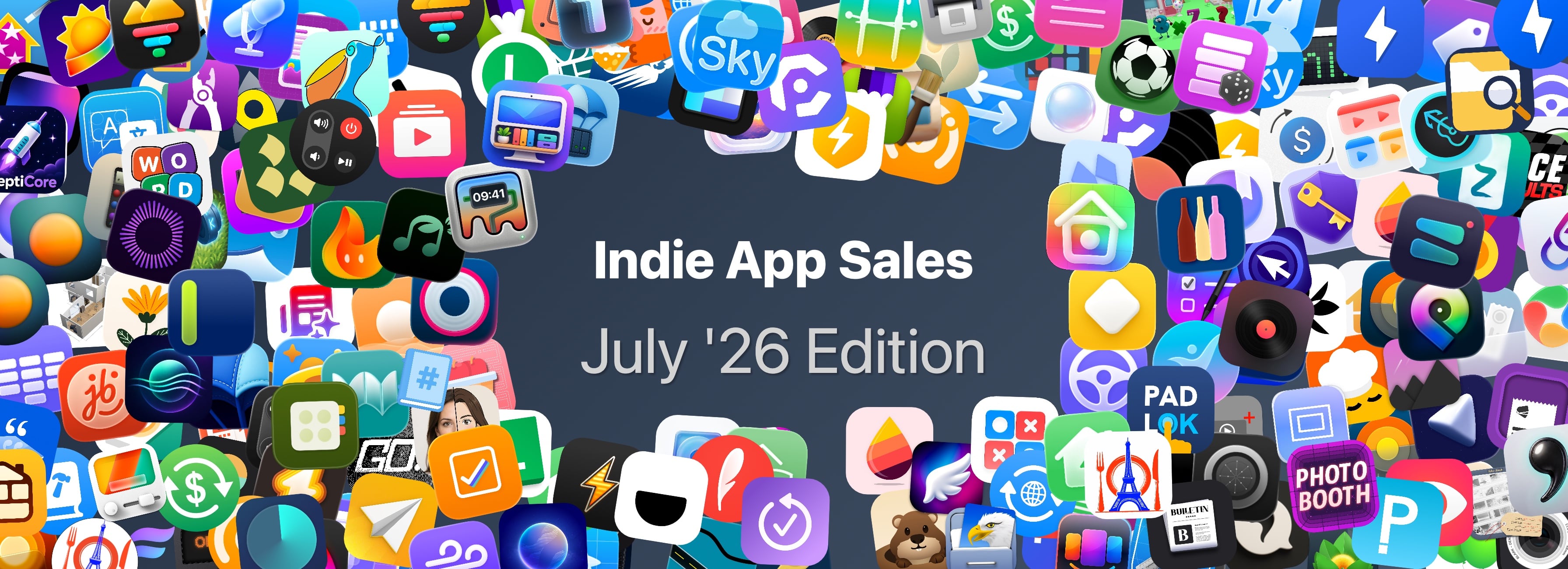
Matt Corey, the maker of Bills to Budget and Signals, has organized indie developers for a big sale that runs from July 28 - 30. The sale includes over 200 apps that will be offered at a discount through Thursday. The list is too long to publish here, but it includes many apps we’ve covered here on MacStories and on Club MacStories in the past, including:
- Gentler Streak (40% off)
- Kaleidoscope (40% off)
- Paku for PurpleAir (50% off)
- Plinky (50% off)
- Tap Forms Database Pro (30% off)
- FitWoody (20% off)
- BoltAI (30% off)
- SideNotes (40% off)
- TV Remote (50% off)
- Kompressor (50% off)
- Sunlitt (60% off)
- Everlog (45% off)
- Play (30% off)
There are a lot of great deals, with many apps discounted 50% or more. What’s listed above is a small fraction of the participating apps, so be sure to visit Indie App Salesand support these great indie apps.
Apple Upgrade Trades Ownership for Lower Monthly Payments
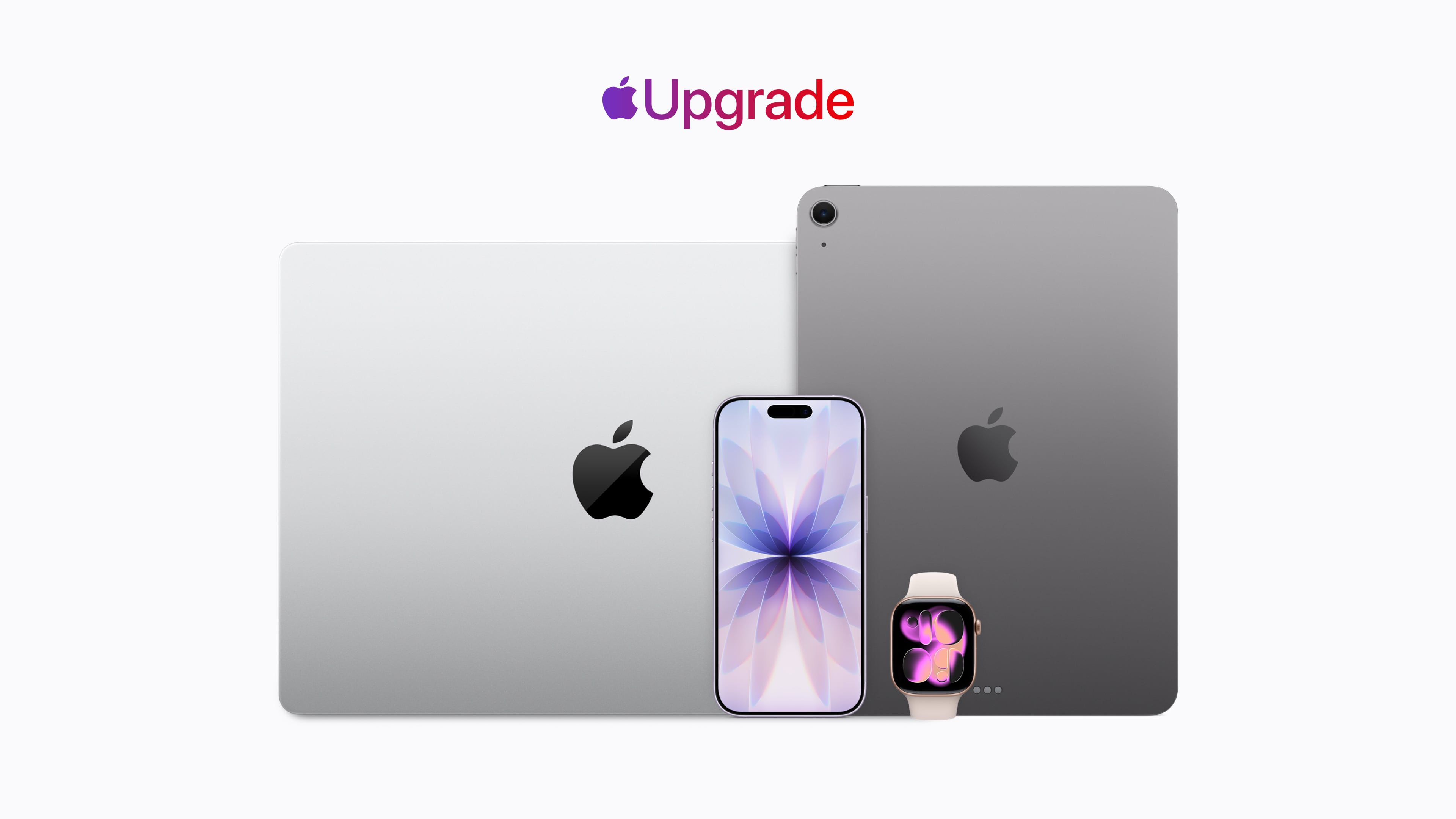
Apple has revealed its new hardware leasing program called Apple Upgrade, which is being offered in collaboration with Klarna. This is Apple’s pitch:
Introducing Apple Upgrade, a new way to always have the Apple products you love. Lease a new iPhone, iPad, Mac, or Apple Watch with pocket-friendly payments and terms that work for you. Then easily upgrade to something new at the end of your lease, and return your current device. It’s that simple.
That pitch comes with a footnote that includes other details worth considering:
- The program is U.S. only (excluding U.S. territories).
- You need to be a U.S. resident who is at least 18 years old, or whatever the legal age is where you live.
- There are eligibility and credit approval requirements and you must have a credit or debit card and an Apple ID.
- When a device is returned, it must be in good condition or damage fees will be assessed.
- Upgrades require a new lease subject to whatever eligibility and credit requirements apply at that time.
- For iPhones, you have to have a carrier and can’t use a prepaid plan.
- The program isn’t available for refurbished devices or through the Apple Employee Purchase Plan, corporate Employee Purchase Plans, Apple at Work, Government, Education, or Veterans and Military Purchase Programs.
Okay, so maybe it’s not “that simple” after all.
The program is available for the iPhone, iPad, Mac, and Apple Watch product lines. For the iPhone, monthly payments start at $17.99 for an iPhone 17e and start at $34.99 for an iPhone 17 Pro Max, for leasing periods of either 12 months or 24 months.
For iPads, the starting prices range from $12.99/month to $24.99/month, Macs range from starting prices of $24.99/month to $48.99/month, and the Apple Watch ranges from starting prices of $11.99/month to $47.03/month. But again, these are just starting prices. You can configure a fully loaded 16-inch MacBook Pro that is just under $230/month, and it won’t include AppleCare.
As a point of comparison, under the current program that is being discontinued, I pay $69.50/month for an iPhone 17 Pro Max, but I have a 512GB model, so my lease price for the same phone would be $40.83/month, significantly lower, but keep in mind that doesn’t include AppleCare+, which would add $13.99/month or $139/year for that iPhone. On a monthly basis, that puts a new iPhone 17 Pro Max with 512GB of storage and AppleCare+ at just under $55/month. Still a superior deal, but not nearly as good as the landing page might initially lead you to believe.
At the end of your lease you’ll have six months to decide to return the leased device, during which you’ll continue to make monthly payments, or pay a fee equal to the difference between the original purchase price and your lease payments to buy it outright. Your other option is to enter into a lease for a new device. If you return your leased device in poor condition, Klarna will charge you a damage fee. You can also terminate your lease early if you pay the remaining lease payments in full plus any taxes and fees.
If you lease accessories for your device, those don’t have to be returned. Why? Presumably because they have no value to Apple or Klarna.
Of course, if you have a device to trade in, that monthly figure could be significantly reduced. If I had the iPhone 16 Pro Max I had last year to trade in and leased a 17 Pro Max for 12 months, my monthly payments would be under $1. However, keep in mind that once you’re on the leasing train, you no longer own your iPhone, so future upgrades won’t reduce your payments the next time you swap your device for a new model. If you don’t own it, the value isn’t yours to trade in.
If you’re on the existing iPhone Upgrade Program like me, it’s being discontinued, but Apple has a transition offer for you. The old program spread payments over 24 months with the option to turn in an iPhone for a new one after 12 months. That’s not changing. If you’re paid in full on your first 12 months of an iPhone, you can sign up for the new program, get a new iPhone, and return your old iPhone to Apple, which will close your old account but won’t reduce your lease payments. You’re not obligated to join the new leasing program, though. You can also trade in your old iPhone, ending your finance contract, and buy a new full price iPhone.
As you may have figured out by now, I’m not a fan of this program, though I expect it will be successful.
Apple products, like all consumer electronics, are getting more expensive every day. The monthly payments on a leased device look very attractive compared to the pay-up-front price. For years, car leases have induced people into monthly payments that can become a burden when their financial situation changes. Now the same will be true of iPhones, iPads, Macs, and Apple Watches.
Maybe as a practical matter this program isn’t that different from the old financing program, but at least there, you owned your device at the end and could just keep using it indefinitely. With the new program, that’s not an option. When your lease is over, you’re empty-handed and faced with leasing again, buying out the lease, or buying at full price with no trade-in, which is objectively worse.
Ultimately, Apple isn’t responsible for customers’ bad financial decisions, but this program feels like Apple is putting its customers in harm’s way.
Pastebot 3 Doubles Down on Mac Clipboard Automation and Introduces Two New Business Models
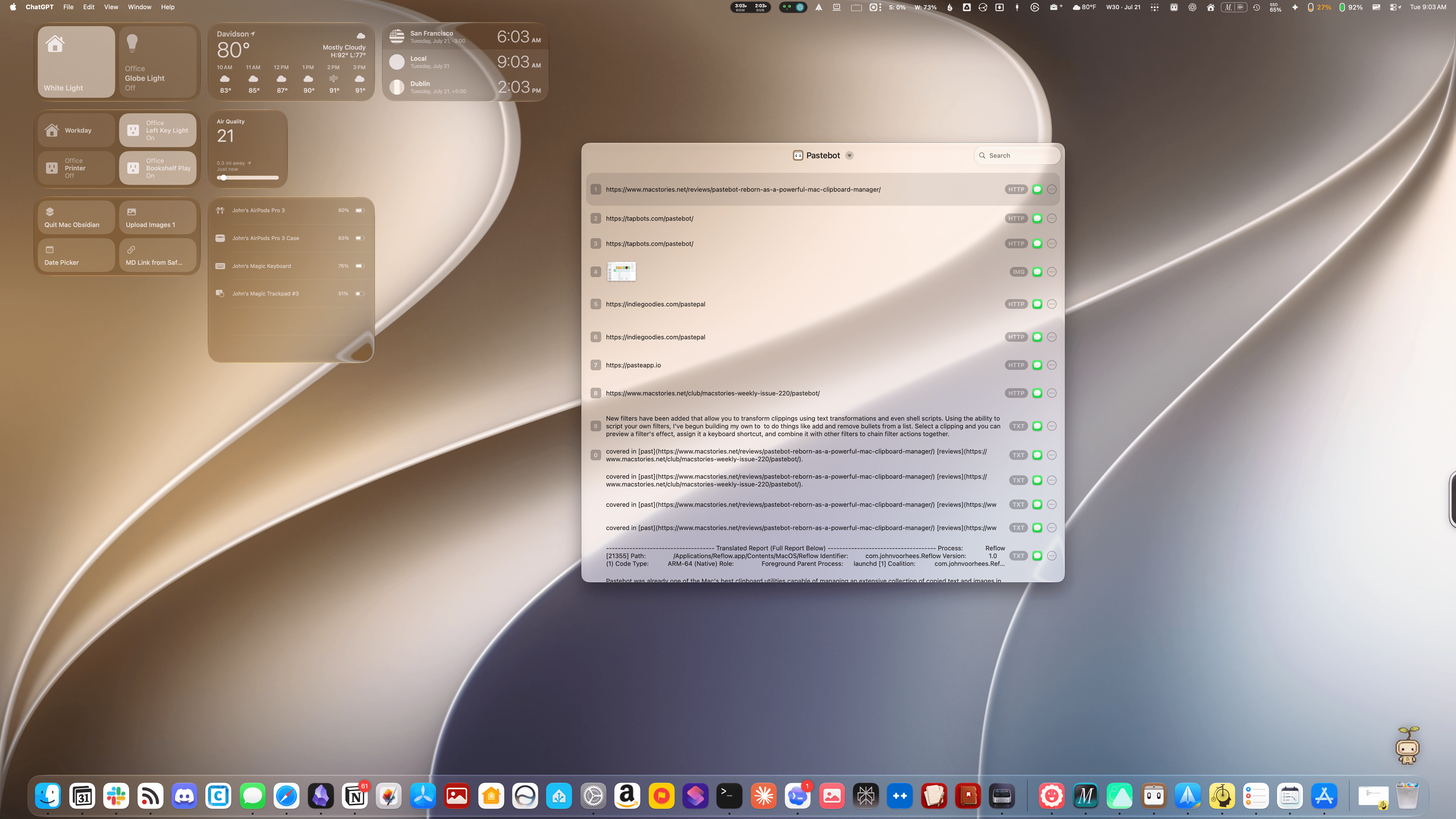
Tapbots has released Pastebot 3, a ground-up rewrite of the Mac clipboard manager that includes several powerful automation and customization options, along with two new pricing models.
Pastebot was already one of the Mac’s best clipboard utilities, capable of managing an extensive collection of copied text and images in multiple formats, PDFs, URLs, files, and HTML, along with metadata. The app can handle up to 1,500 clippings and features fast search, extensive customizable keyboard shortcuts, list and detail views of clipboard items, and iCloud sync between multiple Macs.
 Open Minis Turns iOS into an Agent Playground
 Federico
This week on AppStories, John and Federico discuss the changing face of the AI-fueled App Store and questionable changes made to TestFlight before going into the nerdiest details of Open Minis, an iOS app that brings desktop-class agents onto the iPhone and iPad.
Then on AppStories+, Federico and John explore Cmux, a Mac terminal app with an iPhone and iPad beta that makes it easier than ever to sync coding projects across devices.
Also available on YouTube here.
We deliver AppStories+ to subscribers with bonus content, ad-free, and at a high bitrate early every week.
To learn more about an AppStories+ subscription, visit our Plans page, or read the AppStories+ FAQ.

AppStories Episode 495 - Open Minis Turns iOS into an Agent Playground
0:00
55:06
55:06
This episode is sponsored by:
App Debuts
BrrChecker I love niche weather apps, which is exactly what BrrChecker is. It’s an iPhone and Apple Watch app that tells you how cold (or warm) the water is nearby. I’m a few hours away from the ocean, so most of the data the app presented me with when I first opened it was...