Graham Spencer

917 posts on MacStories since January 2011

Former MacStories contributor.


iPhone 4 Becomes The Most Popular Camera On Flickr

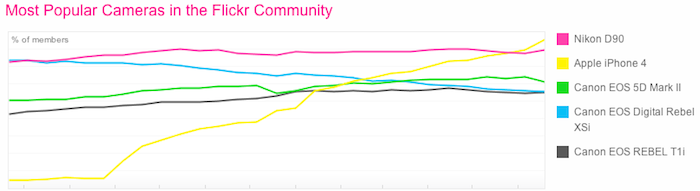
Sometime in the past few days, the iPhone 4 became the most popularly used camera on Flickr – two months after TechCrunch noted that it was poised to take the top spot. The Nikon D90 now holds the second spot, although its share of users has remained constant whilst the iPhone 4 has surged to the front. The next three spots are taken up by various Canon EOS line cameras including the 5D Mark II, Digital Rebel XSi and Rebel T1i.

In terms of smartphones the iPhone 4 took the lead a long time ago but it continues to extend its lead. It is followed by the iPhone 3G, 3GS and then the HTC Evo 4G. Surprisingly the iPod Touch rounds out the top smartphone cameras at number 5.
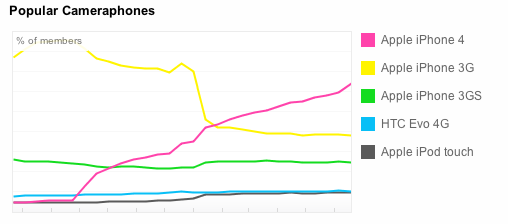
The iPhone 4 becoming the most popular camera in the Flickr community comes after the iPhone 3G held the top spot for just over a year. It lost the top spot earlier this year as it saw a significant reduction in users as the iPhone 4 surged in popularity (just see the above graph and the drop-off in 3G users).

[Via @espiekermann]


Firefox 5 Launches Today, Downloads Already Available

After a number of months in Aurora and Beta testing, the public release of Firefox 5 is expected to come sometime today, but ahead of schedule the downloads are already available now for all platforms.

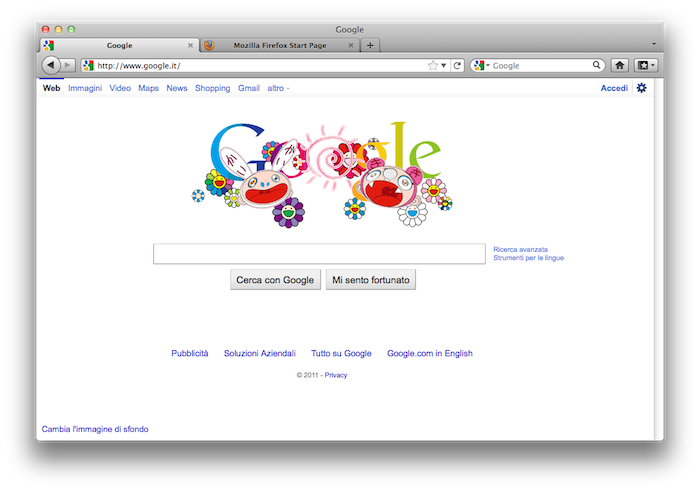
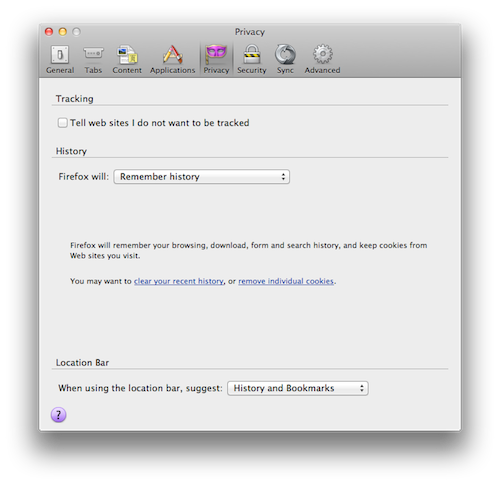
Although the Firefox page has not yet been updated, notable new features in Firefox 5 include improved support for HTML5, MathML, XHR, more support for CSS animation, a ‘do not track’ option in the privacy pane and general speed and perfomance gains. There is also improved sync support, better add-on updates and improved spell checking for many languages.

You can download Firefox 5 here for Mac, Windows or Linux.

Update - Federico Viticci 5 PM GMT +1: Mozilla has announced the official release of Firefox 5, the first browser to enable the “Do not track” feature on multiple platforms. A full list of detailed changes to the browser can be viewed here.

The latest version of Firefox includes more than 1,000 improvements and performance enhancements that make it easier to discover and use all of the innovative features in Firefox. This release adds support for more modern Web technologies that make it easier for developers to build amazing Firefox Add-ons, Web applications and websites.

Here’s a direct link to Firefox 5.0 for Mac.


Nuance Acquires Note-Taking App Noterize

Noterize, which was a fairly popular note-taking app that had been featured by Apple in its Iconic ad, had mysteriously disappeared from the App Store a little while ago. TUAW is today reporting that the absence was because Noterize had been acquired by Nuance.

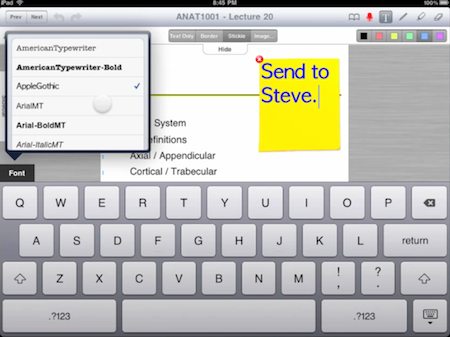
The Noterize app was particularly well known for its fairly innovative and intuitive annotation and markup features, which you can still view in their promotional video here. Perhaps the most obvious reason for this acquisition could be because Nuance is interesting in releasing their own note-taking app with similar annotation and markup features and have them complemented by voice recognition and dictation. Users could then create a note on a PDF and dictate the contents of the note rather than type it out.

This acquisition of Noterize comes after a number of news pieces over the past few weeks relating to talk over Apple doing a deal with Nuance to feature voice recognition and dictation in iOS 5. There was even the supposedly leaked screenshots of an internal iOS 5 build that showed settings that seemed to back up the rumors.

[Via TUAW]


SwitcherSettings Gives Jailbreak Users An Alternative To SBSettings

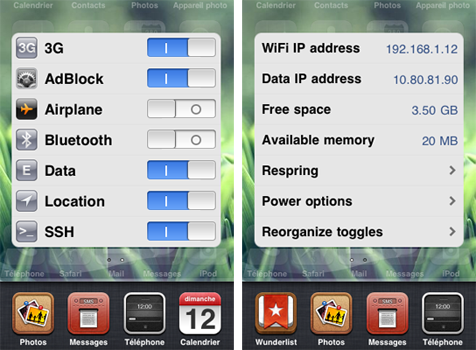
A new jailbreak tweak to hit Cydia this week, from Florian Denis (developer of another tweak, iReply), aims to offer an alternative to the popular SBSettings. The tweak, named SwitcherSettings, works by presenting your SBSettings toggles in the application switcher screen, offering easy access to various settings such as AirPlane Mode, Bluetooth and SSH.

SwitcherSettings is said to be completely compatible with any and all of your existing SBSettings toggles, and unlike SBSettings, it doesn’t require a respring when removing or adding toggles. You don’t even need SBSettings – you can remove it and SwitcherSettings can still run your toggles.

SwitcherSettings is fully compatible with all your SBSettings toggles, and presents them directly into iOS, offering a native user experience: a quick access to your settings, exactly like Apple would have coded it.

Finally, just like SBSettings you can see some vital information about your device including IP address and available memory, just swipe across to the second SwitcherSettings screen as seen above. SwitcherSettings is available from the BigBoss repo for $2.49 - running on devices capable of iOS 4.


Link Your Computer And iOS Device With myPhoneDesktop: Double Pass Giveaway!

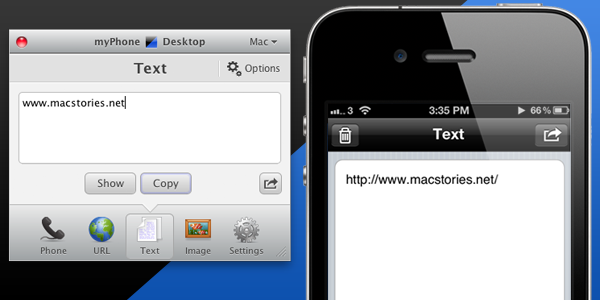
We’ve talked about myPhoneDesktop before on MacStories but we thought it deserved a short ‘re-review’ to accompany today’s giveaway. Keeping it simple, the premise of myPhoneDesktop is that it provides a portal through which you can easily transfer data and information from your desktop computer to your iPhone or iPad.

Broadly speaking the app transfers four types of data including phone data (both numbers and text messages), website URLs, text and images. When you send any of that data from your computer, and there is both a desktop and web client, it will be pushed straight to your device with a notification.

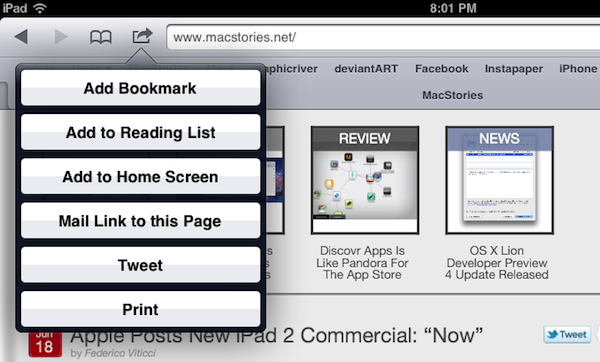
But where I think the app becomes most powerful is when you have the data on your iPhone or iPad. In the corner of the app it has the “Open in” icon where it literally has a wealth of options for your data. There is everything from the obligatory search with Google, to send by email, add to contact, send SMS or launching another app with that data. Importantly, the developers aren’t resting on their laurels, since we last talked about myPhoneDesktop there have been a few updates that continue to add more app integrations including Navigon and InstaTodo.

In reality I have only just scraped the surface of what this app can do, for example it also integrates with Google Voice and Skype, so make sure to check out the myPhoneDesktop website to learn more and get your own copy. Today we’re giving away 5 ‘double passes’ of myPhone desktop – in other words the five winners will receive two promo codes, perfect to give one copy to a iPhone-toting friend or family member, or (god forbid) use it as a belated Father’s Day gift. Details of the give away are past the break.

Read more


Wacom Launches Bamboo Paper, Promotes iPad Note-Taking With A Stylus

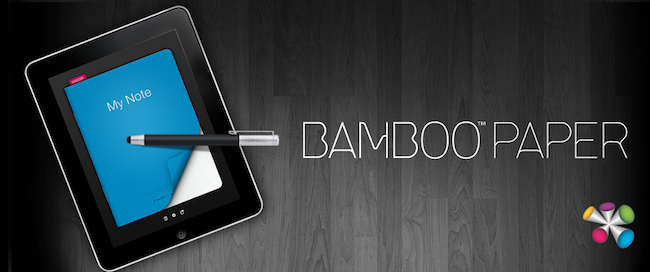
Wacom may have been fairly well known for its stylus based displays that many digital artists used, but in recent years it has started to shift its focus towards the consumer market with its Bamboo range of products. A few months ago it launched the Bamboo Stylus, a high-end stylus designed for the iPad and just a few days ago it released Bamboo Paper – an app for the iPad designed for note-taking with the Bamboo Stylus.

Whilst it isn’t the most fully featured note taking app, it offers a strong set of features and although Wacom recommends their stylus when using the app, it still works with just a finger. Your notebook can have an unlimited number of pages and there is also the option to add ruled lines or a graphing grid to the pages.  Where the app falls a little short compared to some other similar apps is that it only offers 3 options for the brush thickness and 6 brush colors.

Some of the other features of Bamboo Paper include the ability to bookmark pages, mirror the display to a TV or projector, as well as print, email or save note pages or even entire notebooks.  Whilst the app works well with just a finger, the Wacom video demonstrating Bamboo Paper with a Bamboo Stylus does look really interesting – jump the break to view it.

Bamboo Paper for the iPad is available in the App Store for free until July, at which point it will cost $1.99.

Read more


iOS 5 Will Apparently Support Nitro In Web Apps That Are Pinned To The Home Screen

Safari received quite a substantial speed bump with iOS 4.3 when Apple added the Nitro engine, a powerful JavaScript engine. However, some were left disappointed when it was revealed that the engine didn’t work with web apps that had been pinned to the home screen.

It seems that iOS 5 will eventually fix this inconsistency and bring those web apps up to speed. It comes after a user on Hacker News answered a question asking whether Nitro was included for those web apps pinned to the home screen.

This is probably breaking my NDA to say this, but yes, they did. Web.app now has the ‘dynamic-codesigning’ entitlement, which enables Nitro.

Apps that use the UIWebView alternative to Safari apparently won’t be getting Nitro, though the same user says that this is a security restriction rather than an inconsistency.

[Via CNet]


Apple amends complaint against Samsung, asserts more intellectual property rights against more products

Apple amends complaint against Samsung, asserts more intellectual property rights against more products

Florian Mueller on amendments that Apple made to their complaint against Samsung yesterday,

Many of the changes are designed to portray Samsung’s alleged infringement as an incredibly outrageous act of copying. The original complaint already accused Samsung of “slavishly copying” Apple’s designs. The amended one stresses that Samsung “has been even bolder” than other competitors emulating Apple’s products and has created “products that blatantly imitate the appearance of Apple’s products to capitalize on Apple’s success.”

In their amendment Apple significantly expanded the complaint from 38 to 63 pages and are now asserting more patents and other intellectual property rights than before, and onto an extended list of Samsung products that Apple claims are infringing.

One of the amendments emphasized how similarly the Galaxy Tab 10.1 mimicked the iPad 2. Apple goes so far as to pull quotes from recent reviews of the tablet, citing Eric Franklin of CNET in one of their examples. “Taking another page from the iPad 2’s school of sexy tablet building, the Galaxy Tab 10.1 has one of the cleanest designs we’ve seen in a tablet.” I don’t disagree with Apple that the Galaxy Tab 10.1 was purposely built to copy the iPad in form.

Permalink

Kickstarter: iBamboo Speaker Is A Really Cool Eco-Friendly iPhone Speaker

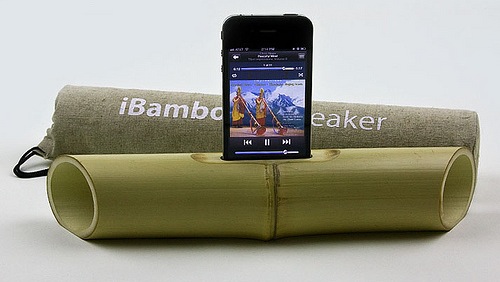
We’ve talked about a number of really cool Kickstarter projects over the past few months and today we’ve found another one; iBamboo speaker. Using just a foot of bamboo it uses the natural resonance to amplify the sound coming from an iPhone to create an ‘electricity-free’ speaker.

Merging the latest high tech with the simple beauty of nature, iBamboo is a100% eco-friendly speaker made from a whole length of bamboo.

Brilliant in simplicity, the iBamboo speaker is literally a foot of bamboo that has only had minor modifications; a slot for the iPhone, a flattened out base (so it sits flat on a surface) and the two edges of the bamboo tapered to direct the sound forward.

These speakers combine the high-tech of the modern day with the simplicity and aesthetics of nature. Since bamboo is a natural material, no two iBamboos are alike. Every piece has the same functional parameters, but each one is unique in its appearance and beauty.

You can support the project on Kickstarter from $5 and if you pledge $25 or more you’ll be pre-ordering your own iBamboo speaker.  Jump the break for a video demonstration of the iBamboo speaker in action.

[Via Tree Hugger]
Read more