This Week's Sponsor:

Inoreader

Build your own newsfeed and cut through the noise


Posts tagged with "reminders"

Due, The Best Reminder App for iPhone, Now Available on the iPad

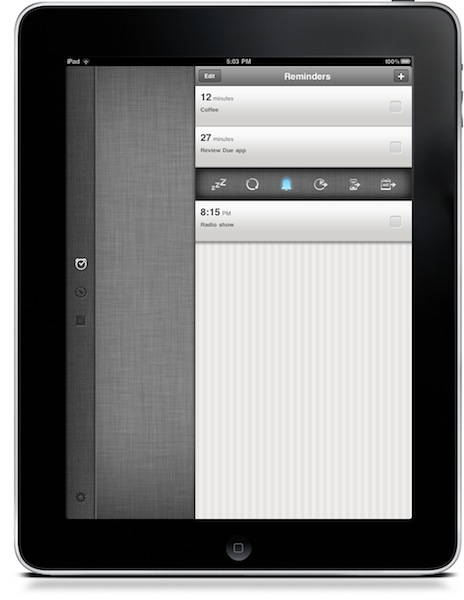
Due, a popular reminder and timer application for the iPhone we at MacStories reviewed several times in the past, was updated last night to include a native iPad version that, together with OTA sync through Dropbox introduced in version 1.3.1, now allows you to have your reminders, timers and logbook always in sync and available across a variety of devices.

Due for iPad sports a completely new interface for the tablet that reminded me of the official Twitter app at first with a vertical navigation bar on the left and a middle panel to add and customize your reminders and timers. The bar on the left lets you switch between the sections of the app, as well as the Settings which now have their own dedicated tab. As you may know Due syncs with Dropbox upon launch and exit, so if you’re running both the iPhone and iPad versions at the same time don’t expect changes to occur simultaneously. It’s highly recommended that you only use one version of Due at a time to avoid sync conflict issues. That said, sync is pretty reliable and fast enough to enable you to switch from a device to another within seconds.

New design aside, Due for iPad follow the steps of the iPhone app to offer an easy to use solution for your reminders and timers. Many of the interface elements are the same so you’ll feel comfortable when using the new Due for iPad. This update also introduces a number of fixes and various improvements, such as the possibility to relaunch the app in its previous state (reminders / timers tabs), double tap to edit reminders and timers, extended undo support. When adding new reminders, the app will now open the “quick panel” automatically to customize snooze and repeat quickly – this one is a very welcome addition to further streamline Due’s workflow and usability.

Due keeps getting better on each release, and this iPad version plays an important role in making Due a ubiquitous way to have your reminders and timers available all the time. You can get the app for $4.99 in the App Store, and check out the full list of changes and fixes below. Read more
MANsaver: The iPhone App That Will Save Your Relationship

It is no secret that men usually forget about things. Especially if you’re married and you have to think about paying the bills, your job, kids and that car insurance that just won’t go away, it might happen to forget about your 4th anniversay, the perfect gift for Valentine’s Day, or the anniversary of the day your first met with your wife. While girls seem to remember any kind of holiday, anniversary and important milestone with ease, guys…well, usually just forget. And if your relationship is anything like mine, you know this could become a problem. Like, a huge problem.

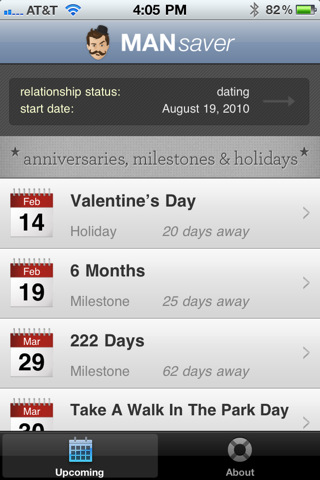
Now, for as silly as it sounds, we there’s an app for that. MANsaver, a free iPhone app by Oven Bits and Creation Code, is aimed at collecting all these kinds of holidays and anniversaries you should remember into a single list view that – and here comes the real trick – will also send you notifications five days ahead of a scheduled event, and on the same day as well. This app, also nicely designed, is literally a man saver: it allows you to build custom lists of dates based on your relationship, set up reminders and even send text messages based on “romantic templates”. This is an iPhone geek’s relationship-oriented OmniFocus, basically. Read more


Notificant Delivers Notifications To All Your Macs, Through The Cloud

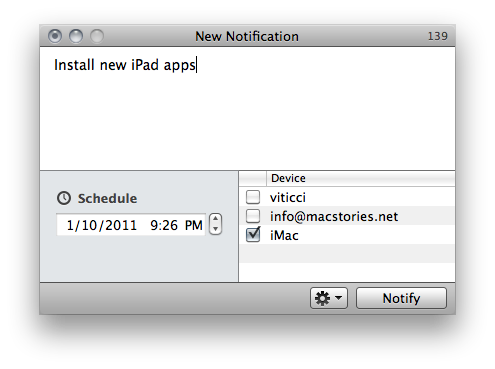
Notificant by Caramel Cloud is a new app available exclusively on the Mac App Store that provides an easy, fast and reliable solution to create and send notifications to all your personal Macs and a selected email address. The app is deeply tied to a cloud infrastructure – as the developers’ name suggests – and it allows you to forward as many notifications you want, at any given time. It’s one of those apps that doesn’t reinvent anything (notification apps have been around for a while, and we recently reviewed Alarms for Mac) but takes a simple approach and throws the advantages and speed of the cloud in the mix.

Basically, Notificant is a simple tool to sync reminders in the cloud. The app takes care of all the sync stuff and forwarding to your personal devices, you just need to write down entries, hit save and forget about it.

Read more