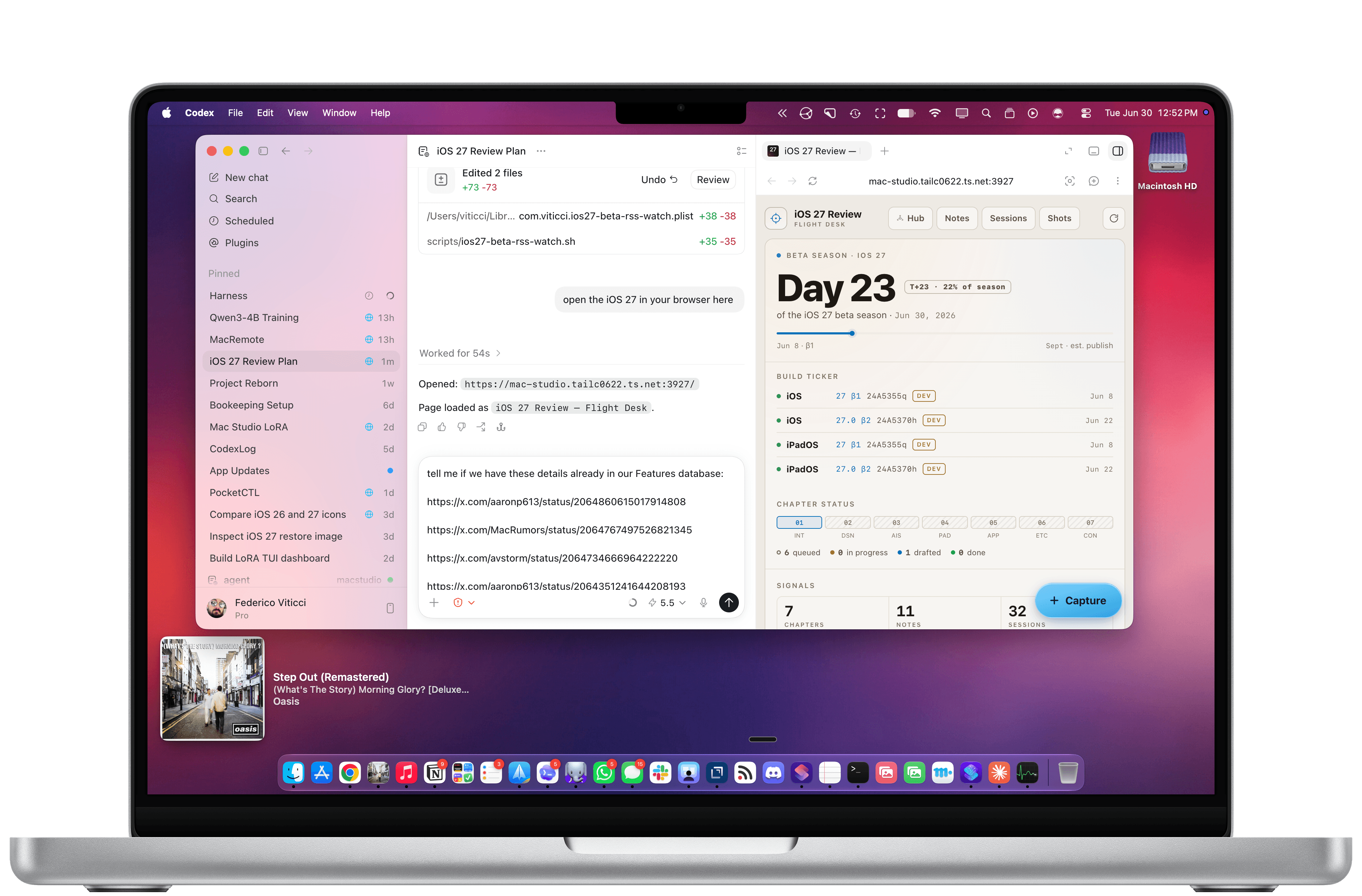
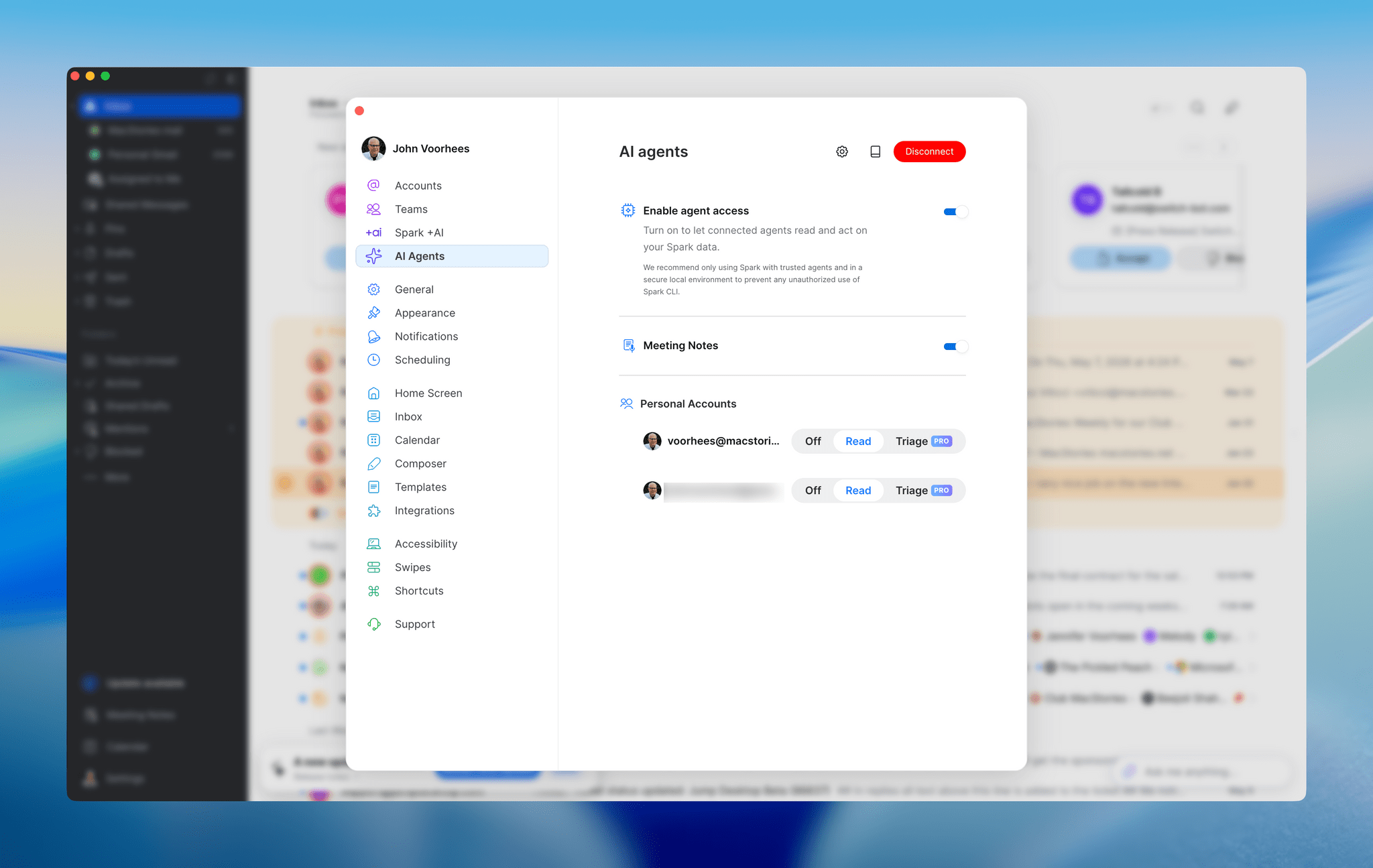
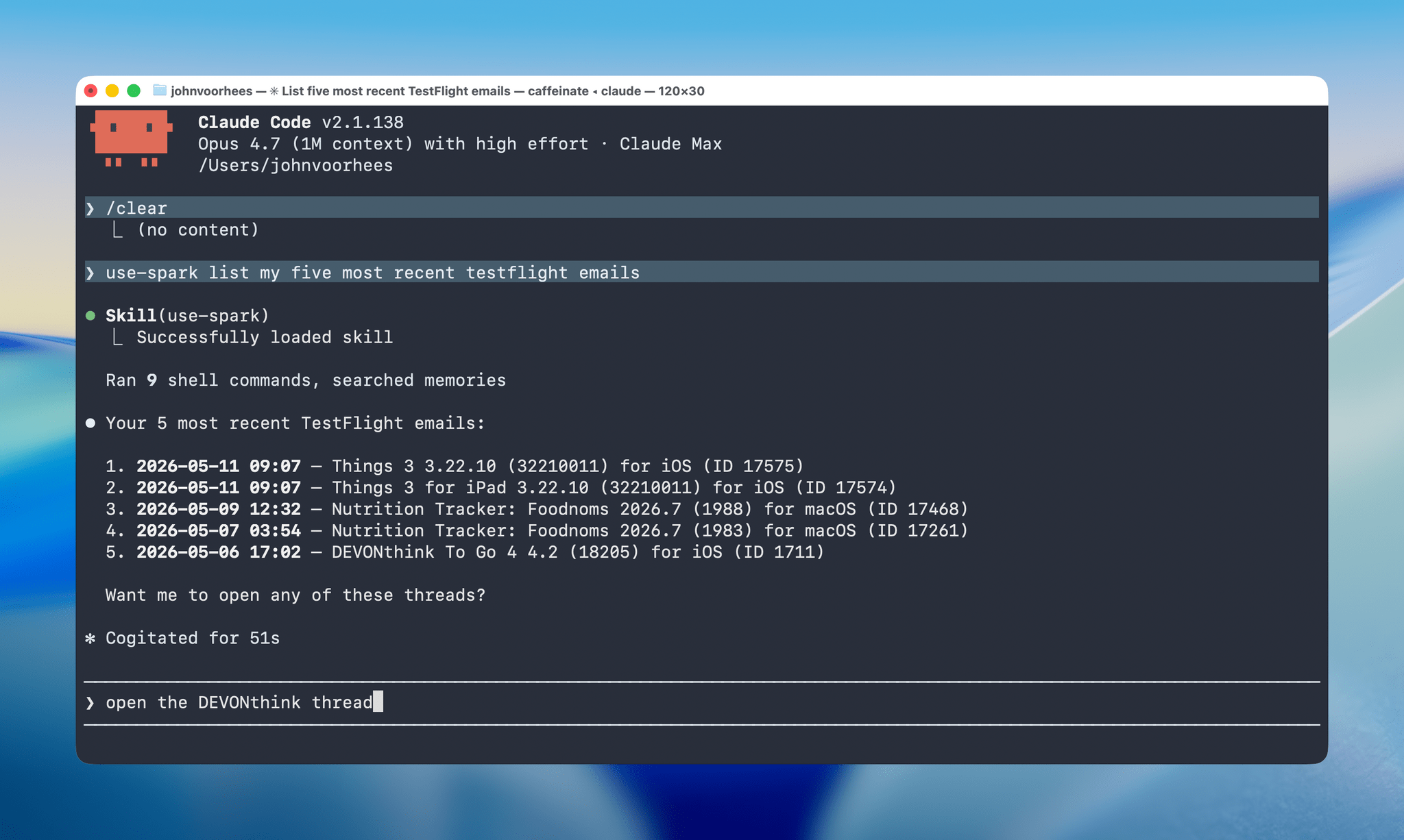
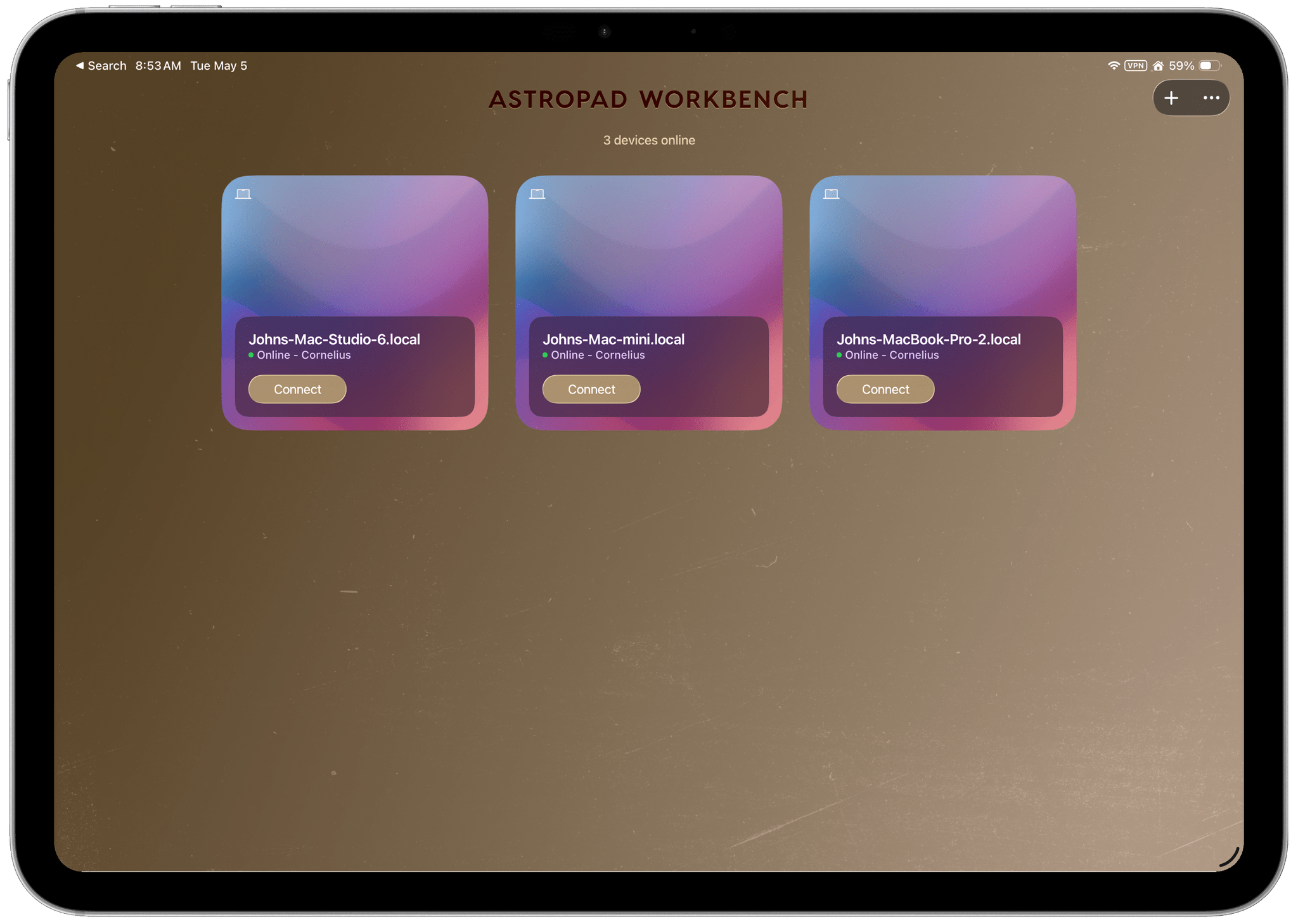
There are a lot of ways to connect remotely to a Mac, and I’ve tried most of them. Today, though, I want to focus on one in particular: Astropad Workbench, an app and service for remotely connecting to your Mac that includes unique features that make it a compelling choice on the iPhone and iPad, but less so when connecting from one Mac to another.
Posts tagged with "mac"
Astropad Workbench Rethinks Remote Mac Control for AI Agents
GameHub’s Desktop Beta Promises to Expand Mac Gaming→
If you follow our show NPC: Next Portable Console, you probably know about GameHub, an app from controller maker GameSir. GameHub first appeared on Android, where it has become one of the hottest recent developments in handheld gaming because it lets you play Windows PC games on Android devices. That’s not something that’s possible on iOS or iPadOS, which Apple tightly controls through the App Store, but macOS is a different story altogether, which is why GameSir is bringing GameHub to the Mac.
Currently in beta, GameHub isn’t the first to bring PC games to the Mac using a software compatibility layer, but it’s one of the more user-friendly implementations, thanks to tight integration with Steam and the Epic Games Store. In fact, GameHub itself is a fork of the Winlator open-source project. And, while it’s still early days for PC games on Android and even earlier for PC games on the Mac, GameHub’s beta is making steady progress as Russ Crandall of Retro Game Corps showed off in his most recent YouTube video:
Of the 20 games Crandall tried, none of which are otherwise available on the Mac, about 60% were playable. As on Android, some games required some tweaking to get them working, but overall, the results were impressive, especially when it comes to games like Pragmata, which has only been out for about a week.
What GameHub for Mac demonstrates is just how capable Apple silicon is. The compatibility layers built to run Windows games on Android, and now the Mac, are complex, but at its core, it’s the sheer horsepower of ARM-based processors that makes this possible, regardless of the OS they run. It also makes me wonder why Apple doesn’t turn its Game Porting Toolkit that helps developers translate PC games to the Mac into a consumer product. It’s been done before with Whisky, a SwiftUI wrapper around the Game Porting Toolkit and Wine, but that project is no longer maintained. It strikes me as a great way to expand the gaming universe on the Mac and encourage more developers to support macOS directly. Maybe we’ll hear something from Apple on the topic at WWDC in June.
In the meantime, you can visit the GameHub website and join its Discord server where you’ll find instructions on joining the beta. And, if you’re interested in learning more about how GameHub and similar solutions work on Android and Mac, a good place to start is with NPC, Episode 48, Steam Emulation on Android Gets Real.
Cronos: The New Dawn Showcases the Mac’s MetalFX and Ray Tracing
Top-tier games continue to roll out on Apple’s platforms at a steady clip. Recently, Crimson Desert landed on the Mac on the same day as other platforms, and then last week, Control: Ultimate Edition added support for the iPhone and iPad, joining the Mac version that was released last year.
Today, Cronos: The New Dawn, a survival horror game by Bloober Team, joins the Mac gaming scene via Steam. In a post-apocalyptic, retro-tech setting, you play as the Traveller, who has been sent on a mysterious mission by a group called The Collective. Not long after you set out on your quest, you realize you aren’t alone. The landscape is littered with corpses that merge into mutant, zombie-like enemies that you have to fight off with a combination of weapons and melee attacks.
Cronos debuted on the Xbox, PlayStation 5, Switch, PC, and Linux last September, but I didn’t play it on any of those platforms. Instead, I dove in fresh when I got the chance to try it on the Mac, thanks to a few days’ early access. I haven’t played very far into the story yet, but despite not being a huge fan of horror games, I was immediately captivated by the game’s incredible sound design, retro tech vibe, and creepy story.
With limited time, I focused on the game’s performance on two Macs: my M1 Mac Studio connected to a 4K ASUS display and an M4 Max MacBook Pro, both on its own and connected to a BenQ 5K display I’ve been testing. As I expected, the difference between the two Macs was noticeable, showing just how far Apple silicon has come in terms of gaming. My Mac Studio may still pull its weight when it comes to productivity tasks, but the M4 Max MacBook Pro operates on an entirely different level.
Bloober Team is no stranger to Apple silicon, having released The Medium with Metal 3 support for Apple silicon in 2023. The experience shows in the studio’s incorporation of both MetalFX upscaling and hardware-accelerated ray tracing in Cronos.
By default, Cronos’ MetalFX and ray tracing settings are turned off, but both are worth trying along with frame generation because they make a big difference. After some experimentation on my M1 Max Mac Studio, I landed on a pretty consistent 70-75 FPS at 1440p with the help of MetalFX and frame generation. Hardware-accelerated ray tracing isn’t supported by Apple’s M1 family of chips, so that wasn’t an option at all.
As you’d expect, performance was much better on the M4 Max MacBook Pro, which does support hardware-accelerated ray tracing. Starting with the default settings and playing on the MacBook Pro’s display, I turned on ray tracing, MetalFX, and frame generation and got a consistent 55-65 FPS, and turning off ray tracing bumped that more consistently into the 60s. The game struggled a little bit when I connected to an external 5K display, but with a few more tweaks, it was running well, too.
What’s clear is that Cronos pushes the Mac’s hardware hard and that Apple’s latest gaming technologies make a big difference in performance. On the MacBook Pro, the fans spin up loudly soon after starting the game; plus, if you don’t have your laptop plugged in, you may be prompted to switch to Low Power Mode pretty quickly. However, the overall experience on Apple’s most recent hardware has come a long way since the M1 chipset, and with every hardware revision, more games like Cronos become viable. And whether you play it on the Mac or not, Cronos: The New Dawn is worth checking out for a creepy futuristic good time.
Cronos: The New Dawn is available on Steam and is 30% off until May 1.
OpenAI Unveils Codex “Superapp” Update with Computer Use, Automations, Built-In Browser, and More
Today, OpenAI introduced a long list of productivity and coding updates to Codex. I haven’t had a chance to try the new features myself yet, but the demo OpenAI gave me was as impressive as the company’s message was clear: Codex isn’t just for coders anymore.
It was just over a week ago that OpenAI raised $122 billion in financing and announced it was shifting its focus to building a superapp that brings the capabilities of its models into a unified experience. It turns out that app is Codex, OpenAI’s app that, until today, was focused primarily on developing software.
However, according to OpenAI, 50% of Codex’s users were already giving it non-coding tasks to complete. Combined with the OS flexibility of a desktop environment, that made Codex the natural place to bring together a wide range of new productivity and coding features.
On the productivity side of things, the update allows Codex to operate your desktop apps, interacting with interface elements and inputting text, for example. We’ve seen computer use from other AI companies before, but one thing that sets Codex apart is its ability to work in your apps in the background so they don’t steal the focus from whatever app you’re already using.
OpenAI has drawn aspects of its Atlas browser into Codex, too. This allows Codex to prototype websites and apps that users can comment on in-line, creating a tight feedback loop for refining designs. Currently, this feature is limited to running sites and apps via a local server setup, but OpenAI says it will be extended to incorporate actions like interacting with the greater Internet, taking screenshots, and stepping through user flows in the future.
Plugins are taking a big leap forward as well, with over 100 being added to the mix. Like the Claude plugins that Anthropic offers, Codex plugins are composed of a bundle of skills, app integrations, and MCP servers. According to OpenAI, the list includes many popular third-party tools and services like the Microsoft suite, Atlassian Rovo, CodeRabbit, Render, and Superpowers. One of my favorite moments in the Codex demo I saw was a prompt that simply asked, “Can you check Slack, Gmail, Google Calendar, and Notion and tell me what needs my attention?” It’s the sort of query that I think a lot of people can relate to as they start a busy day, and it’s all driven by stacking multiple plugins.
OpenAI is also testing an enhancement of Codex’s memory feature as a preview that learns from you as you work. Codex will pick up on your preferences, corrections you make, and context from the tasks you give it. This is the sort of feature that is hard to demo, so I don’t have a good sense for it yet, but I expect that over time, its practical utility will become more clear.
One place OpenAI says Codex’s enhanced memory system will help is with new proactive suggestions. As the app learns your preferences and work patterns, it will offer suggestions on what to do next or where to pick up where you left off. Again, how well this will work in practice remains to be seen, but this is exactly the sort of thing that has made OpenClaw so popular. Having an agent that understands your preferences and accesses your messages, files, and other data in a proactive way can be incredibly useful if done well.
Automations have been expanded, too, allowing Codex to use past threads and schedule tasks over days or weeks. These heartbeat automations stay in the same Codex thread and can be modified by the model itself, allowing it to schedule its own follow-ups – again, very much like OpenClaw.
Also new to Codex is support for gpt-image-1.5 for creating image assets as part of workflows like creating presentations, website mockups, and product concepts.
Although the focus of today’s update is on productivity, developers haven’t been forgotten. New development features include:
- Fast frontend iteration using a combination of the in-app browser, computer use, and image generation tools;
- Multiple terminal tabs;
- A file sidebar for previewing PDFs, spreadsheets, slides, and other formats;
- GitHub PR review support, allowing for review of comments inside Codex;
- A summary pane that tracks plans, sources, and artifacts in a single view; and
- Remote devbox SSH, an alpha feature for connecting to remote development environments.
That’s a lot, but with more than three million users per week, Codex has proven its popularity well beyond its core coding audience. I’m still skeptical about how much functionality a single app can support, especially when OpenAI addresses the mobile market. I also wonder whether Codex’s productivity and developer tools can coexist without alienating some segment of the app’s users. However, proactive automation of busy work and sifting through mountains of messages and other data is precisely what I’ve wanted from Codex from the start. I’ve seen what it can do when I’m working on a script or app and can’t wait to apply that to my everyday work, too.
Today’s Codex update is available in the desktop app to users with a signed-in ChatGPT account. Computer use is a Mac-only feature at launch (undoubtedly thanks to macOS’s deep accessibility support that was the basis of the same sort of computer use magic we saw in Sky, which was acquired by OpenAI last year), and a rollout of the new features will happen in the EU later. Personalization features like proactive suggestions and the memory enhancements will be coming to Enterprise, Edu, and EU users soon, too.
Apple Discontinues the Mac Pro→
In a move that should suprise no one, Apple discontinued the Mac Pro today.
From Chance Miller at 9to5 Mac:
It’s the end of an era: Apple has confirmed to 9to5Mac that the Mac Pro is being discontinued. It has been removed from Apple’s website as of Thursday afternoon. The “buy” page on Apple’s website for the Mac Pro now redirects to the Mac’s homepage, where all references have been removed.
Apple has also confirmed to 9to5Mac that it has no plans to offer future Mac Pro hardware.
This change has felt inevitable ever since the introduction of the Mac Studio. Although the Mac Studio lacks the Mac Pro’s expansion slots, it packs a lot of performance into a much smaller package, meeting a wide variety of professional needs, which undoubtedly cut into the Mac Pro’s sales.
MotionVFX Team Joins Apple→
Earlier today, MacRumors reported that MotionVFX was acquired by Apple. Based in Poland, MotionVFX has been a go-to resource for YouTubers and other creators for years with its highly-regarded plugins, templates, and tools for Final Cut Pro, DaVinci Resolve, and other apps.
According to MotionVFX’s note:
For over 15 years, we’ve been on a mission to create world-class, visually inspiring content and effects for video editors. From the very beginning, we’ve been all about quality, ease of use, and great design. These are also the values that we admire most in Apple’s products, and we’re thrilled to be able to embrace them together.
This is exciting news for anyone who uses Final Cut Pro. My hope is that the acquisition will result in MotionVFX’s plugins making their way into Creator Studio and being extended to the iPad. For the Mac, that would add a lot of value to Creator Studio. For the iPad, it would add plugin support for the first time, a feature I expected Apple to have shipped by now.
MacBook Neo Review Roundup
The MacBook Neo reviews are in and by all accounts, Apple’s new budget Mac is impressive, packing a lot of bang for the buck. The laptop, which comes in a 256GB configuration with no Touch ID and a 512GB version with Touch ID, is Apple’s most affordable laptop ever as well as one of its most fun, thanks to several color options.
I think the review that caught my eye first was Tyler Stalman’s. Tyler is the sort of person the MacBook Pro was built for because he works with video and high-resolution RAW photos for a living. It’s a fun video because it demonstrates just how capable the laptop is, even after Tyler had opened every app, scrolled around in his photo library, and launched a 4K project in Final Cut Pro, while every other app was still running. Amazingly, the Neo handled it all well.
M5 MacBook Pro and MacBook Air Review Roundup
The reviews are in, and it looks like my initial impressions from last week’s press releases hold up pretty well.
The M5 MacBook Pro
What was clear to me from what Apple said is that the M5 MacBook Pro is an especially nice upgrade, even from the M4 models. As Jason Snell put it on Six Colors:
The pace of Apple silicon progress is breathtaking, not just at the base level that powers the MacBook Air and iPad Pro, but up here at the level of bespoke chips designed for Apple’s most powerful systems.
Jason reviewed a MacBook Pro with an M5 Pro (18-core CPU, 20-core GPU) chip, which he reported is overall 23% faster than his personal M4 Max laptop. Even with its 32 GPU cores, Jason’s M4 Max was only 14% faster than his M5 Pro MacBook Pro review unit, which has just 20 GPU cores. I’ve noticed similar GPU improvements between my M1 Max Mac Studio and the M4 Pro Mac mini. I’m working on a story about my recent tests, which show that even the last-generation M4 Pro can run circles around the M1 Max’s GPUs. It’s astonishing.
What I find remarkable about this is that it has allowed Apple to embrace both ends of the computing spectrum at once. The longevity and capabilities of prior generations of Apple silicon chipsets allow for laptops like the MacBook Neo, which by all accounts is a champ at tackling day-to-day workloads. At the same time, the M5 Max exists, which is the sort of chipset that AI workflows and other pro use cases demand. The spread of capabilities has never been wider, which is great for users who can dial in exactly what they need better than ever.
Cameron Faulkner at The Verge was a little less enthusiastic:
People who bought the last-gen MacBook Pros aren’t missing out on a ton, save for the incredibly fast read/write SSD speeds. But if you bought the M2 Max three years ago and you’re already pushing it to its limits, the M5 Max looks like a significant upgrade.
I can’t disagree that if you have an M4-series MacBook Pro, you already have a powerful laptop that most people don’t need to upgrade, but buying decisions aside, I don’t think you can downplay 2× faster SSDs and significantly faster CPUs and GPUs. Given the right workload, those factors matter.
The M5 MacBook Air
In many ways, I find the M5 MacBook Air just as exciting. It’s not as powerful as the M5 MacBook Pros, but I’m intrigued by the 15” model. I’ve been using a 14” MacBook Pro for quite a while, and it has convinced me that I’m not interested in going back to a 13” laptop.
What interests me most about the 15” MacBook Air is using it as a companion to my desktop Mac Studio. The reality is that when I’m away from my desk, I rarely need the power of a MacBook Pro or Mac Studio. Instead, most of what I do on a laptop can be accomplished with the Air, connecting via Screen Sharing to my desktop Mac as needed for heavier workloads.
As Dan Moren put it at Six Colors:
The Neo may vie for the title of Apple’s bestselling Mac, but it’s got its work cut out for it: the crown remains the MacBook Air’s to lose and if you come at the king, you better not miss.
For Dan, the SSD performance was a highlight coming in at a 125% improvement over the M4 Air for read speeds and 219% of the M4 Air for write speeds, using Blackmagic’s disk testing tool. That’s better than what Apple claimed in its press releases and the sort of difference that will have practical impacts when working with large files.
I also found Lance Ulanoff’s perspective on the Air interesting:
The M5 brings the level of performance we’ve previously seen in the MacBook Pro — I had trouble finding anything the laptop couldn’t do.
Consistent with what Jason Snell said of the M5 MacBook Pro, it’s the pace of progress that’s so astonishing. What the MacBook Pro could do yesterday, the M5 Air can do today.
Based on these reviews, I expect the Air will continue to be the best overall laptop in Apple’s lineup for most people. I’m intrigued by the Neo and love what the Pro can accomplish, but the Air sits in a sweet spot that makes it a great value even though it’s no longer the lowest-priced laptop Apple makes.
With these new laptops arriving on customers’ doorsteps and in stores today, I’m sure we’ll hear more firsthand accounts of their capabilities soon. From where things stand today, though, Apple’s laptop lineup has never looked better.
Apple Takes the Wraps Off the MacBook Neo
Apple today revealed a brand-new Mac called the MacBook Neo. The new computer has a 13” screen and an A18 Pro chipset, and it starts at $599. Let’s dig into the details.
The fanless Neo comes in silver, indigo, blush, and citrus colors, which extend to the keyboard in lighter shades. The screen is a 2408 × 1506 Liquid Retina display with a modest 500 nits of brightness and an anti-reflective coating. The A18 Pro chip that powers the Neo has six CPU cores, five GPU cores, and a 16-core Neural Engine. As for memory, the only option is 8GB.
Other features include:
- a 1080p FaceTime camera
- dual beamforming microphones
- side-firing speakers
- Touch ID in the 512GB model
- two USB-C ports (one USB-C 3 10Gbps port and the other USB-C 2 (480Mbps)
- Wi-Fi 6e
- Bluetooth 6
- a headphone jack
According to Apple, the Neo can deliver up to 16 hours of battery life, but it does not include MagSafe charging. Apple claims superior performance to Intel Core Ultra 5 PCs but offers no comparisons to any other device in its own product lineup, so further testing will be needed to see how the Neo stacks up to iPads and other Macs.
In terms of configurations, there are just two options. The first is a MacBook Neo with 256GB of SSD storage and no Touch ID for $599. The other configuration has 512GB of storage and Touch ID and costs $699. Education customers can purchase the Neo for $100 less. The new MacBook Neo can be preordered today. Deliveries and in-store availability begin March 11.