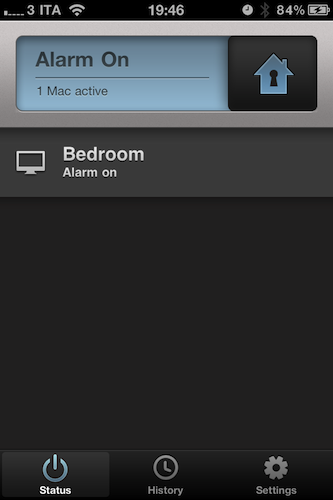
Developed by Orbicule, the creators of computer-tracking utility Undercover, Witness is a new application that’s aimed at remotely locking your Mac, and detecting motion in front of your computer’s camera. Let’s face it: every time we’re away from our Macs, we think about what could ever happen if someone broke into our house or office and stole them. Whilst data protection is essential and there many things you can do to hide critical information stored on your machine (such as disabling automatic login, choose a strong system password or keep everything safe into 1Password, possibly synced with Dropbox), knowing the identity of the person that actually took possession of your computer – or entered your office without authorization – is a whole different story. Unless you’re planning on setting up a relatively expensive home monitoring security system (even with DIY sets, you’re still going to spend a couple of hundred bucks + software to monitor everything) or just carrying your MacBook away with you all the time, there’s no easy to know what’s happening in front of your computer’s screen, and take action at the same time. Orbicule wants to provide an easy and powerful solution to remotely lock a Mac from virtually anywhere, detect motion and be notified with photos and video of who’s doing what in your house.
There are many tweaks and hacks available online to turn your iSight into a security system, as well as utilities to lock your Mac from an iPhone or iPad while on the go. I bet many of you have heard of these methods or at least tried to follow one of those tutorials once. Witness, however, does exactly what a great app has to do: it combines multiple functionalities into a beautiful, easy to use and full-featured package that requires minimal setup and just works. Witness can lock and unlock your Mac from an iPhone, an iPad or the web browser thanks to a system that’s based on an account you’ll have to create on Orbicule’s website. Once authenticated with the account on your Mac, iOS devices and browser, you’ll be ready to start using Witness and be alerted of activity in front of your Mac’s iSight. Witness also requires a desktop companion app that comes as an installer and will restart your computer upon successful installation. The Mac app handles the location of your computer, your account’s credentials, and also lets you decide whether Witness itself or the screensaver should be used to lock OS X. If you choose Witness, a panel will come in the foreground asking for your system’s password. If you don’t want to use the iSight and you have configured other cameras with your Mac, you can choose a different capturing device from the Preferences.
On the iOS side of things, Witness comes with a free remote app that runs universally on iPhones and iPads. The UI is gorgeous, and the app provides a set of functionalities to lock a Mac with a simple swipe, monitor your various machines associated with a Witness account, and browse the history of alerts you’ve received. Being heavily based on the cloud, Witness for iOS will constantly check for updates, pulling images and videos from the Internet if they’re available (meaning: you’ve locked your Mac and something’s going on). If an alert comes in via push notification, you’ll be able to see pictures and videos recorded by your iSight (audio is supported, too). You can email photos directly within the app, and delete alerts you’re no longer interested in. All these features are available on the web counterpart as well.
In my tests, Witness has been very reliable and quite fast both on WiFi and 3G. I was able to lock / unlock my iMac in seconds, receive push notifications moments after motion was detected and download full sets of photos and videos shot through my iSight. A Witness account will cost you $39 as a one-time fee (student licenses available) and gives you access to OS X, iOS and web tools. I highly recommend Witness not only because of the beautiful interface approach and usability – it’s the “just works” factor that combines a utility to lock a computer and turn it into a home alarm system that truly impressed me. You can create a Witness account here, and check out more screenshots below. Read more