This Week's Sponsor:

Winterfest 2025

The Winter Festival Of Artisanal Software


Posts tagged with "iPhone"

The 58-inch Multitouch Table For iPhone Is Real [Video]

We covered the Table Connect for iPhone (a 58-inch surface that mirrors your iPhone screen) a few days ago, and now the developers posted a video of the “device” in action: as you can see in the video above, the table requires you to start an app on the iPhone (likely available through jailbreak) and plug in the cable. Wifi is not supported at this point.

The two guys in the video seem to access the Springboard just fine, they swipe between pages and launch the Photos app. It doesn’t look like a fake, as many readers claimed. The iPhone also seems to be able to output UI elements on that bigger screen just fine.

The Table Connect is still in development, so we’ll keep you up to date with the project.

Update: some readers have pointed out that the guy in the video holds the power button down when firing up the app required to output the iPhone screen.


Skyfire, Already Approved by Apple, Will Bring Flash Videos To The iPhone On Thursday

As noted by 9to5mac, Skyfire will release its first iPhone app on Thursday, which will allow users to load Flash videos on the device using the startup’s on-the-fly conversion technology.

Skyfire takes a Flash video, sends it to its own servers and translates it to HTML5 on the iPhone in a few seconds. I’m not really sure whether Skyfire’s servers will hold up on Thursday, or if there’s anything more to be noted about this app besides Flash conversion. Read more


miCal, Powerful Calendar App for iPhone

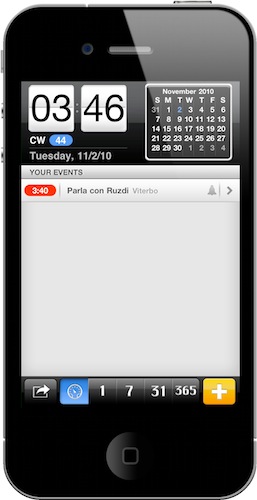
If you follow me on Twitter, you might have noticed I’ve been tweeting about Google Calendar integration on iOS since last week. Indeed, I’m looking at all the possible ways to integrate Google’s calendar utility on iOS, especially on the iPhone which is the device I always have with me. It turns out there are many ways to get your Google Cal up and running on the iPhone, the default one requiring you to create an Exchange or CalDAV account in Mail, Contacts and Calendars. In that way, you’ll be able to use Google Calendar in Apple’s default Calendar app and enjoy the additional sync services offered by Google (very similar to MobileMe).

Or, you can just go looking for a 3rd party calendar application in the App Store and play with features Apple didn’t implement in its default app. So I did, and here’s the first app I downloaded, miCal.

Read more


AppSwitch: Cool Process Management App for iPhone

My  good friend @kenyarmosh tweeted about this app a few hours ago and it immediately caught my attention: a process management app for iOS, like the ones seen on Android and, yes, the dekstop? How’s that even possible without breaking Apple’s ban of usage of private APIs?

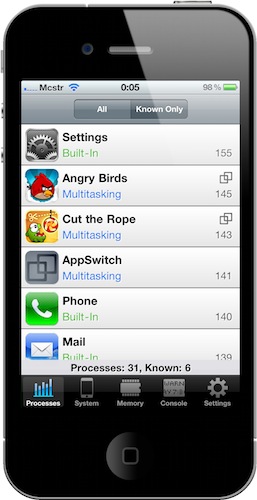
AppSwitch, available at an introductory price of $0.99 in the App Store, monitors and provides detailed information about the apps running in the background on your iPhone. As a matter of fact, AppSwitch can monitor both running apps and background system processes, something that I haven’t seen in any other App Store app before - mainly because Apple doesn’t want users to know which system processes are running. With AppSwitch you can keep an eye on your iPhone memory usage (with an interface similar to the Mac’s Activity Monitor) and see which apps are actually multitasking and which are not, with the possibility to quickly jump to another app or to an app’s specific feature. Read more


Doodle Jump Now Even More Addictive With Game Center Support

Doodle Jump is the iPhone game that started the “Doodle something” trend in the App Store. A simple game where you control a tiny…”thing” that has to jump using the iPhone tilt controls. Simple and addictive.

Doodle Jump’s latest 1.25 update brings support for Game Center: you can now compare your score with your friends to see who’s the best Doodler out there. Please don’t get mad at us when you’ll find out that you wasted 6 hours just trying to beat your friend’s record on Game Center. This update also brings the beloved ghost theme back.

You’ve been warned. Doodle Jump is available at $0.99 in the App Store.


Rumor: iPhone 5 To Hook Up With Any Mac via NFC Technology

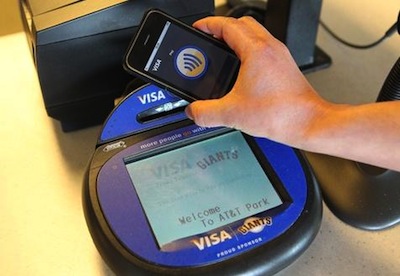
We covered NFC (Near Field Communication) technology before: many rumors and patents surfaced in the past detailing how Apple might be interested in implementing NFC in future iPhones to turn them into “digital wallets” capable of doing things such as on-the-go instant payments. While NFC cellphone-based payments are already reality in Japan and there are a couple of applications that can already do that on the iPhone without NFC (like Visa payWare), we have been speculating about Apple deploying its own solution for months now.

According to new report by Cult of Mac from an anonymous source, Apple might implement NFC in the iPhone 5, but not just for mobile “iWallet” payments. The source claims Apple has been working on a solution to let iPhone users carry their whole OS X experience around and use any Mac as if it was their own computer through an iPhone-based transfer system. Neat stuff. Read more


iPhone DST Bug Spreading Across Europe - And The US?

It happened a few weeks ago in New Zealand and Australia and it’s happening again in Europe: not that European countries have switched from Standard Time to Daylight Saving Time, the annoying iOS 4.1 clock bug that makes alarms go off an hour later is spreading like a virus across European users and it’s making the rounds of Twitter.

Apple promised a fix to ZDNet Australia when the bug was first discovered weeks ago. We speculated that Apple might release a fix the same week to prevent the same bug from happening in Europe (last weekend) and the US (they’ll switch to DST on Nov. 7). No fix has been released yet, and iOS 4.2 is scheduled to ship this month. Perhaps they’ll just wait for the new OS to release a DST fix? Read more