
I’ve previously noted how, almost a year into the Apple Watch, I haven’t found myself depending on any particular Watch app. I mostly use my Apple Watch for basic features such as notifications and timers, and I like wearing it because it looks nice. All the productivity or utility apps I’ve tried are either too slow, too complex for a tiny screen, or they don’t launch at all because of watchOS performance issues.
Posts tagged with "apple watch"
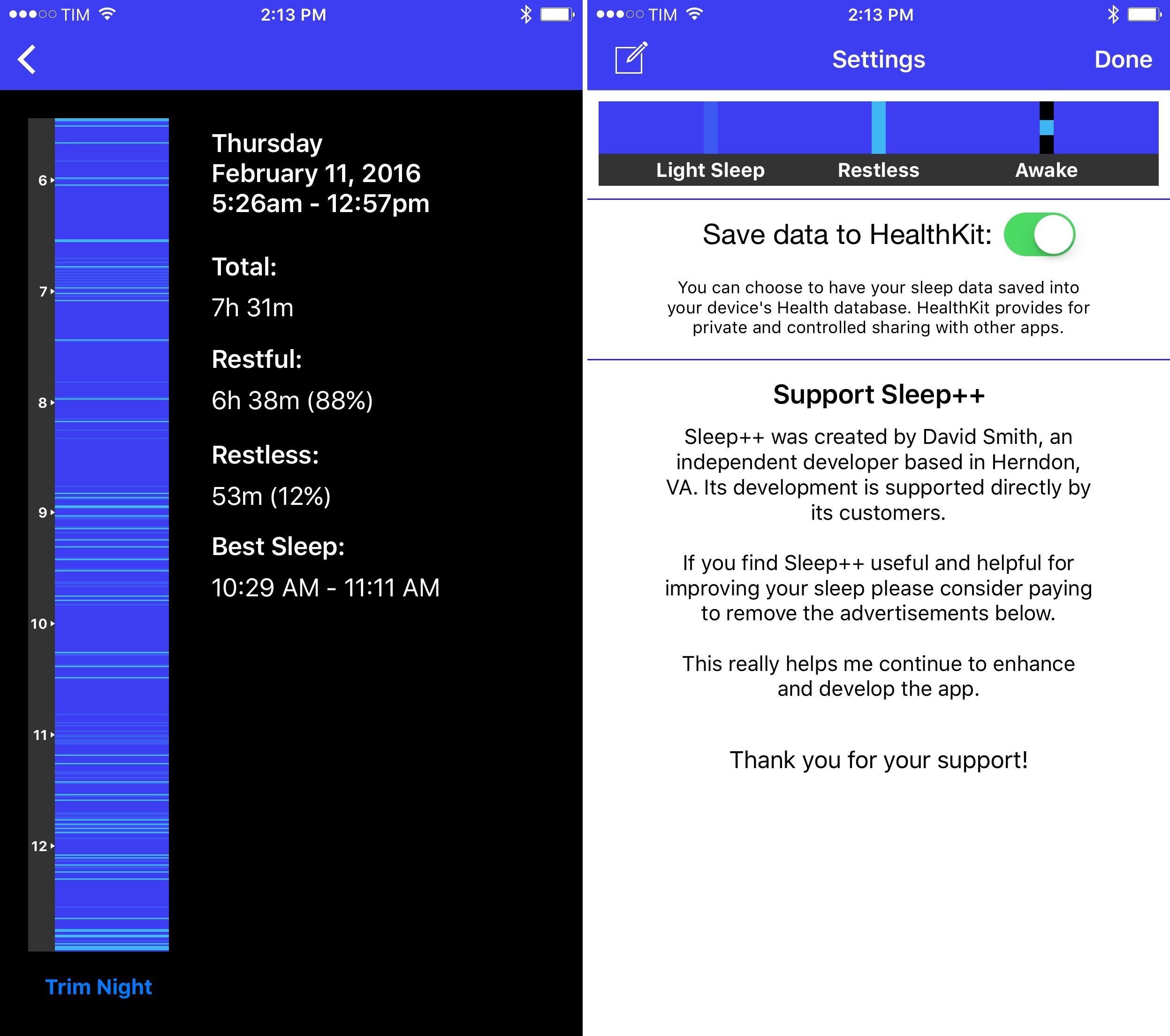
Sleep++ 2.0 Brings Improved Sleep Analysis to Apple Watch App
Unhand Me! – Preventing Unwanted iOS Device Handling
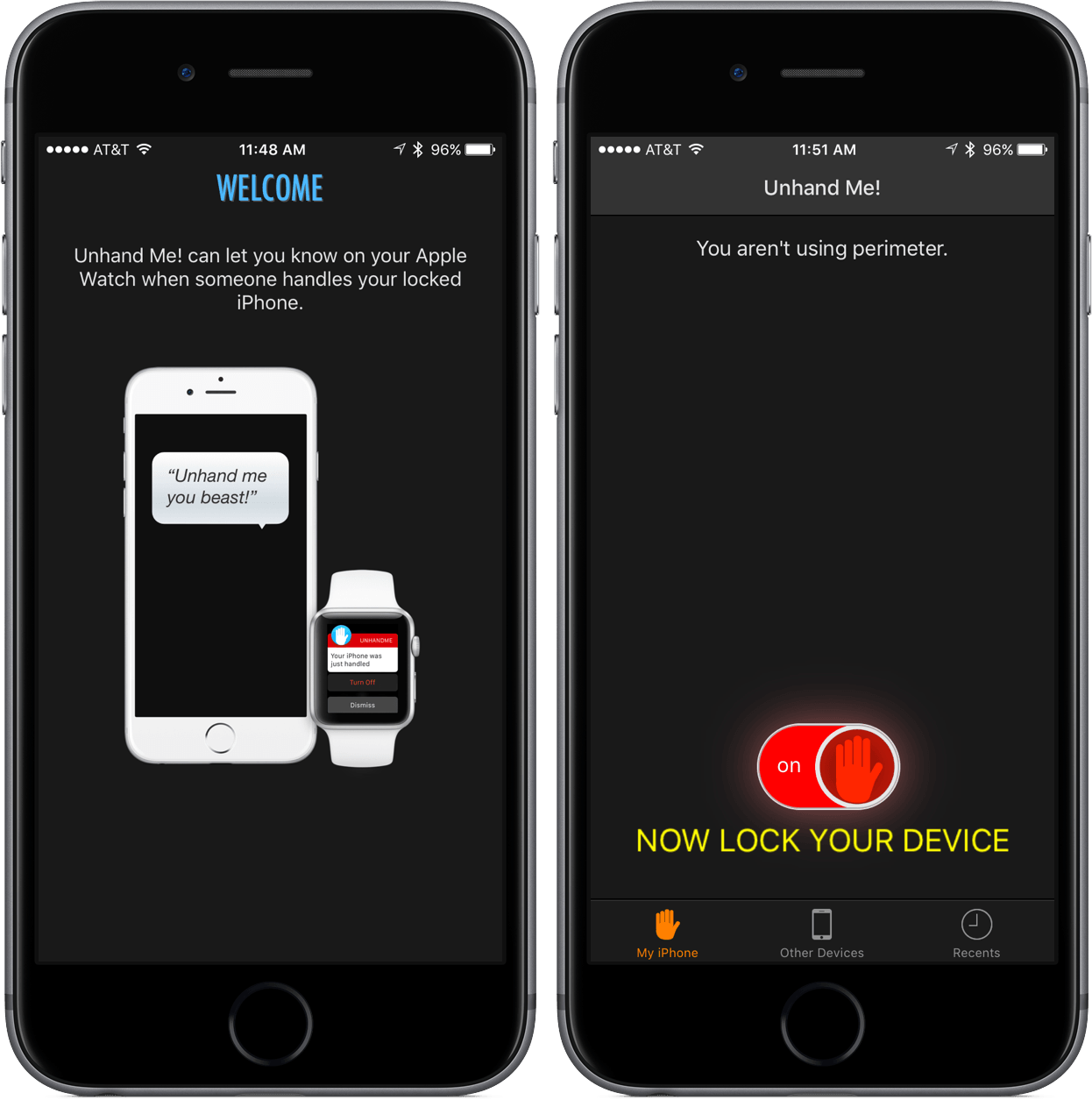
Unhand Me! comes at a time of Apple Watch app confusion. Some developers have chosen to create apps that keep most of their functionality for the Watch; other Watch apps are smaller versions of iOS apps with some added features.
Unhand Me!, which is an app that notifies you when your iOS device has been handled, is an attempt at the latter. Through actionable notifications or the Watch app, Unhand Me! can be a must-have for those who own an Apple Watch. But even for the smartwatch skeptics, this app is one to strongly consider downloading for the safety of both your hardware and data on your iPhone and iPad.
How Apple Watch Keeps Time→
From The Telegraph’s interview with Apple’s Kevin Lynch on the timekeeping features of Apple Watch:
Apple built its own Network Time Protocol (NTP) servers at various locations to ensure the delivered time is as close as possible to Stratum One accuracy, the time server which keeps the Apple Watch within microseconds of Stratum Zero devices - the highest possible quality for time references.
Once the time reaches the Apple Watch, the team worked to ensure it remains accurate, he says. Each device uses a temperate controlled crystal oscillator to counteract the natural drift that clocks and watches tend to experience over time.
I’m not sure any human watch wearer would ever notice a 50-millisecond difference – especially when waiting for midnight at a New Year’s Eve party – but still, fascinating tech.
HeartWatch: An Accidental but Heartfelt App→
Great story and app idea by David Walsh: dissatisfied with the presentation of heart rate data in Apple’s Health app, he created HeartWatch – a dashboard for your heart rate data. The app works best if you’re an Apple Watch wearer (you get readings every 10 minutes) and it includes features such as peak zones, timelines, and – my favorite – separate tabs for regular, waking, and workout heartbeats.
Heart Watch lets you see how your heart is beating across three simple views. Waking, Regular & Workout. Each of these views are isolated because, while you may want a higher heart rate during a workout, if your heart is racing when you aren’t doing any exercise then this is likely not a good thing and probably something you might want to show your medical practitioner.
David has shared the full story behind the creation of HeartWatch in a blog post:
Now I wanted to dig a bit further to find when and what was happening with my heart. Unfortunately, the Health app wasn’t very much help from here forward. There’s a summary graph, then to go any further, you have to read every single heart beat reading captured. With no search! Proverbial needle in haystack. So I looked around to see if there were any apps to help. Short answer. No. They seem to fall into finger on the camera apps, “fitness junkie” apps or just giving a simple average.
My research also made me realise a simple average is close to useless if you work out. Obviously your heart rate will be higher when you work out. This then throws out the daily average compared to days you don’t work out.
So I started a side project. Something that could show me what was going on. This then of course grew, as these things tend to do.
I took HeartWatch for a spin, and I like what David is doing. The app imported months of heart rate data from Health in less than a minute and it presented me with a clear calendar view of different reading types. HeartWatch can show percentage changes from previous readings, and it neatly breaks down a day’s data with colored charts and labels. I would love to see these kinds of average stats for weekly and monthly stats too, but, overall, HeartWatch is off to a good start.
Like David Smith’s Pedometer++, HeartWatch is another app that uses data from the Apple Watch in an interesting and useful way. If you care about your heart rate as measured by the Watch (and you should), I recommend giving HeartWatch a try.
Pedometer++ Gets Smarter Step Counting on Apple Watch and iPhone→
David Smith’s Pedometer++ is one of the apps that got me back in shape and I’ve always appreciated the thought and care that he puts into it.
Today, David released a substantial update to Pedometer++ with an entirely new logic to coalesce steps registered by the iPhone and Apple Watch:
You might be wondering why I don’t use Apple’s Health.app merging system for this. After extensive testing about how that works I determined that it doesn’t really do a good job for step data. The Apple Health algorithm works around the concept of a ‘priority’ device. This priority device’s steps are then used in all instances except where that device is completely unavailable. In which case the secondary devices data is used to fill in the gaps.
The concept of a fixed priority device doesn’t really work for step data. As you move between the various activities of your daily life, the best device for measuring your movement is constantly switching. Thus you need a data merging algorithm that can dynamically analyze your step data and determine which device’s data is best at any particular time.
That is exactly what Pedometer++ now does. It goes through your daily data and can dynamically determine which device to use for any particular point in your day. The result is a much richer and complete picture of your daily activity than you’d get from Health.
I’ve tried many pedometer apps for iPhone and Apple Watch over the past few months, and I’ve noticed annoying discrepancies between data recorded by my iPhone and steps measured by Apple Watch. David’s intelligent system to reconcile steps taken sounds like what I’m looking for. It’s been a while since I wanted to really check out a new watchOS app, too.
Apple Debuts Seven New Apple Watch Adverts

Apple today debuted seven new adverts for the Apple Watch, which follow in the same style as the six Apple Watch adverts that debuted on October 5. These short 15 second pieces highlight various features of the Apple Watch including Apple Pay, different watch bands, music controls and some third party apps including Uber and eBay.
- Dance: Apple Watch lets you control your music right from your wrist. Whatever song you want to hear, just say it and play it.
- Skate: If you need to buy something quick, Apple Pay lets you pay in a hurry.
- Move: Your Apple Watch helps you set and achieve new goals. Even a goal as simple as moving more each day.
- Play: Apple Watch can send you eBay alerts instantly, so you’ll never miss a bid.
- Style: New bands, new colors, new ways to change your Apple Watch to match your own look.
- Kiss: Your Apple Watch will gently let you know when your Uber arrives. But there’s no rush.
- Travel: Apple Watch puts your boarding pass right on your wrist. Now traveling is one step simpler.
You can view all the adverts below the break or on Apple’s website.
Watch Keypad Lets You Call Any Number from Your Apple Watch
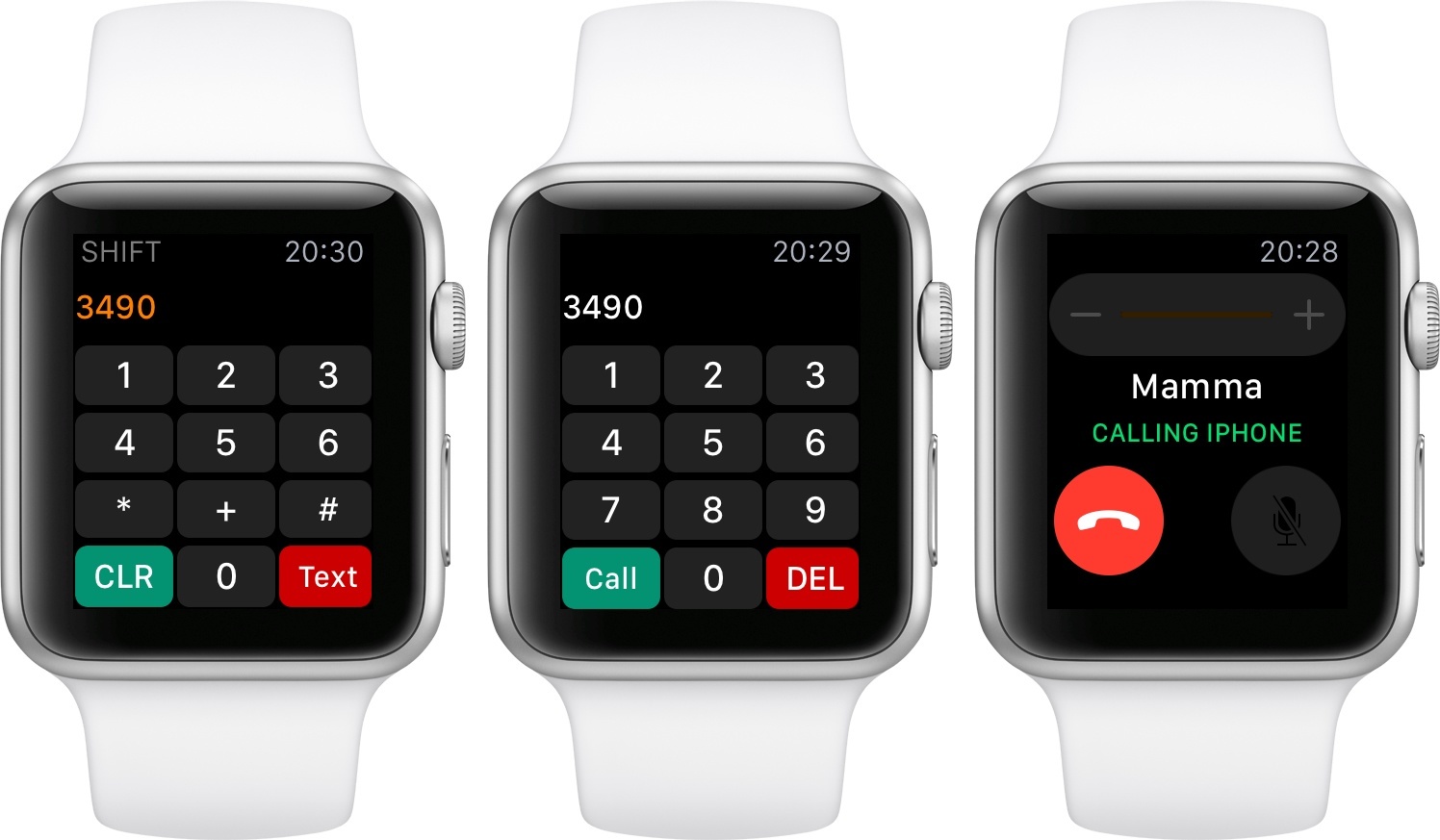
Developed by Rob De Ruiter, Watch Keypad is a useful app for watchOS 2 that lets you call or text any number from your Apple Watch.
I know what you’re thinking – nobody really has to remember phone numbers in the age of cloud-synced contacts and address books. Thinking back to a decade ago, it’s odd to consider how many phone numbers I used to remember – dozens of them for close friends and family members – and compare that to today, as I barely know my own number. Still, there are times when I need to call a number that is not in my contacts list (and that I can’t tap directly in a webpage or in Maps). For those occasions, having the ability to do so from the Watch – which may be best when doing something else, such as cooking or chores – is a good option.
Watch Keypad launches fast and shows a keypad with numbers and buttons to delete and call. Upon each press, the app will play a sound and a subtle vibration to communicate input (sort of like PCalc does). Spinning the Digital Crown upwards will reveal a different set of keys (such as asterisk and clear), as well as a different button to send a text with the built-in Messages app. The app’s primary functionality – phone calls for typed numbers – is handled by the iPhone, which will initiate a call with the native Phone app and display the special green status bar when a call is happening. A list of recent calls is also available in the Watch Keypad app itself, both on the Apple Watch and iPhone.
Watch Keypad fixes a very specific omission – the lack of a keypad in Apple’s Phone app for Apple Watch. De Ruiter’s solution works well, and it’s only $0.99 on the App Store.
Apple Debuts Six New Apple Watch Adverts

Apple yesterday debuted six new adverts for the Apple Watch. The new adverts are short 15 second pieces which highlight various features of the Apple Watch (from Apple Pay to audio messages to fitness features) and how they can be useful in different contexts.
- Sprinkle: With Apple Watch, and Apple Pay, buying something on the go is simpler than ever.
- Date: When you get a new message Apple Watch gently lets you know it’s there, so you can see it right away.
- Ride: Apple Watch gives you turn-by-turn directions, so if you get a little lost you won’t be for long.
- Sing: Sending an audio message on your Apple Watch is simple. Just say it and send it.
- Train: Apple Watch lets you check your heart rate fast so you can keep your heart beating faster.
- Cycle: Apple Watch tracks every second of your ride, from warm up to cool down.
You can view all the adverts below the break or on YouTube.
Apple Leather and Water→
Greg Koenig has been running some (unscientific) tests on Apple’s Leather Loop band:
So far, this chunk of strap has been through 4 different soak cycles. Three of those cycles were a 10 minute soak, followed by air drying at room temp. The latest cycle was a full 8 hour overnight soak. Drying takes about 3 hours.
The result? The leather shows zero visible signs of damage, zero texture change. As far as these (again, unscientific) tests are showing, the leather on Apple’s Loop band is essentially waterproof.
(Make sure to read his disclaimer.)
Anecdotally, my Leather Loop band has been through showers, sea water, rain, and sweat. I took basic care of it, and it’s exactly like the day I bought it. One of my favorite Watch bands.