


A good time-based brain teaser takes considerable skill and mental coordination to solve, and with Woozzle you’ll be shifting colored orbs around a series of mazes to complete the colored wheels and earn your right to a perfect 3-ball’d perfect score (the equivalent of earning three stars in Angry Birds). Woozzle spits out a series of colored orbs which fall into open slots on wheels that can be spun and aligned with maze-like ramps where you can swipe the orbs onwards to the appropriate destination. Becoming increasingly complicated as you progress, you’ll soon have to manage several paths that change direction thanks to levers, while managing incoming orbs and competing to solve the puzzles as quickly as possible. The puzzles aren’t terribly difficult to solve (you can take as long as you need to get through the sometimes grueling levels), but the faster you complete the objective, the higher score you’ll obtain. Excellent management skills are a must: you’ll have to control multiple wheels at once to prevent orbs from bouncing back and to compete for the best times.
Posts tagged with "app store"
Tickle Your Brain With Puzzle-Logic Game Woozzle
“ix.Mac.MarketingName” String Appears In The App Store - What Could It Be?
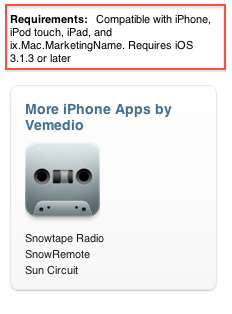
As noticed by several developers and bloggers last night soon after Tweetbot went live in the United States, a strange and curious string started appearing in the App Store’s description pages, under the “Requirements” info tab: ix.Mac.MarketingName. Initially tweeted by Panic’s developer Cabel Sasser, the “bug” has extended to hundreds of other apps in the Store.
This string has lead many to speculate it could be an indication of a new device capable of running iOS apps in the works that’s somehow showing up on the App Store due to a technical error, an old placeholder, or a simple bug on Apple’s end that doesn’t mean anything. Some theories point to “ix.Mac” as an emulator for iOS apps on the desktop – similar to what Apple is already doing with the iPhone Simulator, but for consumers. Others speculate it could be a new device, a sign of universal OS X / iOS apps, or apps finally coming to the Apple TV. The Apple TV second-gen, however, runs a modified version of iOS – whilst the string clearly mentions the Mac.
The most interesting theory we’ve read so far is perhaps looking a bit too much into the placeholder’s name, yet here it is: what if it’s not “ix.Mac.MarketingName” but iX – as in iOS meets OS X?
You can see an example of the string here.
Update: Apple removed the string from every app in the Store. See here.
World of Goo Now Available for iPhone, Now Universal

2D Boy’s mega hit World of Goo set records for iPad sales and just last week we told you that a universal update was awaiting approval. The universal update is now available with support for iPad, iPhone and iPod Touch. So instead of walking around in circles waiting for Tweetbot (and our review), why not grab the universal update to World of Goo HD? It’s only $4.99 and you can get your gooey hands on it right here.
An iPhone/iPod Touch only version is also available for only $.99, you can get it here.
Oscium’s $300 Kit Turns iPad into Oscilloscope

For anyone that doesn’t know, an oscilloscope, or O-scope, is an electronic measuring instrument that creates a visible two-dimensional graph, on a screen, of one or more continuously varying voltages or currents. Oscium has revealed the iMSO-104, a combination of a free universal iOS app and a $300 hardware kit that attaches via the iDevice’s dock connector. Read more
Microsoft Releases Bing for iPad

Bing for iPad has just been released onto the iTunes App Store and it is Microsoft’s first app to make it onto the tablet device. Just like their Bing iPhone app and the Bing website, the daily image is the first thing you’ll notice with the app and it looks beautiful on the iPad’s screen. Furthermore the app gives you a quick glance of key information of Weather, News, Movies, Trends and more in a bar at the bottom of the screen.
The app contains a wealth of features and has been exceedingly well-designed to take advantage of the iPad’s strengths - this can definitely not be called just a search engine app. Those bottom tabs of information are a gateway into a full screen of lots more information. However probably the best feature of the app is the Trends page which gives you a very nice, almost FlipBoard-esque, page with all the top searches on Bing, along with a relevant image. Like the iPhone app it features a Voice Search (which works pretty well) and search, whether it be done via text or voice, can be for a website, news, image, video or map.
There is a lot of swiping that can be done in the app and it allows you to go back and forward from your last ‘panel’ of information, whether it be a web search, news page or weather. Bing Maps is included and fully functional letting you search for an address or business, find local business and even get directions.
The iPad app is curiously only available in the US iTunes app store which is certainly odd considering the web version does have international editions, that even have a different daily picture. However even weirder is that I downloaded it from the US store and ran it in Australia and it not only gave me the correct weather but the daily image was the Australian one and even Bing Maps showed my location and correctly showed local businesses, only the movie theatre times didn’t work. Jump the break for some more screenshots of the app.
ESPN Launches ‘WatchESPN’ App, Commercial for iDevices

ESPN announced today its flagship network ESPN as well as ESPN2, ESPNU and ESPN3.com are now available to subscribers of Time Warner Cable, Bright House Networks and Verizon FiOS TV via the new ‘WatchESPN’ App in the iTunes App Store.
WatchESPN has shown up in time for the Masters, the NBA Playoffs and the Major League Baseball season. Qualified subscribers who receive the linear networks as part of their video subscription can now watch the channels from the convenience of their iDevices. They even made a very funny commercial to promote the app, check it out after the break. Read more
US Privacy Investigation Targeting Smartphone App Developers
Federal prosecutors in New Jersey are reportedly investigating whether various smartphone applications are illegally obtaining and transmitting data from users without their consent or knowledge. In the US it is a violation of federal computer fraud laws for companies to collect information about a user without notice or authorization.
The prosecutors are investigating whether various apps on smartphones such as the iPhone and various Android phones are not notifying users what data is being collected and why such data is required by the app. This data being collected ranges from a users location to the unique identification data for that device and even personal information. The Wall Street Journal tested 101 apps and discovered that 56 of those transmitted the unique identification number for the device without letting users know, 47 transmitted the phones location and 5 sent a users age, gender and other personal information. Worryingly 45 of the apps tested did not have any privacy policy either in the app or on their website.
Grades 2: The Student’s Record Book to Success
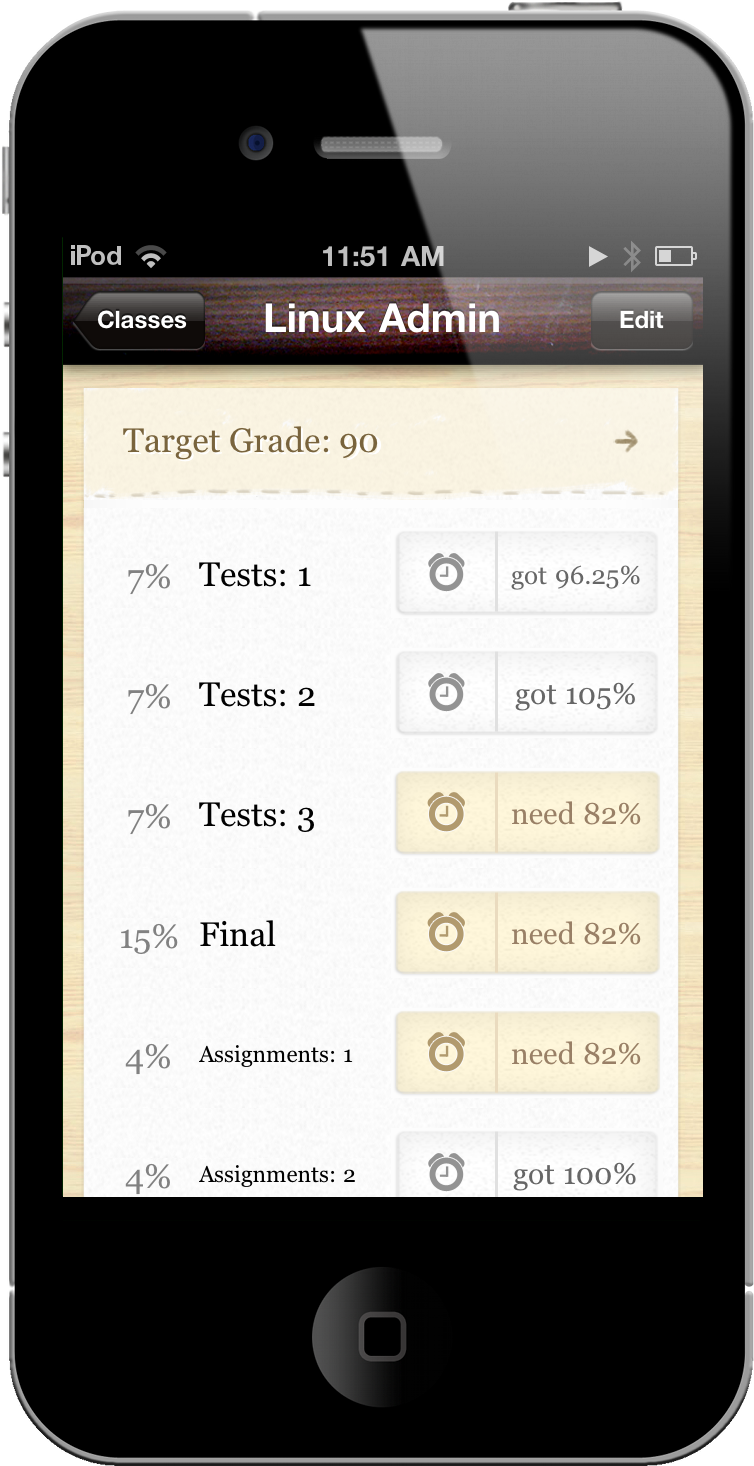
As ambitious as we are as students, we’re not always guaranteed good grades or perfect scores despite long nights and exam crams. With nothing more than a few syllabi and red ink, keeping track of your grades and measuring your performance with a calculator is outdated and unnecessary. Weighted grades and a failed exam can turn a trip to the calculator into a worrisome mess of numbers and unmet expectations. In your pocket, however, you already have all the tools necessary for instant grade-ification. Grades 2 is your personal performance record that crunches all of the numbers so you don’t have to, providing near instant feedback on what you need to aim for to maintain your target grade (preferably an A). Jeremy Olson is at it again, refining the user experience from Grades and delivering a free update that adds a GPA calculator and due dates to keep you on schedule.
iAd Gallery Violates Apple’s Own Guidelines
iAd Gallery, a free iPhone app Apple released yesterday in the App Store, has generated several debates on the Internet about its rather “limited” feature set: the app, good-looking and responsive, does only one thing: it’s a collection of advertisements you can browse and “love.” By aggregating the best campaigns recently launched on the iAd network, iAd Gallery only lets users interact with a spinning wheel featuring ads from different brands, view information and “launch” them to experience the rich functionalities of iAds. Basically, it’s a free ad collector for iPhone. Not exactly the kind of “productive” (or at least entertaining) software most users would expect from Apple.
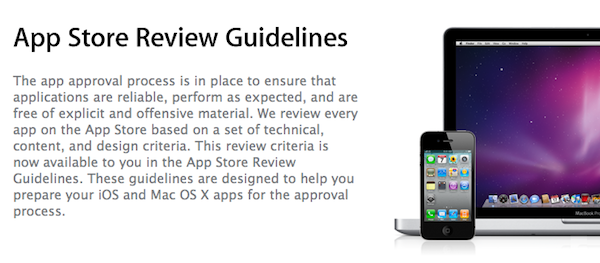
As noted by Dan Frommer at Silicon Alley Insider, it is kind of ironic that iAd Gallery may be violating Apple’s own Review Guidelines for iOS apps and should have been rejected by Apple itself. In the 2.13 section of the Guidelines, the company explains:
Apps that are primarily marketing materials or advertisements will be rejected
iAd Gallery indeed is based on marketing materials and doesn’t do anything but enabling you to browse various ad campaigns. Sure, you can read details about a specific campaign and learn more about the agency behind it, but that’s not really a “functionality” in our opinion. The app also lets you get in touch with the iAd team with a Contact button: perhaps the App Review Team at Cupertino thought that was enough to let the app through the App Store gates.
The truth is, of course Apple won’t reject its own app because it violates one of the Guidelines. They manage and have the ultimate word on the App Store, and they can release whatever they want under the Apple, Inc. name. But looking at the big picture, it is kind of funny that Apple is distributing an app that would have been rejected if it came from someone else.