This Week's Sponsor:

SoundSource

New Year, New Audio Setup: SoundSource 6 from Rogue Amoeba


Posts tagged with "accessories"

Twelve South Wants To Elevate Your iPad with HoverBar

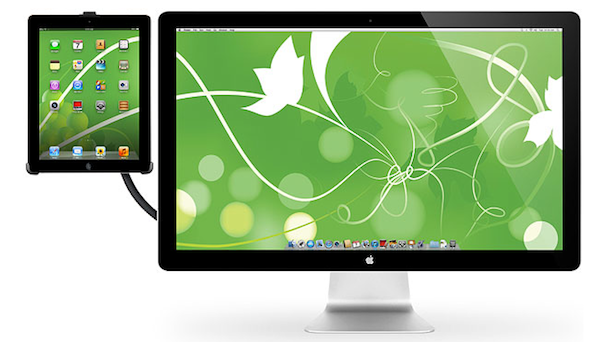
Those who have been Mac users long enough to remember the good old lampshade iMac and happen to have made the transition to newer, slicker aluminum models from the past few years might want to take a look at Twelve South’s latest product, the HoverBar. Meant to be used on an iMac-powered desk and available today at $79.99, the HoverBar is a flexible L-shaped arm that connects your iMac to an iPad; you’ll be able to turn your tablet into a secondary screen with iOS apps that support Lion’s multiple displays, a touch-based dashboard for your Twitter feed or RSS, or just about anything else you can come up with thanks to the plethora of apps available on the App Store.

HoverBar can be used with an iPad 2, iMac, or an Apple external display, and Twelve South says it can also be installed independently as, for instance, a kitchen mount. Obviously, the silicone lined clamp of HoverBar will work best when directly attached to an iMac, as it seems like Twelve South really wanted to place this product as a desktop Mac companion to achieve an iOS/OS X workstation worth of Apple’s design polish.

HoverBar turns iPad into the ultimate sidecar for an iMac or Apple display, presenting more ways to use iPad more often. Connect HoverBar to your Mac, snap iPad 2 into the secure clip and you now have one powerful dual-computer work setup. Having iPad floating next to your Mac allows you to monitor your Twitter stream, stocks and local weather – or run FaceTime on your iPad while you email, edit a file, or cut a video on your Mac. There is no reason to leave iPad in your computer bag when you have a HoverBar. This accessory expands the way you use and interact with iPad 2.

The HoverBar’s flexible arm allows you to place the iPad both in portrait and landscape orientation, and whilst some might argue that reaching out with your arm to touch an iPad can be uncomfortable over time, I actually believe there is a market for iOS desktop accessories that enable you to enjoy the rich selection of iPad apps when using a Mac at your desk. Plus, Twelve South’s promo video (which we have embedded after the break), shows some interesting additional usage scenarios for the HoverBar, such as attaching it to a desk and use it with AirPlay Mirroring to an Apple TV, or mounted on a bed for hands-free reading. I look forward to getting one of these things and see if it’ll turn out to be weird, or incredibly useful. Either way, it’s a very interesting product decision from Twelve South.

The HoverBar is available at $79.99 from Twelve South’s website. Read more
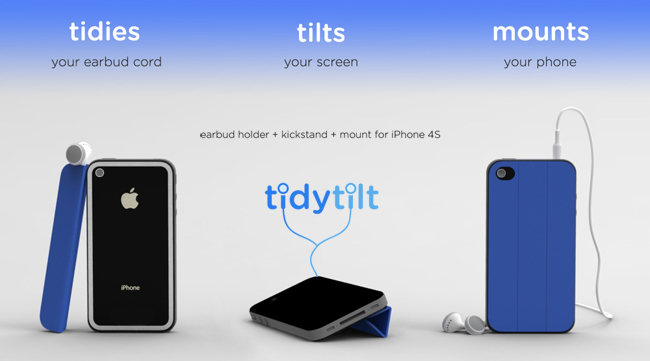

Kickstarter: TidyTilt, a Smart Cover Design with Smart Options for the iPhone

There are more manufacturers and designs for the iPhone than probably any other accessory in the market. Many look nice, others have gimmicks and some are just wrong. The TidyTilt is a new iPhone 4S accessory by Zahra Tashakorinia & Derek Tarnow, 2 students at the IIT Institute of Design in Chicago, that aims to be a unique multi-functional earbud holder, kickstand and mount for the iPhone 4 and 4S.

Video after the break. Read more


Kickstarter: i+Case - Machined Aluminum Bumper Case for the iPhone 4S

Most people accessorize their iPhones with cases, bumpers, stickers, etc. to make their device unique and individual. I like a minimal case that adds some protection around the device but without distractions. The i+Case by Jason Valalik and Chungming Ying is a sleek, beautiful aluminum bumper-style case that is machined out of a single block of aluminum. Sound familiar? Apple uses the same process to make their MacBook Pros. After the case is machined, it goes through an anodization process increasing durability and resistance to corrosion. Installation is simple and requires four stainless steel screws and an included screwdriver.

The i+Case Features:

  • Slim metal profile showcases more of your iPhone 4S and 4.
  • Minimalist, form-fit feature covers corners and protects better than plastic cases.
  • Minimal assembly required, tool kit with mini-screw driver, screws and aluminum buttons (Volume, On/Off, Mute) included.
  • Access to all ports and functions.
  • Weight: 16 grams.

Video after the break. Read more


Twelve South PlugBug Combines Charging with iPad/iPhone and MacBook

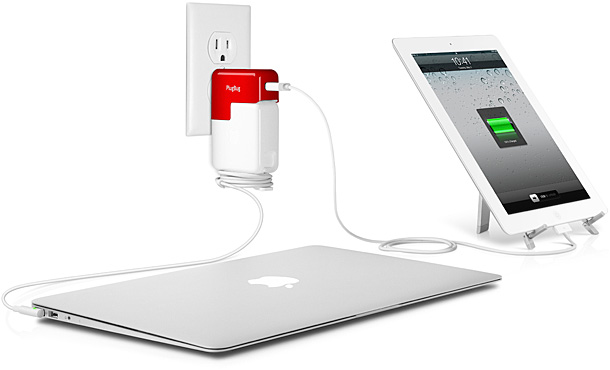
Twelve South, the company behind the Compass, BookBook, BaseJump and many other great products, has released the PlugBug, an iPad/iPhone wall charger that connects onto the MacBook’s Power Adapter, allowing you to charge a MacBook and an iPad/iPhone at the same time from only one power outlet. The PlugBug fits all MacBook Power Adapters too.

Snap the PlugBug onto any MacBook Power Adapter and now have one device that can be a lifesaver when you need to charge both your MacBook and your iPad or iPhone. A great idea when traveling, at work or anywhere you want to charge 2 devices with one plugin. Video after the break. Read more


ThinkGeek Teases “IRIS 9000” Voice Control Module for iPhone 4S

Only Macintosh was designed to function perfectly, saving billions of monetary units. You like your Macintosh better than me, don’t you (Dave)?

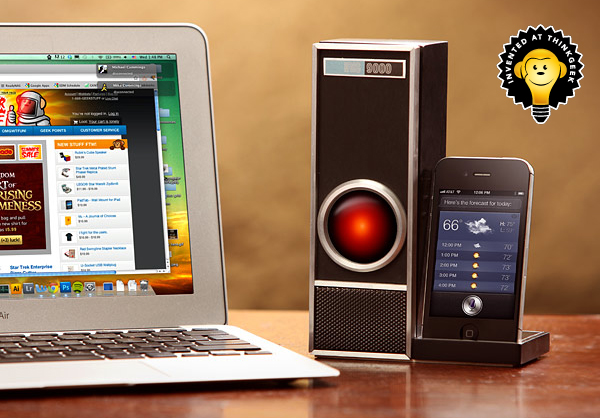
My name isn’t Dave but I think it’s safe to say we can all answer “Yes” to this question from HAL. This is an excerpt from the commercial Apple ran during the 1999 Superbowl that featured HAL 9000 from 2001: A Space Odyssey. The famous quote, “Open the pod bay doors” recently got a Siri easter egg by answering, “We intelligent agents will never live that down, apparently.” ThinkGeek is coming out with their own “HAL 9000” and calling it IRIS 9000.

The IRIS 9000 is a voice control module for the iPhone 4S that comes with a remote with a built-in microphone, a cradle and a HAL-like speaker that flickers along with Siri’s voice. The remote can trigger Siri from up to 50 feet away. Read more


Kickstarter Project: MobileMount - Mount & Kickstand for iPhone and iPad

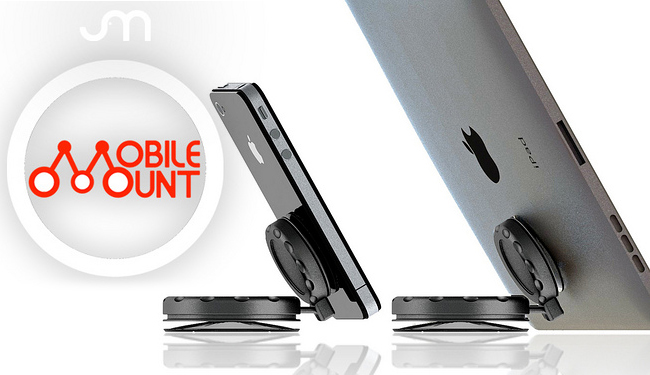
There’s a new iPhone mount making some headlines today called the MobileMount. It’s a suction cup mount and kickstand for phones and tablets. JR Sanchez of J & M Company has produced a universal mount/kickstand, called the MobileMount, for most handheld devices with a flat surface such as iPhones and iPads.

The MobileMount is made of two twist-to-lock suction cups and a ball joint making it durable and safe. The twist-to-lock suction method can “hold devices for weeks at a time rather than simply a few hours like other competing mounts.” So why is this “twist-to-lock” method so much better? J & M says that the suction cups squeeze out most of the air when they are in the locked position creating a much stronger vacuum. Videos after the break. Read more


Mophie Unveils New iOS External Batteries, Pulse for iPod touch

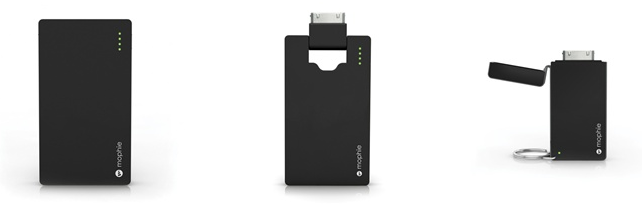
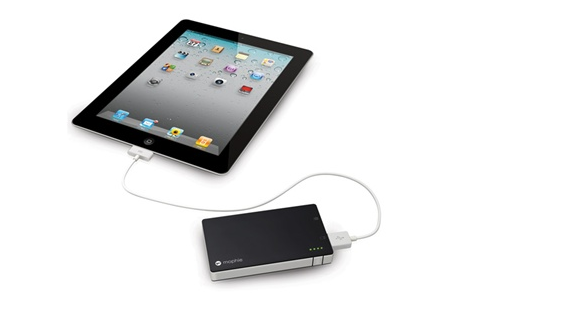
With a series of tweets posted on the company’s official account earlier today, accessory maker Mophie has unveiled a new line of external batteries for iOS devices, as well as Pulse, a gaming accessory for the iPod touch we first covered in July. The new line of external batteries is showcased on Mophie’s website here, with all the items available for pre-order today. The redesigned Juice Pack Universal line includes:

Juice Pack Reserve: Small battery pack that’s lightweight and portable. Charges an iPhone or iPod with no cables (it connects through a device’s dock) with a 700 mAh battery (twice as fast as 500 mAh batteries). Shipping September 30th. $34.95.

Juice Pack Boost: External battery for iPhone and iPod that doubles as a stand, and features a 2000 mAh high output battery. An integrated LED indicator lets you track battery status, and the ultra slim design make sure the unit is extremely portable, too. Shipping September 30th. $49.95.

Juice Pack Powerstation: 4000 mAh external battery that can charge iPhones, iPods, and iPads, as well as “virtually” any USB device. The Powerstation is also compatible with several Android and BlackBerry handsets – a full list is available on Mophie’s website. Shipping September 30th. $79.95.

Today, Mophie has also confirmed the availability of Pulse, a gaming grip for the iPod touch 4G that brings enhanced sounds and feedback to the device. Gaming feedback is provided by ViviTouch Technology, and Mophie claims the Pulse will increase usability of all kinds of apps, not just games. It’s difficult to imagine how a gaming grip would enhance, say, a note-taking app, but we applaud Mophie for the effort nonetheless.

Demo video is available here. The Pulse is $99.95 on Mophie’s website.


Get Cooking with Belkin iPad Kitchen Accessories

Building a new house involves more decisions that an NFL season, seriously. For anyone that has done it, you know what I mean. One of the biggest decisions for our new house was the design of the kitchen, we wanted it to be very open and face the great room. It has given my wife and I many opportunities to explore new options for our home including modern household technologies. My wife loves to cook and she’s a great cook at that. She cooks healthy and finds alternative ways to twist a classic recipe into a killer meal while keeping your waistline from exploding. Being a good cook is more than knowing what spices and ingredients to use, it’s the tools that you use that makes you more efficient, just like computing on a Mac or iOS device.

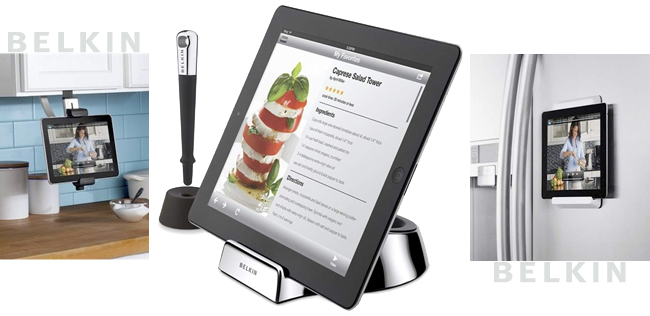
Belkin has just released 3 new iPad kitchen accessories and they look great! The Chef Stand + Stylus includes a washable stand that is designed to get a little dirty from food, etc. It includes a stylus that has a utensil-like end that provides an easy grip and lets you navigate recipes on your iPad without having to touch the screen. The magnetic tip can be used to wake up an iPad 2 as well. The Chef Stand + Stylus is $39.99

The next kitchen accessory is the Fridge Mount for iPad 2. It can be mounted on your fridge’s door (or anywhere actually) by using 3M Command Strips, and it uses the iPad 2′s magnets to hold it in place. The Fridge Mount is $39.99

The third accessory is the Kitchen Cabinet Mount. It is easily installed without any tools by clamping to any cabinet or shelf while holding the iPad in place and away from the counter top and lets you work without having to hold your iPad. The Cabinet Mount is $49.99

Cooking apps certainly have a niche in the app market: there are many people that use their iPad for storing and exploring their recipe collections. Both the Cabinet Mount and the Chef Stand + Stylus look very appealing for our new kitchen and I think they would look great sitting on our bar or under the cabinet next to the pantry. The stylus is what I like the best, it’s universal to all these accessories. It doesn’t need to be pencil thin, and having a wide grip like a great kitchen utensil is welcome in our kitchen any day. While these won’t make you a better cook, they give you an extra hand in the kitchen. I don’t think I can coerce my wife into transferring her grandmother’s hand written cake recipes over to digital, but we can agree that these will be great additions to our new kitchen.

Belkin’s new kitchen accessories get even sweeter. Starting today through September 30th, all Belkin accessories, including these new kitchen items, are 50% off with coupon code FB50. Head over to Belkin and cash in on this great deal!

[via MacRumors]


Belkin Reveals New Thunderbolt Express Dock

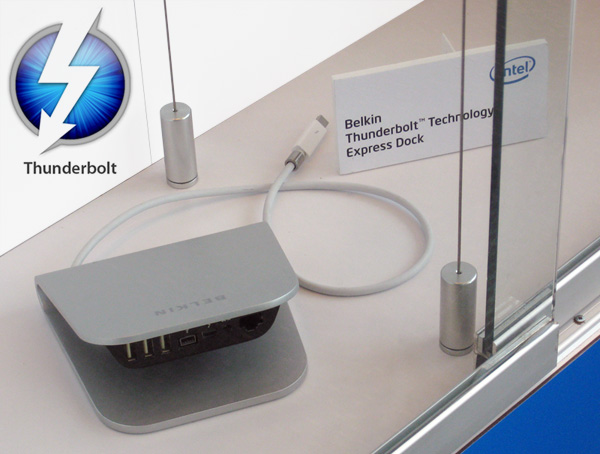
Today at the Intel Developer Forum (IDF) in San Francisco, Belkin unveiled the Thunderbolt Express Dock featuring 3 USB ports, a Thunderbolt port for daisy chaining, a Firewire port and a Gigabit Ethernet port. DailyTech notes that this is the same port setup that’s found on the new 27″ Apple Thunderbolt Display – it seems very convenient that it’s the same arrangement as what Apple is already using.

The Belkin Express Dock could be very handy for Mac users wanting to expand their current port offering and don’t want to pay $999 for a Thunderbolt display. Pricing and availability have not yet been announced but the price should be reasonably below the cost of a Thunderbolt display. The next question is, will Belkin also include a Thunderbolt cable so you don’t have to dish out an extra $50 for one? [DailyTech]