Convertrain: Model Railroad Converter

Before I started MacStories, I used to work at an eBay drop-off store where people could come to sell and buy things on eBay if they didn’t have the time or knowledge to do it on their own. There was this guy who came to visit twice a week to buy and sell railroad and train models – they were rare and expensive, and they required a lot of talking to potential bidders and sellers to ensure the quality of the model. I had heard of that hobby (known as model railroading), but the firsthand experience of selling and buying models allowed me to know more about the fervent community of rail transport modellers (and railfans in general, which include Pixar’s John Lasseter).

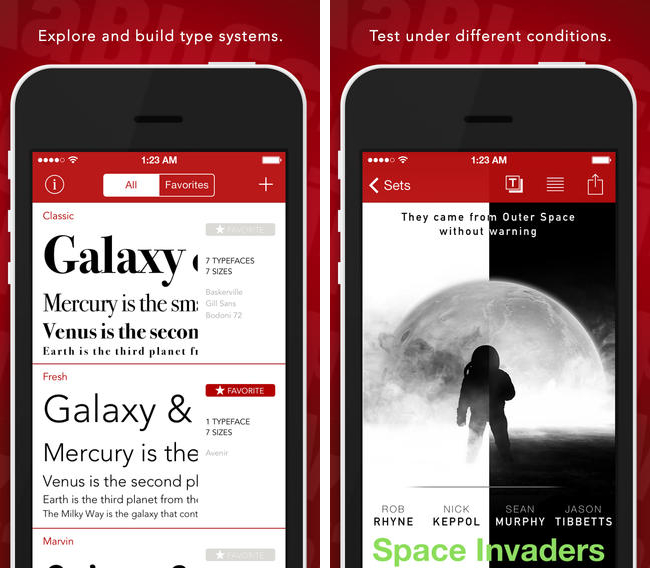
All of this to say that when I got an email from the developer of Convertrain, I knew what he was talking about. I remembered the days when I used to look up prices and photographs for my old customer and the time spent tracking down rarities on eBay. Convertrain is a handy converter for scale models that lets you set up notebooks for your models, add your own scale units, and export items to a variety of apps and services. It’s designed for iOS 7 and it integrates with the iPhone’s camera to add photos of your model railroads.

$1.99 on the App Store.

Permalink

Quick Math+

Last year, I reviewed Quick Math, a game that let you solve quick arithmetic tests using your handwriting on the iPhone’s screen. This year, developers Shiny Things have released Quick Math+, an expansion of the original concept that includes new game modes and avatars to unlock as you play the game.

The Quick Math series is a great example of education and fun combined on iOS, and the new game is every bit as challenging as the old one (the Memorize mode is especially tricky at Advanced, but you should try Extreme). Quick Math+ is a new (Universal) app available at $1.99 on the App Store.

Permalink


Anand Lal Shimpi On The iPad Air vs. iPad mini

The biggest in my eyes is the iPad Air’s wider gamut display with full sRGB coverage. The mini’s Retina Display is good, the Air’s is just better. There’s also more thermal headroom on the iPad Air, which can come in handy if you’re doing compute intensive work on it. If neither of those things matters to you, then the decision becomes one of usage model and portability. I believe the iPad Air does a better job of approximating a primary computing device, particularly in its ability to give you a reasonable sized virtual keyboard to work on. The iPad mini on the other hand is substantially more portable. Although the iPad Air is light enough to come along with me more than any prior iPad, the mini’s form factor makes it even more likely that’ll I’ll bring it with me (the best tablet is the one you have with you?).

In spite of my snark, I do agree with readers who pointed out that, for professionals who rely on the iPad and demand color accuracy, having the best display is important. I don’t think that average users will notice any issues with the mini’s (amazing) Retina display, but if you’re looking for hard facts and numbers, AnandTech’s review is the one to read.

Permalink

Jason Snell On The iPad Air As A Work Device

From Jason Snell’s review of the iPad Air:

But make no mistake, we’re still in the early days, and if you rely on a certain kind of workflow that the iPad just can’t perform, then it can’t be your main system. As a writer, I’m set on the iPad (though I would lean on a Bluetooth keyboard for day-to-day use). As someone who edits a podcast every week, I’m on the fence. There are a few multitrack audio editors out there for the iPad, but how long would it take me to use my fingers to edit a podcast compared to the speed I’ve got using Logic Pro X on my MacBook Air? When my fingers and an iPad can do the job as well as a keyboard, trackpad, and Mac, then I can make the switch.

But if the iPad Air isn’t suitable as a work device, it won’t be because of its lack of computing power. It’ll be because the software just isn’t there yet, or because fundamentally a tablet and touch interface aren’t appropriate for that kind of job. Steve Jobs famously once likened iOS devices to cars and PCs to trucks. Note that he said trucks, not horse-drawn carriages: Some jobs still require trucks. But the iPad Air makes it clear that it’s a car, and a powerful one at that.

My hope is that, following the new foundation of iOS 7, next year’s iOS 8 will include serious improvements for people who use the iPad as a work device (both in terms of user features and developer APIs).

Permalink

Pixelmator 3.0 FX [Sponsor]

Our thanks to Pixelmator for sponsoring MacStories this week.

Pixelmator is a full-featured image editing app for OS X that takes advantage of Apple’s latest technologies to make image editing twice as fast and fully compatible with Mavericks. Version 3.0 brings numerous improvements to Pixelmator, such as Layer Styles (to quickly apply non-destructive changes to individual layers) and Liquify Tools (to shape images in multiple ways).

Built exclusively for the Mac, Pixelmator 3.0 integrates with Mavericks features like App Nap and Compressed Memory to make the app consume less resource and be faster overall. Other existing OS X integrations, such as Retina display and full-screen support, are even more impressive on Mavericks and Apple’s latest line-up of MacBook Pros.

Pixelmator 3.0 FX is a free update for owners of Pixelmator 2.0, and it’s available at $29.99 on the Mac App Store. A free 30-day trial is available here.

Permalink

Evernote’s New Web Clipper for Safari

Bake in Clearly, integrate Skitch, toss in the clipper from Evernote’s helper, then add sharing, and you end up with Evernote’s new Web Clipper for Safari. Once a pop-up that simply copied the full page or URL, the new Web Clipper condenses page grabs and annotation tools into a simple sidebar, adding almost all of the base features you’d find in Skitch, a standalone screenshot, image, and PDF markup and sharing application for desktops and mobile devices.

The new Web Clipper is activated by clicking on the toolbar button, which slides out a sidebar that’s reminiscent of the formatting bar found in iWork’s updated apps for OS X Mavericks. All of the actions are organized neatly into various sections for cropping the web page, drawing shapes, and sharing the results. Arrows, squares, and text can be dragged around, rotated, and resized using onscreen handles for annotating webpages. Clip tools give you a wide variety of options, including the ability to format the page into a readable article view as Clearly would before taking the final screen grab. Sharing gives you a URL that you can paste into a chat app or your favorite website, while also presenting options to share via Facebook, Twitter, or publicly via Evernote itself. There’s a couple kinks with the extension, mainly that it doesn’t like to be used with swipe back gestures or the back button while the sidebar is open, but otherwise the tools work just as Skitch lets you on a Mac.

Saving web pages into Evernote is a great way to remember a cool design, highlight an important note, or refer back to a piece of content for later reading, homework, and marketing research in an instantly searchable database. The extension is a complete revamp over the previous one, putting all of the tools that used to require two or three apps into a streamlined list of actions that doesn’t get in the way. Chrome received the new look a while ago, and hopefully the Firefox extension is next.

Learn more and grab the Safari extension here from Evernote.


Google Play Music Now Available on the App Store

Joining the wealth of music streaming services such as Rdio and Spotify, Google Play Music is now available to download on the App Store. Formally announced in March, Google Play Music All Access originally let subscribers stream a collection of two million songs from the web and to Android devices for $9.99 a month. Similar to iTunes Match, Google also lets users match up to 20,000 songs from local music libraries for free, but like Spotify lets users listen to local music alongside streaming content.

Google Play Music for iOS brings all of All Access’ features to the iPhone, including unlimited streaming, ad-free custom radio stations with unlimited skips based on songs or artists, recommendations, and curated playlists. For streaming to speakers, the iOS app will stream over AirPlay and Chromecast.

Download Google Play Music from the App Store for free. A $9.99 monthly subscription is required to enjoy the service, but you can stream the first month for free.

[via 9to5Mac, The Verge]


iBooks 3.2 Flattens the Pages With New iOS 7 Design

iBooks was one of the most obvious examples of an app that made sense in Apple’s pre-iOS 7 world, when metaphors for describing real world objects were king. You had a shelf full of books, highlighting that looked like it was drawn by hand, and page curl animations that mimicked the feeling of flipping through a real book. The app was warm and inviting, providing a sense that you were browsing the modern equivalent of an actual book.

Apple has been staggering a lot of updates post-iOS 7, focusing on core product suites like iWork and iLife, coming back to apps like Remote at later time. I figured an app like iBooks would need some preferential treatment, given its importance to Apple’s ecosystem, their focus on education, and the relevance of the iBooks Store in the digital age. It would have been perfect to have on hand during this September’s Keynote, but maybe it would have been too much to announce on stage at once.

iBooks 3.2 features a brand new design that follows in the footsteps of Newsstand, with gradient rows replacing wooden shelves, leaving covers to stand out on their own. While some might have deemed all of the previous textures distracting, it’s almost a shame to see all of the rich design in the app stripped away. It’s still largely the same app as before, but it’s just been reduced to generic iOS 7-isms we’re all familiar with by now: textual buttons, straightened lines, and outline icons.

What’s gone is the charm — the new iBooks is strictly all business. Highlighting no longer has that ink-on-paper look to it, nor does inserting a note resemble a sticky or Post-it note. The app has received an iOS 7 inspired reskin, but what’s Apple doing to really show off this design’s potential? Developers such as Tapbots are taking iOS 7 design much further with apps like Tweetbot 3.

There’s also an update for iTunes U which is similar in design, using the same design language to describe courses and content.

iBooks and iTunes U are free updates from the App Store. Download them directly via the links below: