Spotify Acquires The Echo Nest

The Echo Nest, a music data company that specializes in recommendations, playlists APIs, and artist/fan understanding, has been acquired by Spotify. From their blog post:

Spotify shares the intense care for the music experience that was the founding principle of our company, and it’s clearly winning the hearts and minds of music fans around the globe. Our dedicated team of engineers, scientists, music curators, business, and product people are utterly electrified with the potential of bringing our world-leading music data, discovery, and audience understanding technology directly to the biggest music streaming audience out there.

The Echo Nest is the artificial intelligence that powers several features of over 400 modern music streaming and online radio services, including Rdio, iHeartRadio, and SiriusXM. The Echo Nest provides features that are often essential to some of these services, such as audio recognition and fingerprinting, music discovery based on listener tastes and patterns, metadata cleanup and artist bio updates, and playlist personalization.

According to The Echo Nest, the API that allows apps to use their features will remain available:

You’re about to see some great stuff from the new Echo Nest-enabled Spotify, and we’re excited to hear what you think. We’re all staying in town, our API stays up, and every single person at our company will continue to focus on building the future of music. Talk to you soon; we’ve got some work to do.

Permalink

Wello iPhone Case Will Track Heart Rate, Blood Pressure, Lung Function, and More

Wello, a new iPhone case by technology and science company Azoi, aims at providing an easy way to monitor vital signs with sensors embedded directly in the accessory. As first reported by GigaOM, Wello will become available this Fall in the US at $199.

Just like most iPhone cases, the Wello covers the back of the iPhone to offer protection for the device. Inside the case, however, Azoi built sensors and a chip that, communicating with Bluetooth Low Energy with an iPhone app, can track and archive heart rate, blood oxygen levels, blood pressure, temperature, electrocardiography (ECG), and respiration. Through a separate, attachable spirometer, Wello can also measure lung capacity and air flow; to use Wello, you just hold your phone up as shown in the promo video and wait a few seconds for the system to process data and pass it to the app.

Wello won’t offer diagnoses or prescribe medications – it’s meant to replace checkups that normally require specialized equipment at a doctor’s office, or a basic knowledge on how to operate them at home. By using a simple touch interaction and the convenience of software, Wello can store and track data digitally, finding patterns over time that can be shown to a doctor to offer a better representation of health stats. The Wello is waiting for FDA approval, and, according to today’s announcement, daily usage will grant the device two months of battery life on a single charge.

Azoi is also thinking on making sure Wello can understand physical activity data from fitness-oriented wearable devices: today, the company has confirmed that Wello will be compatible with the FitBit API, allowing Wello to sync with a FitBit and keep data in one place. The Wello app will have support for multiple users, providing a personalized dashboard for each family member.

Wello comes at an interesting time, with Apple reportedly getting ready to announce a wearable device capable of measuring health data and interacting with iOS devices later this year. More details, including a FAQ, can be found at Azoi’s website.


Cathode Brings the Vintage Terminal to iOS

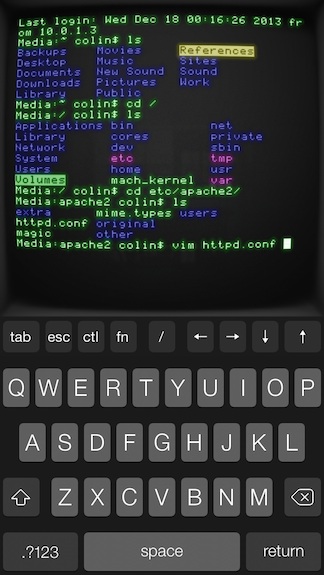
Your favorite customizable terminal app for the Mac is now available for iPhones and iPads, letting you wirelessly connect to any computer offering SSH access. The app gives you lots of control over its vintage look and feel, letting you change color, lighting, “shape,” and your choice of retro bitmap fonts. For iPad owners, the app supports Bluetooth keyboards, and works in both portrait and landscape orientation. Cathode supports multiple sessions and can automatically connect to nearby computers using Bonjour. For the geeks out there, Cathode costs a cool $5.99 from the App Store.


Flipboard Acquires Personalized Magazine Zite

Flipboard

Flipboard

Zite, the personalized magazine that categorizes news based on popularity and reader interest, has been acquired by Flipboard, the social magazine that defined the genre back in 2010. According to TechCrunch, Flipboard acquired the company from CNN (which bought Zite in 2011 for $20 million) for a deal valued at $60 million and that includes CNN content (feeds and special magazines) coming to Flipboard in the future.

Flipboard and Zite has always shared some similarities: both companies started as iPad apps, and they both enabled readers to discover interesting articles by intelligently scanning sources from Twitter, Facebook, and other social services. Unlike Flipboard, however, which has been focusing on its editorial and user-created magazine efforts in the past couple of years, Zite has continued to prioritize automatic, algorithm-based discovery of content: Zite had a mechanism that allowed users to vote for the quality of articles offered by the app, as well as a propretary engine to analyze web trends, topics, and user interests to further filter articles.

In a blog post, Zite co-founder and CTO Mike Klaas has confirmed that the Zite app will be discontinued, although tools to migrate accounts and user data to Flipboard will be offered to existing Zite users. In a separate post on LinkedIn, Zite CEO Mark Johnson announced that, unlike the rest of the Zite team, he won’t be joining Flipboard, and that the combination of the two companies will be an “epic force”.

Behind the deal, what’s interesting is the kind of technology that Zite will bring to Flipboard. Besides the obvious social aspect that enabled Zite to look at links shared by a user on Twitter and other services, Zite had built algorithms to calculate the credibility of a user, match names and places in articles, characterize writing style and parts of speech with semantic classifiers, collect article metadata, and analyze context with text mining techniques to better summarize content. And these were just a part of the system Zite had in place: as the company detailed two years ago, Zite could collect and match user interests over time, aggregate reading habits and interests of a community of users, and find relationships between similar articles and related topics.

The interest graph and artificial intelligence that Zite created has high potential for Flipboard, which has long allowed users to browse Cover Stories, a feature that shows popular articles (based on the Ellerdale tech that Flipboard acquired in 2010), but that isn’t as powerful as Zite for discovering new, interesting stories.

Flipboard, launched in July 2010 three months after the debut of the original iPad, has now over 100 million users, and recently started rolling out an update to their Cover Stories layout to organize articles by source, social network and topic.


Twitch Announces SDK For Mobile Games

Twitch

Twitch

Video game live streaming service Twitch has announced a mobile SDK, which will allow developers of smartphone and tablet games to add gameplay recording and broadcasting functionalities to their games, taking advantage of many of the features that Twitch supports on the web and home consoles. As reported by Polygon, the mobile SDK hasn’t been released yet, and Twitch’s official press release doesn’t clarify whether or not it’ll be available for both leading mobile platforms, iOS and Android.

Twitch, which passed 45 million unique monthly viewers at the end of 2013 and 10 million installs for its official mobile app, is seeking to expand on as many platforms as possible, building a platform that lets players easily record and broadcast gameplay, while allowing viewers to watch streams and chat through various community features. Launched in June 2011 as a subsidiary of Justin.tv, Twitch now comes pre-installed on Sony’s PlayStation 4; on March 11, a Twitch app will officially launch on Microsoft’s Xbox One with more functionalities than the PlayStation’s counterpart such as video archiving, a split layout for streaming and text chats, and media achievements for spectating games.

According to details shared by Twitch so far, the initial version of the mobile SDK will more closely resemble the experience offered on PC and Xbox One: besides the ability to record gameplay video and audio, Twitch will allow players to capture video from the front-facing camera, capture audio from an internal or external microphone, and archive videos for immediate streaming on Twitch. The SDK will come with settings to control brodcast quality, and there will be chat integration and discovery features to browse and follow live streams from other gamers.

“Facilitating the ability to ‘broadcast anywhere’ by bringing live streaming functionality to mobile has the potential to convert millions of Twitch’s passive viewers into active broadcasters,” said Michael Pachter, video game analyst, Wedbush Securities. “Now that Twitch has cornered the PC and console markets with turnkey broadcast integrations, given the proliferation of gaming due to the massive penetration of mobile devices, they are in a unique position to change the game once again.

The addition of mobile games is interesting for Twitch: the service isn’t available on the 3DS and PS Vita portable consoles, and Twitch has typically been associated with longer, more articulated gameplay experiences granted by dedicated home consoles and PCs. While new console-quality games can be found on Apple’s App Store and Google’s Play Store and ports of older console games are common at this point, it’ll be interesting to see if developers of mobile games that are usually played in short bursts of time will consider adding Twitch streaming functionalities to their games.

On mobile devices, Twitch will also have to take into account technical aspects such as cellular and WiFi streaming, battery life, and hardware fragmentation. On iOS, Apple has traditionally been against solutions to record videos of the device’s screen, although it’s possible that, by leveraging streaming rather than local video archiving, Twitch has figured out ways to enable this sort of functionality.

Details on release date and platform availability of the Twitch mobile SDK aren’t available at this point. You can read Twitch’s press release here, and wait for updates on the Twitch developer website.


CloudyTabs Puts iCloud Tabs In Your Mac’s Menu Bar

CloudyTabs

CloudyTabs

Since I switched to Safari as my primary browser, I’ve been enjoying the convenience of iCloud Tabs, which allow me to easily find webpages that I have open on my devices and re-open them anywhere, at any time. iCloud Tabs have been reliable and fast in my experience, and I cannot imagine going back to a browser that doesn’t have this sort of functionality.

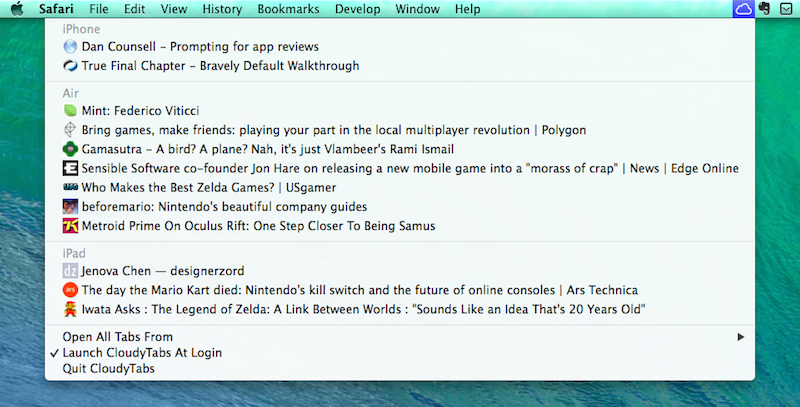
The problem with iCloud Tabs is that they’re limited to Safari, so if you’re using Chrome or Firefox on OS X, you can’t access the tabs that you have open on your iPhone or iPad. For this reason, Josh Parnham has devised a simple and clever solution: CloudyTabs is a menu bar app that lists iCloud Tabs open on all your devices. CloudyTabs reads data from the .plist file that stores iCloud Tabs data on OS X, which is why the app isn’t available on the App Store and has been released on GitHub.

Once installed, CloudyTabs will need a few seconds to find open tabs and after that it’ll present a dropdown menu listing devices and webpages open on each one of them. You can CMD-click tabs to open them in the background in your default browser, and there’s a handy shortcut to open all tabs from a specific device at once. You can also type the first few letters of a tab’s title to select it.

If you don’t use Safari on OS X and wish there was a way to open iCloud Tabs without copying and pasting URLs, CloudyTabs gets the job done quite elegantly, and it’s free. You can download it here.


Command-C Browser Actions

Command-C

Command-C

When I’m writing on my iPad at home, there’s a chance I have my MacBook on my desk with either iTunes open (to check for app updates or playing music from iTunes Match/Radio) or MailMate running (because I’ve been having issues with Mail on the beta of iOS 7.1). It’s not uncommon for me to use a dual-monitor setup when writing, relying on my MacBook for Google searches and other reference material – effectively, I use it as a secondary display to my iPad when I’m working on articles that require a fair amount of research.

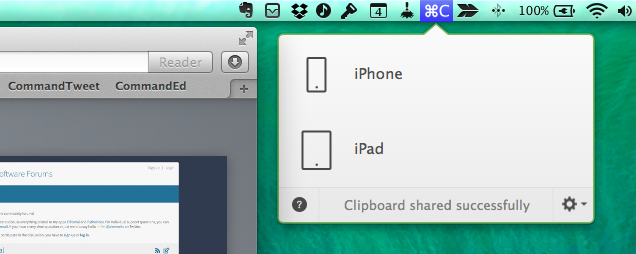
Since the release of Command-C, I’ve been using Danilo Torrisi’s utility to quickly beam text and URLs across all my devices, using Launch Center Pro actions to speed up the process. Command-C has excellent support for URL schemes – a boon to iPad users who fiddle with automation tricks to save time when working on iOS. I recently realized, however, that most of the content I share with Command-C is made of URLs from Safari, therefore I asked myself whether I could put together a solution to send URLs with one click from Safari without using an external app or keyboard shortcut. It was pretty clear from the beginning that I would end up with a bookmarklet, but I have to thank Danilo for providing the necessary guidance I needed to achieve the kind of workflow I wanted.

The bookmarklet is part made for myself, part proof of concept (as always) for others to iterate upon. It doesn’t only send URLs from Safari on another device with Command-C – it sends the webpage you’re currently viewing in Safari to another app on another device with Command-C.

Read more