

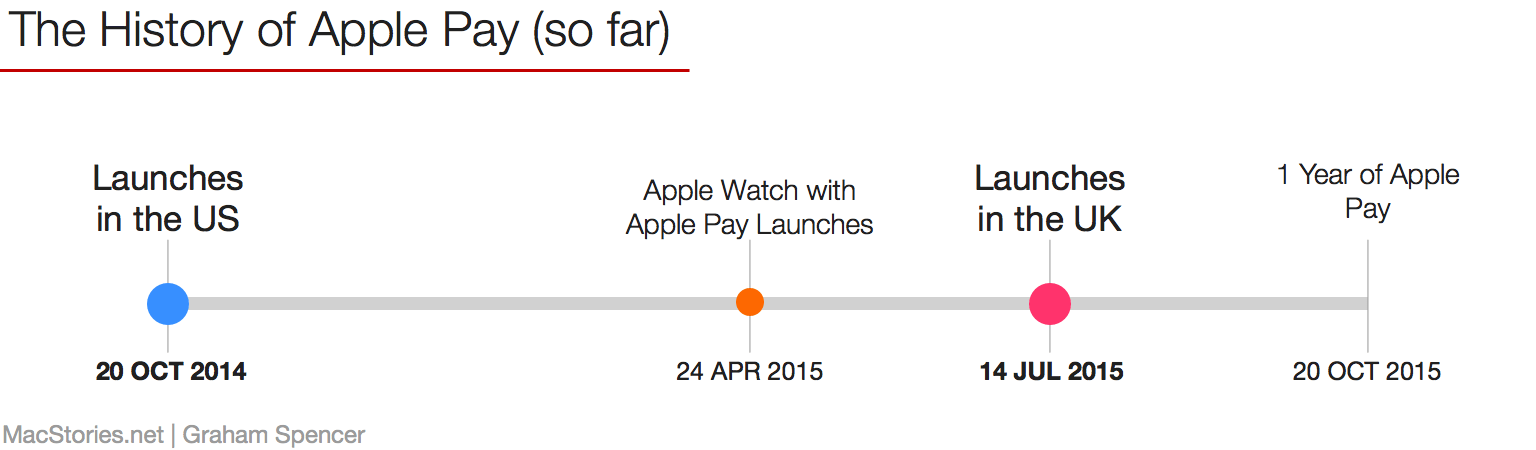
Now that we’re approaching the one year anniversary of Apple Pay on October 20 and with Apple’s Vice President of Apple Pay speaking at the Code/Mobile conference later today, I thought it might be interesting to take stock of what has happened with Apple Pay so far, and what’s next for it.
The State of Apple Pay
New Enhanced Editions of Harry Potter Series Now Available on iBooks→
In a press release from Apple:
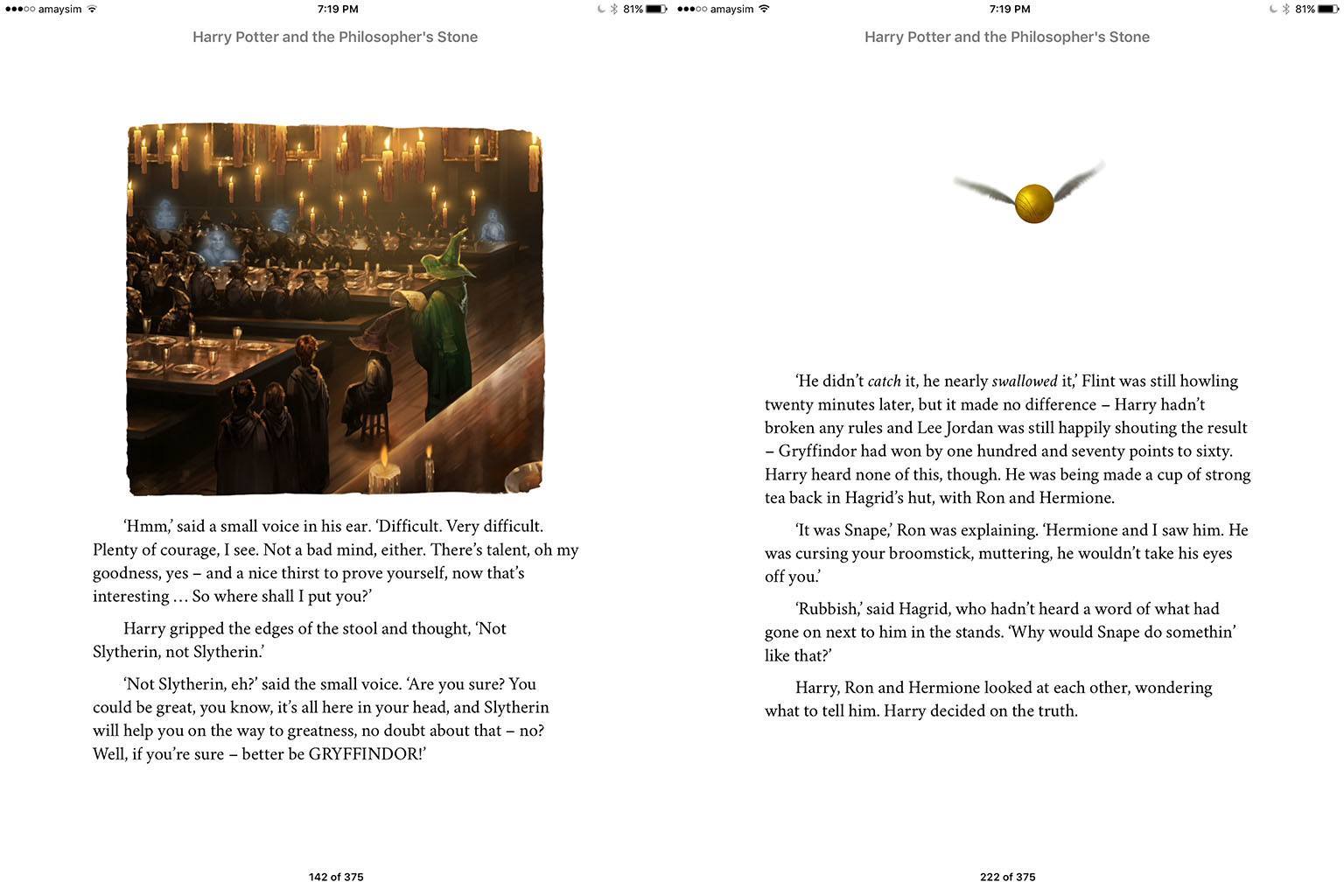
Apple today announced that enhanced editions of all seven books in J.K. Rowling’s Harry Potter series are now available exclusively on the iBooks Store for readers around the world to enjoy on their iPhone, iPad, iPod touch and Mac. Customers can download individual books featuring full original text, interactive animations and elaborate artwork bringing these beloved stories to life in a unique way. Harry Potter fans will also find annotations throughout their literary journey, written by the author herself.
Each book costs US$9.99 and they are available in 32 countries today. French, German and Spanish versions are also available for pre-order and will be released on November 9 in 18 additional countries.
“I’m thrilled to see the Harry Potter books so beautifully realised on iBooks for the digital world; the artwork and animations in these enhanced editions bring the stories alive in a delightful new way,” said J.K. Rowling.
I had a quick look through the first book, Harry Potter and the Philosopher’s Stone and there are quite a few illustrations. They all look terrific and the animation really does bring it to life (they’re reminiscent of the moving images of the Daily Prophet, or perhaps more appropriately, Live Photos from the iPhone 6s). But that’s about it, the rest of the book is virtually identical to a standard ePub.
Connected: Driving on a Vespa in a Landscape of Pastel Colors→
This week on Connected: Apple’s new Watch ads, cell phone carries and the return of #ConnectedQA.
A lot of interesting reader questions in this week’s Connected. Make sure to stay until the last one. You can listen here.
Sponsored by:
- lynda.com: An easy and affordable way to help individuals and organizations learn. Free 10-day trial.
- Arq: Arq automatically backs up all your Macs and PCs. Your files are stored securely, readable only by you.
- The Freelancer’s Guide to Escaping Taxes, by Andrew Carroll
Beats Announces New Beats Pill+ Wireless Speaker→
The first new Beats product under Apple has been announced today, and it’s a new version of the Beats Pill speaker called Beats Pill+.
The Beats Pill+ is slightly larger than the original Beats Pill speaker, allowing for a bigger and fuller sound. The stereo active 2-way crossover system creates an optimized sound field for dynamic range and clarity across all genres of music. Tweeter and woofer separation uses the same acoustic mechanics found in professional recording studios around the world.
The Beats Pill+ can charge devices with USB and Lightning ports, and the refreshed look has an Apple-like feel to it. Sean O’Kane, writing at The Verge, likes its sound:
Whatever it’s doing, it works. I listened to a handful of different tracks from a few different genres: one from The Weeknd and his alt-R&B, some bassy hip-hop from Kendrick Lamar, a standard rock-and-roll track from Tom Petty, and some punk rock from PUP. Everything came through full and clear, and all the music sounded much better than I expected from yet another portable Bluetooth speaker. The bass in Lamar’s “Swimming Pools (Drank)” didn’t muddy up his vocals. I could hear piano parts in Petty’s “Here Comes My Girl” that would be inaudible on most cheap speakers. For lack of a better way to describe it, there was space in between all the sounds coming out of the speaker, whereas most others tend to crush all the different frequencies together.
In addition to the speaker itself, there’s going to be a companion app:
There’s a DJ mode that’ll allow multiple phones/tablets/etc. to pair with the speaker so more than one person can control the playlist. It also helps you add a second Pill+ to either make the overall sound louder or to use ‘em as a stereo setup with left and right channels. If you’ve already opened your wallet to buy Dr. Dre’s latest, you’ll have to wait until next month to drop $230 at an Apple store and other places Beats’ goods are sold.
I’m a happy Bose SoundLink Mini user, but I’m intrigued by the Pill’s look and software features.
Fantastical 2.5 Brings watchOS 2 Complication, iPad Multitasking on iOS 9
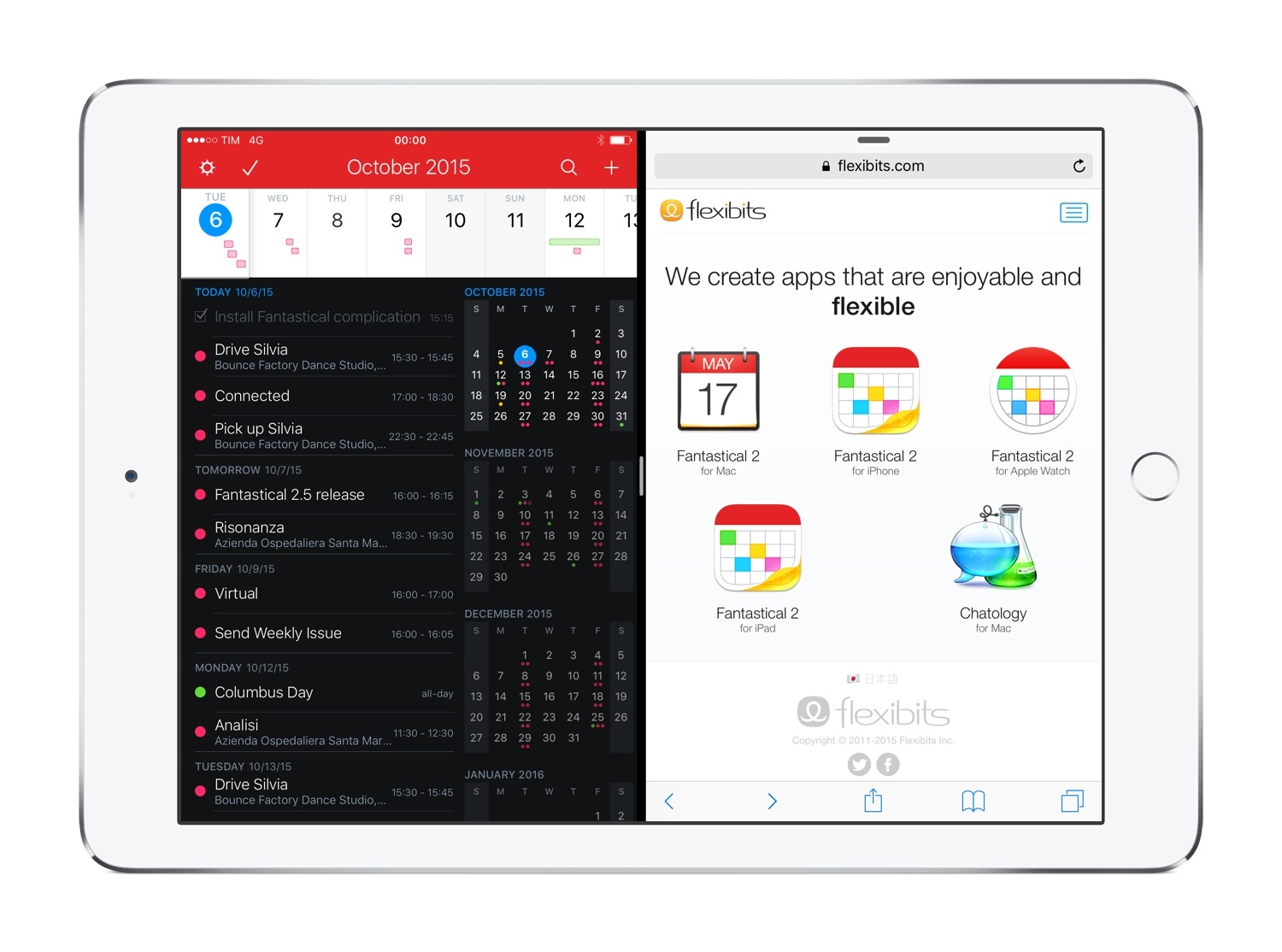
Despite my appreciation for Apple’s updates to the Calendar app on iOS 9, I still find Flexibits’ Fantastical to be the more powerful, flexible Calendar and Reminders client we deserve. Fantastical is an app which I’ve loved covering over the years because of Flexibits’ unwavering commitment to quality. Today’s 2.5 update continues to confirm the indie studio’s penchant for new versions that truly take advantage of what iOS has to offer.
Speedafari Is an iOS 9 Content Blocker for Slow Connections
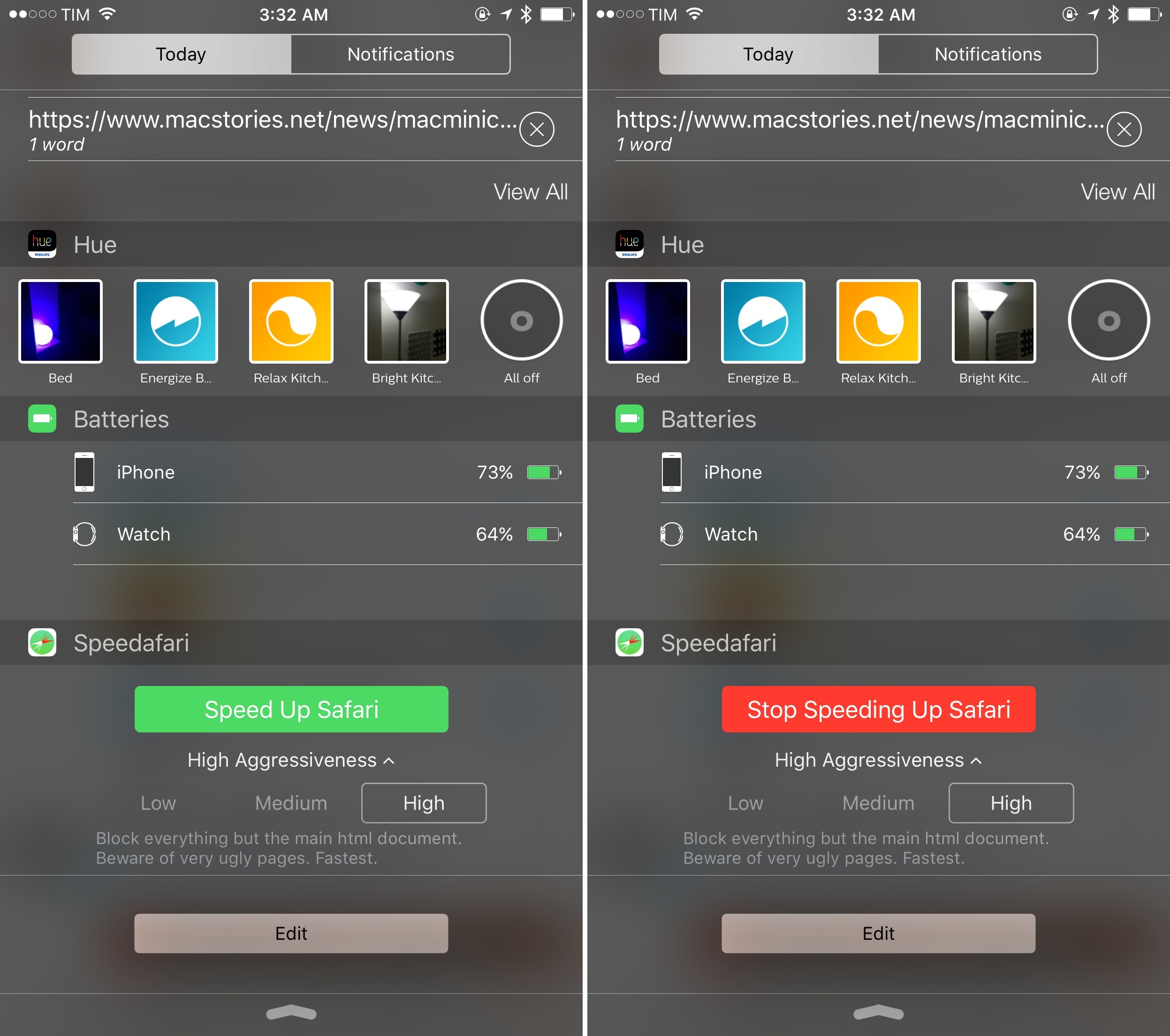
Among the dozens of Content Blockers available for iOS 91 – most of which are based on blocking ads and scripts, often with the same sets of rules – Speedafari strikes me as an ingenious idea, built with a clever interaction in mind.
Disney Artists Test iPad Pro and Apple Pencil→
Chance Miller, writing for 9to5Mac on the iPad Pro’s latest appearance:
Disney’s team of designers used the iPad Pro to sketch a variety of different characters from Disney classics, including Olaf from Frozen and Mickey Mouse.
The testing seemingly went well for Disney. “Let’s order a bunch,” product manager Paul Hildebrandt said at the end of a Periscope stream showcasing the device. In a separate Periscope steam, Disney animators Jeff Ranjo and Jeremy Spears used the iPad Pro to draw caricatures of each other.
Videos shared by Disney employees (via Periscope) show that palm rejection when using the Pencil appears to be as impressive as Pixar artists described it. You can view one of the videos here and take a look at some drawings below.
Jeremy (@whittlewoodshop) trying out the new #iPadPro #applepencil pic.twitter.com/8S9sYfyiMt
— Paul Hildebrandt (@paulhildebrandt) October 6, 2015
Paul (@pbcbstudios) drawing Olaf #iPadPro #applepencil pic.twitter.com/fKG0iZIlsh
— Paul Hildebrandt (@paulhildebrandt) October 6, 2015
Paul Felix rocking Mickey #iPadPro #applepencil pic.twitter.com/vyHWPQQJh1
— Paul Hildebrandt (@paulhildebrandt) October 6, 2015
Twitter Launches Moments→
Twitter has officially launched Moments: previously known as Project Lightning, Moments is a new section of the Twitter app that aggregates collections of tweets in a custom layout which contains pictures, GIFs, Vines, and more. You can browse Moments, subscribe to one temporarily and have tweets belonging to that Moment show up in your timeline, and act upon individual tweets in a Moment, which are laid out with swipeable full-screen cards.
Casey Newton writes at The Verge:
A big week for Twitter just got bigger. A day after announcing co-founder Jack Dorsey would return to the company as its CEO, the company is rolling out the product formerly known as Project Lightning to a worldwide audience. Moments, as the new product is called, surfaces the day’s most talked-about stories in a new section of the app. It’s a magazine-like view of Twitter that works even if you’ve never followed a single person. It represents Twitter’s best — and maybe last — hope of attracting a large new base of casual users who want to enjoy the service without having to figure out its unique quirks and lingo.
From Twitter’s blog post:
Every day, people share hundreds of millions of Tweets. Among them are things you can’t experience anywhere but on Twitter: conversations between world leaders and celebrities, citizens reporting events as they happen, cultural memes, live commentary on the night’s big game, and many more. We know finding these only-on-Twitter moments can be a challenge, especially if you haven’t followed certain accounts. But it doesn’t have to be.
Moments helps you find the best of Twitter as easily as tapping an icon – regardless of who you follow. Just visit the new tab called Moments, where you will discover stories unfolding on Twitter.
Interestingly, Twitter has assembled a dedicated team of curators to sift through the best tweets for each Moment, but they’re also partnering up with various media companies to provide their own Moments. Somewhat reminiscent of Snapchat Discover, Twitter Moments won’t likely appeal to the power users who constantly check their timelines with Tweetbot, but it could help in bringing new people to Twitter by simplifying the process of following news.
If done well, I’d argue that even power users could derive some value from temporarily following tweets curated by Twitter for events like football games, tech events, conferences, and more. The highly visual format also reminds me of Facebook Paper, and the richness of modern Twitter features such as Vines and GIFs really shines in Moments thanks to full-screen playback and gesture-based interactions.
Sadly, Twitter Moments appears to be a staggered rollout: the Moments tab is launching in the US first; users outside of the US will be able to view Moments shared via links, but they won’t have the dedicated tab to browse all of them, which is coming “soon”.
To start, we’re introducing Moments to people in the US across Android, iPhone, and the desktop web. But as with Tweets, a Moment can be shared anywhere: if you discover a link to a Moment in a Tweet or DM, or embedded elsewhere, those of you outside the US can enjoy the same experience we’re rolling out today. And we’re hard at work to bring this same functionality to more places in the coming weeks and months.
Not yet seeing the Moments tab? We’re rolling out over the next few hours, first in the US and soon to other places around the world.
— Twitter (@twitter) October 6, 2015
I don’t understand Twitter’s decision to prevent users from browsing Moments in English (is it because of US-based ads and partners?), but I think the feature is a good first step to better explain the value of Twitter and expose its information-rich nature to more users. I’m curious to actually try it on a daily basis.
See also: BuzzFeed’s guide to Twitter Moments and the company’s guidelines.
Fixing Safari View Controller→
Dan Provost has a simple fix for the ‘Done’ button of Safari View Controller that is in an annoyingly awkward position to reach:
The hard-to-reach-and-sometimes-hidden Done button makes browsing links in Tweetbot way slower. I have even turned Reachability back on in an effort to make things a little easier. The horror.
Thankfully, I think there is a pretty easy fix that I hope Apple would consider.
I like his idea. I hope Apple comes up with a better way to dismiss Safari View Controller that doesn’t involve stretching my thumb all the way to the top.