1Writer Update Includes Open in Place and Drag and Drop Support

Before I moved to Ulysses for most of my writing, I used 1Writer. At first, it was how I accessed my large collection of NVAlt notes when I wasn’t at my Mac because its search is exceptionally fast. Over time though, it became my primary text editor because it syncs with iCloud and Dropbox, works with Markdown files, has excellent export options, is highly customizable, and supports URL schemes and JavaScript actions. I don’t use 1Writer as often these days, but it remains one of my favorite text editors, so I was glad to see it has been updated to take advantage of new iOS 11 features.

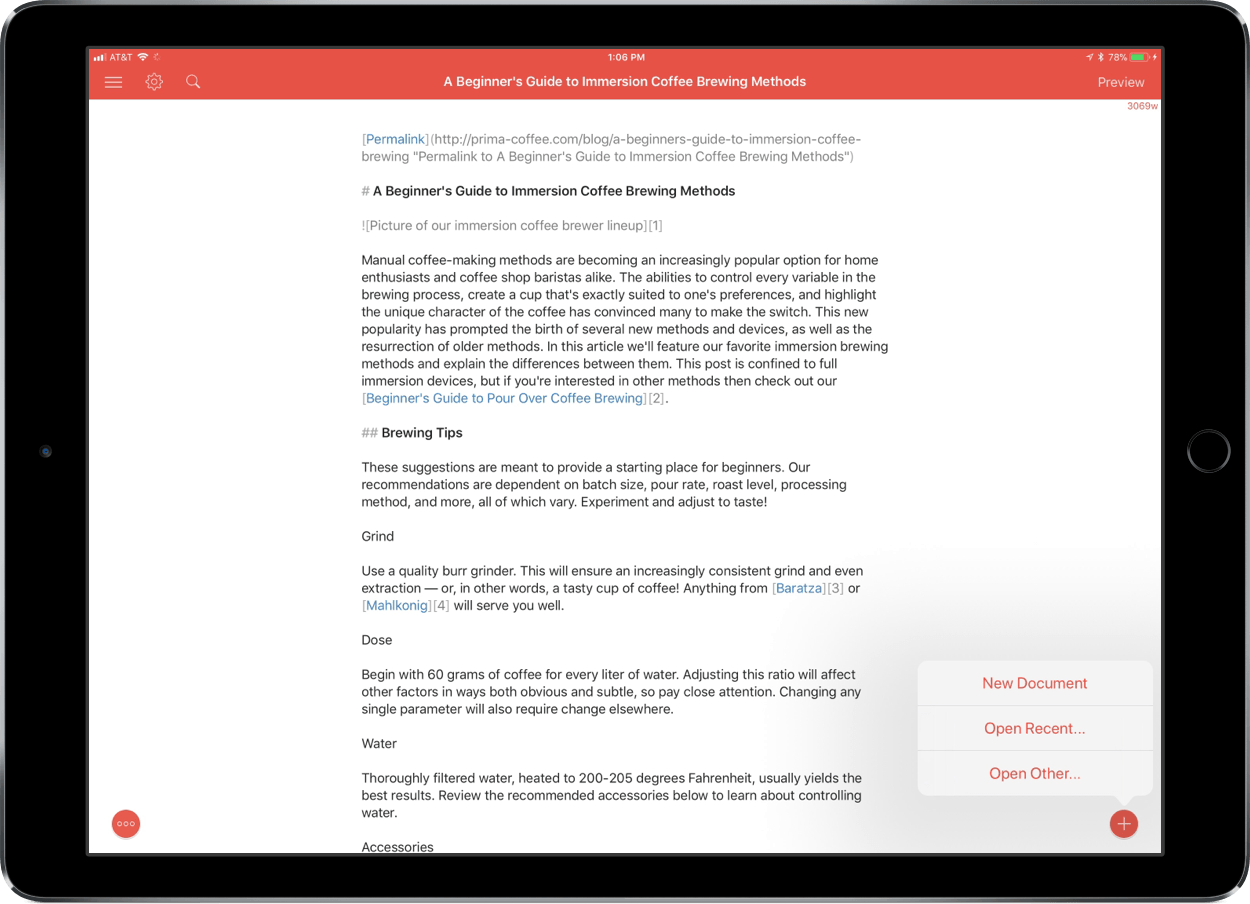
The latest version of 1Writer supports Open in Place via iOS 11’s new document browser. Tap the omnipresent plus button in the lower right-hand corner of 1Writer and choose ‘Open Other…’ to launch iOS 11’s document browser. 1Writer has tinted the navigation elements of the document browser, which helps remind users that they are still in 1Writer, which is a nice touch that not all apps bother to support. With Open in Place, 1Writer can edit the Markdown or plain-text files of any file provider. For example, that allows me to grab a draft from one of our MacStories GitHub repos via the Working Copy file provider to make edits to the original document without creating a local 1Writer copy of the file.
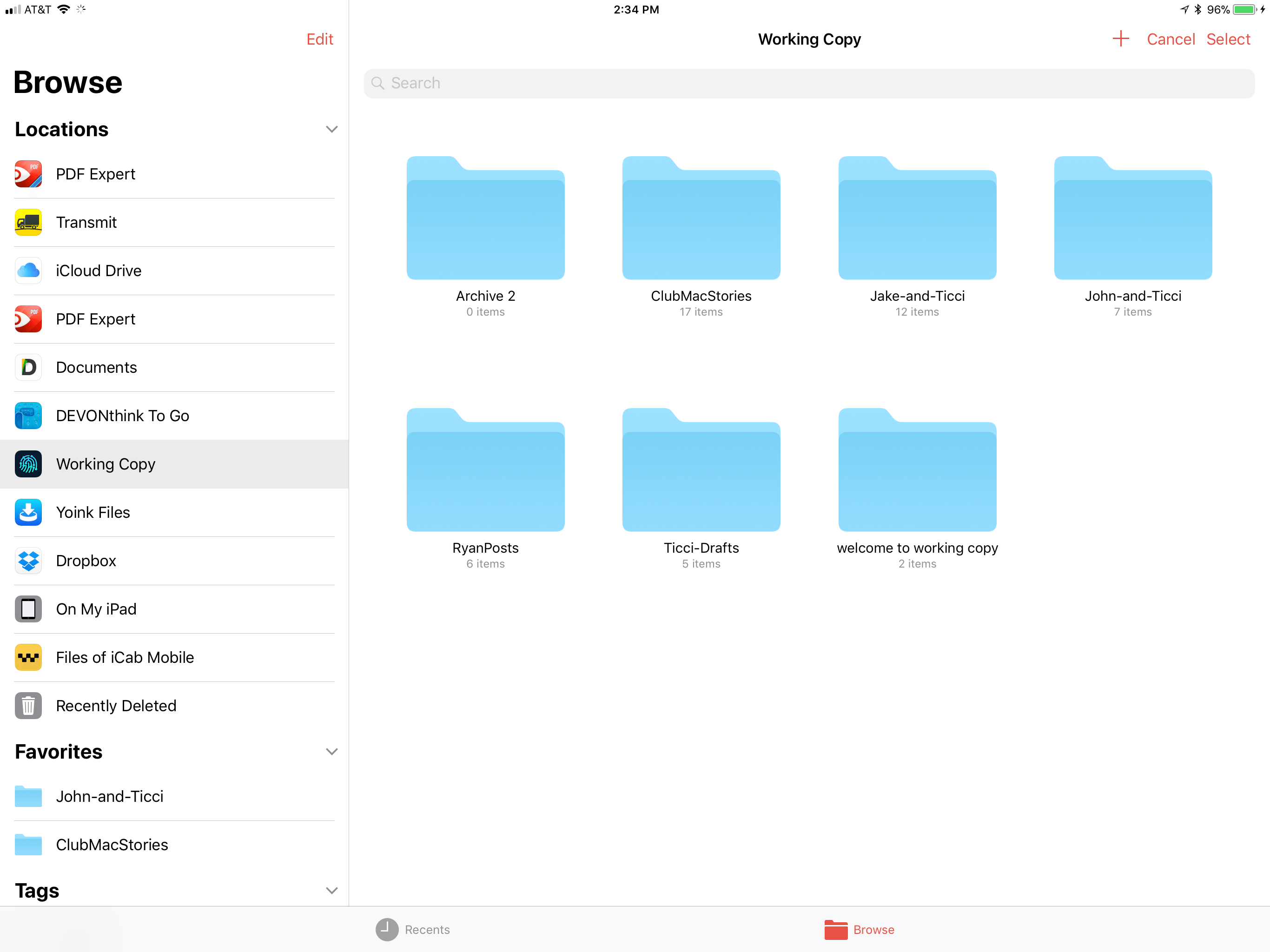
1Writer supports Open in Place.

1Writer supports Open in Place.

1Writer also supports two-way drag and drop. I can drag any document from 1Writer’s document browser and drop it into another compatible app that accepts text like iA Writer, Byword, or Notes. I was also able to attach a 1Writer file to a message using Apple Mail.

Dragging into 1Writer works too. 1Writer can handle text and URLs, so it disregards images included in something like a note from the Notes app, but will set up Markdown syntax for an image if you drag in just a photo. If you drag into an existing 1Writer document, the text and links are appended to the end of the document.

1Writer has also added support for smart punctuation, which, for example, replaces straight quotes with the curly variety, and is iPhone X-ready.

1Writer is one of the most versatile text editors available. The addition of Open in Place means the app can be used with a wider variety of apps than ever before and drag and drop eliminates the number of steps needed to get text into and out of 1Writer. If you’re looking for a text editor that is at the forefront of iOS 11 technologies, 1Writer is an excellent choice.

1Writer is available on the App Store.

Fantastical Gains Drag and Drop Support on iPad and iPhone

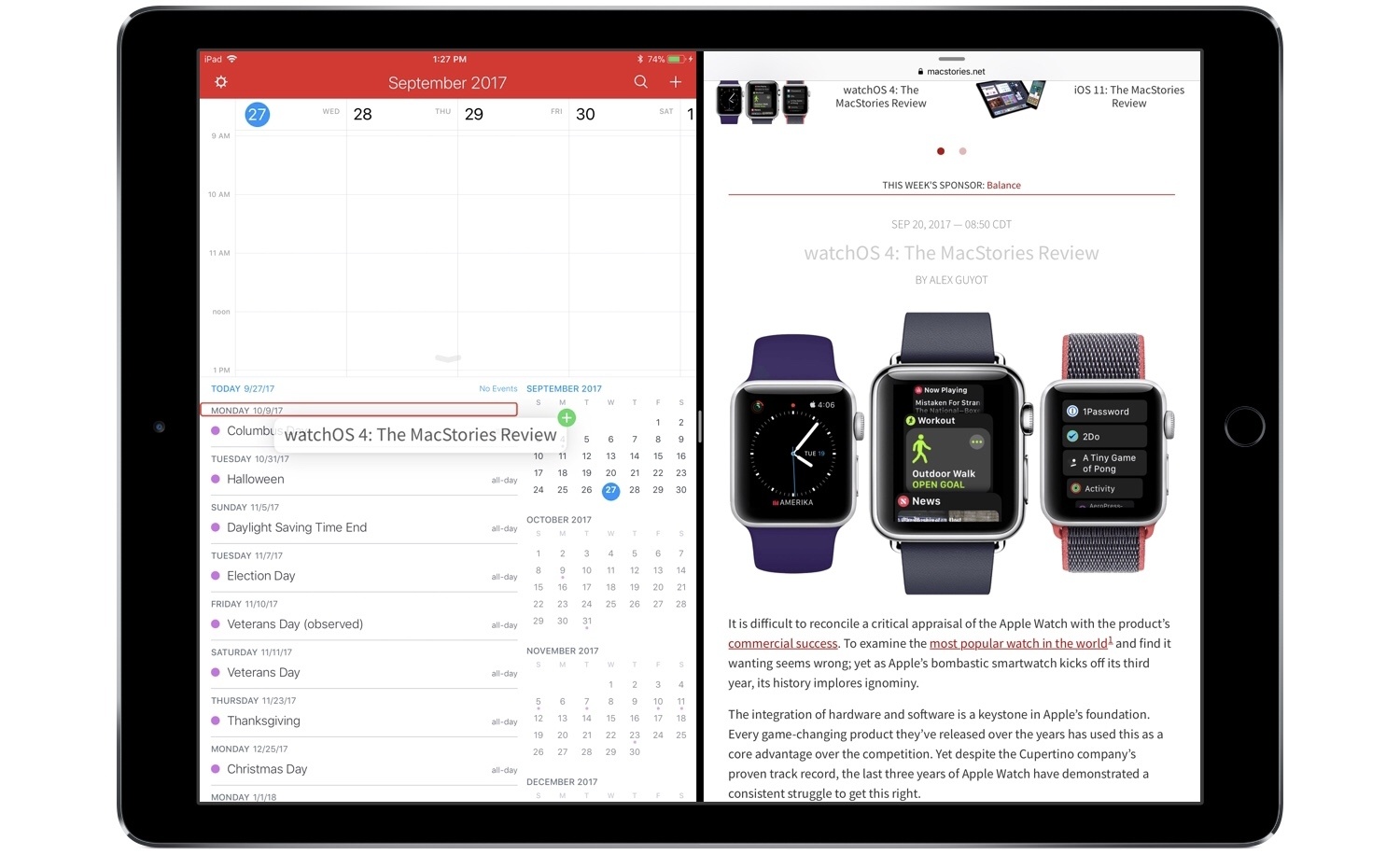
One of the most valuable advantages of digital calendars over physical ones is how much easier they are to manage. For example, the concept of a recurring event is easy for calendar apps to grasp, while adding the same event to a physical calendar can be both a time drain and a literal pain in your dominant hand. After recurring events, I’d guess that rescheduling is the next greatest pain point for physical calendar users. There’s erasing and re-writing involved when dealing with something physical, whereas with calendar apps you simply scroll the little date spinner to adjust a rescheduled event. Or if you’re using Fantastical, then thanks to the addition of drag and drop you can simply pick a task up and drop it on the new date.


On both iPhone and iPad, drag and drop in Fantastical empowers easy event rescheduling, and it also enables you to drag and drop reminders to set new due dates for them. The drag and drop support on iPad is more extensive, of course, allowing you to bring events and reminders out of Fantastical and into the app of your choice. Drag events into a Mail.app compose field and they’ll send as ICS files. Add them to a text editor and they’ll expand to include all attached information, such as location data, notes, and more. Similarly, reminders dropped elsewhere include their additional metadata as well. You can also drop text from other apps into Fantastical to create new events: simply hold the text over the day you want to create an event on, and drop. The text will be pre-filled in a new event creation dialogue, letting you add additional details then and there, or hit the Add button to complete it.

The pace of new apps adding support for drag and drop on iOS has been encouraging. There’s still plenty of work to be done by third-party developers, but we’re moving quickly toward the day when all of the main apps we use on a daily basis will be able to send and receive information in the most natural way possible.

Fantastical is available on the App Store for iPhone and iPad.


iOS and macOS Text Replacement Gaining CloudKit Syncing Soon

There’s been quite a stir over the last week regarding an area of the Apple cloud ecosystem where syncing has remained unreliable for years. Brian Stucki wrote a detailed post on the matter, which John Gruber linked to with echoing sentiments. Today, however, Gruber followed up on his post with an exciting update:

Good news related to yesterday’s item regarding the fact that text replacement shortcuts have never synced reliably between Macs or iOS devices: an Apple spokesperson emailed me to say they checked with the team, and an update that moves text replacement syncing to CloudKit should be rolling out to iOS 11 and MacOS 10.13 High Sierra users in the “next month or so”.

I use text replacement every day across my iOS devices, and haven’t dealt with syncing issues myself, but it’s great to hear that this long-standing problem should soon be put to rest for everyone else. Recent history shows that once a cloud product moves to CloudKit, syncing issues disappear almost entirely – hopefully that will be the case here as well.

Permalink

Apple Introduces Revamped Privacy Site Featuring Face ID Details and More

Apple today launched a newly revised privacy page on its website that aims to help customers understand the company’s views on the subject. Besides the landing page, there are four main sections: Our Approach to Privacy, Manage Your Privacy, Transparency Report, and Our Privacy Policy. I found Our Approach to Privacy the most interesting, as it walks through, in plain and easy-to-understand language, how privacy is deeply built into an extensive number of Apple apps and features, from Apple Pay and iMessage, to Analytics, Safari, Siri, Health, and more.

The most timely update to the site is the inclusion of a Face ID security white paper. This 6-page PDF goes into impressive detail on how Face ID works, with an emphasis on privacy and several interesting details to be gleaned. One of the feature tidbits is a comprehensive listing of when your passcode will be needed in place of Face ID. Passcode input will be required under the following circumstances:

• The device has just been turned on or restarted.
• The device hasn’t been unlocked for more than 48 hours.
• The passcode hasn’t been used to unlock the device in the last 156 hours (six and a half days) and Face ID has not unlocked the device in the last 4 hours.
• The device has received a remote lock command.
• After five unsuccessful attempts to match a face.
• After initiating power off/Emergency SOS by pressing and holding either volume button and the side button simultaneously for 2 seconds.

Other sections of the document confirm that any third-party app currently supporting Touch ID will automatically support Face ID without any user or developer changes. Also, Face ID can be used for all the same things as Touch ID, such as purchases from the App Store, iTunes Store, and more.

Permalink

AppStories, Episode 24 – Our Favorite iOS 11 Apps, Part 1

On this week’s episode of AppStories, we give an update on the iOS 11 review and anniversary activities at MacStories and Club MacStories then talk about some of our favorite new apps and updates that show off the new capabilities of iOS 11.

Sponsored by:

  • Balance - A wallet for all the worlds currencies and tokens.
  • Readdle – Redefining productivity.
AppStories+ Deeper into the world of apps

AppStories Episode 24 - Our Favorite iOS 11 Apps, Part 1

0:00
34:07

AppStories+ Deeper into the world of apps

Permalink

App Camp for Girls 2017 Compendium App Released

Following the completion of its summer camps this year, App Camp for Girls has launched a new app featuring work done by 2017 camp participants. This year’s app includes a set of 14 quizzes and choose your own adventure games. The app’s release notes describe how the app came to life:

In one week, [camp] participants brainstorm ideas, design icons and interface, build their quizzes in Xcode, and make their own swag. Each session culminates in a fun pitch session with a panel of investors and entrepreneurs, where the young developers get to show off their work.

If you’re interested in learning more about this organization, Federico and John hosted the co-founders of App Camp for Girls, Jean MacDonald and Grey Osten, on an episode of AppStories earlier this year.

At a $0.99 purchase price, the App Camp Compendium 2017 app is a small, but simple way to show support for the work App Camp for Girls is doing.

Permalink

Shazam Launches Redesigned, Faster Apple Watch App

iOS 11 apps have been receiving the most attention in recent weeks, and for good reason – drag and drop, ARKit, and more make it an exciting time for the platform. But watchOS is also seeing significant improvement of late. With watchOS 4 and the Apple Watch Series 3, the Watch feels like it’s beginning to truly mature in several key ways. There’s still a long way to go, but developers are now able to build the most capable, refined Watch apps ever seen. Shazam is a great example of that.

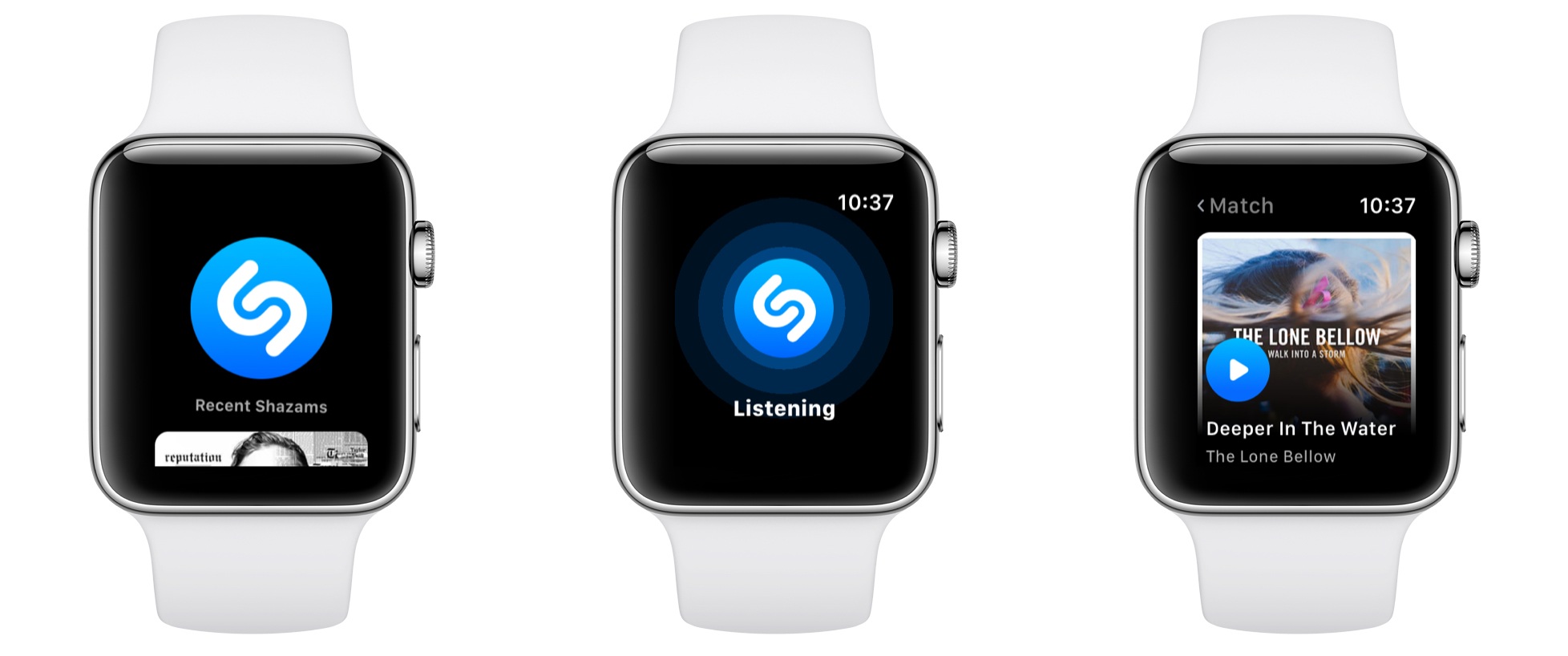
Shazam’s new Watch app is extremely simple, and as I like to say, that’s the way all good Watch apps should be. Launching it presents the familiar blue Shazam button, which upon a tap will begin listening to whatever music is currently playing. After you hit the button, you can turn your wrist away and the app will notify you through a haptic tap when the song’s been identified. In testing on a Series 3 Watch, songs were identified very quickly, taking only 2-3 seconds on every try.

After songs have been identified, they’re stored below the Shazam button in the main app interface. By scrolling with the Digital Crown, you’ll see the last five songs presented in a style similar to watchOS’s revamped Music app: large album covers resembling cards that slide in over each other as you keep scrolling. Tapping an album cover plays a short preview of the song using the Watch’s built-in speaker.

One final thing worth noting is that unlike many other third-party watchOS apps, Shazam is built to take full advantage of the iPhone independence made possible by the new Series 3 LTE Watch. According to an official support document:

Do I need my phone to use Apple Watch Shazam features?

If you have the Watch Series 3 LTE, you can shazam phone-free! If you have an older Apple Watch device you’ll need to have your iPhone connected in order to name that song.

It will likely be a while before we see a significant number of third-party apps updated to support independence from the iPhone, but Shazam is a good start.


Why There Are No Standalone Apple Watch Podcast Players

With watchOS 4 and the Series 3 Apple Watch, Apple has made several improvements to how the Watch handles music, untethering listeners from their iPhones. Apple Music subscribers can sync their My Favorites Mix, My Chill Mix, My New Music Mix and the Heavy Rotation section of Music to their watches, for example. In October, Apple will expand users’ options on the Watch by adding Apple Music streaming for subscribers. However, there’s a glaring omission in Apple’s iPhone-free audio strategy: podcasts.

There is no good way to listen to podcasts on an Apple Watch without bringing along an iPhone. As Marco Arment, the maker of Overcast, details on Marco.org,

The Apple Watch desperately needs standalone podcast playback, especially with the LTE-equipped Series 3, which was designed specifically for exercising without an iPhone.

Believe me, I’ve tried. But limitations in watchOS 4 make it impossible to deliver standalone podcast playback with the basic functionality and quality that people expect.

Arment’s article walks through each of several technical challenges in detail, the biggest being syncing progress between a Watch and an iPhone. The post outlines the minimum changes to the watchOS APIs that Arment believes are necessary to build a viable standalone podcast player for the Watch as well as detailing more ambitious changes to Apple’s APIs that would be nice to have.

During the watchOS 4 beta period, I began running without my iPhone. I enjoyed listening to the music synced overnight to my Watch, but it was a taste of untethered freedom that only made me want a standalone podcast player more. Audio playback and syncing undoubtedly pose battery life issues and other challenges, but with the advancements in the Series 3 hardware, I hope we see corresponding API changes that will allow Arment and others to build iPhone-free podcast players.

Permalink