The Iconography of Apple Maps

Mercury Intermedia, in a post on Medium, shares its extensive documentation of Apple Maps’ iconography over the years:

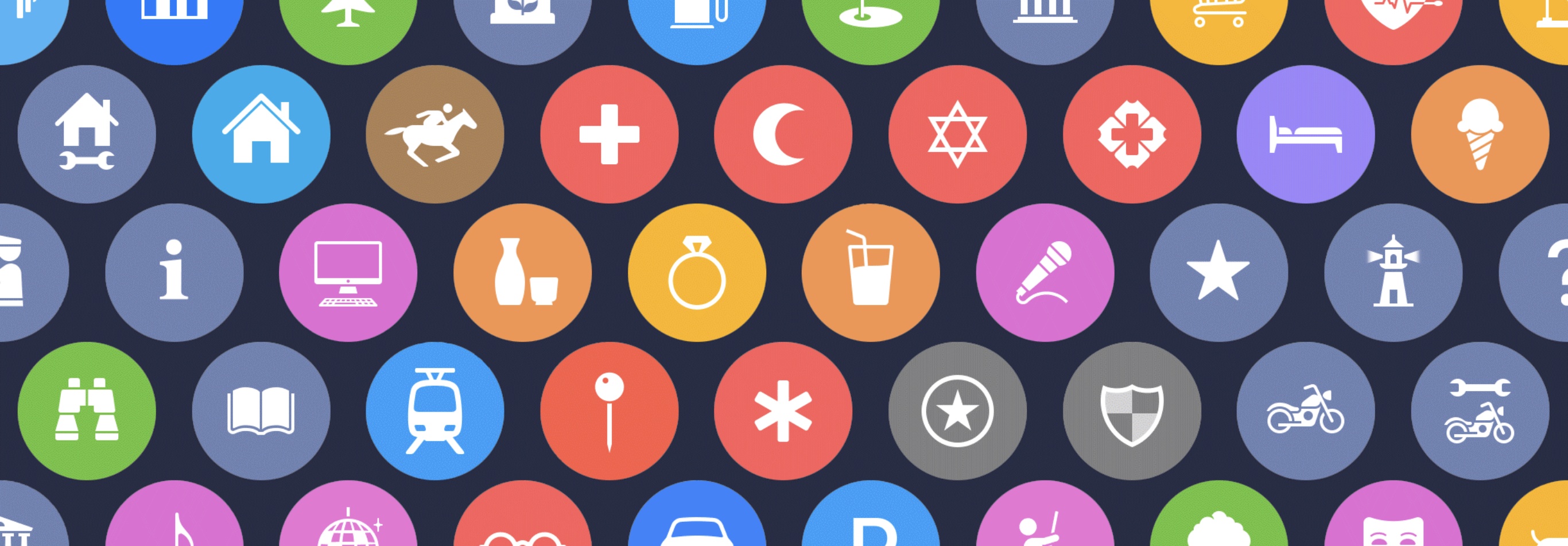
A few years ago we published a post examining the point of interest (POI) icons within Apple Maps titled More Than You Ever Wanted to Know About Apple’s Spotlight Location Icons. POI icons have existed in Apple Maps since Google was the maps provider. But with iOS 6, Apple took full ownership of Maps and introduced a selectable, color-coded POI system with all new iconography.

We took particular notice of the icons included with iOS 8 when Apple began using larger versions of these icons at the system level as part of their new Spotlight search feature. Apple has continued to iterate on these icons and has made several additions and refinements. With iOS 10 for example, Apple redesigned the Maps app to use the larger POI icon set directly on the map itself. This post will examine how the system has grown and evolved over the past few years.

If you’re interested in design, iconography, or how these things have evolved over time in Apple Maps, the post is a fantastic resource and fun exploration of the little details that make a significant mark on user experience. For example, the article includes quotes from designer Scott Dunlap comparing Apple’s icon changes over the years and what purpose those tweaks served, as well as offering feedback for how Maps’ icon set could stand more improvement, particularly for greater clarity at small sizes.
Permalink

Adobe Marks World Emoji Day with Findings of Key Emoji Survey

Today on World Emoji Day, Adobe has shared the results of its recent survey of 1,000 US emoji users:

Among the emoji users surveyed, the overwhelming majority use emojis to lighten the mood of conversations (93%) and show support to people (91%). Aligned with this finding, emoji users’ top three favorite emojis are ???? (#1), ❤️ (#2), ???? (#3). Interestingly, a majority (81%) of emoji users believe that people who use emojis are friendlier and more approachable.

The survey included participants ages 16-73 who use emoji at least weekly. The full report is interesting to explore, as it lists favorite emoji by users’ gender and the region of the US they live in. Across all tracked demographics, the laughing emoji was most-used, but the differences in runner-ups are well worth checking out.

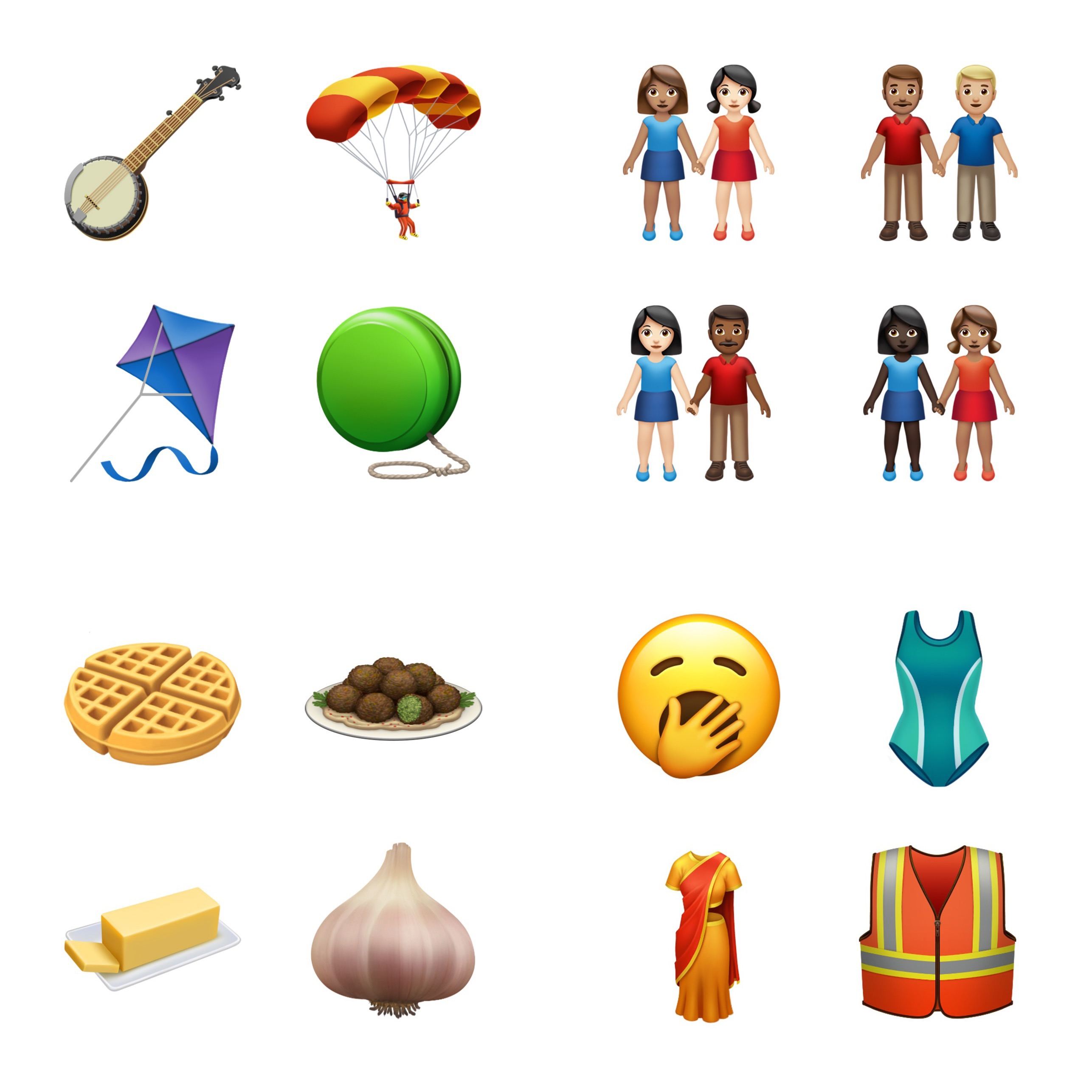
Yesterday Apple got a head start on World Emoji Day by sharing a preview of its new emoji coming in iOS 13 this fall. Though there aren’t any obvious standouts that seem destined to achieve high levels of use, my personal favorites so far include the sloth and yawning face.

Permalink

Apple Previews New Emoji Arriving in iOS 13, macOS Catalina, and More

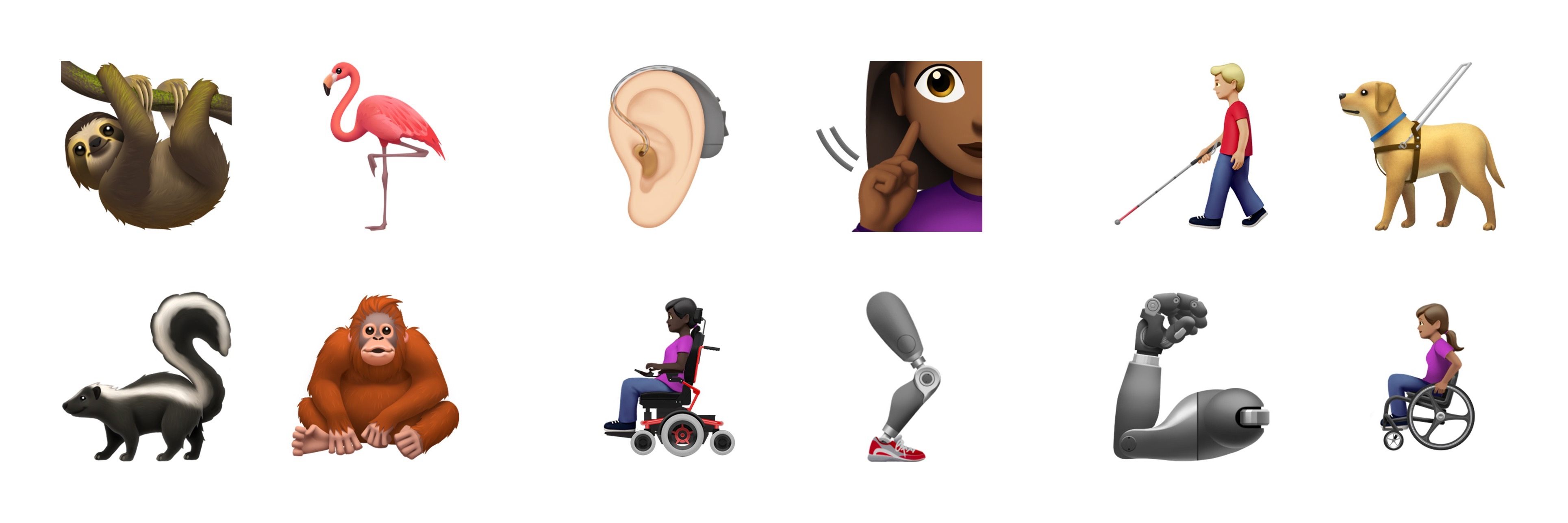
Tomorrow is World Emoji Day, and Apple is starting the celebration early by offering a sneak peek at some of the new emoji arriving later this year in iOS 13, iPadOS 13, macOS Catalina, and watchOS 6.

In early February the Unicode Consortium, which makes all emoji approval decisions, debuted the full list of 230 emoji coming this year. Apple notes that this group can be consolidated to fifty-nine new emoji designs, many of which include variations – such as the people holding hands emoji, which can be customized in more than 75 ways to have various mixes of gender and skin tone. Another big theme in this emoji release is a set of disability-themed emoji, which Apple is actually responsible for proposing to the Unicode Consortium last year.

The previous two years, new emoji have launched in the x.1 updates to Apple’s software platforms, which often debut in October. If that tradition holds, we’re just a few short months away from gaining access to the 2019 emoji set.


Connected, Episode 251: The Worrier Warrior

On last week’s episode of Connected:

Myke has a story about the beach, Federico has a plan for NFC stickers, and Stephen has some thoughts on this week’s MacBook news.

You can listen below (and find the show notes here).

AppStories+ Deeper into the world of apps
0:00
01:22:50

Connected, Episode 251

AppStories+ Deeper into the world of apps

Sponsored by:

  • Pingdom: Start monitoring your websites and servers today. Use offer code CONNECTED to get 30% off.
  • Astropad Studio: Turn your iPad into a professional graphics tablet. Get started today with a 30-day free trial.
  • ButcherBox: Thoughtfully sourced meat delivered directly to your door. Get free bacon for life.
Permalink

Adapt, Episode 5: Desktop-Class Safari and the Magic of OCR

On last week’s episode of our iPad-focused show Adapt:

Safari is growing up this fall in iPadOS 13 to a true desktop-class browser, and Federico and Ryan detail everything that’s new; also, this week’s challenge involves using apps to perform OCR on a 400+ page PDF.

You can listen below (and find the show notes here), and don’t forget to send us questions using #AskAdapt and by tagging our Twitter account.

AppStories+ Deeper into the world of apps
0:00
01:05:38

Adapt, Episode 5

AppStories+ Deeper into the world of apps

Permalink

Video Game Narrative Design and Writing Science Fantasy Novels with Carrie Patel (Part 1)

Today on Dialog, we are joined by video game narrative designer and novelist Carrie Patel. In this first part of our conversation, we explore narrative design in games Patel has worked on at Obsidian Entertainment, including Pillars of Eternity and The Outer Worlds, which is coming to consoles and PC in October.

In this installment of our conversation, Patel explains what narrative design is, how it fits into the video game development process, balancing gameplay and narrative, working collaboratively with a large team from different disciplines, and more. Next week, we’ll dive into Patel’s Recoletta trilogy of novels and how she balances the demands of writing books and working on video games.

You can find the episode here or listen through the Dialog web player below.

Sponsored by:

  • Astropad Studio – Turn your iPad into a professional graphics tablet. Get started today with a 30-day free trial.
  • Hullo – Your favorite pillow, guaranteed.
Permalink

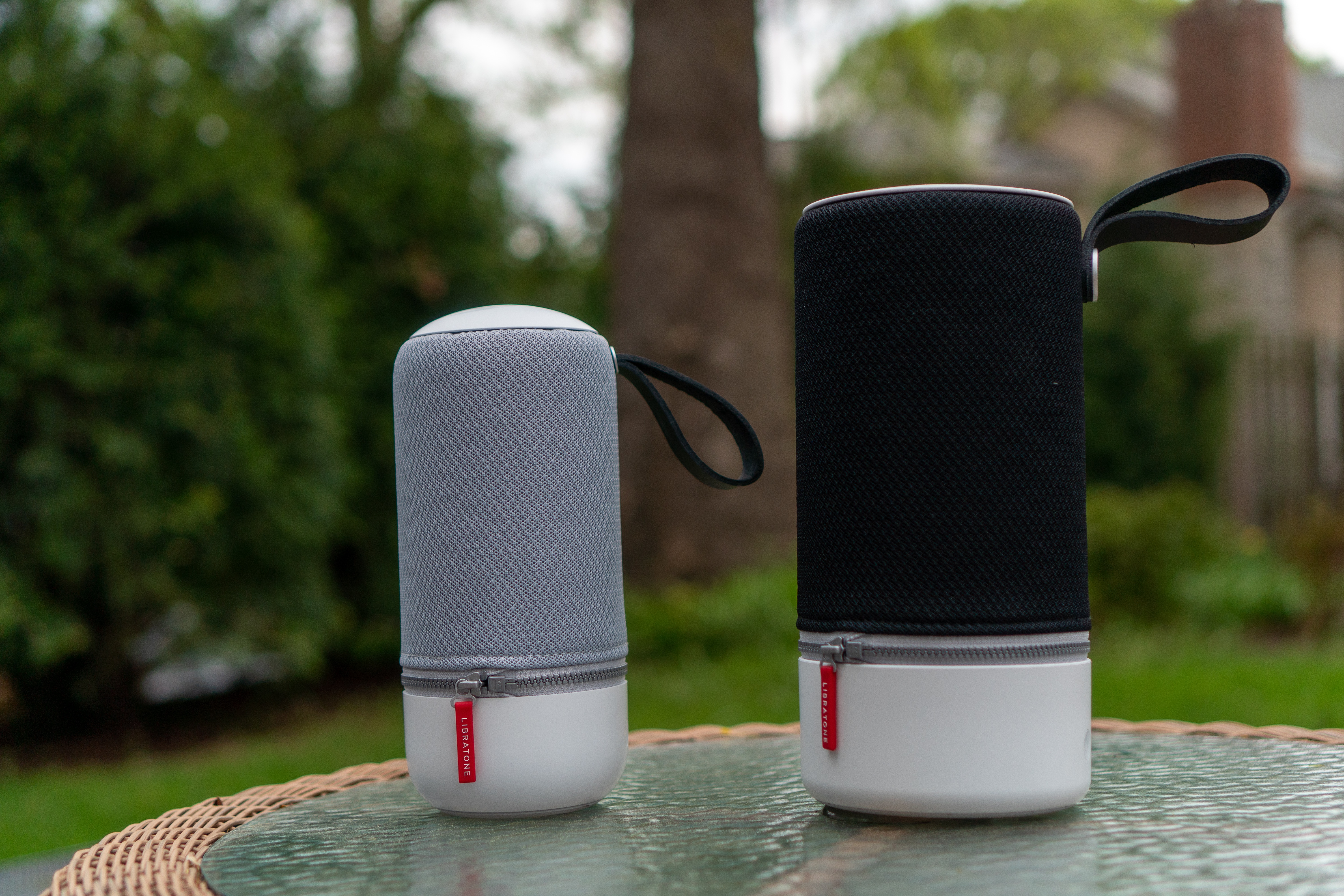
Libratone’s Zipp 2 and Zipp Mini 2 Portable Wireless Speakers: The MacStories Review

I love my two HomePods. One sits in my living room and the other in my studio. When I finish working for the day, I can ask Siri to move my music from the studio to the living room where I continue what I’m listening to as I make dinner and relax. Most of the time, both HomePods are also within earshot for issuing Siri commands to turn lights on and off, add items to my grocery list, and kick off shortcuts.

Here’s the thing though: it’s summertime. I’m spending time outdoors and going on road trips to visit family. Meanwhile, my HomePods remain tethered to the wall by power cords. They’ll be there waiting when I return, but when I’m on the go, my HomePods are useless, which prompted me to start looking at portable speakers that could reach beyond the walls of my home.

My research led me to Libratone’s Zipp 2 and Zipp Mini 2 wireless speakers, two of the only wireless solutions I’ve found that support Apple’s AirPlay 2 audio streaming technology. Libratone sent me one of each model for testing, and I’ve spent the past few months using them in different spots around my house, in my backyard, and at the beach. Both speakers deliver on the versatility I was looking for, extending the ways and places I can play music. However, neither of the Zipp speakers was quite as simple to use or reliable as the HomePod. The few issues I ran into are balanced out in no small measure by the versatility of the Zipp speakers though, which depending on your needs makes them a worthy replacement for or supplement to the HomePod.

Read more


Airmail Zero: Blazingly-Fast Gmail Triage for the Mac and iPhone [Sponsor]

The makers of the Apple Design Award-winning app Airmail are back with Airmail Zero, a brand-new take on Gmail for the Mac and iPhone.

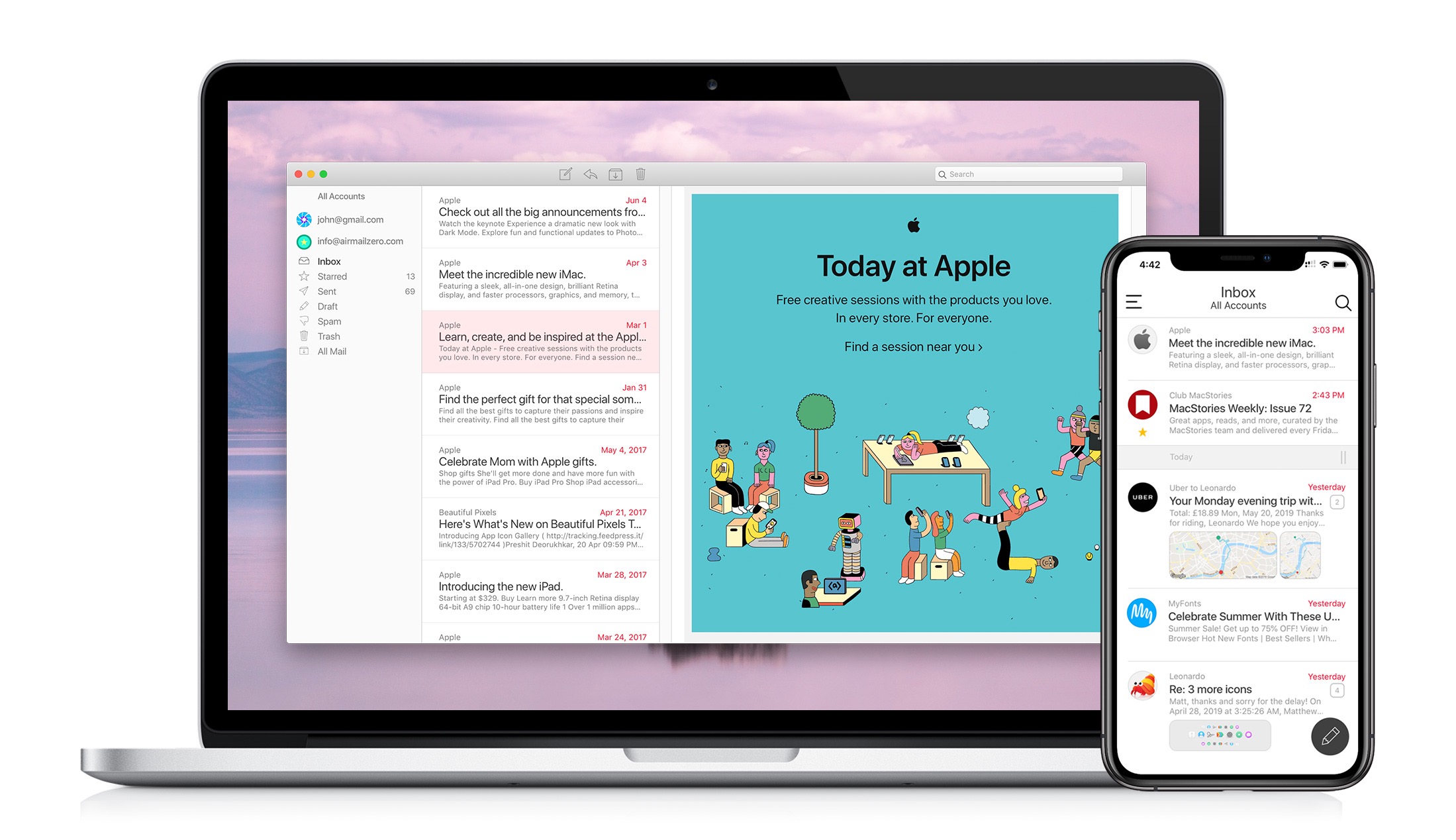
Speed is critical to getting through a mountain of email messages, and you don’t want your email client slowing you down. That’s why Bloop, designed Airmail Zero, the successor to Airmail, from the ground up with speed and efficiency as a top priority.

Airmail Zero is built on an all-new Swift codebase for lightning-fast app launches, and instantaneous message handling. The app has been architected to use virtually zero storage, memory, and CPU to keep everything working smoothly throughout. Sync is speedy, the app works exceptionally well with virtual private networks, and it communicates over HTTPS connections too.

The emphasis on speed extends to Airmail Zero’s design, which is brought to life with custom animations. Email messages are presented in a clean, easy-to-read card interface with simple, intuitive controls for rapidly triaging an overflowing inbox. Add to that a rich set of keyboard shortcuts on the Mac and you’ll find yourself with an empty inbox in no time.

The Mac and iPhone versions of Airmail Zero are free to use with one Gmail account. Subscribe for $0.99/month or $9.99/year and you add multiple Gmail accounts organized in a unified inbox, plus live help from the Airmail Zero support team.

Spend your time answering email instead of managing your email client by giving Airmail Zero a try today on the Mac and iPhone.

Our thanks to Airmail Zero for supporting MacStories this week.


AppStories, Episode 120 – Changes to Photos Coming in iOS 13 and Catalina

On this week’s episode of AppStories, we take a close look at the upcoming changes to the Photos app on iOS and the Mac.

Sponsored by:

  • Secure Shellfish – Connect your servers and your apps.
  • Remote for Mac – Remote Control for Mac.
  • Linode: High-performance SSD Linux servers for all of your infrastructure needs. Get a $20 credit.

AppStories+ Deeper into the world of apps

AppStories Episode 120 - Changes to Photos Coming in iOS 13 and Catalina

0:00
45:00

AppStories+ Deeper into the world of apps

Permalink