Apple Launches New 4.7-inch iPhone SE at $399

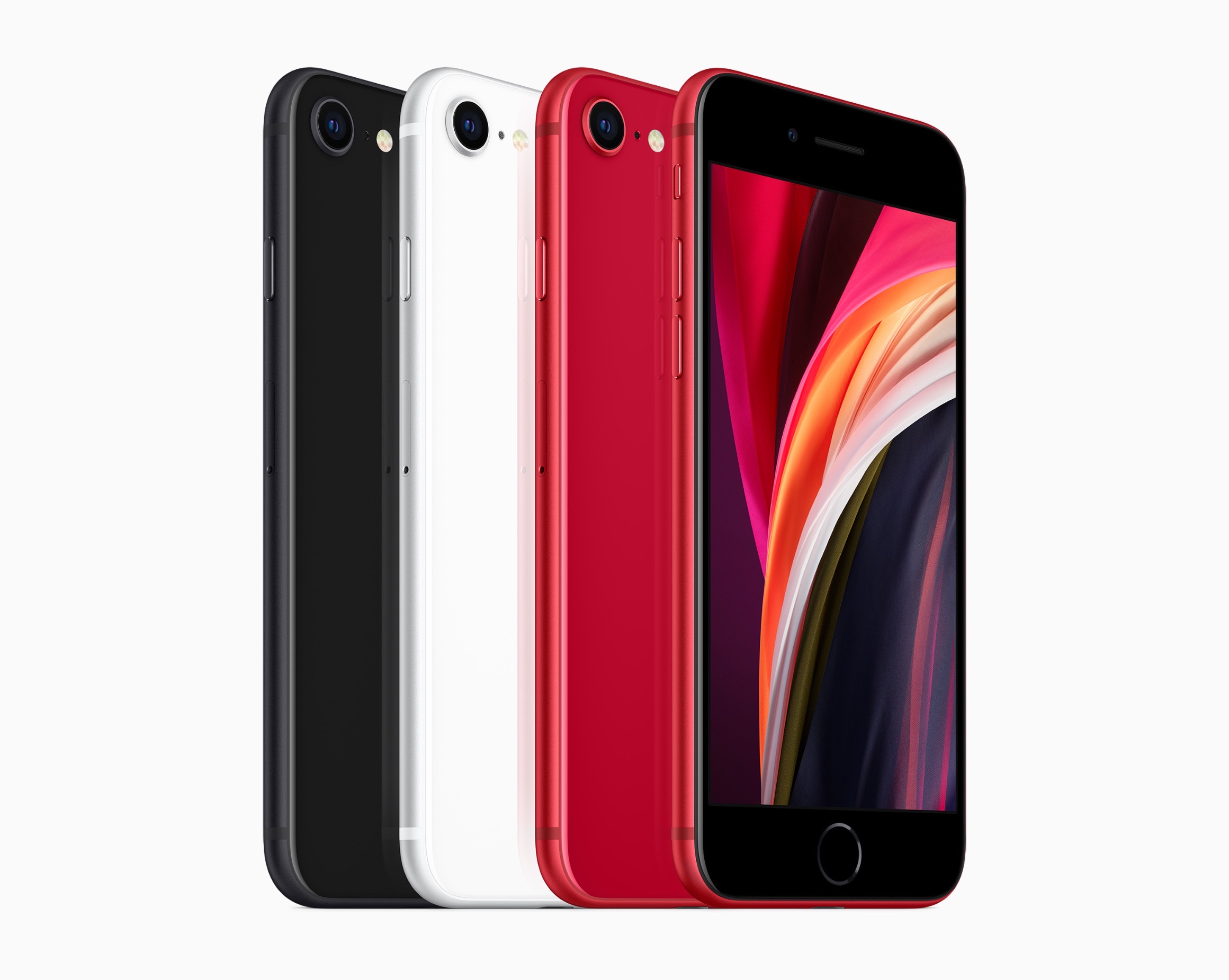
Today Apple announced the successor to 2016’s iPhone SE, a new model that retains the same name and goal of being the budget option for customers. The new iPhone SE will be available for pre-order this Friday, April 17, it ships one week later on April 24, and starts at $399, the same price the original SE had when it launched. Unlike that original model, though, the new SE carries an altogether different form factor. While the original SE was based on the iPhone 5’s 4-inch design, the new SE resembles the iPhone 6/7/8’s 4.7-inch design. This makes it notably larger than the previous iPhone SE, but still smaller than any of the flagship iPhone 11 line.

The 2020 iPhone SE, like its predecessor, contains modern specs but in a classic iPhone body. It has the same A13 Bionic processor found in the more costly iPhone 11 and 11 Pro models, but cuts costs in other ways such as by offering Touch ID rather than Face ID authentication, and a single 12MP rear-facing camera rather than the dual- or triple-lens arrays on Apple’s flagship models. The presence of Touch ID in particular makes the device an attractive option not only for users on a tighter budget, but also those who really don’t want to lose the Home button the next time they upgrade devices.

Read more


Apple Creates Tool for Spotting Trends in Mobility Data for Feedback on COVID-19 Policies

Apple has shared a new web-based tool that provides insights from Apple Maps on mobility trends. According to Apple’s press release:

This mobility data may provide helpful insights to local governments and health authorities and may also be used as a foundation for new public policies by showing the change in volume of people driving, walking or taking public transit in their communities.

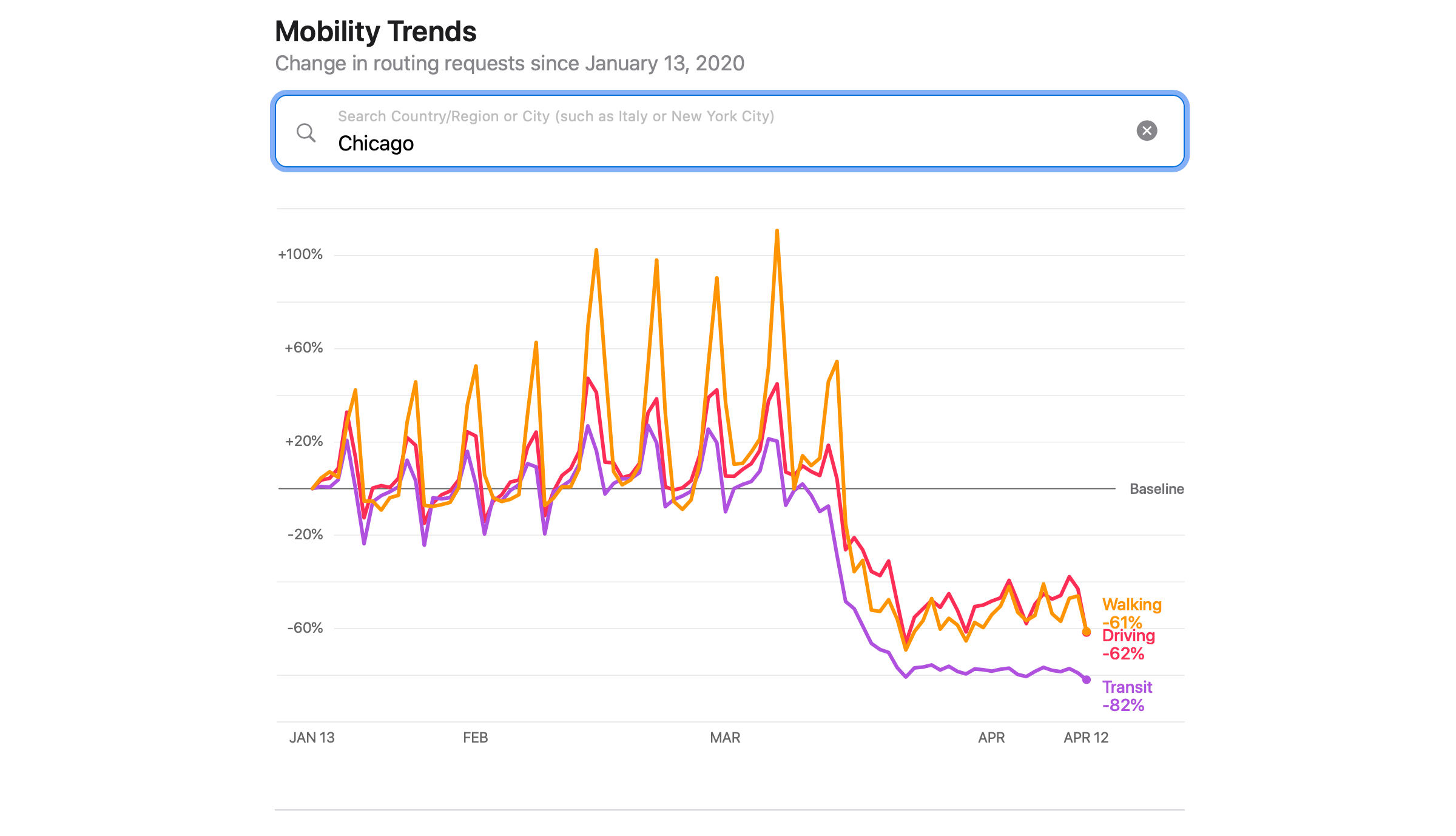
The tool can be found at apple.com/covid19/mobility, where you can view driving, walking, and transit trends for 63 countries as well as major cities around the world. Apple’s press release also explains how the data is collected and addresses privacy:

Maps does not associate mobility data with a user’s Apple ID, and Apple does not keep a history of where a user has been. Using aggregated data collected from Apple Maps, the new website indicates mobility trends for major cities and 63 countries or regions. The information is generated by counting the number of requests made to Apple Maps for directions. The data sets are then compared to reflect a change in volume of people driving, walking or taking public transit around the world. Data availability in a particular city, country, or region is subject to a number of factors, including minimum thresholds for direction requests made per day.

Having tried the tool, it’s fascinating to see the differences between the effect of mobility restrictions around the world. I’m glad to see Apple sharing this information on an aggregate, privacy-conscious way that hopefully can help governments and health organizations around the world assess the effectiveness of measures put in place to slow the spread of COVID-19.


HomePass 1.7 Brings Refreshed UI, Customizable Data Fields, and Improved Shortcuts Support

My HomeKit setup started out simple enough with a few Hue bulbs, but over time, it has grown to include security cameras, door sensors, electrical outlets, and more. As the number of accessories connected to my network grew, so did the hassle of managing them.

The initial setup of a device is rarely the problem. Instead, the trouble starts when you need to set up an accessory again later. In that case, you may have discarded or lost the documentation containing the HomeKit accessory code, or it may be in a hard to reach location. That’s where HomePass by Aaron Pearce comes in handy. It stores and manages your HomeKit accessory codes and other relevant information in one place.

Digital spring cleaning is something that’s been on my mind as I’ve been stuck at home and had some extra free time. We discussed the topic on AppStories this week in the context of apps, but HomePass provides the opportunity to extend digital spring cleaning to your HomeKit devices too.

We’ve covered HomePass before, so I won’t go into all the details of its core functionality. Instead, I’ll focus on what’s new and the features that make HomePass one of my favorite HomeKit utilities.

As with prior versions, HomePass remains incredibly easy to use because it pulls information about your HomeKit accessories from the Home app’s database. Add to that the fact that accessory codes can be added by scanning the stickers that you find on most devices or entering them manually, and you’re starting with a lot of information with virtually no effort.

With the latest update, HomePass has added greater flexibility and a more compact UI that works better with larger collections of HomeKit devices. For instance, sometimes you want to add more information about an accessory than is available in the Home app. With version 1.7 of HomePass, you can now add custom fields to a device’s entry to collect additional details. I’ve been satisfied with the existing fields that are auto-filled from the Home app, plus HomePass’s notes section, but it’s also something I’m glad will be available if the need arises for me in the future.

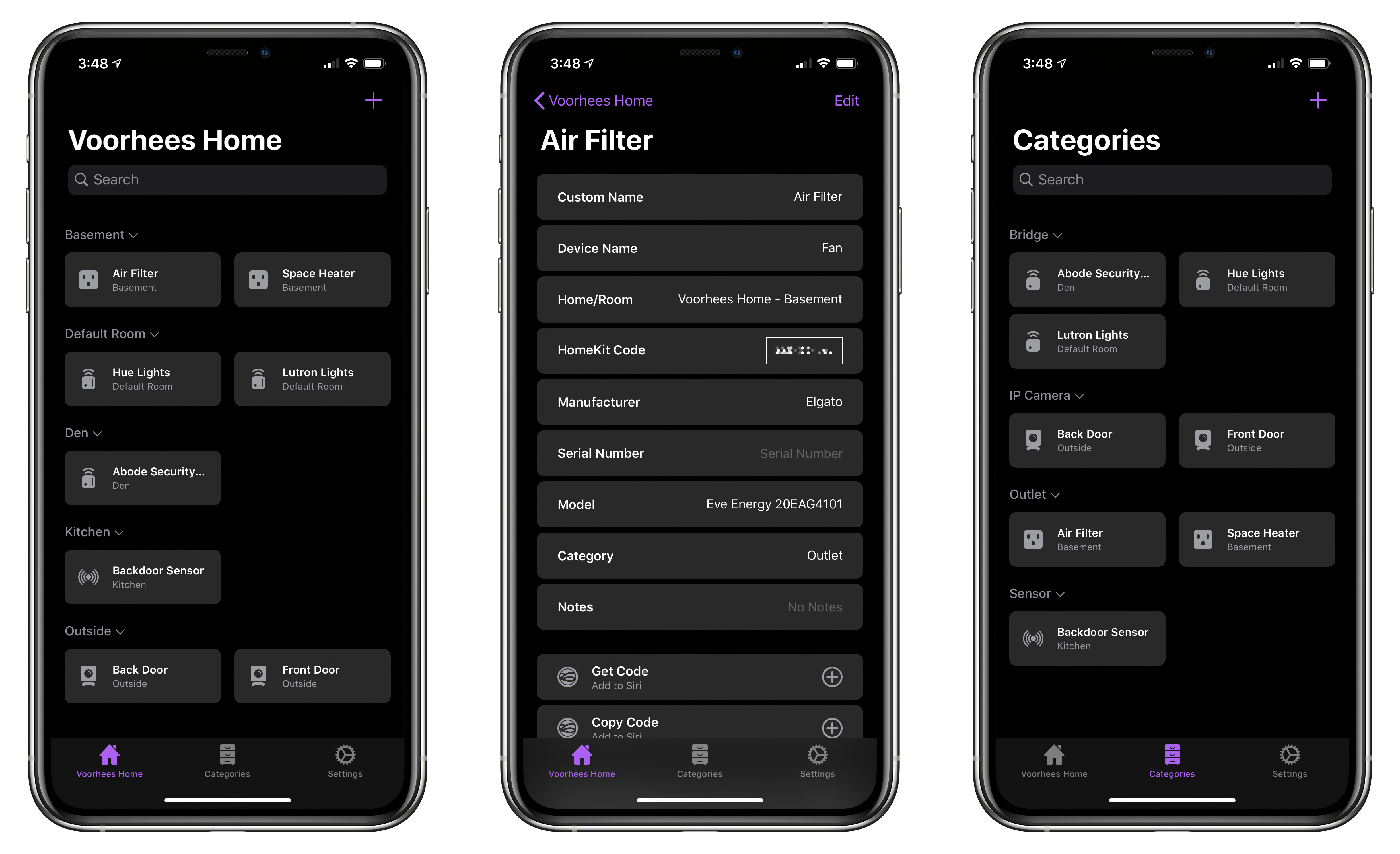
On the iPhone, devices stored in HomePass are now organized in a two-column grid of rounded rectangles a little like the tiles found in the Home app. Like Home+ 4 by Matthias Hochgatterer, HomePass does something Home can’t, though, which is collapse rooms by tapping on their names to hide away devices you don’t want to see. Combined with the new layout on the iPhone, which is similar to the existing layout on the iPad, it’s easier to manage a large collection of devices from a single screen.

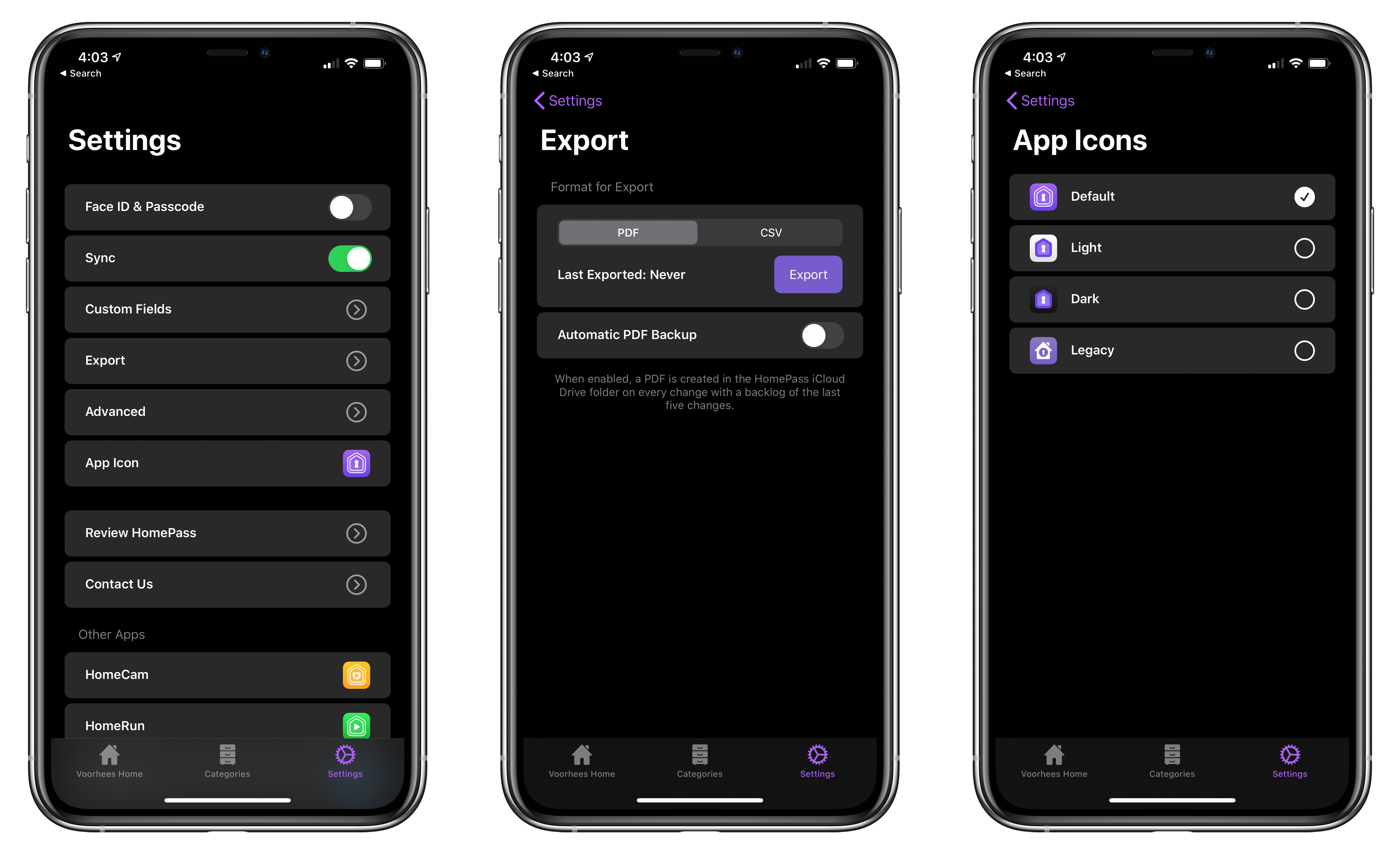
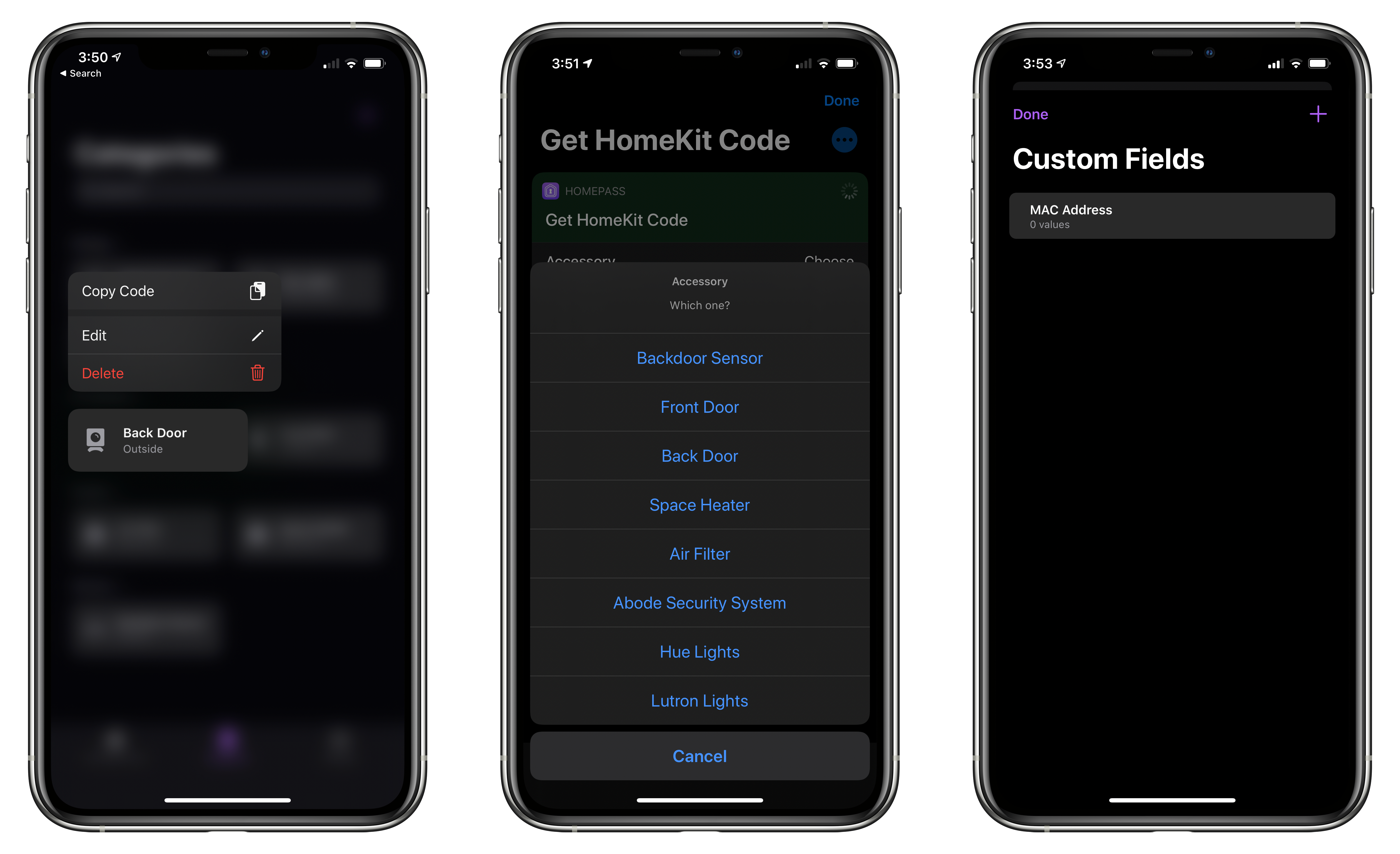
From HomePass's Settings tab you can manage custom fields, export your data, and pick from four different icons.

From HomePass’s Settings tab you can manage custom fields, export your data, and pick from four different icons.

HomePass is organized into tabs now too. The first tab organizes devices by your home’s rooms. The second tab organizes the same accessories by category like ‘Bridge,’ ‘Camera,’ ‘Outlet,’ and ‘Sensor.’ Like rooms, devices are laid out in a grid, and sections can be collapsed. Categories is an excellent alternative way to break down your HomeKit devices functionally.

Device tiles support context menus now too. Long-pressing on a tile offers options to edit or delete the device or copy its code. It’s a terrific way to quickly grab a code when that’s all you need.

Tapping on an item opens up a view with the details about each device. Long-pressing on the HomeKit accessory code allows you to copy it. Also, at the bottom are buttons to set up ‘Get Code’ and ‘Copy Code’ actions using Add to Siri. Once set up, the actions can be triggered using Siri voice commands or included in custom shortcuts you build.

HomePass now supports context menus, better Shortcuts support, and custom device fields.

HomePass now supports context menus, better Shortcuts support, and custom device fields.

In addition to device-specific actions, the app comes with the following built-in Shortcuts actions that have been improved by the addition of parameters:

  • ‘Copy HomeKit Code,’ which presents a list of your devices by default, and copies the code for the one you pick to the clipboard. The action can also be used to grab the code of a specified device and pass it to the next action.
  • ‘Get HomeKit Code’ also retrieves a device’s code, but passes it to the next action without copying it.
  • ‘Get Accessory,’ which the app’s description seems to suggest retrieves all of the information about a device, though it only returns the name of a specified accessory when I’ve used it.
  • ‘Get All Accessories,’ which retrieves a list of all your HomeKit devices.

The app includes an x-callback-url scheme that developers can use to automatically add devices to HomePass from their apps too.

The app’s final tab is Settings, where you can manage the new custom fields, pick from among four Home screen icons, and export your device data as a PDF or CSV file for safekeeping.

I don’t use HomePass often, but it’s one of those utilities I’m glad is on my iPhone because it eliminates frustration when I need it. Too often in the past, I’ve had to dismantle gear to find a HomeKit code. Now that I’m in the habit of adding codes to HomePass when I get a new device, troubleshooting issues with my setup is far easier. Moreover, with a larger collection of devices than I had when I started using HomePass, version 1.7 has substantially improved their management.

HomePass is available on the App Store for $2.99.


PDF Expert’s New Reading Mode Offers the Best iPhone PDF Experience

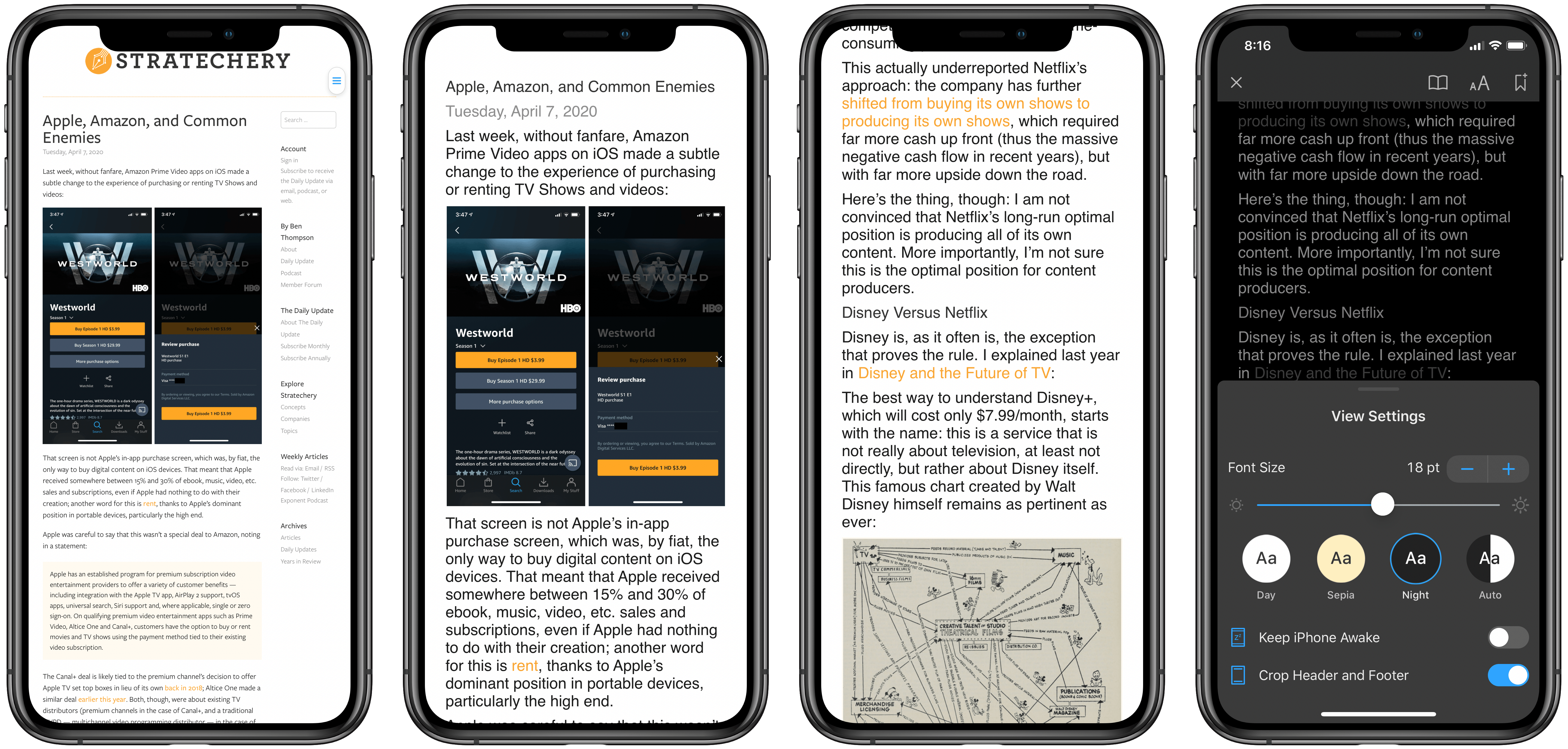
Original PDF (far left) vs. PDF in Reading Mode (all other images).

Original PDF (far left) vs. PDF in Reading Mode (all other images).

If you’ve ever read a PDF on your iPhone, you know the experience is less than ideal. For short documents you can manually zoom to make the text readable and pan from line to line. For long documents though, that’s a pretty painful option. The best method you can use involves a Max-sized iPhone turned into landscape mode, but even that comes with drawbacks, such as the weight distribution making it uncomfortable to hold your phone one-handed while reading. A solution has long been needed, and now it’s arrived.

PDF Expert is launching a new feature today, Reading Mode, which offers easily the best PDF reading experience available on iPhone. When viewing a PDF in the app, there’s a new button in the bottom-right corner that opens Reading Mode. This mode takes the contents of the PDF, converts it to a simplified layout that’s optimized for your device’s size, and provides custom view settings you can tweak to your liking. It reminds me a lot of Safari’s own Reader view, but for PDFs rather than websites.

Read more


Gear.Coffee: Upgrade Your Coffee Ritual with the Kinu M47 Series Hand Grinders [Sponsor]

If you’re someone who can’t get through the day without coffee, I’m sure you understand the importance of having great coffee. With the Kinu M47 Series Hand Grinders from Gear.Coffee you can upgrade your entire coffee experience with freshly-ground, flavorful coffee.

Each cup of coffee should be supreme, and you should enjoy each sip you take during the day. After all, believe it or not, this is part of what makes your day great. Every little detail sums up to produce an outstanding cup of coffee, but freshness is key here. So make sure that you get this part of your coffee ritual right.

To get a fully flavor-filled experience, the first thing you need is fresh-ground coffee beans. And to get the richest infusion of flavor and aroma to your coffee, you should grind it just before you brew it. Of course, you need a coffee grinder to accomplish this because coffee beans are super hard!

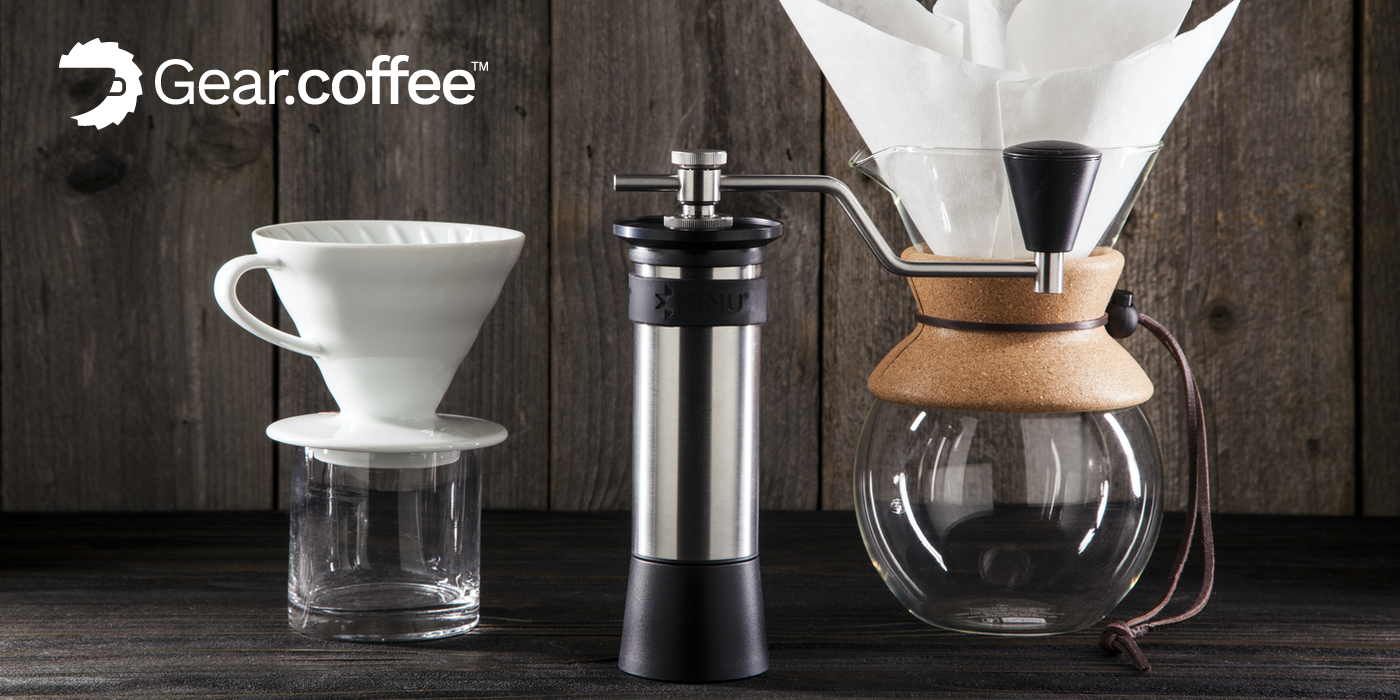
Gear.Coffee makes it easy for you to choose because they’ve selected the top three high-quality manual coffee grinders by Kinu Grinders. The German-engineered Kinu M47 Phoenix and Simplicity hand grinders feature the best in consistency and reliability no matter how you prepare your coffee: Aeropress, Pour-over, Espresso, Moka Pot, Drip, etc.

Choose the one that suits you best. There’s no wrong choice with these grinders!

MacStories readers can get $10 off their first grinder purchase by visiting the Gear.Coffee website using code “macstories10” at checkout throughout April. Check out these terrific grinders today and enjoy a fantastic cup of coffee.

Our thanks to Gear.Coffee for sponsoring MacStories this week.


Apple Shares ‘Creativity Goes On’ Video on YouTube

Apple today published a new video on YouTube that shouldn’t be missed. It’s called “Creativity goes on,” and it celebrates the resilience of humanity amidst a pandemic and self-quarantine.

The video shows how people around the world are using Apple devices to express themselves and connect with each other. One example shows an elderly man and presumably his grandson playing chess together, with the grandfather connecting over FaceTime on the child’s iPad. Another features a person following an instructional yoga video that’s playing on their Mac. The soundtrack for the whole thing is lovely, evoking Apple’s traditional sentimental holiday videos. It’s well worth 98 seconds of your time.

Permalink

Apple and Google Partner for COVID-19 Contact Tracing

Today Apple announced a special partnership with Google to develop contact tracing technology designed to reduce the spread of COVID-19 in the coming months. The plan involves two steps:

First, in May, both companies will release APIs that enable interoperability between Android and iOS devices using apps from public health authorities. These official apps will be available for users to download via their respective app stores.

Second, in the coming months, Apple and Google will work to enable a broader Bluetooth-based contact tracing platform by building this functionality into the underlying platforms. This is a more robust solution than an API and would allow more individuals to participate, if they choose to opt in, as well as enable interaction with a broader ecosystem of apps and government health authorities. Privacy, transparency, and consent are of utmost importance in this effort, and we look forward to building this functionality in consultation with interested stakeholders. We will openly publish information about our work for others to analyze.

Additionally, Apple has published draft technical documentation covering their joint work with Google.

This marks only the latest of several efforts Apple has developed to help fight the spread of COVID-19. The company developed an app and website, in partnership with the CDC, to help people with symptoms know what they should do. Additionally Tim Cook has been tweeting periodic updates about the masks and face shields the company has sourced and developed to send to first responders. Today’s partnership with Google, however, may be the most significant effort to date.

The World Health Organization explains how contact tracing – which involves keeping track of anyone who has been in contact with an infected person – can help limit the transmission of disease. Although current social distancing policies are a strict form of containment, well-implemented contact tracing could help prevent the need for such drastic measures in the future.

I’m glad that Apple and Google are collaborating on this effort, and that it will be privacy-first and opt-in. Anything that can be done to minimize the spread of COVID-19 is a good thing.