MoneyBook: Manage Your Finances with Elegance

If you’re a freelancer, it’s very likely that you need to keep track of your finances. You have to track expenses, choose a budget every month, check where does your income come from or where and how you spend more money.

Today I’d like to talk about MoneyBook, an iPhone application by NoIdentity which does all of this with a stunning user interface.

Read more


Backup Your Mail Library with MaBuRe

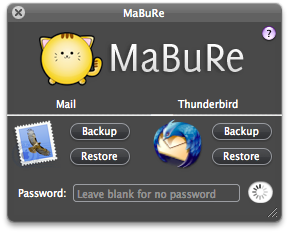
Here’s a great utility for all you Mac users out there who use Mail.app or Mozilla Thunderbird. MaBuRe (ok, let’s not talk about the name..or the icon) is a lightweight, free app for Mac which can backup and restore your mails in a single click.

The main (and only) window is a HUD panel which lets you backup and restore your Mail / Thunderbird database. The messages will be archived in a .zip file in your desktop.

The developer said on MacThemes forum it will soon implement the possibility to schedule backups for the next release.

Nice app!


The Ultimate Introduction to Applescript: Part 1

Applescript, that amazing resource many Mac users ignore because they think it’s too complex. Guys, Applescript is an amazing tool to get things done automatically, though I recognize many of you just don’t want to get started because you don’t have the right motivation, or you just don’t know enough about it. I wrote a post which collected the best examples of Applescript but still, there wasn’t a real introduction.

That’s why I asked my friend Jesse from iScript Netcast to get started on a posts series about Applescript. There will be 3 parts, where Jesse will outline the pros and cons of Applescript, together with some sample scripts and tips for beginners.You can also get in touch with iScript Netcast on Twitter here.

Enjoy!

Read more


Apple, Lala, Google and the Tea Table

So, turns out Apple has acquired Lala, the music streaming web service everyone’s talking about right now. Many people (here and here) are saying Apple has just did one of the best moves in years, purchasing a young and growing startup which could help Cupertino building a better iTunes, a better Genius, a better music discovery engine.

No doubt about it.

But I believe these people, Apple, Google and even Lala are forgetting about that small group of guys from Sweden who created one of the most successful music streaming services ever developed: Spotify. Sure, Spotify isn’t “officially” available in the US yet (but come one, everyone here knows how to use it anyway) but is going very well in Europe and the growth won’t stop in my opinion. I last played my local music 5 months ago, before installing Spotify. This service from Sweden is strong, reliable and offers a huge catalogue: every artist I searched for was in, with high-bitrate streaming, detailed bio, albums and singles. The recommendation system works fine too, it made me discover tons of bands I didn’t know before.

So, Spotify works and again - there’s no doubt about it. But here comes the cool thing: Spotify has an iPhone app which supports offline playlists and syncs with the desktop client.

Hmm. You may argue that the mobile application is exclusively meant for Premium users but seriously - would you prefer a per-album purchasing system or a huge music catalogue for $10 a month? You choose.

I once heard Shigeru Miyamoto used to scrap the entire development of a game if the project didn’t meet his standards. They called this scrapping “upending the tea table”. If the new iTunes won’t met your standards and your needs guys, go upend the tea table. There’s something better than Lala out there, and it’s called Spotify.


Beak Gets a Complete Rewrite. It’s Gonna Be Awesome.

I tested Beak some weeks ago and to me, it seemed just another simple Twitter client for Mac. I didn’t like the interface, it didn’t have interesting features..It was an average app. Now, I remember someone told me things were very likely to change, but I didn’t believe him. The good news is Beak is going under a complete rewrite, and it seems absolutely awesome.

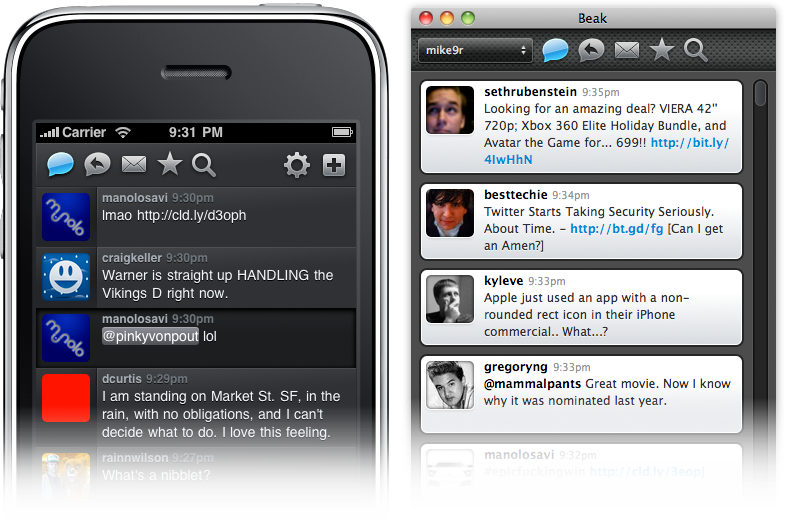
Mike Rundle, the designer and developer of Beak, has announced yesterday with this blog post that Beak for Mac will be completely rewritten and that there will be an iPhone version too. Here’s a screenshot of a working build of Beak for Mac and iPhone.

Beak Mac and iPhone

Beak Mac and iPhone

Well, it’s gorgeous guys. But the most interesting thing is that both versions will share the same UI principle, a top toolbar instead of the “normal” bottom toolbar. Isn’t this “cross-platform” consistency?

By the way, here’s an excerpt of Mike Rundle’s post:

“First and foremost, I’m building Beak for me. I’m a designer and developer who has worked on the web for a very long time and I’m desperate to build something more tangible and real. Beak fills this need. Beak also lets me be creative and have fun without worrying if it will pay the bills since I have a fantastic full-time job that does that for me. I’m not building Beak to supplant my full-time income, I’m building it because it’s interesting and lets me learn new things.

Second, Beak is not competing for your Twitter application-purchasing funds. I want you to go out, right now, and buy Tweetie, Twitterrific, Birdfeed, Reportage, Birdbrain and every other beautifully-designed Twitter-related application for Mac & iPhone. Go support quality developers, it’s extremely important. When Beak 1.0 ships the new website will have links to my favorite Twitter apps at the bottom. Why? Because they deserve to be purchased and supported.

Third, Beak is a side project and will not have every feature you love. I have some strong opinions about which Twitter API features should be included in Beak and not all of them will be there, because, again, I’m building Beak for me. Lists & Retweets are in Beak 1.0 but they’ve got a twist. Things I don’t like about Twitter or that I think are pointless probably won’t be included, but that’s just because I’m going to work on what I want to work on, and lame features just aren’t fun to implement. I’d rather sweat the details on the things I choose to include instead of half-assed features that have been suggested that I hate.”


Favorite Tweets of the Week Nov 29-Dec 5, 2009

I usually tweet a lot of stuff: apps tutorials, news, videos, reviews, hacks and so much more. Everything that’s Apple-related and it’s interesting, it’s worth a tweet.

To keep up to date with all these links you can follow me on Twitter, but in case you missed here’s a small compilation of the best tweets of the past week.

You can find me on Twitter as @storiesofmac.

Enjoy!

Read more


Foobi Winners Announced

First, thanks everyone for the support and the comments! Then, I’d like to thank Tapplox for giving us 5 additional promo codes for the giveaway.

Now, here are the winners:

Lez

Nick

Jimi

Greg

Teryn

Niko

Carrie Drazin

mila

You’ll receive the U.S. promo code straight in your inbox in a matter of a few hours.

Anyway, stay tuned! Something huge is coming on December 15th.


Multifl0w 1.2.1 Brings Possibility To Close Apps

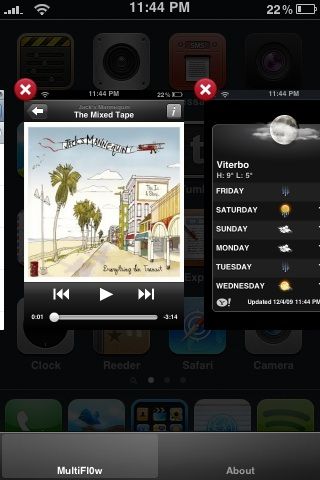
Multifl0w, the excellent app that lets you switch between backgrounded apps on your iPhone, has just been updated to 1.2.1 version which adds a much requested feature: the possibility to close a running application from the multifl0w interface itself.

multifl0w

multifl0w

This update make Multifl0w even more useful and gorgeous. In case you don’t know anything about it, here’s my review.


Nottingham: Notepad and Simplenote Client for Mac OS X

You’d probably already know how much Simplenote is amazing. It’s a little iPhone note taking application that sync every note over the cloud, allowing you access the notes you took from your mobile device on your desktop. It’s very cool. But even better, the developers launched an API service that let other developers create application that integrate with Simplenote.

I reviewed JustNotes a while ago, a beta application for Mac which perfectly sync with the Simplenote cloud. Today, I’ve just discovered another app, Notthingam and guess what, it’s a little gem.

Read more