
“But there’s another dilemma: it looks like there will be significant pressure, both political and technical, for universal apps that run on both the iPad and the iPhone. Like multiple-iPhone owners, this only counts as one sale, since one purchase of the app will run on both devices. So for any apps that use a universal edition, their entire existing customer-base will result in zero new sales. “
Marco Arment on iPad Apps Sales
Enjoy a Comment-free Web with Shutup
“shutup.css is a custom user stylesheet that can be applied to your browser to hide comments on many popular web sites without user intervention.”
3D Bookshelf: When eBooks Feel the Power of Graphics
They say that most of times releasing a product is just about good timing. Understanding what people need in that precise moment, being sure that your app will be the only one that can appease the users for months. Until a new app will show up and beat yours to death, people usually adds. Then there’s another situation, pretty weird actually: you announce and release a product while one of your biggest competitors has announced a similar app that will go out in a few months and it promises to revolutionize your same market niche. Yeah, that sucks.
In this case, if you consider that a) the biggest competitor is Apple and b) the aforementioned app is iBooks, you can easily realize that c) it’s a game over before the game even starts. Man I wouldn’t recommend this stuff to my worst enemy. Or maybe yes. Anyway, fortunately the Ideal Biunary guys are not my enemies, and their newest app 3D Bookshelf is very good and promising.
Even though it’s very similar to iBooks and Classics, we should take a look at it. Because it has some chances to survive.
iPad User Experience Guidelines
Interesting roundup of stuff found in the latest iPad “Human Interface Guidelines”.
Apple iPad Deal Pushes Another Publisher to Renegotiate with Amazon
“During his company’s earnings call this week, Murdoch revealed that he doesn’t like the $9.99 pricing currently employed by Amazon because it devalues books and hurts retailers who sell the hardcover editions. But he noted Apple’s content deals for its new iPad allow publishers more flexibility to set prices at a level they believe is fair.”
An Open Letter to Loren Brichter, Developer of Tweetie
Dear Loren,
Let me state this straight up: I don’t want to sound like one of those creepy fanboys that daily knock at your door asking for a “BETA VERZION PLZZ”. These are just my thoughts, hoping that you won’t be disappointed by my position.
I understand that making a good app requires time. A lot of time. Guess how much time an high-quality app such as Tweetie would require. But the situation is getting a little bit awkward.I’m talking about Tweetie for Mac and the long-awaited 2.0 version which, in your words, was due to be released after Tweetie 2 for iPhone. You said Tweetie for Mac was upcoming back in September. It’s four months ago.
Now, please define “upcoming” Loren, because I don’t get it.
Really, I do understand that you don’t have a 30+ people working team and that you’re an independent developer, but you can’t treat the people who purchased Tweetie for Mac like this. They believed in your product, I still believe in it and I’m sure many other people do, but this is just wrong. Promising an upcoming huge update and then not giving a single hint about it. No news about the development, no replies to the users who daily ask you on Twitter about it - nothing.
I agree with the “don’t promise. just ship” policy, but the problem is you actually promised something months ago and never shipped anything. Not a single blog post about it. To me, it seems like you just don’t care about the situation and prefer to cover this buzz with silence. This is wrong.
And you know why? Because customers want to trust the person they’re paying. It’s not about “I give you money, you give me updates”, it’s about believing that the person you gave part of your money to will care about you and your trust in the future. I strongly believe that an application isn’t just some lines of code thrown up together, it’s so much more. A good application can change a life, I dare to say so. I would have never been able to achieve 10k Twitter followers if it wasn’t for Tweetie. It’s become part of my workflow, so seamlessly integrated that I just can’t imagine how can I work without it now.
But you’re making that fantasy a real thing, Loren. I’m finding myself looking for a new Twitter client for Mac everyday - I still haven’t found a good one. That’s because I still trust you, man. It’s just that I don’t understand this way of acting.
Glad to be proven wrong.
Your truly,
Federico Viticci
Lunettes, the New Face of VLC for Mac
During this past week I’ve been talking a lot about alternatives for VLC. I’ve covered MPlayer and Movist so far, and both these apps are very stable, good looking and overall promising. But what about the actual VLC? You should have heard not so long ago that the development of VLC for Mac was going under some trouble, and that the devs were talking about ceasing it.It’s not like that, fortunately.
VLC is getting a new face. Its codename is Lunettes, it’s got a brand new user interface, it’s fully 64-bit enabled. It’s basically a new application. From what we can read on the official Lunettes’ wiki page:
“VLC for Mac must attract designers.We have decided to offer to designer the possibility to edit via a simple text file the look of VLC.
VLC for Mac needs a good interface to be the best Video Player.We want to make sure you’ll get the best experience ever when watching your favorites TV shows or Movies using VLC.For instance, if I am watching a TV show, and then quit Lunettes. At next launch Lunettes will offer you to go back to where you were.
Then the famous playlist fades out: It is not visible by default, and you don’t have to use it anymore.
Also in fullscreen you can now scroll through your playlists or TV channels.
And finally Lunettes is 64 bits.”
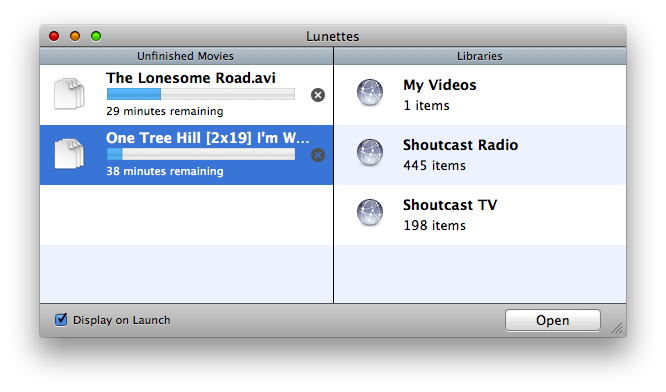
And I’ll tell you what, it works. It’s fast, it’s nice, it’s smart enough to remember where I was before I quit the app. The cool thing is, you can already head over the Github page of the project and download an early working build of Lunettes.The future of VLC has been that promising, I believe.
13bold, Developers of Bluebird and Bowtie, Will Make An Announcement Next Week
Rumor has it that 13bold, the developers of the popular Bowtie and Bluebird, will make an announcement next week.
13bold was founded by the developer Matt Petaneude and the graphic designer Laurent Baumann, who’s now working at Apple. To stay up to date, be sure to follow @mattpat @13bold and @lobau on Twitter. Stay tuned for next week.
Neven Morgan on Third Party Apps for the iPad
“Now think about app quality. Not being able to test on an iPad will suck for sure. That’s why responsible developers won’t ship before they’re happy, and irresponsible ones will churn out crap with the same speed and vehemence as always. You can’t stop stupid. Apple will hopefully reject unusably crappy apps, but beyond that, expect the same mix of pearls and dogcrap in the store as today.
I wouldn’t be surprised if top-rate developers such as EA, Rockstar, Activision, ngmoco got early units to test on. I also wouldn’t be surprised if a huge number of apps got iPadded without too much fuss, real units in developers’ hands or not.”