

Yes, it’s out. Expect a review next week.
Bowtie for iPhone Available in the App Store
Notational Velocity Hack Shows Note in Markdown
Must have hack by Steven Frank.
Billings Touch Wins the “Best of Show” Award at Macworld
Congratulations guys, you deserve it.
Our review.
Ghostly, Mood Music Monotony
I’m a big fan of things like Last.FM, thesixtyone, and other services that can turn me to new music or help me get into (or out of) certain moods. Ghostly Discovery is a free application that allows me to get into the mood of things. Or at least tries to. On one hand it’s an application that I really want to love. On the other, it’s hard not to look past some obvious pitfalls.
Let’s take a look shall we?
Pixelmator 1.5.1 Is Now Available, 1.6 “Nucleus” In the Works
Pixelmator has been updated to 1.5.1. Here’s the changelog:
- Brush Collections;
-
Fit Images and Crop Images Automator Actions;
-
Move to Applications dialog;
-
A tiny Dock menu;
-
The ability to change the background color of the work area;
-
Many more tiny improvements and important bug fixes
From the same blog post:
“The entire Pixelmator Team is getting to work on Pixelmator 1.6 Nucleus, and it is going very well.”
TaskMate: Minimal, Simple, Uncluttered To-Do List
You hate Things, you can’t stand The Hit List, you don’t want to use a web based application. You want minimalism in your GTD app. Or maybe, you just want a simple to-do list application, because that’s how you get things done.
TaskMate by Ryan Conway is a straightforward Mac app that lets you enter tasks, delete them and mark them as complete. Nothing more, just checkboxes.
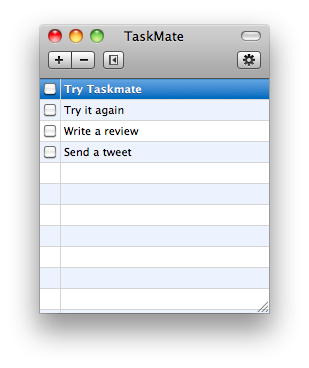
When Apple will bundle a Tasks.app with Mac OS X I’m sure it will be something like this.
Also, it’s free.
David Pogue Demonstrating “Dragon Mind Dictation” iPhone App at Macworld
Hilarious, that’s it.
When the PC is a Toaster
“Lots of the criticism around the iPad mimics the same criticism that Apple faced with the introduction of Macintosh. Macintosh was the first computer of the era to not ship with a programming language. For the enthusiast of the time, it was a huge issue. For the consumers, the inclusion of MacWrite and MacPaint was far more valuable and useful.”
iDocument: A Better Way To Organize Your Documents
Have you ever felt the need of collecting data into one single application? I have. To tell the truth, sometimes I wish there was an application that could collect everything (links,images, videos, music, documents) into a single interface, but I recognize that might end up being a nothing more than HD.app. So, here come database driven applications like iPhoto for images, iTunes for music or Yojimbo for..anything else. You should how much I love Yojimbo (here’s my post of some months ago about it) and you should also know how much I wish the developers of Yojimbo listened to the users. Yojimbo it’s great, but as you keep using it you realize it’s somehow outdated. Bookmarklets work fine, the Quick Input panel is useful, same applies for the Drop Dock…but it’s not fluid. Particularly after many months of serious usage, my installation of Yojimbo is starting to fall under the huge amount of data I’ve put into it. So I’ve come to a conclusion: certain file types must go elsewhere. I hence decided that documents, in the form of .PDFs and iWork files, should have been stored into another app. But that wasn’t easy you know: I wasn’t able to find an app that was exactly meant for collecting documents or at least, I wasn’t able to find the right app for me.
fast forward 30 days
iDocument totally came out of nothing. A follower of mine replied to me on Twitter saying “Hey, check out this app!”, and there I opened the link. Is iDocument really worth your money? Or, can iDocument really save you from those hundreds of documents cluttering you hard drive?