
Giveaway: Win a Copy of Doux, Beautiful Winterboard Theme

This is quite new for MacStories. I know that many of you guys have an iPhone, and I know that many of you have a jailbroken iPhone. There are many reasons to consider jailbreaking an iPhone, like multitasking, Cydia Store apps and graphical customizations.

For this reason, I thought it would have been nice to start giving away stuff for jailbroken devices. Today we start with a “premium” Winterboard theme you can find in Cydia at $0.99 and it’s called Doux.

Entering is simple. First, be sure that you have a jailbroken device and you know how to manually put a theme via SSH (using Cyberduck, perhaps)

Then:

Leave a comment here, telling us the theme you’re currently using. Winners will be announced on Wednesday, Feb. 10th.

Good luck!


Awaken Winners Announced

Thanks everyone for the comments on the Awaken giveaway. Also, I’d like to thank Embraceware for the 5 promo codes they gave to MacStories.

Here are the names of the winners:

Mattia Canfora;

Cathy C;

Abe Jellinek;

gab;

Weston Gallagher

You’ll receive the code in your inbox tomorrow.

Cheers!


Sneak Peek: Newsprint, A New “Professional Grade” RSS Reader for iPhone

I thought I was done with feeds readers for iPhone. I switched from Netnewswire to Byline, from Byline to Newsstand, from Newsstand to Reeder, and I’m currently using Silvio Rizzi’s elegant and minimal app as my only one RSS reader. So, I thought I was done with this kind of apps, as Reeder was (still is) the best and aggregator I’ve tried so far. Then, an icon showed up on Ember app’s image stream: it was wooden, with a newspaper delivering a..rss icon. It was beautiful, and the title was “Newsprint”.

I started searching for this new app, I was later invited to the beta testing and here I am now, giving you a sneak preview of this new RSS app for iPhone.

Read more


Sketchpad: Beautiful, Pixelmator-like,HTML5 Based Online Drawing App

HTML5 is the future. Developers using HTML5 today are pioneers.

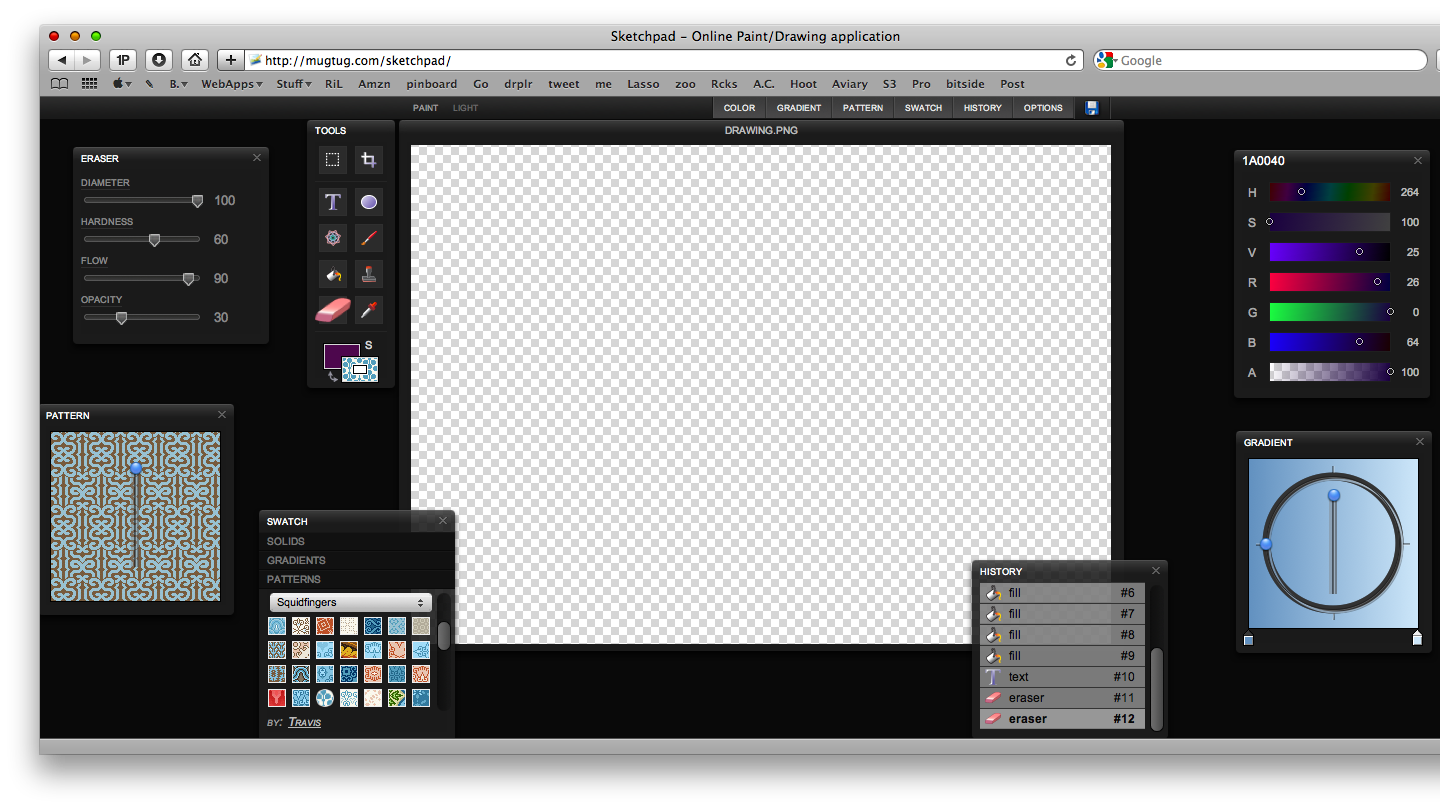
Ten days ago I posted an article (and so did John Gruber) about SublimeVideo, a promising HTML5 video player which already has features other HTML5 based videoplayers (Youtube, Vimeo) don’t have. Today it’s time for another HTML5 online “demo”, it’s called Sketchpad and it’s a painting / drawing application. Go check it out here.

You see? It’s got a beautiful Pixelmator-like interface made of floating panels. Sketchpad has all the basic features like the bucket tool, eraser, gradients and text - and it even lets you save your creations. (when you hit the save button the browser displays the image you’ve designed and returns a URL like this: data:image/png;base64. Interesting.)

Sketchpad

Sketchpad

Sure it’s rough and nothing more than a techical demo of what HTML5 is really capable of, but it’s the concept behind it that matters. Applications are moving to the cloud, because technology allows that. I think that during 2010 we’ll see hundreds of projects like this, projects that will anticipate what’s coming in 2 / years.

We’d better get ready.


One Week App Launches: Meet Dayta.

One Week App has finally launched. With OWA Sahil Lavingia, well known iPhone developer of Color Stream (our review) and Twizzle, aims at creating a fully functional and working iPhone app in just 7 days. The app has already a name, it will be called “Dayta” (day + data) and it will be a data management application.

From the official website:

“Your weight, your kill-to-death ratio in a first-person shooter, your daily intake of water (eight glasses a day, they say!), or your daily workout which you must… not… missed, again. There are individual apps for all of these things. But why? Think about this: tracking your weight is recording down a single number, daily. So is your kill-to-death ratio. So is your daily intake of water. So is whether or not you go to the gym today (either a 0 or a 1). If you reduce activities down to the numbers that represent them, it’s easy to see that one app can manage them all.

Meet Dayta.”

The concept is really interesting, and Sahil is continuously posting status updates on the OWA blog. These include sketches, early mockups and videos.Be sure to follow, give him suggestions and feedback and keep an eye during the week.


Automate Your Workflow with Sikuli

I think things such as Applescript and Automator scare a lot of people. While it’s an easy language, the Average Joe does not want to learn how to program. Personally I stayed away from those things for a long time, but have recently adopted them into my workflow once I made up my mind to just do it. Still, it took a weekend of reading and a week of just messing around to get comfortable going pro so to speak. Sikuli takes the idea of Automated workflows and makes it available for regular people. While it’s a simple screenshot app in it’s most basic form, more advanced users can add a ton of functionality.

Read more


Why (and How) Apple Killed the $9.99 Ebook

Link

“Publishers joining Apple’s iBooks store are turning their back on Amazon and its vision of the flat $9.99 ebook. Apple forced the music industry to charge 99 cents per song, so why are they helping publishers set their own prices?

To screw Amazon.

The difference between Amazon and Apple is this: Amazon is very much in the ebook business to sell ebooks. They want you attached to their platform. That’s why the Kindle Reader is on both PC and iPhone, as well as the eponymous e-ink device. Ebooks are huge for them. They sell six ebooks for every 10 physical books. Apple, on the other hand, sells content in order to sell hardware. The iTunes Store, the App Store and the brand-new iBooks Store exist so you’ll buy iPods, iPhones and iPads, which is where Apple really makes money. iTunes revenue is just a bonus, though an ever fatter one with the explosion of the App Store.”