Sketchpad: Beautiful, Pixelmator-like,HTML5 Based Online Drawing App

HTML5 is the future. Developers using HTML5 today are pioneers.

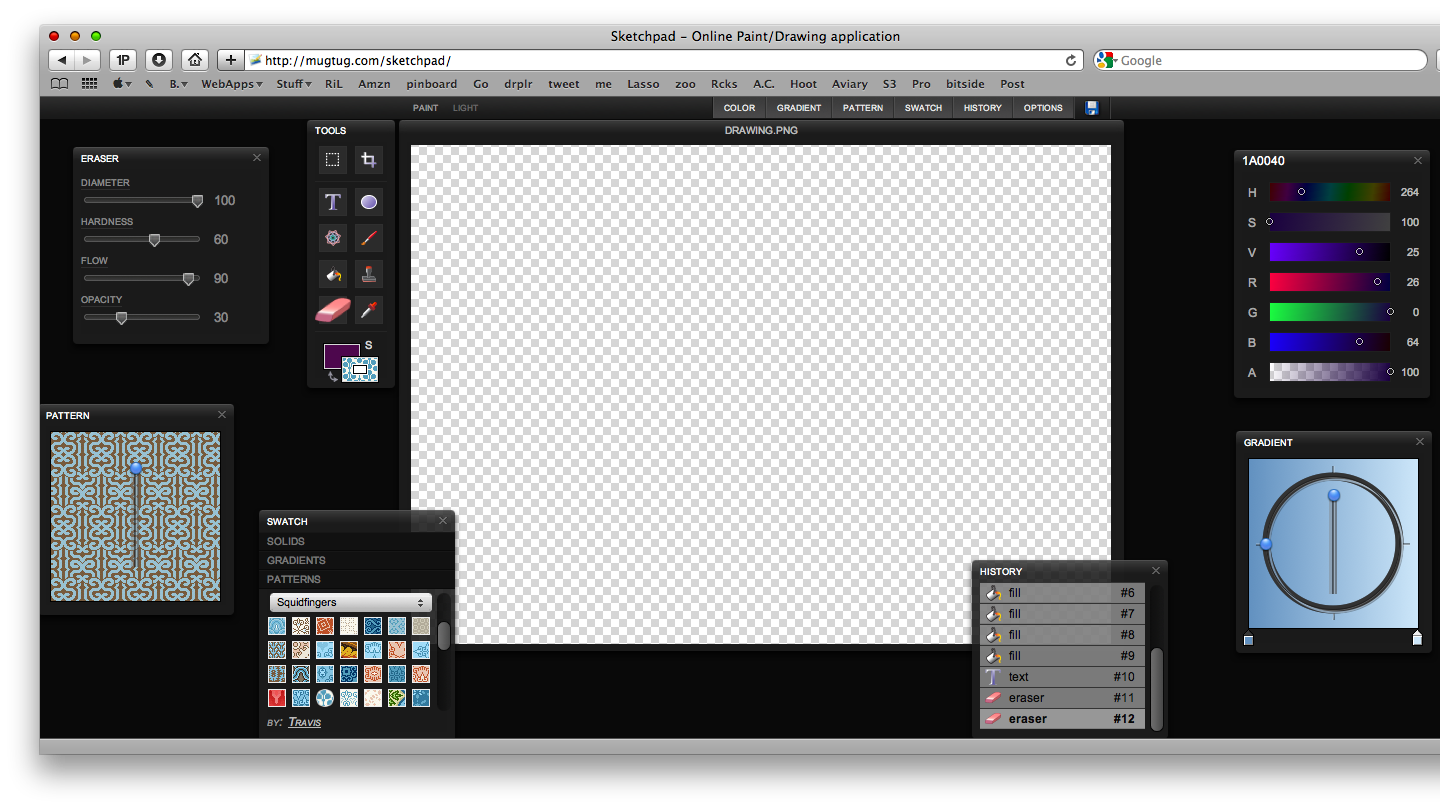
Ten days ago I posted an article (and so did John Gruber) about SublimeVideo, a promising HTML5 video player which already has features other HTML5 based videoplayers (Youtube, Vimeo) don’t have. Today it’s time for another HTML5 online “demo”, it’s called Sketchpad and it’s a painting / drawing application. Go check it out here.

You see? It’s got a beautiful Pixelmator-like interface made of floating panels. Sketchpad has all the basic features like the bucket tool, eraser, gradients and text - and it even lets you save your creations. (when you hit the save button the browser displays the image you’ve designed and returns a URL like this: data:image/png;base64. Interesting.)
Sketchpad

Sketchpad

Sure it’s rough and nothing more than a techical demo of what HTML5 is really capable of, but it’s the concept behind it that matters. Applications are moving to the cloud, because technology allows that. I think that during 2010 we’ll see hundreds of projects like this, projects that will anticipate what’s coming in 2 / years.

We’d better get ready.

One Week App Launches: Meet Dayta.

One Week App has finally launched. With OWA Sahil Lavingia, well known iPhone developer of Color Stream (our review) and Twizzle, aims at creating a fully functional and working iPhone app in just 7 days. The app has already a name, it will be called “Dayta” (day + data) and it will be a data management application.

From the official website:

“Your weight, your kill-to-death ratio in a first-person shooter, your daily intake of water (eight glasses a day, they say!), or your daily workout which you must… not… missed, again. There are individual apps for all of these things. But why? Think about this: tracking your weight is recording down a single number, daily. So is your kill-to-death ratio. So is your daily intake of water. So is whether or not you go to the gym today (either a 0 or a 1). If you reduce activities down to the numbers that represent them, it’s easy to see that one app can manage them all.

Meet Dayta.”

The concept is really interesting, and Sahil is continuously posting status updates on the OWA blog. These include sketches, early mockups and videos.Be sure to follow, give him suggestions and feedback and keep an eye during the week.


Automate Your Workflow with Sikuli

I think things such as Applescript and Automator scare a lot of people. While it’s an easy language, the Average Joe does not want to learn how to program. Personally I stayed away from those things for a long time, but have recently adopted them into my workflow once I made up my mind to just do it. Still, it took a weekend of reading and a week of just messing around to get comfortable going pro so to speak. Sikuli takes the idea of Automated workflows and makes it available for regular people. While it’s a simple screenshot app in it’s most basic form, more advanced users can add a ton of functionality.

Read more


Why (and How) Apple Killed the $9.99 Ebook

Link

“Publishers joining Apple’s iBooks store are turning their back on Amazon and its vision of the flat $9.99 ebook. Apple forced the music industry to charge 99 cents per song, so why are they helping publishers set their own prices?

To screw Amazon.

The difference between Amazon and Apple is this: Amazon is very much in the ebook business to sell ebooks. They want you attached to their platform. That’s why the Kindle Reader is on both PC and iPhone, as well as the eponymous e-ink device. Ebooks are huge for them. They sell six ebooks for every 10 physical books. Apple, on the other hand, sells content in order to sell hardware. The iTunes Store, the App Store and the brand-new iBooks Store exist so you’ll buy iPods, iPhones and iPads, which is where Apple really makes money. iTunes revenue is just a bonus, though an ever fatter one with the explosion of the App Store.”


Caffeinated App: A Second Sneak Peek

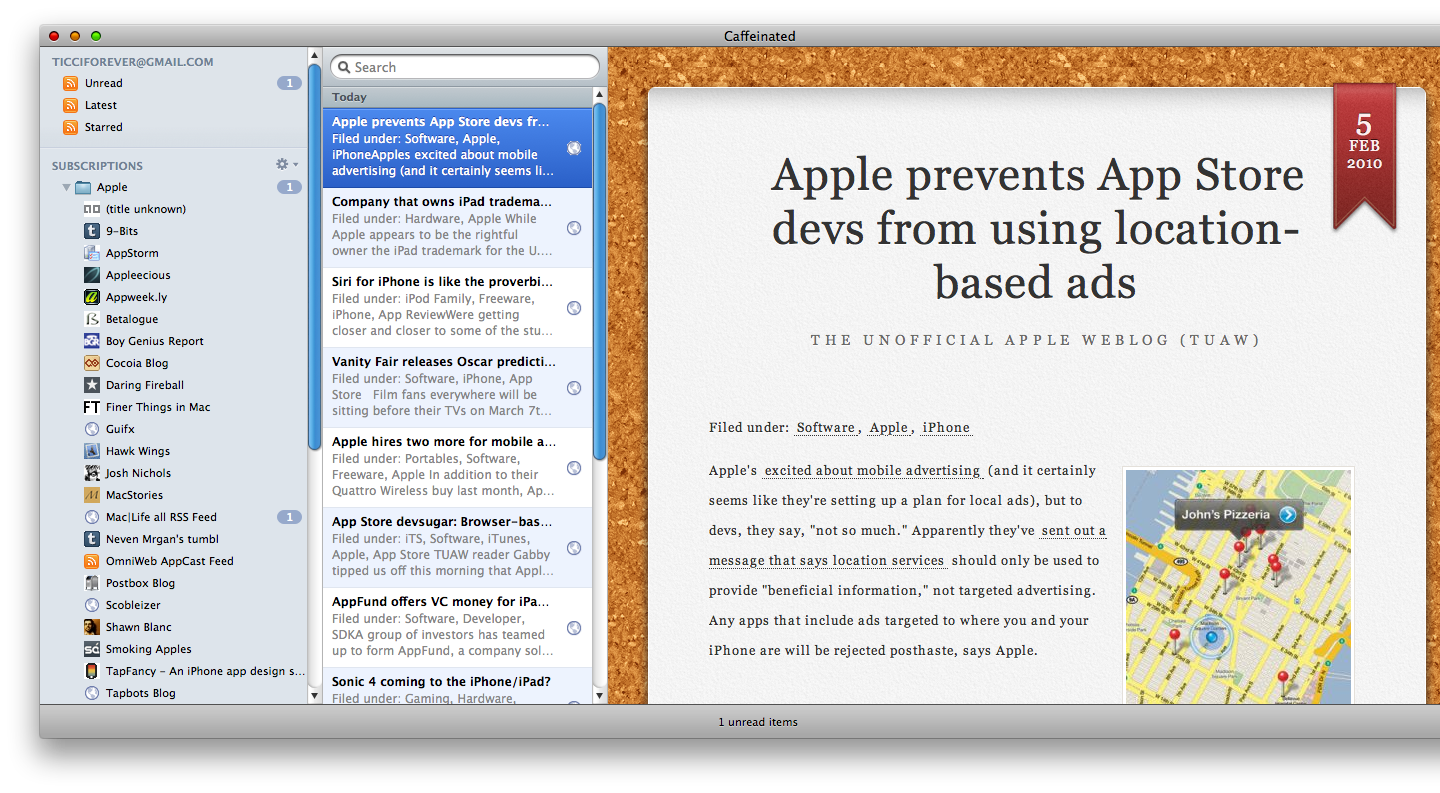
Do you remember Caffeinated, the app I called “the next big thing in RSS readers for Mac”? Of course you do. Well, I’ve just received another preview from the developer and I’m even more impressed.

This app is coming up huge guys: it’s beautiful, it’s slick, it’s fast. And by fast I mean “blazing fast”: I don’t know how Curtis managed to achieve this, but refreshing Google Reader took me 2 seconds. Really, 2 seconds. It’s even faster than Reeder on the iPhone. The theme has been improved and tweaked a little bit, and tons of new features are being added.

Caffeinated App Mac

Caffeinated App Mac

Still, no release date has been confirmed. In the meantime, be sure to follow @caffeinatedapp to get the chance to test it once the closed beta testing group will open.


A Pilot’s Take on the iPad

Link

“Unlike a computer, which it essentially is, you don’t have to wait for it to get started. Turn it on and you’re doing something. It’s got wifi and Bluetooth and will be able to make use of 3G on some models, too, so you can be online even when you’re not near a wireless internet connection. That’s a huge plus for aviation use. For the record, though, my netbook will do all those things, too, with the addition of a plug in 3G card.

[…]

For non-aviation use, I’ll probably stick to my netbook–the virtual keypad on the iPad looks awful. But for flying, the iPad sounds like a dream chart reader. It’s going to be quick to turn on, it’s going to have a brilliant display, and it’s going to be supremely easy to use. Charts, especially IFR approach charts, are a natural.”


The iPad, Aristotle and the “OS Democracy”

“Constitutions which aim at the common advantage are correct and just without qualification, whereas those which aim only at the advantage of the rulers are deviant and unjust, because they involve despotic rule which is inappropriate for a community of free persons.”

- Aristotle -

I think we can still find a lot of wisdom in Aristotle’s words, even regarding our beloved technology world. Obviously Aristotle didn’t write anything about tech, but he did for politics and ethics.

I believe that Apple is doing nothing more than applying Aristotle’s concepts to his devices, both the iPhone and the iPad. I read a lot of negative comments about the recently announced iPad and its - again - closed system, but all these people don’t get the main point: a closed system is actually more open and reliable than an already-open one.

Let’s say Apple is the ruler and the iPhone / iPad is the country: with a closed OS (monarchy) Apple doesn’t want anyone else to get in their way of ruling. But clearly, Apple (the ruler) has the interest of his country at heart: it’s a strict type of government, yet focused on what’s best for the country (the device)

Other scenario: the country (iPad) is a democratic one. This means that the citizens (the users) are more directly involved in governing (OS), they can make requests and see them applied. Clearly, they only care about their own interest, they don’t want the best for the country: they just want the best for them.

Apple doesn’t want anyone to get in their way. They provide a closed OS, with strict rules and limitations but pay attention: having rules to follow is always better than having no rules. If you still think that “OS Democracy” is a good thing, please remember that many times in the past democracy deviated into anarchy. No authority means no control, and no control means terrible user experience. On the other hand, you could say that monarchy can deviate in tyranny. That’s true folks, but that’s where trust comes in: do you trust the ruler? Then you have nothing to fear. Can I trust some dude who wants flash on his iPad? Definitely not.

“We want flash” is the new “We want lower taxes”.