
This Week's Sponsor:

Cotypist

Smart Autocomplete for Your Whole Mac


DEVONthink Pro: 50% Off

DEVONthink Pro: 50% Off

In today’s world, everything is digital. From shopping receipts to important research papers, your life often fills your hard drive in the form of emails, PDFs, Word documents, multimedia files and more. Questions eventually pop up, like where do you store all of this stuff?

If you haven’t yet, now is a great time to get your hands on DEVONthink – in my opinion the must-have information organizer / file manager / anything bucket for Mac. The iPad app came out two weeks ago and I’m finally working on a comprehensive review of the suite. If you purchase the app through this link, we also get a small kickback.
Permalink

Adobe: Apple Incites Negative Campaign Against Us (Yet We Followed Steve’s Advice)

We thought those days were over. Remember back in April, right after the iPad came out, the Apple / Adobe controversy about Flash somehow came back to where it started, The Internet. Hundreds of blog posts and pundits’ rants later, Steve Jobs managed to end the argument with his Thoughts On Flash. If you think about it, the whole Flash story kind of died after Steve Jobs’ “open letter”. Or maybe we just focused on the true meaning of “openness” more.

Anyway, Adobe is bringing the old debate back. Again, yes. Here’s Adobe CTO Kevin Lynch talking to FastCompany:

I just think there’s this negative campaigning going on, and, for whatever reason, Apple is really choosing to incite it, and condone it,” Lynch says. “I think that’s unfortunate. We don’t think it’s good for the web to have aspects closed off–a blockade of certain types of expression. There’s a decade of content out there that you just can’t view on Apple’s device, and I think that’s not only hurtful to Adobe, but hurtful to everyone that created that content.

Read more


Color Snatcher: Simple Safari Extension To Grab Colors Off Webpages

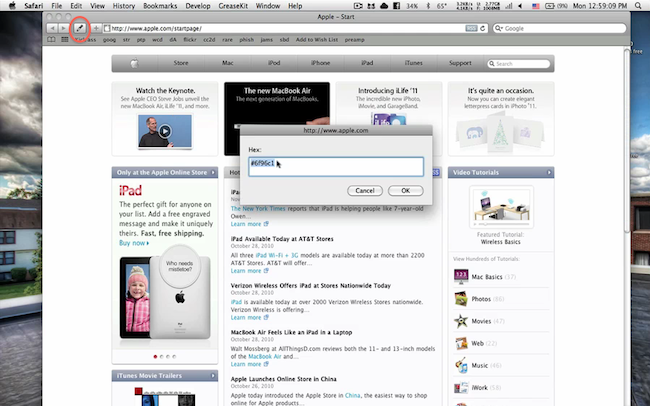
This one’s a Safari extension designers and developers alike are going to like a lot: with just two clicks, Color Snatcher for Safari allows you to grab colors off any webpage and copy it to your clipboard from a dialogue box that will appear on screen.

The extension, due to Apple’s restrictions, can’t automatically copy a color’s HEX or RGB code to the clipboard – you’ll have to manually copy it from a secondary tiny window. The extension, however, delivers on what the developer promised: a simple tool to grab pixel colors. That’s it.

Color Snatcher is, of course, free and the developer is already working on a better way to copy color codes. Very nice. Go download it.


MacJournal for the iPad

It used to hold true that I’d occasionally coordinate my nefarious plans for world domination inside of the iPad’s very own Notes application. I don’t like using Simplenote (as many will tell me to do) for such radical means, which is its own whitespace dedicated for short bursts of random prose. The only solace I could find was with MacJournal, though for a while, it only existed on OS X. And MacJournal is appealing not as a blogging solution, but as a database solution for maintaing multiple journals with optional encryption and password protection. When I can avoid it, I don’t like maintaining multiple files in the Finder.

Read more


Andrew Hyde’s iPad Experiment Gone Wrong

Andrew Hyde’s iPad Experiment Gone Wrong

I like writing, and the touch interface just wasn’t cutting it, so I purchased the bluetooth keyboard for when I wanted to write posts. It was pretty brilliant as a setup. On my last flight I was forced to check my bag, and in the rough handling the keyboard was turned on, keys were pressed, the iPad took this as incorrect password guesses and it locked.

I had all sorts of screenshots and apps to show off, those are all gone, because once your iPad gets in this mode, the only way to get it out is to restore it to the computer it was last synced with. I, not owning that computer, had no choice but to delete everything.

Delete everything.

I can imagine the frustration – more evidence that the iPad still can’t live on its own. [via BrooksReview]

Permalink

BMW Seriously Committed To iOS Integration

Looks like BMW is getting serious about iOS devices integration with their new car models. Engadget first detailed the system BMW was building to integrate iPads in their cars back in September; like it or not (I personally think it’s a little bit overkill) BMW thinks that’s how you’re supposed to enjoy using the iPad in the back seat.

A few days ago BMW launched an ad campaign to prove that what they have is the best way to use the iPad (and iPhone) on board – there’s no room for homemade stands and ugly wooden solutions. That’s really what the video is all about, check it out below.

Read more


Greenpois0n Source Code Released

Greenpois0n Source Code Released

The Chronic Dev-Team has kept their promise, and just made the source code for most of the limera1n-based jailbreaking tool available to the public. It has been released under the GNU license, so hopeful programmers are free to modify and distribute it as they please.

“Most of the limera1n-based tool” means the core components of Greenpois0n. The code is available here.

Permalink

What It’s Like to Work at Apple

What It’s Like to Work at Apple

At Apple, it’s never, “How long did you work for the company?” but rather, “How many times did you work at Apple?” The Apple attitude seems to infect everyone who works closely with the technology – and, even after leaving the company, we all say that we still “bleed six colors,” in reference to the original six-color Apple logo.

Interesting post, perfect for some late night Instapaper.

Permalink

Buddies For iPad Provides A Better Way To Check On Your Facebook Contacts

At this point, I guess you’ve figured out there’s no official Facebook iPad app nor does Zuckerberg plan to tell his team to start developing one. Or perhaps we just have to wait a little bit more, as Facebook is currently focused on mobile devices and the iPad isn’t exactly a mobile device. No matter how you look at it, there is no Facebook for iPad and we have to rely on 3rd party offers when it comes to status updates and photo galleries on world’s most crowded social network running on the iPad.

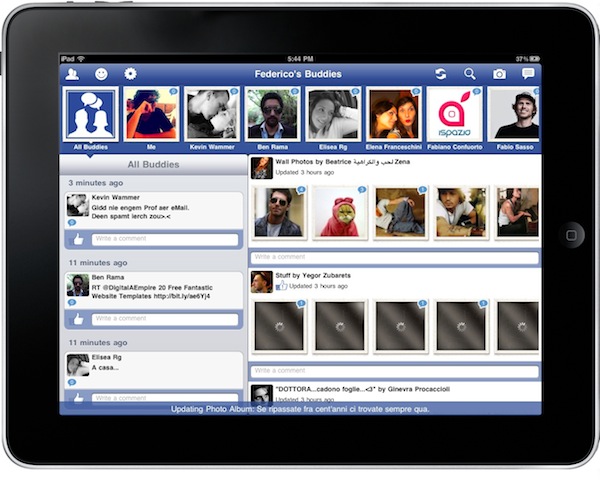
Up until now, Friendly for Facebook has been the most successful unofficial app for iPad to land in the App Store, and sales of the app sky-rocketed with the recent release of a major update. A new 3rd party Facebook app was released yesterday, it’s called Buddies and simplifies the way you can check on your Facebook contacts on the iPad. All wrapped up in an interesting native interface with noteworthy features and curious navigation schemes. Let’s take a look at it. Read more