Real Racing HD Updated with iOS 4.2 Support and Online Multiplayer via Game Center

Award-winning game Real Racing (well, at least the iPhone version) received a major update today: owners of the iPad version are now able to start online multiplayer sessions thanks to Game Center built into the update. Multiplayer supports up to 4 players, and you can invite friends to play also via Game Center.

As many other apps these days, Real Racing HD has also been updated to support iOS 4.2: it basically supports persistent state now, so you’ll be able to quickly pause and resume when switching between apps.

Real Racing HD is available at $9.99 here. Check out the full changelog below. Read more


HootSuite Official iPad App Now Available

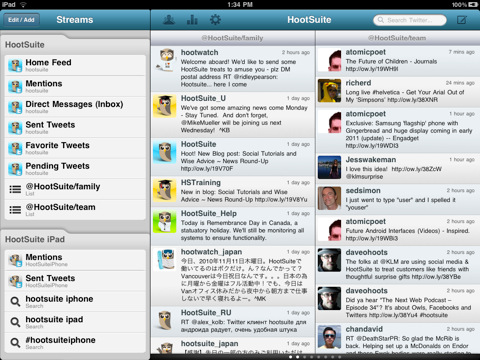
HootSuite, the online service to manage multiple social networks in one single place, released its first official iPad app a few minutes ago in the App Store. The app is free and available here.

HootSuite for iPad features all the options and functionalities iPhone users have been able to enjoy for almost a year now, but it sports a native interface for the tablet that takes advantage of the larger screen to display multiple “columns” at once, so you can keep track of your Twitter messages and mentions without having to switch between different views, for example.

The app currently supports Twitter accounts (lists and searches are included), Facebook profiles and pages, Foursquare checkins and, of course, HootSuite’s own URL shortening and analytics system ow.ly. Read more


TikTok+LunaTik: Multi-Touch Watch

TikTok+LunaTik: Multi-Touch Watch

Speaking of cool iPod Nano watch mods:

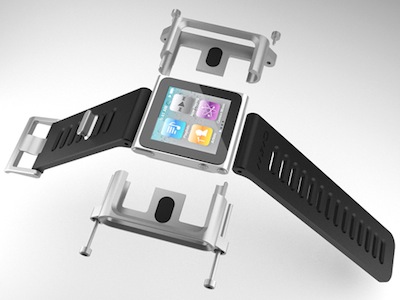
TikTok and LunaTik simply transform the iPod Nano into the world’s coolest multi-touch watches. The idea to use the Nano as a watch was an obvious one ever since the product was announced. But we wanted to create a collection that was well designed, engineered and manufactured from premium materials and that complemented the impeccable quality of Apple products. Not just clipped on a cheap strap as an afterthought.

Designed by MINIMAL, I suggest you watch the video with the explanation of the concept. This is serious design work.

Permalink

Kinect, OS X and iPad Come Together In Futuristic Cubes

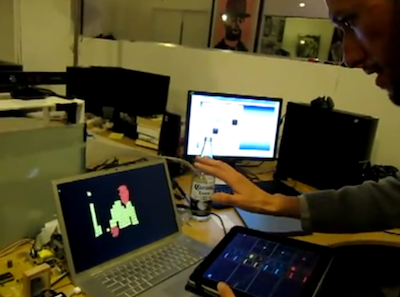
As if being able to display Kinect’s captured images on OS X wasn’t enough, the solid community behind Kinect’s incredible hacks managed to manipulate the data recorded by Kinect and output everything on OS X using cool futuristic cubes (a system called Box Cloud). These neon cubes may vary in size according to the distance of the subject from the camera – it’s overall a pretty cool thing to look at.

But modders and hackers took the whole concept a step further and allowed iPad users to control “planes of interest” using their multitouch tablet. With the iPad you can change the colors visualized on screen, adjust zoom by tilting the device. Somehow, it all comes together in the video below.

It’s only hacking, but we like it. [via Engadget] Read more


Slap The Nano

Slap The Nano

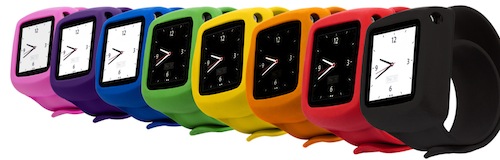
We’ve wrapped a memory-metal wristband with soft silky silicone. Slap’s flexible, spring-steel band lies flat and rigid until you slap! it onto your arm. Snap Slap open, then snap Slap shut around your wrist. (Say that 10 times real fast.) The Slap band self-adjusts to a comfortable fit, exactly your size.

Griffin’s latest accessory for the iPod Nano looks like an interesting alternative to those Nano wristbands that have been floating around on eBay. Available at $24.99 here.

Permalink

The Glif, A Success So Far

The Glif, A Success So Far

The Glif’s designers hoped to raise $10,000 to produce a few hundred iPhone 4 tripod adapters. Dan Provost and Thomas Gerhardt planned to do most of the fiddly final assembly, packaging, and mailing themselves. Instead, the project brought in $137,417 in crowdfunded contributions via Kickstarter over 30 days. The pair have been scrambling to keep up with success.

Whole post is worth a read. I can’t wait for my Glif to arrive. [via DF]

Permalink

Twitter for iPad: Bitter Sweet Imperfection

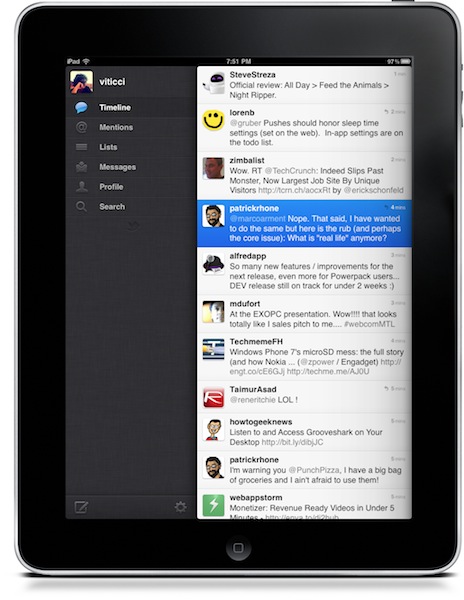
Twitter released an update to their official iOS app last night. The update includes the much talked push notifications for messages and mentions which, especially on the iPhone, really help in keeping track of what’s happening on Twitter when you’re not in front of your computer. I want to focus on the iPad version, though.

People went hard on criticizing Twitter for iPad when it first came out. Admittedly, it wasn’t the easiest “upgrade” to perform: until two months ago, users were accustomed to Osfoora HD and Twitterrific, two great clients that I still keep on my iPad because I don’t mind using them every once in a while. They’re beautiful and powerful pieces of software. Twitterrific has a huge userbase, but it doesn’t differ much from the iPhone version nor does it try to walk away from the standard established by Apple in Mail.app (sidebar in landscape mode, popover in portrait) being incorrectly used in thousands of other apps. I like Twitterrific, but it doesn’t give me the sense of trying something new, something revolutionary. Apps like Twitter for iPad, Aweditorium and Flipboard do. They bring a new, fresh experience to a new kind of device that seven months after its release still manages to surprise me. Read more



Going SSD On Your Mac

Those who follow me on Twitter know that a couple of weeks ago I upgraded my MacBook Pro (15-inch model, late 2008) to the new generation of hard drives: I bought a Solid State Drive, also simply known as SSD. Many have been asking and sending emails about the best tips to follow while changing a MacBook’s internal drive and upgrading to SSD, but the truth is there is no real “guide” or “tutorial” to follow. Yet another list post of must-read tips would be useless as my experience and setup is different than yours, and I’m not forcing anyone to follow steps and procedures that might just waste time.

So instead of putting together a tutorial, here’s the story of what I did. Read more


OmniFocus 1.8 for iPhone Adds Background Sync Completion, Improved Due Reminders, Lots of Fixes

Following the 1.2 update for iPad, the OmniGroup today released OmniFocus 1.8 for iPhone, an updated aimed at improving performance of the app on iOS 4.2 (still in GM version for developers) and the behavior of due reminders.

On iOS 4.2, OmniFocus 1.8 takes advantage of the sync completion API to complete in-progress sync even if put in the background. The app can now also perform automatic sync as it enters the background. This is something OmniFocus users have been requesting since the first betas of iOS 4.2. As for due reminders, they are now presented when the app is active, not just when OF isn’t the active app. The developers also implemented a custom sound to differentiate OmniFocus’ alerts from system and other 3rd party apps alerts.

OmniFocus for iPhone is available at $19.99 here. You can check out the full (and huge) changelog below. Read more