“Apple Has A Spectacular Year”

“Apple Has A Spectacular Year”

Never before has this venerable company, which at age 34 is a grizzled veteran by Silicon Valley standards, stood so firmly atop the high-tech industry. Earlier this year, Apple’s market capitalization surpassed that of Microsoft, making it the most valuable property in the tech universe. And during its just-completed fiscal year, it broke four consecutive quarterly revenue and profit records. Amid the worst recession in decades, Apple hired thousands while others cut jobs.

The key point:

Apple’s innovation is not only relentless but also ruthless. No company is more willing to kill its own babies. Rather than wait for competitors to draw the knife, co-founder and CEO Steve Jobs does the deed himself.

Permalink

Pull To Refresh for Mail Is A Dream Come True | Cydia

Since Loren Brichter first implemented the popular “pull to refresh” functionality in Tweetie 2 for iPhone, lots of other developers were inspired by him to do the same in their apps. Hundreds of other Twitter clients can do “pull to refresh”. Even the official Facebook app has pull to refresh. Now Apple’s Mail app for iPhone can, too. Read more


How To Turn Your iPhone and iPad Into AirPlay Speakers

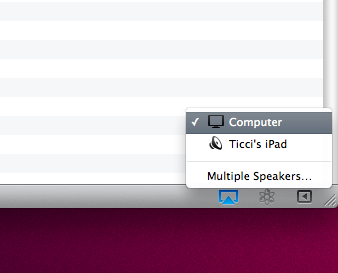
One of the biggest limitations of the current version of AirPlay shipping with iOS 4.2.1 (well, video streaming to Apple TV aside) is the fact that you can’t use an iOS device as an AirPlay speaker. In fact, a speaker can be an Apple TV, an audio system connected to an AirPort Express station or an AirPlay-enabled audio system. But, you can’t send audio from an iOS device to another iOS device or from iTunes on your Mac/PC to an iPhone/iPad.

Imagine the possibilities of iOS devices as AirPlay speakers: you’re in the car, iPhone is connected to your car’s audio setup, a friend’s in the backseat playing with his iPad. He wants to send some music from his iPad library to the iPhone, he fires up the iPod app on his tablet and instantly streams music to the car’s audio system thanks to the iPhone acting as a speaker. Or, your Mac’s in your bedroom and you want to play some tunes on your iPad. If only the iPad was an AirPlay speaker, you wouldn’t have to sync music (and thus eat space) on it.

With the following tutorial (files courtesy of TouchBite) you’ll be able to turn any iOS device running iOS 4.1 and above into an AirPlay speaker. Read more


Hey, My Fake MacBook Pro Runs OS X

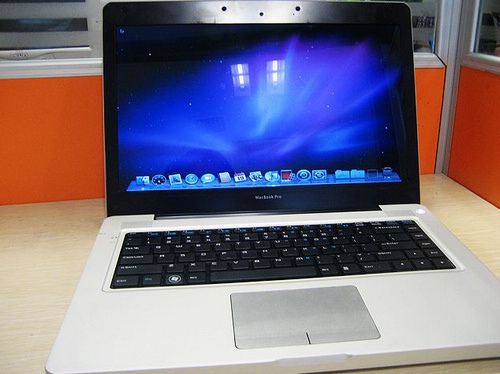
Maybe. Maybe it’s just a Windows 7 skin. Damn, those Chinese manufacturers fooled us again. Thing is – we have seen “interesting” Apple knockoffs in the past, but this one beats them all. It’s a fake MacBook Pro that seems to be capable of running OS X out of the box, even if the website reports it ships with Windows 7. Hmmm. Maybe they just don’t want to get in any trouble with Apple, right?

As for the specs:

For 3100 yuan (about $466), it’s got a 14-inches 1376×768 LED backlit display in 16:9 ratio, powered by Intel Atom D510 1.66GHz processor, 2GB RAM, 320GB hard drive (5400rpm), based on Nvidia ION-2 platform in which you get dual graphics, Intel GMA 3150 and ION 2.

The machine also comes with a fake Apple logo, a Windows key (what?), three USB ports, a 1.3MP camera and a built-in SD card reader. 10 hours battery life. Not bad, right? Right? Come on, it’s basically a MacBook. I think.

Check out more photos below. But don’t ask us where you can get one. We don’t know. [Engadget via M.I.C. Gadget] Read more


Soon, You’ll Be Able To Control Chopper 2 for Mac With Your iPhone

A few weeks ago we saw the first screenshots of the next version of The Incident, which will allow you to mirror the game on your TV and control it with your iPhone. Admittedly, the iPhone can serve as a great “external” controller, even better than when you’re using it to control and play at the same time because you don’t have the actual game covered by your fingers. With a small multi-touch surface in your hands, the possibilities for TV gaming are endless.

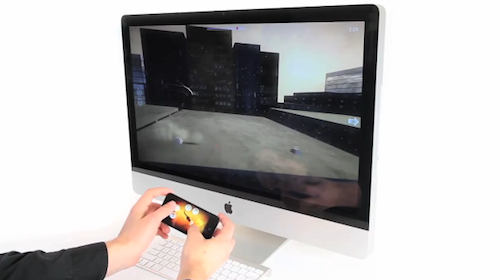
The next version of Chopper for Mac, Chopper 2, will allow for a similar setup, although the TV isn’t involved this time. Instead, Chopper 2 will let you pair your iPhone with your Mac and control the game on your computer using the accelerometer and multi-touch technology on your iPhone. The demo video below gives you a brief preview of what’s coming, and it’ll be interesting to see whether Mac games that will be published in the Mac App Store will take advantage of this pairing technology or not.

What’s for sure is, the iPhone can be a great game controller. Read more


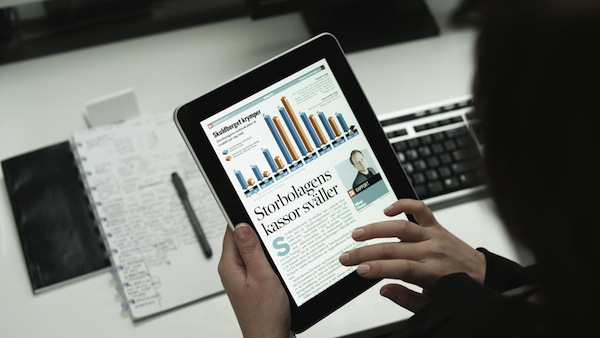
Reinventing The Newspaper On The iPad with News+

Bonnier are the developers behind the Popular Science magazine for iPad, and with their latest News+ project they’re trying to reinvent the newspaper, which first appeared 150 years ago. They believe the iPad is the right and most obvious device to do so now, and they’re willing to try by basing the entire concept on fresh navigation methods (gestures), a richer layout (clearly inspired by magazines) and inline media.

News+ combines the depth and editorial choices of a daily newspaper with the web’s possibilities for interaction and quick updates.

Browsing News+ and absorbing the content comes naturally, making readers feel close to the articles and photos. You can follow the most important news as it develops in a special section that is continuously updated, so News+ keeps you on top of the news all day.

Read more


How To: Make Any iPhone Icon Retina-ready With iRetiner

If you’re anything like me, you know how disappointing it iswhen you purchase an app from the App Store and you find out the icon hasn’t been updated for the Retina Display. Ok, it’s just an icon – but you know it looks bad and ruins the feng shui of your homescreen. If you care about your homescreen, you know what I’m talking about.

Now, this tutorial is about a tweak available for free in Cydia that does some kind of magic: it turns any App Store icon into a Retina Display-ready icon with just a few taps and a respring. How is this possible? I don’t know for sure, but from my understanding this tweak, iRetiner, takes the original icon and redraws it automatically at a higher resolution. Most of all, it just works.

So, jailbreakers, jump after the break and take a look at how you can get rid of those awful fuzzy icons with our guide. If you haven’t jailbroken your device yet, well, here are a few reasons why you should. Read more


“My Next iPad Won’t Be A 7-incher”

“My Next iPad Won’t Be A 7-incher”

My biggest problem with the iPad is its shortcomings as an e-reader. First off, it’s heavy. Josh noticed it in his review, and it hasn’t gotten any lighter over time, no matter how many iPad-curl reps I do. Next up, it’s just a little large for curling up with like you do with a book. Combining the curl-up-incompatibility and the weight and I’ve actually managed to hit myself in the face numerous times with the iPad while attempting to recline with it. Third, the screen’s resolution is inferior to many e-ink displays, along with the high-res LCDs being used on the 7-inch Tab and Nook Color and PlayBook. Finally, the glass front might look classy, but it’s terrible for glare, particularly when it’s outside.

Paul Miller makes some good points, but I wonder how many of his complaints about the current generation iPad will be fixed in the second generation one. With a thinner and lighter form factor, a somehow higher resolution and a better behavior when outside, the “iPad 2” won’t surely  be a 7-incher or become a dedicated ebook – but you can stay assured it’ll be better at things it already does, reading included.

Permalink