Unreal Development Kit Coming to iOS

Unreal Development Kit Coming to iOS

When it ships, the UDK iOS will include the same editors and code used to create a number of blockbuster games, and will be available to anyone wishing to publish games via the App Store. Toolsets of this quality generally cost developers anywhere from $500 to tens of thousands of dollars, so by releasing the UDK for free, Epic is drastically lowering the barrier of entry for iOS developers wishing to create graphically impressive games.

We can’t wait for Infinity Blade to show up on December 9th. It’s a taste of great things coming to iOS gaming in the future.

Permalink

Apple Posts New iPad Ad To Showcase iOS 4.2 Features

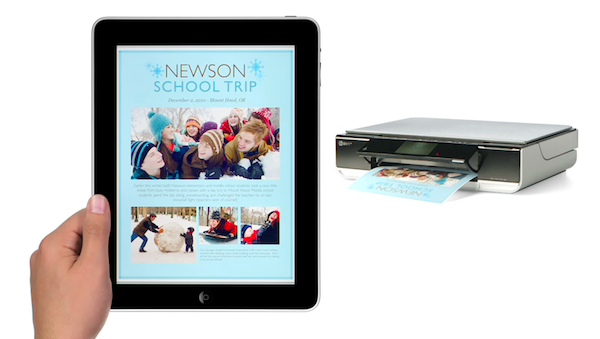
A few minutes ago Apple posted a new iPad commercial on its website called “iPad is amazing”, aimed at showcasing the new features of iOS 4.2. Everything’s in there: AirPlay, AirPrint (although limited to some HP printers), multitasking and the usual selection of apps.

Surprisingly enough, no folders are shown in the video. As for the apps that made an appearance in the commercial, it’s nice to see the official TED app developed by Matt Drance in there.

We’re working on getting a Youtube version up as quickly as possible. In the meantime, check out the video here.

Update: Youtube embed below.


iOS 4.2 Comes With Technology To Minimize Network Congestion

iOS 4.2 Comes With Technology To Minimize Network Congestion

With its latest iPhone iOs 4.2 software, it looks like Apple is joining efforts to cut smartphone signalling down to size. Tests by Nokia Siemens Networks have shown that iPhone iOs 4.2  supports a technology called Network Controlled Fast Dormancy, which we have already introduced into our networks. Basically, the technology makes the network and the handset work together to create the best conditions for smartphones to work quickly, yet have a long battery life and minimize network congestion.

Nice.

Permalink

Right After The Mac Beta, Reeder 2.2 for iPhone Brings New Facebook and Instapaper Features

The first public beta for Mac went out a few minutes ago and an update to the iPhone version showed up in iTunes soon after that. Looks like December 1st is going to be a Reeder day.

While I think I’ll definitely spend the night working in Notational Velocity trying to figure out the best way to put in words what I’ve been thinking about Reeder for Mac all along, the 2.2 iPhone version is here and it rocks. Just like the latest iPad update, Reeder now comes with Zootool and Facebook sharing. Fair enough, iPhone users were waiting for a way to easily send items from Google Reader to Facebook. But this 2.2 update doesn’t stop at Zootool and Facebook, or improved Delicious login support.

Reeder for iPhone 2.2 comes with a new article slider functionality that allows you to send items to Instapaper and / or Read It Later with a single swipe. It’s awesome. If you’re an active Instapaper or RIL user, this is a very welcome feature.

Reeder for iPhone is still the best Google Reader client out there. Go get it. Now.


Public Beta of Reeder for Mac Now Available

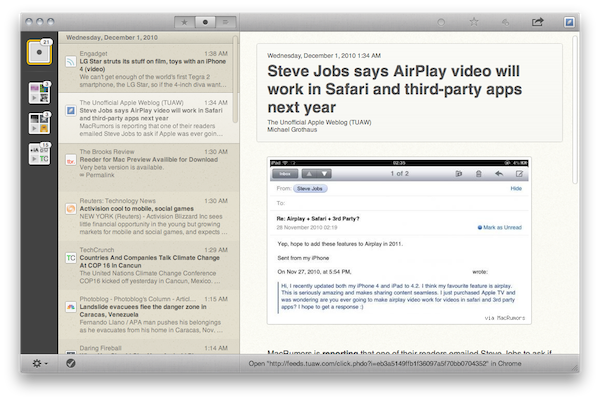
Reeder developer Silvio Rizzi promised a public beta of Reeder for Mac by the end of November and he didn’t break his promise: Reeder for Mac “draft 1” is now available for download here. Reeder comes to the Mac after two very successful iterations on the iPhone and iPad (our review of the iPad version here).

This is a first rough beta of the app, which has been in the works for several months now, and it’s still missing key features such as in-app feed management, search and downloads. The application is already pretty fast and stable, but it can’t be considered a final version at all. Feedback can be submitted to: [email protected].

A lot of things have changed since our exclusive first look at Reeder for Mac months ago. Rizzi has been busy polishing the overall feeling of the app and adding features (especially sharing ones); he completely redesigned the navigation of unread items in Google Reader by putting folders and subscriptions in “boxes” sitting in a left sidebar, he tried a more iPad-like approach.

Reeder for Mac is going to be huge, and this is just the beginning. I guess the app will eventually find its way to the Mac App Store after initial testing. Look for a detailed review of Reeder “Draft 1” on MacStories tomorrow.

Update: review online here.

Update #2: Reeder Vs. Fitt’s Law.


Attention, RIM: JPMorgan Deploys iPads

Apple CEO Steve Jobs said months ago they didn’t see RIM catching up with Cupertino’s extraordinary success in the “foreseeable future”, and everyone’s been talking about the fast growth of Apple devices such as the iPhone and iPad in the business market (and enterprise). Businesses were already “jumping on the iPad” back in August (and July too, we recall), now the deployment of iOS devices continues with JPMorgan Chase & Co giving iPads to investment bankers.

Bankers will be able to use the iPad for both business and personal use, they’ll be able to download personal apps on the tablet while keeping tabs on their tasks using business apps sold in the App Store or developed internally. Of course the Wall Street folks will have the ability to access their emails, calendars and meeting notes on the iPad. Read more


Richard Branson Talks Project Mag for iPad, The Daily, Dinner with Jobs

So the Project for iPad came out this morning and we weren’t really impressed with it. The app surely looks good, but in my opinion it fails at delivering a more innovative experience then, for instance, the one seen in the Wired app months ago.

It is no surprise, anyway, that Project has quickly become the top free app in the iPad App Store. In the following video, you can listen to Sir Branson talking about the iPad as the platform of choice to launch Project, the plans for future versions on multiple devices, and a dinner with el Jobso. [via 9to5]

Read more


Paperless: Customizable Checklist App for iPhone

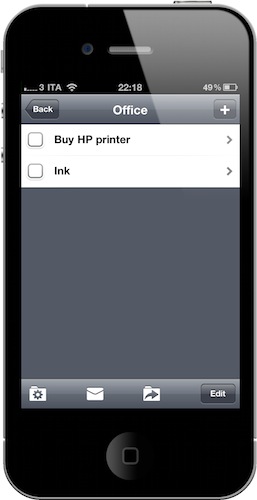
I’m not really that kind of user who’s into checklists, but I can spot a good app when I see one. I daily depend on OmniFocus and Simplenote for my projects, tasks and notes – yet I can see why many users prefer checklists (or just “lists”) on their mobile devices: they’re simple to play around with, yet they allow for a certain level of complexity.

Paperless for iPhone is based on this very same concept: it’s a simple app everyone could use, but it also lets you customize the way it works to achieve more complex setups. Read more