

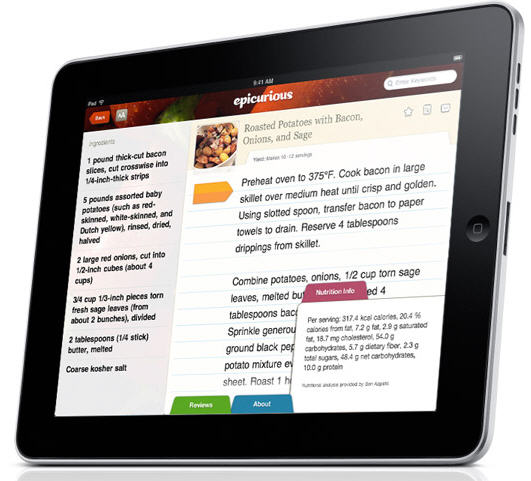
If you haven’t yet amassed the yearly pool of relatives and neighborly freeloaders who collectively eat you out of house and home, you may have a fighting chance to thwart off hunger pains thanks to the cook’s companion, Epicurious.
Get Cozy With Your iPad And Bake Cookies With Epicurious
aTV Flash Beta 2 for Apple TV Available, Adds 4.1 Support
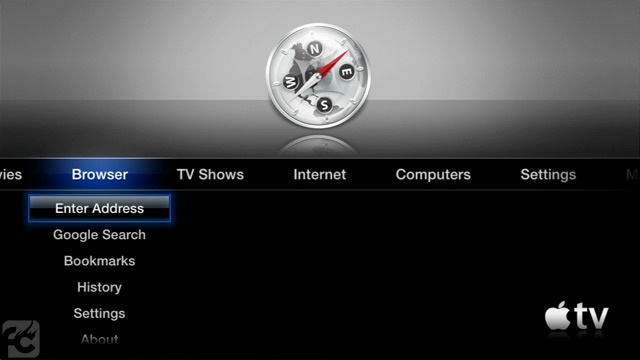
ATV Flash is an excellent application for jailbroken Apple TVs that adds a browser, Last.fm integration and extends the media playback capabilities of Apple’s tiny black device. The latest update to the app, beta 2, which was released yesterday, adds a number of improvements and fixes and introduces support for iOS 4.2.1 – known as 4.1 for Apple TV owners.
The developers say that aTV Flash is perfectly compatible with the latest OS, even if a untethered jailbreak still isn’t available for iOS 4.2.1 / 4.1. If you don’t want to jailbreak your Apple TV with the current tethered redsn0w jailbreak, feel free to wait for the Dev Team to ship a better solution as, anyway, support for the latest software update is built into aTV Flash beta 2.
aTV Flash is available here. Check out the full changelog below. Read more
ReTweetie Adds Native Retweets to Tweetie for Mac
Tweetie for Mac is one of the most popular desktop clients for the Mac, even if version 2.0 still has to show up and the app hasn’t been updated to support Twitter’s latest functionalities such as retweets, lists, real-time streaming. As I said, though, Tweetie for Mac still manages to be one of the most used apps by Mac users.
Developer Nick Paulson, feeling the need of native retweets in Tweetie for Mac and tired of seeing the old “RT @” or “(via @) being used by the app, wrote a plugin that adds Twitter’s native retweet functionality to Tweetie for Mac. It’s called ReTweetie, and it’s available here. Read more
Backgrounder Now iOS 4.2.1 Compatible | Cydia
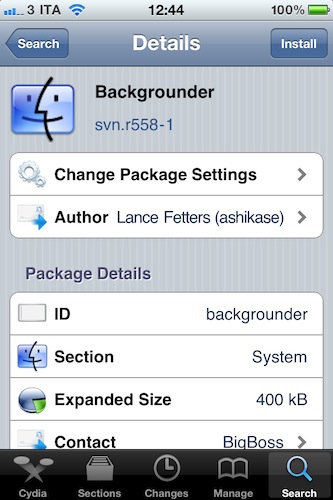
Backgrounder, the popular hack that brought multitasking to iOS 3.x devices and now allows you to take control of how apps run in the background on iOS 4, has been updated to support iOS 4.2.1.
Compatibility with the latest OS aside, version svn.r558-1, adds bug fixes and comes with a new installation method for iOS versions that don’t support Backgrounder.
Backgrounder is available for free in BigBoss’ repository.
Lab For iPhone Gives You Detailed Information About Your Photos
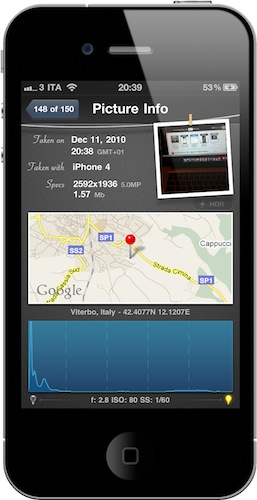
They say the best camera is the one that’s always with you, and there’s no question the iPhone has become the best camera for many. The iPhone is with us all the time, whether we’re on the go checking in venues with Foursquare or at home, playing some Infinity Blade. Most of all, the iPhone 4 provides a very good picture quality thanks to its 5MP lens, flash and shiny Retina Display.
If the iPhone is our best camera, there must be an app for that, right? I’m not talking about the stock camera app, or the hundreds of popular alternatives such as CameraBag, Instagram or Camera+. I’m talking about an app to manage photos shot with the best camera.
We have talked about Cydia tweaks that enable photo management on-device through some Camera Roll hacks. Lab by LateNiteSoft is a $0.99 app available here that, with a beautiful user interface, provides a quick and elegant way to scroll through your photos and get detailed information about them. Read more
Almost 2,000 Game Center Games Available In The App Store
Game Center, the social gaming network Apple introduced with iOS 4.1 in September and iOS 4.2 for iPad a few weeks ago, is not doing bad. After a quick search in the App Store, I noticed that Apple has almost 2,000 games ready for Game Center – 1917 to be exact.
In fact, the App Store contains two specific sections to showcase Game Center games for iPad and iPhone: 517 apps are available for iPad, 1400 for iPhone. That’s not too bad, considering that Game Center has been around for a few months. Read more
iPad Cutting Board Actually Better Than The iPad For Food
Remember this? That’s probably one of the weirdest…things that every showed up here on MacStories. A Japanese guy that thought eating off an iPad would be a good idea.
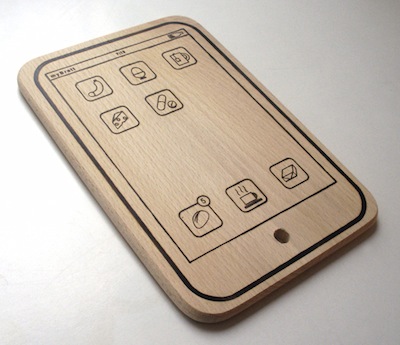
While we don’t recommend such an original usage (but hey, you can try!), we have to admit it was “particular” enough to deserve a post. If you’re looking for a way to use the tablet for cutting, and not eating, food, but you don’t want to ruin the precious Apple glass washed in unicorn tears – look no further than the iPad cutting board.
It’s laser cut from a chunk of wood, it’s got fake food icons on its “Springboard”, and the author wants to remind you that it can be used both in landscape and portrait mode. Also: the battery icon has been replaced with a bottle of wine.
The iPad Cutting Board is available here at 15 Euros (around $20). We think this deserves a spot on every Apple-themed Christmas dinner this year. For real. [TUAW via MyBrett]
iPad As A Communal Device→
iPad As A Communal Device
First, we must think of the computer (PC). It may not be very personal, but it is made for the individual. Same goes for the laptop. Same for a netbook. Same for a smartphone. The iPad, however, is *communal*. Actually, more than that. The iPad is at once both personal and communal. This has never before existed in computing and it is the combination of price and form factor that makes it so. The iPad is another Apple trebuchet that will destroy barriers, gates, walls and re-make the current state of computing.
Brian makes several good points in his piece. The iPad is meant for a new era of computing based on collaboration, open workspaces and apps. The “other tablets”, the seven inchers, are meant for personal use.
I don’t know about the Playbook (a very few people have actually tested it so far), but I do know the iPad is great for “local collaboration”. Great for games, meetings, sketches, and so forth.
As for built-in online collaboration, we’re all waiting.
MobileMe Wants (And Needs) To Be Free→
MobileMe Wants (And Needs) To Be Free
Interesting piece by Charles Jade at GigaOM:
By making MobileMe free, those using it with iOS devices won’t be using services from Google or Microsoft, which makes switching to Windows Phone 7 or Android more difficult. While PC users would also have MobileMe free, they’d need to have iOS devices to make it really worth using. The Halo Effect, which argues that iOS device sales later lead to Mac sales mitigates the loss associated with giving away MobileMe to PC users in the present. If they do switch, free MobileMe helps encourage them to remain all-Apple in the future. Free MobileMe would be an investment in hardware customer retention, and it doesn’t even have to be completely free.
MobileMe is not a fundamental source of revenue for Apple. Apple makes money by selling mobile devices and computers. In fact, sales of software in the last quarter (which include OS X, iLife and iWork, among other things) generated $662 million. A free MobileMe – or at least the basic parts of it – would be an investment to keep people on the Apple ecosystem.
Jade also writes:
The point is lock-in. Get people using Apple’s free services with Apple’s highly profitable hardware, and they’ll be less likely to buy hardware from competitors.
Or, get people used to the integrated system.