Backflip Games: 20 Million Monthly Active Users

Backflip Studios is a profitable game development team. In the past two years they pulled out hits like Paper Toss and NinJump, and they’re making half a million dollars per month through in-game advertising. That’s a remarkable result, especially considering that when the app’s free, most developers struggle to find a sustainable business model.

Clearly that’s not the case with Backflip which, according to a report from Mobile Ent, has now ninjumped to 20 million active users per month. Active users, not just people who open the App Store to download apps.

Mobile game developer Backflip Studios says it has now racked up more than 65 million downloads of its games across iOS and Android.

The company had more than 20 million monthly active users last month, and more than two million daily active users.

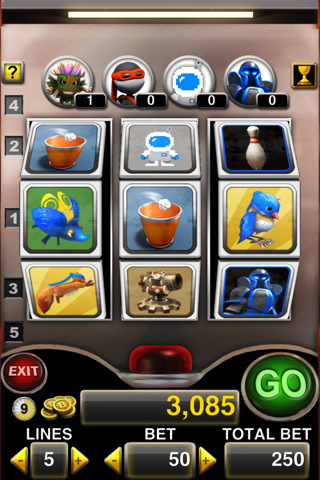
Backflip isn’t stopping anytime soon. The company has recently started porting its portfolio of iPhone games to Android devices, with NinJump already available in the Marketplace. Backflip released another game today, Backflip Slots, which is another take on the classic slot machine game with fancy graphics and the usual Backflip style.

Who’s going to buy Backflip Studios?

There’s A New Text Editor On My iPad: Writings

The iPad. The perfect writing device, right? The tablet surely doesn’t miss apps meant for writers, quick note takers and bloggers alike. There are hundreds of text editors available in the App Store, not to mention the word processors and apps meant for more specific tasks such as novel or screen writing.

The iPad has the writing tools.

One may wonder whether all these tools actually have something in common or are all single pieces of software based on fundamental differences and unique features. It is undeniable that the trend amongst most text editors for iPad is to come with Dropbox sync capabilities. Of the “writing tools” mentioned above, the text editors rely on sync nowadays. And to good reason: it was a pain to save a post or note as a .txt file and manually manage it. Now everything happens in the cloud, in the background, automatically.

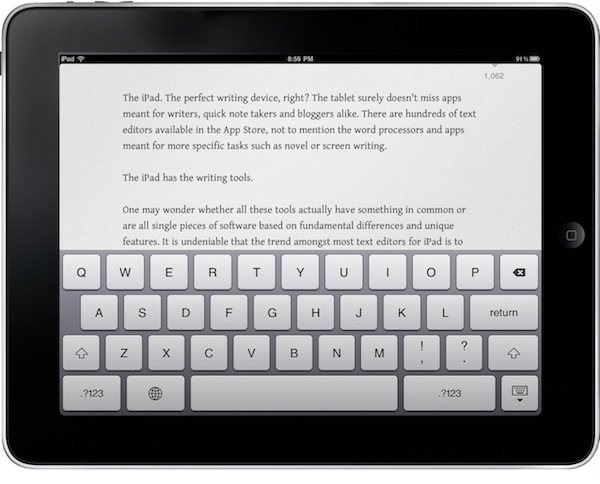
The Dropbox trend has lead to great apps: PlainText, Elements, IA Writer – just to name a very few. Writings, a new app released today by Italian developers Ludovico Rossi and Vito Modena, shares a feature set similar to other writing applications available in the Store, but comes with new functionalities and interaction methods that have made it stand out from the others on my iPad.

Writings makes composing text on the iPad a real pleasure. Read more


MacPaw Teases Ensoul For Mac App Store

You might know MacPaw as the genius band of Mac savvy gurus who develop CleanMyMac and MacHider. The well known developers have introduced a fantastic teaser website and video showcasing a special project for the Mac App Store that’s going to bring a little soul to your iPhone. Details are sparse, but we’re pretty stoked after watching that gorgeous video a few times over. Heads up though, MacPaw is giving away a free copy of the app to every 100th person who subscribes to receives updates on the status of this yet unknown application. Give it a shot, and let us know what you think Ensoul could be in the comments below.

Read more


Invaders Corruption Mutates Invaders With Geometry Wars

I like to hunt down different indie games that fulfill the ever growing desire to feast my eyes on well made, yet simple titles that are available on a variety of platforms so that even our Windows readers can take part in all the fun. But mostly I’m just looking for some casual pixel love for my midnight Mac gaming cravings. Last week I came across Invader Corruption, where a unique name creates an individual gaming experience so that no two games are quite the same. What starts off as a boring and possibly mundane shooter ends up being compelling and totally addictive. Shoot past the break to learn more about this frantic free title.

Read more


Top 5 OmniFocus Applescripts

Top 5 OmniFocus Applescripts

The OmniFocus Extras forum on the Omnigroup user forum is one of the great sources for ready-to-use Applescripts. All you need to do is move them into the right directory on your machine and occasionally modify some of the scripts parameters to fit your needs.

The following AppleScript are those which are extremely handy and I use on a daily basis. There are many others available on the forum and other places, but many of them didn’t really add much value to my workflow, which is a pretty standard one, or solve problems I never encountered.

The “find project” one is a must-have.

Permalink

Jailbroken Apple TVs Get VNC Hack

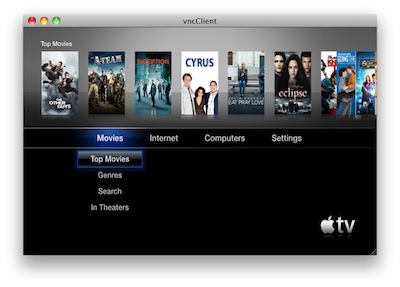
As if Wiimote hacks, third-party browsers and a brand new jailbreak coming before Christmas weren’t enough, jailbroken Apple TV owners can now enable a VNC server on their black boxes with a new hack called Exposed.

VNC access to the Apple TV should, from my understand, allow you to control the device remotely using apps like Screens and iTeleport.

The hack, however, is still in its early stages:

It’s method for getting screen data isn’t great and lacks some effects and animation, but it does work without HDMI plugged in. So if you want to try it out, grab Exposed and place it in the Lowtide Appliances directory. I think it is also important to note that this does require a jailbroken AppleTV 2G running Dustin Howett’s beigelist. Crazy busy with work, but I’m hoping to finish my site redesign by the new year. Peace.

So, jailbreak required and lots of bugs to fix. I’ll give this one a try once it’s more stable. [via 9to5mac]


SBSwitcher Brings SBSettings To The Multitasking Tray | Cydia Store

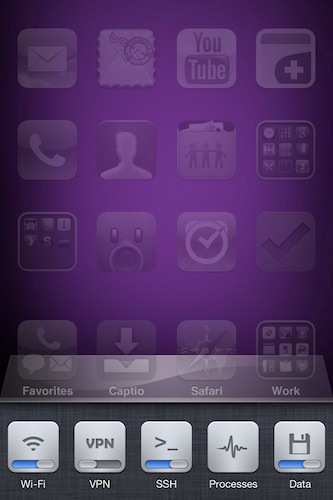
SBSwitcher is a new tweak available in the Cydia Store at $2.99 which brings the SBSettings toggles to the iOS 4 multitasking bar. SBSettings is one of the most popular applications in Cydia, which can be customized to display a series of buttons (indeed, toggles) that can perform a variety of actions otherwise buried deep down into the iPhone’s settings. I’m talking about shortcuts like “activate WiFi”, “turn on Bluetooth” or “open VPN connection”.

SBSwitcher will put these toggles in the multitasking tray, past the iPod widget controls and the volume slider introduced in iOS 4.2. The tweak supports themes for SBSettings and it’s got a bunch of options to set in the Settings app.

SBSwitcher is available at $2.99 in BigBoss’ repository.