Meet Hikari, The iPad Controlled Robot [Video]

Some say the iPad is a device for content consumption, many iPad owners are firmly convinced it can be used for content creation, too. After watching the following video, you’ll be wondering if, actually, the tablet was meant for content disruption.

Without getting too technical, there’s a robot controlled from an iPad which uses an app (TouchOSC) to send commands to a PC. The robot is connected to the Windows machine and can be controlled through the Open Sound Control (OSC) supported by the aforementioned app. It’s quite complex, but it works. Hikari – the robot – can walk and stand up, move and even attack. On the author’s Youtube channel, there are other videos when Hikari even learns to dance.

Check out the video below. [via TUAW]


Does The iPad Make You Less Masculine?

Does The iPad Make You Less Masculine?

From a piece on The New York Times:

Call it the male iPad dilemma: too large to slip into a pants pocket, too stiff to be curled up like a magazine and too precious to leave unprotected. With its rigid tablet shape, Apple’s iPad has raised an awkward consideration for many men: how to carry it in a manner that is practical and yet, well, masculine.

Perhaps it’s a cultural difference, but I didn’t have any problems carrying my iPad inside a Tom Bihn Ristretto here in Italy. It’s actually pretty cool.

Permalink

Classic Mac Icons Come To Life Again As Prints

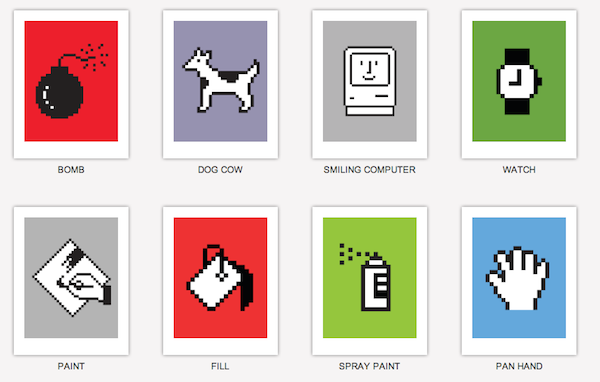
Susan Kare is a well known designer who created many of the icons and interface elements for the original Apple Macintosh in the 80’s. After Apple, she worked at NeXT and Facebook. I guess there’s the chance you’ve seen one of her icons somewhere.

Now you can get the classic Mac icons in print edition. Available for purchase over at Kare Prints, you can choose from various sizes and have a personal inscription on larger prints.

Smiling Computer is a must-have. [via Gizmodo]


Rage HD Update: Game Center, Gyroscope, Play It On Your TV

Together with Epic’s Infinity Blade, John Carmack’s Rage HD is the app that really shows what gaming on iOS devices has become: an experience that, technically speaking, is at the same level of consoles such as the Wii or the PlayStation 2. Rage is impressive, and the latest update (1.11, approved last night) adds a lot of new features to make it even better.

First off, you can now play Rage on your TV (or an external monitor) using an iPhone or iPad as a controller. You can output the game at 480p with the official Apple Component cable (Amazon) or 720p with the official Apple VGA cable (Amazon). This is neat, and reminds me of The Incident, which added a similar TV out functionality in its last update. Rage HD on a TV must be fantastic.

The app now comes with Game Center integration, but there’s no online multiplayer option. Instead, the developers implemented leaderboards and achievements. If you feel like unlocking them all, you have 50 new achievements to add to your list.

Other features include gyroscope controls for iPhone 4 and iPod touch 4th gen, mirror mode and (finally) a Museum Mode to explore the levels without mutants.

Rage HD 1.11 is a great update. As the app description says, “the update you’ve been waiting for”. Go download it here.


First Unofficial WikiLeaks App

You can think Julian Assange should have been TIME’s person of the year or not – we’re not here to discuss Assange’s (and his team’s) actions. There’s an unofficial WikiLeaks iPhone and iPad app in the App Store, and it was released earlier today. It’s available now at $1.99.

The app sports a nice and clean interface design, and allows you to check on the latest WikiLeaks’ updates from Twitter or the organization’s website. Both the tweets and the website are formatted for the iPhone and iPad. WikiLeaks App can automatically forward to the latest mirror and access the CableGate page.

WikiLeaks App for iPhone and iPad is available here at $1.99.


iWork Out of Stock, iWork 11 Shows Up On Apple.com

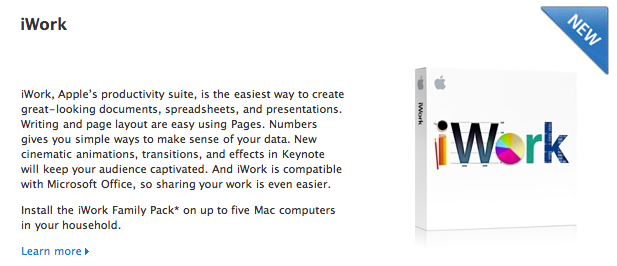
Here’s an interesting tidbit from 9to5mac: according to an Apple Store employee “there is no iWork on the shelves, no iWork in Stock and none on the way”. iWork 09 seems to be out of stock at Apple retail stores and Amazon, although family packs are available on Amazon and Apple.com says the suite is available, but with a curious “New” label next to it.

According to previous rumors, the new version of iWork has been ready for some months and it’s simply awaiting a Mac App Store debut. The new Store will open on January 6th.

Now, is Apple going to make iWork 11 available in retail stores as well? If so, are we going to get the physical box before the Mac App Store downloads?

Also: is iWork.com ever going to get new features?


Backflip Games: 20 Million Monthly Active Users

Backflip Studios is a profitable game development team. In the past two years they pulled out hits like Paper Toss and NinJump, and they’re making half a million dollars per month through in-game advertising. That’s a remarkable result, especially considering that when the app’s free, most developers struggle to find a sustainable business model.

Clearly that’s not the case with Backflip which, according to a report from Mobile Ent, has now ninjumped to 20 million active users per month. Active users, not just people who open the App Store to download apps.

Mobile game developer Backflip Studios says it has now racked up more than 65 million downloads of its games across iOS and Android.

The company had more than 20 million monthly active users last month, and more than two million daily active users.

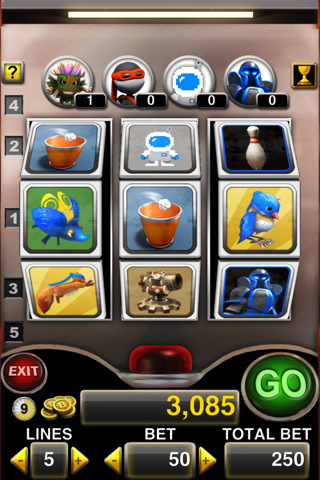
Backflip isn’t stopping anytime soon. The company has recently started porting its portfolio of iPhone games to Android devices, with NinJump already available in the Marketplace. Backflip released another game today, Backflip Slots, which is another take on the classic slot machine game with fancy graphics and the usual Backflip style.

Who’s going to buy Backflip Studios?


There’s A New Text Editor On My iPad: Writings

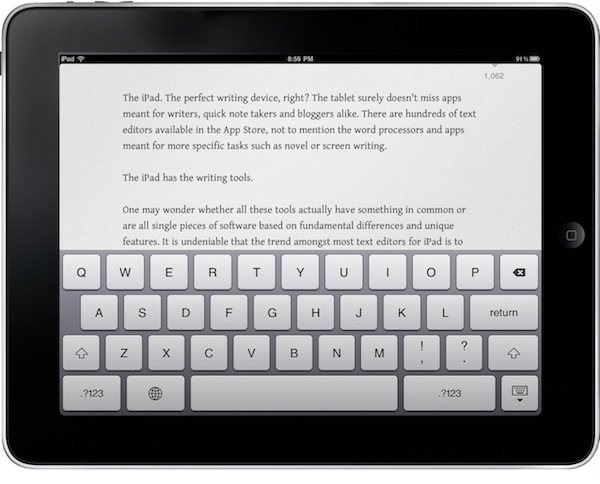
The iPad. The perfect writing device, right? The tablet surely doesn’t miss apps meant for writers, quick note takers and bloggers alike. There are hundreds of text editors available in the App Store, not to mention the word processors and apps meant for more specific tasks such as novel or screen writing.

The iPad has the writing tools.

One may wonder whether all these tools actually have something in common or are all single pieces of software based on fundamental differences and unique features. It is undeniable that the trend amongst most text editors for iPad is to come with Dropbox sync capabilities. Of the “writing tools” mentioned above, the text editors rely on sync nowadays. And to good reason: it was a pain to save a post or note as a .txt file and manually manage it. Now everything happens in the cloud, in the background, automatically.

The Dropbox trend has lead to great apps: PlainText, Elements, IA Writer – just to name a very few. Writings, a new app released today by Italian developers Ludovico Rossi and Vito Modena, shares a feature set similar to other writing applications available in the Store, but comes with new functionalities and interaction methods that have made it stand out from the others on my iPad.

Writings makes composing text on the iPad a real pleasure. Read more


MacPaw Teases Ensoul For Mac App Store

You might know MacPaw as the genius band of Mac savvy gurus who develop CleanMyMac and MacHider. The well known developers have introduced a fantastic teaser website and video showcasing a special project for the Mac App Store that’s going to bring a little soul to your iPhone. Details are sparse, but we’re pretty stoked after watching that gorgeous video a few times over. Heads up though, MacPaw is giving away a free copy of the app to every 100th person who subscribes to receives updates on the status of this yet unknown application. Give it a shot, and let us know what you think Ensoul could be in the comments below.

Read more