ClipTouch, Final Cut Server Client for iPad

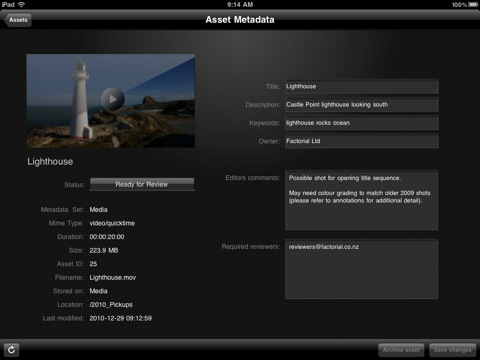
With an update for the Final Cut suite rumored to be released around March or early April, a new client for Final Cut Server showed up in the App Store. And I believe this is the first native Final Cut Server client specifically designed for the iPad – ClipTouch by Factorial. ClipTouch (which requires iOS 4.2, Final Cut Server v1.5.1 and access to open ports 8821 and 8826) works “out of the box” by giving you access to all your video assets stored in FCS, browse and collaborate on your media taking advantage of the iPad’s large screen and multi-touch functionalities.

You can use the iPad app instead of a review workstation to access your library over local or remote WiFi, 3G and VPN, download and view clip proxies, change the default asset’s metadata and add annotations. ClipTouch works with the standard format of clip proxies, but a compressor is available to achieve optimal results. A search feature is available, together with the possibility to clip the timecode display.

ClipTouch for iPad is available at $14.99 in the App Store. More screenshots below. Read more



The 90 Megapixel Steve Jobs Portraits Made of Apple Products

Realized by the popular Tsevis visual design studio, this might be one of the most impressive portraits of Apple CEO Steve Jobs you’ve ever seen. The design was commissioned by Italian magazine Panorama and ended up on the front page of the Economy section. The portrait comes in two different versions – the original files are 90 megapixel images available here and here.

If you look closer, the portraits are made exclusive of Apple products: iPhones, iPads, iMacs and MacBooks make every single details of Jobs’ face – yes, even the glasses.

The creative director of the magazine requested a ‘white on white’ portrait where Steve Jobs was to be illustrated with all of Apple’s white products. I created the mosaic but then became curious with what a black version would look like.

These mosaics are made with custom developed scripts, hacks and lots of love, using my Mac, Studio Artist, the Adobe Creative Suite and good music.

More portraits be Tsevis are available here but if you ask me, these are the best ones to date.


Apple Approves Another BitTorrent App, A Native Transmission Client

Apple has a strict policy on iOS apps that come with any mention of the BitTorrent file transfer protocol. Even if BitTorrent is not illegal by itself, Apple doesn’t want its name to be associated with it. Apps that had found their way past the app review team and into the App Store were quickly removed from sale. It happened with IS Drive in October.

iControlBits by developer Luka Hlastec is a native mobile client for popular BitTorrent app Transmission, available for Mac, Windows and Linux users. Transmission, by default, allows you to check on active downloads using a mobile web interface that’s accessible from iOS devices, but it doesn’t have an official app in the App Store. iControlBits, a native front-end that relies on Transmission’s RPC protocol, offers a faster alternative to the web view and it lets view ongoing transfers, pause and resume downloads and even browse active downloads to a NAS server remotely. You can’t initiate new downloads from the app, but the developer says he’s working on it for a future update. In an interview to TorrentFreak, the developer admits he created the app mainly for himself as he didn’t like the way Transmission for Mac let you see downloads through a slow webapp. iControlBits, however, allows you to change and set speed limits without having to use Transmission on the desktop; all you have to do is enable remote access.

It is unclear whether or not Apple will pull iControlBits from the App Store, but if you’re in need for a remote Transmission client to manage your torrents, go download it now. The app is available at $1.99 in the App Store.


With Airplay Speaker Still Missing, iHome Announces Bevvy Of New Products For iPhone, iPad

iHome is a favorite of mine when it comes to finding a good bedroom clock/radio & speaker for my iPod touch. Expanding the line to include Apple’s iPad, you can expect a whole slew of iHome gadgetry to arrive later this year to support your army of iDevices you likely received over the holidays. A couple products really stuck out to Federico and I, so instead of going through iHome’s entire catalogue of product-sauce which you can review at iLounge, we’ll share our favorites past the break.

Read more


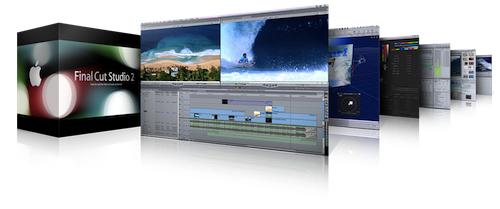
Final Cut Update Coming in April, Beta Version for Lion In Testing Stage?

French rumor site Hardmac is reporting that, according to their sources, Apple is testing beta versions of Final Cut for Snow Leopard and the upcoming Lion OS, with an update to the pro suite coming in March or “early April”. In November, Steve Jobs told a customer to “stay tuned and buckle up” for a Final Cut update, while previous rumors suggested a huge update was set to come out in the first months of 2011.

Hardmac reports that the Final Cut beta for Lion sports some exclusive features due to changes Apple is making in QuickTime for 10.7. Spring is usually a great time for new Apple product launches (iPad, MacBooks) and we wouldn’t be surprised to see the Final Cut suite finally being updated and promoted together with some new computers. Read more


SwiftRing for Mac Combines Gestures and Keyboard Shortcuts

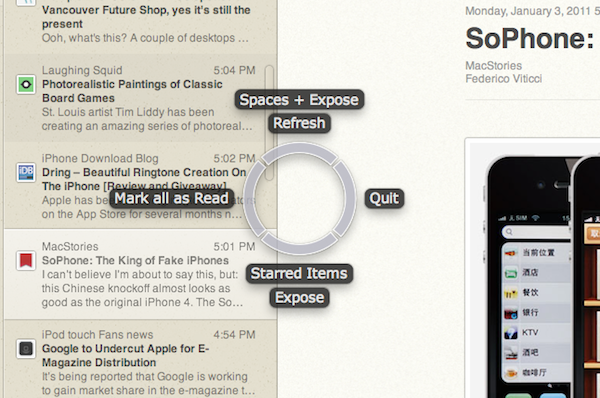
SwiftRing is a new app for OS X that’s still in beta and available as a free download here. It’s also one of the new apps for the Mac I’m most excited about, as I believe it shows great room for improvement, it’s promising and it combines two of my favorite things about the Mac platform: gestures and keyboard shortcuts. I love to get things done with the keyboard, especially when I’m in a hurry and shortcuts come in handy to save precious time. Still, multi-touch gestures on my MacBook’s trackpad (and Magic Trackpad on the iMac) have spoiled me with their ease to use, speed and, sometimes, “cool factor”.

SwiftRing aims at delivering the best of both worlds through a system-wide circular interface that appears as an overlay to any app (even the Finder itself) and allow you to perform any action that has a keyboard shortcut with a simple gesture. Read more


SoPhone: The King of Fake iPhones

I can’t believe I’m about to say this, but: this Chinese knockoff almost looks as good as the original iPhone 4. The SoPhone is, without a doubt, the closest thing to an Apple iPhone 4 I’ve seen so far – not just because of the strikingly similar exterior design. First off, the SoPhone looks just like an iPhone 4, has the same size (115.2×58.6×9.3mm) and fits in any case produced for the real thing. As long as the “glass sandwich” appearance is concerned, the SoPhone seems a success. We can’t comment on the actual build quality, but judging from the video – it’s an iPhone 4.

Problems arise when the average user willing to buy a SoPhone (example: my dad) wants to go deeper and asks about the operating system and internal specs. This thing of course doesn’t run iOS, but the average user might think it does. I mean, look at the video: it’s a well-done iOS skin (probably built on top of Android 2.2?) that’s got Apple’s icons, menus – even the Cover Flow. Guess what’s missing? The smoothness, the scrolling, the refinements – exactly what the “average dude” won’t notice on first sight. This is best shown in the comparison video shot by MIC Gadget. The SoPhone has got an Apple logo on boot, folders (slow), Spotlight and Springboard pages. It’s a fake iOS running on a fake iPhone 4. From what I can see, I believe multitasking’s in there, too. As for the specs, as you would expect this is nowhere near the iPhone 4: 2 MP cameras, no Retina Display, 4 GB of flash storage and a MTK6235 chipset.

The final price for a SoPhone unit? Around $200. Not bad for a well-done ripoff, but still – you won’t have an iPhone. You’ll only get close (closer than any other Chinese knockoff, that’s it) to it. If you’re on the edge, check out the hands-on video below. Unlike the reviewer says, I’m not sure the SoPhone is “very fast” though. Read more


Music Mashup with iPhone, iPad and iMovie [Video]

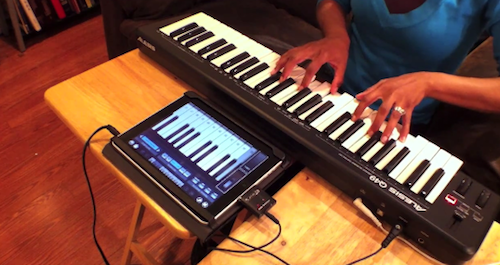
In 2010 we saw some amazing videos of songs played and, at best, created using only iOS devices. Does the new Gorillaz album sound familiar to you? That’s because it was entirely created with an iPad and some apps. iOS devices, also thanks to full-featured MIDI support introduced in iOS 4.2, now provide a feasible alternative to portable, digital music making and mixing.

Ellen Hilton wanted to show her friends and family that it was possible to do music with an iPad and a MIDI external device. So she took two of her favorite songs – “Hey Soul Sister” and “New Soul” – mashed them up and played along with her iPad. She filmed the performance using Pro Camera on the iPhone, edited the video using iMovie ‘11. The session was recorded by running everything into Cubase. The result is fun and definitely worth a look.

The apps used in the video include Pianist Pro, NanoStudio, Percussions and BeBot. If there’s anything Steve Jobs should feature on stage at the next iPad keynote, that should be about people using the iPad to make music. Read more