
Handoff Pushes Web Pages From Your Computer to Any iOS Device

One of the features many users wish Apple implemented by default on OS X is the possibility to easily and quickly send any kind of content to iOS over the air. Through the Internet, in seconds, from a computer to the iPhone or iPad. We’re not talking “sync” here: I’m talking about web links, images, maps, phone numbers, Youtube videos “pushed” instantly to an iOS device. The other way around, from iOS to the Mac, would be welcome as well: instead of relying on third-party apps, one could save content and information to consume later on a Mac. Like a video you don’t want to watch while you’re out because, honestly, Instapaper wasn’t meant for video.

Luckily for us, a number of apps that enable OS X to iOS communication over the air have surfaced in the past years, and today we’re taking a look at a new one. The app / service is called Handoff, and it’s probably the simplest I’ve stumbled upon so far. It allows you send web links from your browser to the iPhone or iPad (the iOS app is universal) through a bookmarklet or extension. Read more

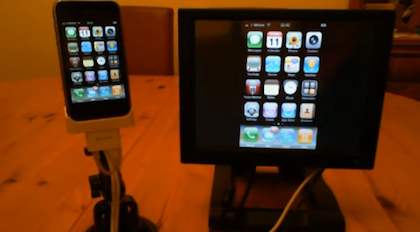


The External Touchscreen That Can Control An iPhone

Geeks and modders have been looking for a way to control an iPhone or iPod touch from an external touch input for years. And when we say “a way to control”, we actually mean “an easy way to let the setup work”. In the past years, we’ve seen hundreds of individuals coming up with incredibly complex configurations that revolved around dozens of cables, jailbreak, dock stations, screens and modifications to the original iPhone software. What Mr. Romin has achieved is a rather simple, affordable and easy to understand method to get the iPhone to mirror its screen on an external monitor, and have the monitor capable of controlling the iPhone itself via touch.

With a Lilliput FA1042 touchscreen, an iPhone, a Belkin AV dock adapter cable and a software called “Centrafuse” he managed to get this two-way mirroring and controlling system to work. The iPhone’s Springboard is blown up on the screen in standard mode, but Youtube videos, for example, play in fullscreen mode on the external panel with controls visible on the iPhone.

Check out the demo video below. Read more


What Is This Psychedelic Macintosh Helmet?

Matt “Kid Chameleon” Loniero is an audio engineer / graphic designer / DJ who creates visual experiences for live performances of other DJs and bands. He also likes to experiment with stuff. A lot. And his latest experiment, a Macintosh Plus helmet with an embedded iPad connected to a Bluetooth keyboard, is one of the coolest things we’ve seen in a while.

The visualizer helmet is made of a Macintosh Plus bought on eBay, which had its inner parts removed. A bicycle helmet was then placed inside the case together with an iPad. In the live performance you can watch below, this was the setup:

For this specific performance, we used an iMac connected to several projectors and televisions around the room and above the bar. The iMac was running Resolume Avenue and the video was triggered using a MIDI keyboard and a Wiimote. The iPad was connected to a bluetooth keyboard which allowed me to press play on the iPad video and press the B button on the Wiimote at the same time Kid Chameleon started his set.

If you missed the first DJ set in Phoenix, you can get the chance to see Kid Chameleon perform live again tonight at the LA Art Mix at the Gallery Godo in Glendale, CA. Check out the video below, and more photos here.
Read more


App Store About to Hit 10 Billion Downloads, Apple Celebrates

Nearly 10 billion apps have been downloaded from the App Store, which was launched in 2008. In January 2010, App Store downloads topped 3 billion; during Summer 2010, Apple reached the 5 billion milestone. Now, it’s time to get to the 10 billion figure, and Apple wants to celebrate and “say thanks” by giving away a $10,000 iTunes Gift Card (also valid for the Mac App Store) to a lucky user who will download the 10 billionth app.

Check out the contest’s official rules here, entrants have to be at least 13 years of age and resident in a country where the App Store is available.  You can also enter without a purchase or download by filling this form.[9to5mac via iSpazio]


The Future: Thought-Controlled iPad

When I was a kid and I tried to imagine what “the future” would look like, I have to admit I could only think of flying cars, spacecrafts and thought-controlled objects. As I grew up and realized flying cars were a no-no and the year 2000 didn’t bring anything new except for a weird computer bug people were scared of, I lost my faith in space exploration (well, at least in the short term) but I kept hoping for thought-controlled gadgets. Because I knew manufacturers and scientists were playing around with the idea and a few prototypes had been demoed at, say, videogame-related conferences.

So what does this have to do with Apple? Fair enough, good question. At the latest CES, InteraXon (a Canadian company) has announced and demonstrated a headset that can connect to iPhones and iPads and allows you to control apps and games with your mind. There, I said it. Technically, this custom EEG headset pairs with a thought-controlling framework that has been added to the popular iPad game Zen Bound 2 game, letting users control the wooden shapes on screen with their brainwaves.

Now the real question is: are you willing to put a headset on to control stuff with your brain? Doesn’t it look a little bit, well, weird? The project is in its early stages, we have time to put some thought on it. Literally.

Video after the break. [via iSpazio]

Read more


Twitter for Mac: ‘Tweet’ from Anywhere in OS X

Just a few days ago everyone (including us) was talking about a simple bookmarklet for Safari that sends the site title and link to Twitter for Mac (Tweetie 2). Last night, I even found a Safari extension that did the same thing but also adds a tweet option in the contextual menu (right click) within Safari. Right after I tweeted the link, @SebastienPeek told me “who needs that when you can highlight anything, right click and it’ll show Tweet?” I had no idea what he was talking about, do you? I asked him if it was Safari only and he went one step more and said that it’s system wide, you can do it with a right click and highlight of any text. @BoltClock is credited with pointing me to this discovery. It’s system-wide for all apps that support Mac OS X’s contextual menu item additions. Here’s some visual goodness:

Read more


Rumor: iPhone 5 with “Apple A8” Dual-Core Processor?

According to the latest rumors coming this morning from Digitimes and Apple Daily, the next generation iPhone, the “iPhone 5”, will adopt Qualcomm’s chipsets, which use substrates from Kinsus IC. Similar rumors surfaced months ago after Intel acquisition of chipset maker Infineon.

According to this report, the iPhone 5 is set to come out in the second quarter of 2011 (announced at the WWDC, we guess?) and will include a new “A8 processor”. Currently, the iPhone 4 is based on the “Apple A4” processor, which is a combination of a ARM Cortex-A8 CPU and a GPU. From the reports of this morning, as also noted by Slashgear, it is unclear whether these rumors of a new A8 processor are pointing to an upgrade of the current Cortex-A8 or a new, rebranded Apple version of the CPU that might suggest a move to a dual core processor, like two Apple A4s combined.

Today’s reports don’t tell much about the details of this new processor, but we wouldn’t be surprised to see Apple taking existing technology and rebrand it to their own name like they did with the Apple A4. Furthermore, a dual-core processor in the iPhone 5 would help Apple stay relevant considering what manufacturers are doing on Android with the Tegra2.