Toggle Any Twitter Client On Your Mac

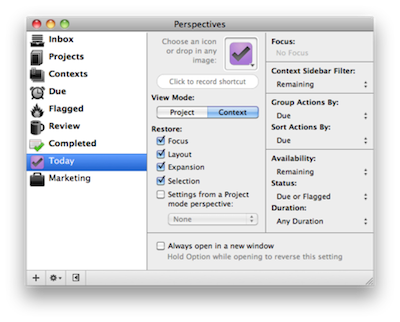
Toggle Twitter is a simple and useful script created by Daniel Jalkut of Red Sweater Software which can toggle and make visible most any Twitter client for OS X. Well, at least it comes with built-in support for the most popular ones. The concept behind the script goes like this: we try a lot of Twitter clients every week, or month. Many of us even use multiple clients throughout the day. The problem is, not every client has support for a general hotkey to toggle the visibility of the app.

So if you’re using Twitterrific or Twitter for Mac and you assigned the same keyboard shortcut to both the apps to show them when active, you’d be disappointed to find that other Twitter clients don’t allow you to assign a hotkey. This script comes with a list of popular Twitter apps, but you can add your favorite ones manually with a bit of AppleScript Editor. The ones supported “out of the box” are:  Twitter, Tweetie, Kiwi, Ostrich, Twitterrific, Hibari and YoruFukurou. Read more


AT&T and Verizon Finally Together In Apple’s New Ad

So Apple has a new iPhone 4 coming out on February 10 in the U.S., under Verizon’s network. We guess you know everything about it at this point. Well, Apple wants you to take a look at the big picture: iPhone on two carriers is better than iPhone on one carrier. It’s pure and simple Jobsian mathematical art. The iPhone 4 on Big Red and AT&T is something worth launching a new commercial for.

Or, as a commenter on Youtube says, “AT&T and Verizon both in the same commercial? I’m surprised the universe didn’t explode.”

Indeed, think about 3 months ago when this was all rumors.


A Better Way To Search The Mac App Store

The Mac App Store is great and everything, but searching for a specific app might be an annoying procedure for many: open the Mac App Store, place the cursor in the search box (or hit CMD + F), type, wait, scan results. Wouldn’t it be great to do it from the keyboard, in seconds, from the app launcher / Spotlight replacement you use every day?

I use Alfred, and this tip has incredibly improved how I search for apps in the Mac App Store. In Alfred, in fact, you can create custom search queries for any website / search engine and assign them to a quick shortcut that can associate terms to the query. Like “google MacStories” will open a tab in your default browser with a Google search for MacStories, and so forth. With this same method, you can create a Mac App Store search query that will let you search for an app’s name directly in Alfred and have the search results page open automatically in the Mac App Store. Read more


App Store: 10 Billion Apps Downloaded

It’s official: 10 billion apps have been downloaded from the App Store for iPhone, iPad and iPod touch. The competition Apple launched to celebrate the new milestone has ended, and Apple is now projected towards the next milestones, 15 billion apps and 20 billion apps.

The App Store was launched in 2008, when the only iPhones available were the original iPhone and the 3G. In January 2010 App Store downloads topped 3 billion; the downloads became 5 billion during summer 2010. Thanks to the enoermous success of the iPad and iPhone, Apple added another 5 billion downloads in 6 months.

Will we see 20 billion apps by the end of 2011?


View Instagram’s Most Popular Photos on Instagreat!

Instagram has been a massive success but it is largely an experience that has been exclusive to its iPhone app. Not anymore though, web developers Elliott Kember and Hector Simpson have created Insta-great, a site that showcases all the most popular photo’s from Instagram.

The brilliantly designed site allows you to also drill down to photos by a specific person, in a specific place, on a specific date or photos using one of Instagram’s filters. Plus Elliot (who has a game of Snake running on top of his site!) and Hector added keyboard navigation which is another great touch to a really finessed site.

If you’re a fan of Instagram like I am, definitely check the site out, you’ll find yourself just scrolling through the photos for ages.

[Via Cult of Mac]


DoublePane, The Keyboard-Only Version of Cinch

With Cinch you can grab windows from anywhere in the desktop and drag them to various edges to snap them left or right, or make the windows fullscreen. With DoublePane, keyboard shortcuts dictate all of your happy snapping, with the same abilities using your control, option, and arrow keys. The keyboard shortcuts are static, which may cause incompatibilities in apps like Linkinus that also use those keyboard shortcuts. I would like to see an option in the future to return the window (or undo) position with the down arrow, and for custom shortcuts. The app is a lightweight addition to your Mac which will certainly improve your workflow, and it can be had for only $2.99 on the App Store.


Sending Emails From @mac.com Accounts Will Soon Be Impossible

According to a recent thread on Apple’s Discussion boards and a support document on Apple’s website, users of @mac.com email addresses who upgraded to iOS 4.2 are no longer able to send email messages through a @mac.com account unless it was setup prior to updating to iOS 4.2. Alternatively, the @mac.com account details can be synced through iTunes on the desktop, but this won’t enable push for emails.

A user on Apple Discussions explains:

Because of this unannounced development, I had a sneaking suspicion that Apple may be planning to do the same in the future for sending email from @mac.com addresses via www.me.com and a desktop email client.

It appears my suspicion was true. Here are the relevant sections from a Chat Session I’ve just finished with a very nice MobileMe Support agent.

Read more


Amid outcry, Apple says it monitors work conditions in China

Amid outcry, Apple says it monitors work conditions in China

Apple restated its pledge to provide safe working conditions for workers assembling of its products after environmental groups in China released a report criticizing the tech company for failing to be transparent about its suppliers.

“Apple is committed to ensuring the highest standards of social responsibility throughout our supply base,” said Apple spokeswoman Carolyn Wu in a statement. The company requires all suppliers to sign up to Apple’s code of conduct before the contracts are made. Compliance is then monitored through factory audits and measures to correct violations.

However, Apple would not directly comment on the report, which had the backing of 36 environmental groups from China. Titled “The Other Side of Apple,” the report faulted the tech giant for failing to respond to inquiries related to the working and environmental conditions at its suppliers, while also refusing to disclose who the company’s suppliers are. The 26-page document pointed to suppliers reportedly connected to Apple that had violated environmental regulations or poisoned workers due to working conditions.

Apple came dead last in the list of 28 companies reviewed from the Institute of Environmental and Public Affairs, which included Hewlett Packard and Sony (companies at the top of the list). Apple’s products are lauded to be environmentally friendly, though the Chinese have something different to say about that.

Permalink

SyncPad: The Collaborative Online Whiteboard For iPad. Review & Giveaway!

Inspiration hits us often at MacStories, and we’ll usually collaborate by sharing sketches thanks to Skitch and iChat. Imagine, however, if we didn’t rely on static images and browser refreshes to share content collaboratively over the Internet: SyncPad is an answer to our clunky workflow, thanks to immediately accessible online sketch rooms available via the Internet or SyncPad’s reader component for the iPad. In realtime, you can watch as the creators create instant wireframes, sketch over photos, markup PDFs (yes!), or draw the “OctoTicci” as I’ve done screwing around when I first tried the app with Federico. Below you’ll find many a 4th grader’s sketch (read: my terrible finger painting), an overview, and a little something for our readers who’d like to win one of ten copies. We can’t keep all of this collaborative-ness to ourselves after all.

Read more