iPad “Best Thing to Happen to Meetings Since the 1960s”

iPad “Best Thing to Happen to Meetings Since the 1960s”

Ben Brooks is right about the iPad as a device for meetings:

There is an artificial barrier between you and everyone else because of those damned laptop screens.

The iPad changes all of this, it can sit slightly angled on the table and not be a a barrier to anyone, or even completely flat on the table mimicking a notepad. Further, because the screen is not staring you in the face, participants get a more open sense about how you are using it — that is people can see what you are doing on it. This is crucial to making the other meeting attendees feel like you are actually paying attention.

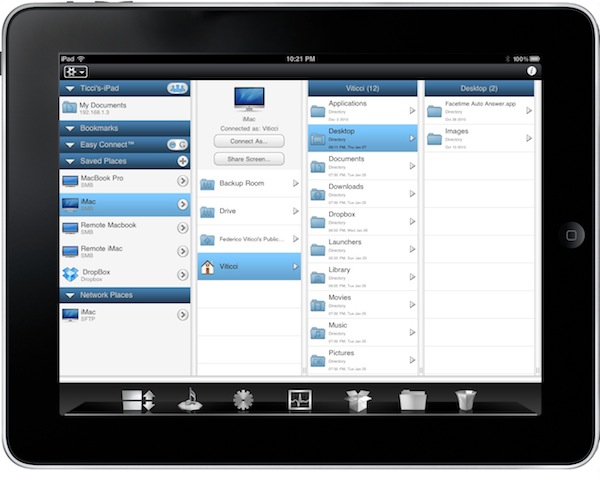
The real difference, though, is once again made by apps: easy-to-use yet powerful software like Screens, iFiles, Omnifocus, Dropbox and FileBrowser can turn the tablet into a killer machine for business purposes. “Apps” is where the competitors will need to catch up with.

Permalink

App Store Gets Official Twitter Account

It looks like Apple has just started sharing status updates with an official @AppStore account on Twitter. The account isn’t verified yet but its first tweet has been retweeted by the already verified @iTunesMusic. So why is the App Store on Twitter? Well, according to the first public message:

Welcome to App Store on Twitter! Follow us to discover new apps, get exclusive offers, and share with friends.

It will be interesting to follow the tweets from this account closely and see if they mirror the apps Apple features every Friday on the App Store homepage. This new account expands the set of official Apple services and personalities on Twitter.com: @iTunesMusic and @iTunesTrailers tweet new material from the iTunes Store on a daily basis and @pschiller has been busy sharing Instagram pictures lately. Apple is also active on Facebook and Youtube, where all the commercials and keynotes end up in HD.

On a side note, Scott Forstall hasn’t tweeted yet.

Update: the account is verified now. [Thanks, Florian]


Free “Plus” Widget Turns Dashboard Into A Launchpad

Launchpad is a feature of the upcoming Lion operating system that will allow users to have quick access to all their apps and folders through an iPad-like overlay interface. A few weeks ago, we saw developers already trying to imitate this functionality on Snow Leopard as I covered QuickPick, an app that brings a Launchpad-like UI to OS X 10.6. Plus, a new widget by Junecloud, takes a similar approach to QuickPick but it’s free and works with the system’s Dashboard.

Plus can turn anything into a Dashboard widget. That’s right: a widget to create other widgets; sort of meta, and it works. You can in fact drop multiple instances of Plus on to the Dashboard, and make each one a different shortcut to something else. Like an app, a screenshot, a document, a web address or a folder. Anything that you can drag out of the Finder can be dropped into Plus and become a widget of its own; Plus even lets you decide the size of the item’s preview. With a bit of organization and time, you can thus turn the Dashboard into a grid of most used apps and shortcuts, although you won’t be able to expand folders within the overlay the way we’ve seen in the Launchpad preview.

All things considered, Plus is a cool widget that’s being given away for free and definitely works as expected. Give it a try.


NoteTote: Download Files Remotely Using Simplenote

Previously known as MobileDL and now available at $8.99 in the Mac App Store, NoteTote is an interesting solution to trigger downloads remotely on your Mac using the iPhone, iPad or any other device that has access to Simplenote. For as simple as it sounds, all you have to do to start a download on your Mac is paste a URL into a specific note. NoteTote, in fact, upon logging into the service with your credentials will create a “special” NoteTote_Downloads note that will always stay there, monitored by the app running on your Mac’s menubar. While you’re away from your Mac and you want to start a download remotely, open the Simplenote app, paste the link and that’s it. On a regular interval (which can be adjusted in the Preferences) NoteTote will look for URLs inserted in the special note and try to download them. All of this while you don’t have access to your Mac. Read more


Google Launching Cloud Print with iOS Support

With an official post on the Gmail blog, Google has announced that in the next few days they will launch the Google Cloud Print online service with initial support for iOS devices and Windows operating system. Cloud Print allows you to print any kind of document and supported Gmail attachment by configuring a local printer with Google’s remote system. Once a printer is connected to Cloud Print, an iOS device can remotely send a document to the printer from the Gmail webapp in Mobile Safari. Support for Mac OS X and Linux is coming “soon.

To get started, you’ll first need to connect your printer to Google Cloud Print. For now, this step requires a Windows PC but Linux and Mac support are coming soon. Once you’re set up, just go to gmail.com from your iPhone or Android browser and choose “Print” from the dropdown menu in the top right corner. You can also print eligible email attachments (such as .pdf or .doc) by clicking the “Print” link that appears next to them.

It all sounds fairly interesting, especially considering that it happens in the cloud, in the background. Will Google manage to pull off real driver-less, wireless printing?


iPhone 4 Game Boy Decal? $13

In the past months, we have covered different Game Boy decals for the iPhone 4. Reproducing both the original Game Boy and the “Color” version released a few years later, these decals never went up for sale officially and when they did, they were sold on Etsy and quickly disappeared.

Now you can get a Game Boy decal for the iPhone 4 thanks to website Mysticker, which is selling the decals at 9.95 Euros each, about $13. The decal covers the back of the iPhone and it’s got a hole for the camera and flash light.

Go buy it here if you feel like going through a Spanish product description and ordering process.