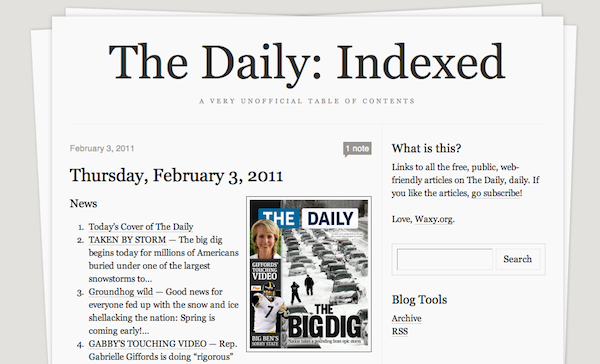
Don’t Have an iPad? Want All The Daily Articles In One Place? Here You Go

The Daily is a cool experiment, although the app needs some serious optimizations in our opinion. Still, the content seems to be pretty nice, and it’s indeed being updated “daily” with new articles, covers and videos. As you may have noticed, most of the articles from The Daily app are also shared by News Corp’s team on the web, but there’s no index for all these links. Either you follow @thedaily on Twitter to read every single link, or you can’t just head over the website and browse a complete archive of stories. The availability of backlog issues was a also a subject discussed by News Corp and journalists at the official announcement of the app yesterday and it looks like, at least for now, The Daily has no plans to create a public archive of all their stories on the web.

But, there is a solution. The unofficial “The Daily: Indexed” archive by Andy Baio provides a single place to find all the articles from The Daily that have already been shared on the web. The blog aggregates all the links, organizes them by day and even offers a preview of each day’s cover. It’s an interesting (and useful) experiment that also plays very well with Instapaper and Read It Later, if you like the content of The Daily but don’t want to download the app.

Check out The Daily Indexed here. [via Daring Fireball]
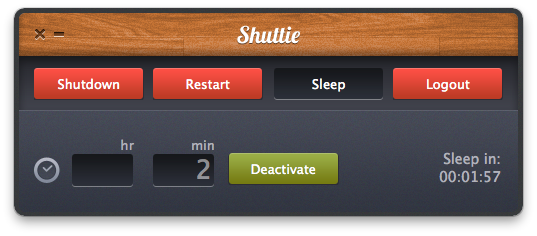

Shuttie: Set A Timer For Your Mac To Shutdown Or Sleep

Shuttie, a $0.99 app available in the Mac App Store, is the kind of utility I’ve been looking for these days, as I’m tweaking my workflow to include Time Machine backups through Dolly Drive, and hard drive clones with SuperDuper. My problem with backups is that I want them to run at night, but I’d like my MacBook to sleep once backup sessions are completed. And even though I know it’s possible to trigger AppleScripts to put a Mac to sleep with iCal, or tweak the System Preferences to enable display and computer sleep, Shuttie is a simple app with a nice design that offers more options, and it’s very easy to use.

Shuttie lets you set a timer for shutdown, sleep, restart and logout. Set a time (hours and minutes are supported), activate the timer and forget it. Once the countdown is up, Shuttie will perform the function you assigned it. This is quite handy for me, as I can let Dolly Drive and SuperDuper do their backups, then put the computer to sleep after 3 hours, when the backups are completed. This way, I don’t have to leave my MacBook running all night.

Shuttie provides a nice interface for things that can be accomplished manually in other ways, and it works very well. If you don’t want to mess with System Preferences and AppleScripts, give it a try.


iAds Twice as Effective as TV Says Apple, Campbell’s

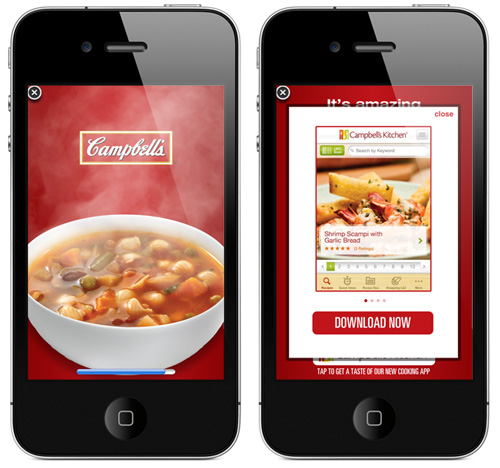
A Nielsen study shows iPhone users are paying attention, while TV views – eh, not so much. iAds started around 7 months ago on our iDevices and now there are effectiveness studies showing up, this one from Campbell’s (the soup maker).

People exposed to one of Campbell’s iAds were more than twice as likely to recall it than those who had seen a Campbell’s TV ad. This five-week Nielsen study showed that consumers who saw an iAd remembered Campbell’s brand five times more often than TV ad respondents and the ad’s  message three times more often. iAd respondents were four times as likely to to purchase Campbell’s than the TV viewers. Users also liked the ad five times more than the TV commercial. Read more


Rumor: Apple Planning iPad 2 & iOS 4.3 Event Next Week

According to website MacNotes.de, which previously reported the next-generation iPad is set to come out in the first weeks of April, Apple is planning a media event next week to discuss the new features in iOS 4.3 and provide a preview of the iPad 2.

A release date between 2nd and 9th April seems quite likely, sources - not only ours - pointed to a release in early April. The only question is: When will the iPad 2 be presented? One manufacturer of iPad accessoires now told us Apple is planning on holding an event next week.

Our guess is Apple will present the iPad 2 as a “One more thing” during a special iOS 4.3 developer event next week. iOS 4.3 is still a beta, Apple released the third beta on Tuesday. It still contains critical bugs, but might be released soon as soon as all the bugs are fixed.

The rumor follows a series of reports surfaced last night that hint at the release of iOS 4.3 in two weeks. iOS 4.3 is currently being tested with developers and has reached the beta 3 status, which may lead to a release of a GM seed next week. If the rumors are to be believed, in two weeks (and after the release of the Verizon iPhone on February 10th) Apple could roll out iOS 4.3 for all iOS devices, which, among other features, will introduce the Personal Hotspot functionality on the iPhone. The timing is also somewhat curious: the long anticipated iPad newspaper The Daily offers a free trial of two weeks, sponsored by Verizon Wireless. The Verizon iPhone will come out on Feb. 10 with the Personal Hotspot feature as an exclusive; AT&T iPhones will get Personal Hotspot only with iOS 4.3. Looking at the numbers and hints, the two-week timeframe seems likely.

It is unclear, however, why would Apple hold an event to announce both a new version of iOS and the iPad 2 as “one more thing”. Usually, new devices are always given a dedicated media event, not a brief preview during an iOS-related event. [via]


Apple’s Data Center, Tailor-Made

It’s not terribly difficult to drive by Apple’s data center in Maiden, North Carolina, to witness Apple has something rather big planned, especially when you start seeing the plans for a parallel building in the unassuming clearing. A single Apple data center has over 447,142 square feet available for sever racks, power, and cooling whose purpose remains a mystery. Details continue to pour in from local news outlets, however, meaning Carolinians get to be on the front lines of witnessing some serious tech installments when leaked.

“This data center has truly changed the playing field in terms of size, efficiency, and engineering, and we were thrilled to have the opportunity to bring our expertise to the table to make it a reality,” said Todd Schneider, Senior Product Manager at Electrorack.

Instor and Electrostak have been creating a custom architecture for Apple, hired by Holder Construction to provide power, cooling, and custom mounting equipment needed to host a slew of unnamed, third party equipment. The solutions deployed at the Apple data center are noted to be unique in design, though I read that as: “There’s a crap load of pretty braided white cable attached to endless rows of aluminum racks.” Maybe I’m breathing too much of the Apple mantra, but I am inherently interested in Apple’s storage solution vs. a company like Google who sports systems are generally cheap, disposable, and exist in large quantities to prevent downtime. In jest, I’m assuming Apple’s data center is just a field of Mac Minis until I hear otherwise.

[via Data Center Knowledge]


New York Times Giving iPhones To Reporters

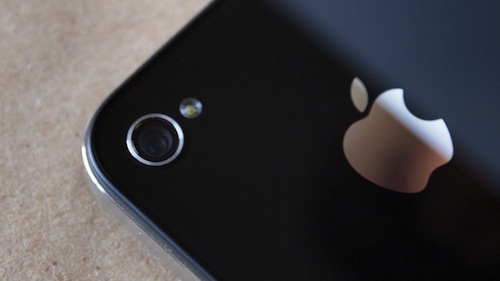
It’s no secret that the camera of the iPhone 4 has dramatically increased the quality of photos and videos shot with the device. The New York Times noticed this as well, and has decided to provide iPhone 4s to reporters for news video gathering. The reporters will be able to record videos and upload them to the NYT’s servers using Aspera’s file transfer tools.

Speaking to Beet.TV, Editorial Director for Video and Television Ann Derry called the Apple iPhone 4 a “game changer” for mobile video shooting and uploading, confirming that reporter Andrew Ross Sorkin used the device during Davos. Videos have become prominent in the paper’s website homepage, and the adoption of the iPhone as a portable camera will extend the staffers’ capabilities of recording videos in almost real-time, as events happen.

Check out the interview below. Read more


Thermo: “Hot” Weather App by Robocat, Free

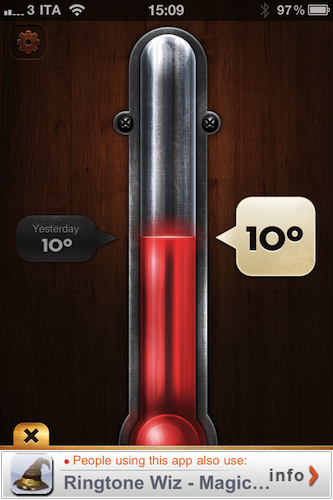
Robocat is a quite popular iOS development studio that released a weather app for the iPhone we have covered a few times on MacStories: Outside. Their latest effort in mobile weather software, Thermo, takes from where Outside left off with beautiful graphics and intuitive interface but adds a serious level of simplicity stripping away all the additional features found in the former app. Thermo is, in fact, free and aimed at letting you see the temperature of where you live.

The app comes with delicious interface design, indeed. In pure Robocat style, Thermo is really, really “hot”. You can select temperature in Celsius and Fahrenheit degrees, check on today’s temperature and the one from the day before. Tap on the thermometer to refresh. That’s it. In the settings, you can disable auto-locate, go ad-free ($0.99) and select your unit of choice.

Thermo is a simple weather app with a pretty design. Go download it here.


Verizon To Throttle Data Speeds, Compress Images & Videos To Keep Its Network Up

Early reviews of the Verizon iPhone were clear about one point: it’s a great phone, but data is slower than AT&T’s network. The Verizon iPhone gathered good phone call points among reviewers, but each one of them mentioned the fact that, both in download and upload, AT&T was faster. And it looks like things are only getting worse.

As reported by BGR, to handle the flock of new iPhone users on its network Verizon will begin throttling data speeds for the top 5% data users:

Verizon Wireless strives to provide customers the best experience when using our network, a shared resource among tens of millions of customers. To help achieve this, if you use an extraordinary amount of data and fall within the top 5% of Verizon Wireless data users we may reduce your data throughput speeds periodically for the remainder of your then current and immediately following billing cycle to ensure high quality network performance for other users at locations and times of peak demand.

But it gets even worse than data throttling. To keep its network capacity at an optimal level for customers, Verizon will compress images and videos over the air (to save bandwidth) before they’re served to a device. Here’s what the PDF memo says:

These techniques include caching less data, using less capacity, and sizing the video more appropriately for the device. The optimization process is agnostic to the content itself and to the website that provides it. While we invest much effort to avoid changing text, image, and video files in the compression process and while any change to the file is likely to be indiscernible, the optimization process may minimally impact the appearance of the file as displayed on your device.

While it’s likely that these “optimizations” (we think “compressions” is a more appropriate term) will happen only during the first period of Verizon iPhone on sale, it’s still inconvenient for customers to not have access to high-quality media on 3G. Full excerpts and link to the PDF document available on BGR. Pre-orders of the Verizon iPhone went live last night.