


Here are today’s @MacStoriesDeals on iOS, Mac, and Mac App Store apps that are on sale for a limited time, so get them before they end!
#MacStoriesDeals - Thursday
Tweetbot 1.2 Released With Several Enhancements

Tweetbot, the Twitter client from Tapbots we reviewed here, has been updated to version 1.2, adding several features requested by users in the past weeks and fixing some of the minor gripes we had with the application when it first came out. Whilst version 1.1 focused on adding CloudApp and landscape support, Tweetbot 1.2 brings a series of refinements and enhancements across all the sections of the client that should dramatically improve the experience. For example, you can now undo retweets, and retweet from another account if you hold down the retweet button. That’s quite handy: not only you can delete accidental retweets, you can also retweet quickly without constantly switching between accounts. And if you don’t like Twitter’s standard retweets, Tweetbot 1.2 has an option to send old “quote style” retweets.
Tweetbot 1.2 introduces absolute and relative timestamps, Google/Instapaper Mobilizer support for when you need to strip away all the clutter from a webpage and read it in a text-only view, as well as integration with Bitly.Pro for those who keep a custom domain on the popular link shortening service. Besides the new great user & hashtag picker from the compose view (make sure to check out the animations), short link geeks should be happy to know Tweetbot 1.2 has support for custom API endpoints. Other features in this update include:
- Pinboard support in the read later options
- Pikchur image upload support
- Tapping on a success/failure message dismisses it instantly
- Added @username/listname for followed lists
Tweetbot 1.2 is available now at $1.99 on the App Store.
Will Older Devices Get All of iOS 5’s Features?

It doesn’t come as a surprise when Apple’s latest and greatest software updates end up killing off compatibility with older devices, but the intrigue here is that something as recent as the original iPad may not be included in iOS 5’s full feature set. For example, developers have access to enabling special multi-touch functions for multitasking between apps, launching the multitasking bar, and closing apps with a four finger pinch in iOS 4.3. These functions, that work well on any enabled iPad or iPad 2, may not be included for use on the original iPad. According to Appadvice the iPhone 3GS doesn’t have access to many of the photo features available on the iPhone 4.
Perhaps these are temporary bugs, or Apple is really looking for reasons for people to buy an iPad 2 when iOS 5 drops over the less expensive iPad elsewhere. Bryan M. Wolfe from Appadvice writes,
We’ve received numerous reports the upcoming gesturing feature in iOS 5 will not work on the original iPad. If proven correct, this would be the first time the first-generation iPad was denied a key feature besides those that require the iPad 2′s camera.
The iPad’s touchscreen is exceptional, and there’s no reason why Apple wouldn’t (or shouldn’t) enable these features. If Apple does remove any features, I’d bet the iPhone 3GS and the 3rd generation iPod touch would be the most likely to be at risk.
[Appadvice via Cult of Mac]
Apple Goes Shopping, Comes Back with Over 50 Domains
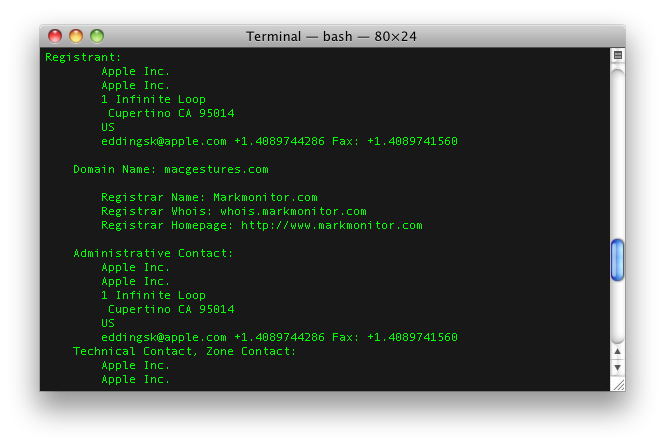
In a move to protect key terms and product features related to Monday’s Keynote that kicked off WWDC 2011, Apple decided to go domain shopping. Obviously you’d want to protect product names like Lion and iOS 5 from being abused, but Apple may have overdone it with their acquisition of over fifty domain names, including goodies like “macmailconversationview.com” and “pcfreeiphone.com”. Robin Wauters from TechCrunch was quick to point out that Apple still doesn’t own ipad.com or ipods.com, but what is Apple really afraid of?
You can tell Apple is clearly trying to protect their branding, but are they going too far? Do they have anything to worry about? I guess iTunes in the cloud is pretty important. But Mac gestures? Apple should definitely put a tutorial there.
Here’s some good examples of what Apple has picked up.
- airplaymirroring.com
- itunesinthecloud.com
- macgestures.com
- osxlionairdrop.com
For the full list, be sure to hit up the source link below.
[via Techcrunch]
iOS 5 To Enable FaceTime in Middle East?

According to a report posted by website Apple-wd.com [Google Translation], the iOS 5 beta seeded to developers earlier this week doesn’t come with the FaceTime restrictions in Middle East countries we first covered back in October. Soon after Apple started removing graphics and mentions of FaceTime from its Saudi Arabia eight months ago, the company released an official document detailing the carriers that were not supporting FaceTime video calls on iOS – the document is still available here and shows Saudi Arabia and United Arab Emirates having FaceTime unavailable on certain carriers.
Other reports also confirmed FaceTime for Mac wasn’t showing Middle East countries as supported ones in the app’s preferences, which left us wondering why would the Mac version go under the same “rules” if a carrier wasn’t needed at all. Well, according to Apple-wd the iOS 5 beta has FaceTime working between iPhones in Saudi Arabia from STC and Mobily, as seen in the screenshot above.
Apple-wd speculates this might be a good indication of iOS 5 finally easing carrier restrictions on FaceTime which, as spotted at the WWDC keynote slides, is getting improvements for video call quality and may even work on 3G come the final release. However, it’s also possible that carriers will update their configuration files when iOS 5 is released publicly to block FaceTime again.
iOS 5 To Feature Panoramic Camera Option?

According to some code strings posted by 9to5mac and found in the first beta version of iOS 5, Apple may soon introduce a panoramic camera functionality to go alongside the photo editing enhancements announced at the WWDC keynote. As detailed by Scott Forstall on stage, iOS 5 will bring the possibility to crop, rotate and auto-enhance images from the native Photos app – these features won’t be available on the iPhone 3GS, but they represent a great addition for iPhone 4 users that won’t need to purchase additional basic photo-editing apps anymore. With red-eye reduction and Photo Stream compatibility, Apple touts the new Photos app as the best way to take photos on an iPhone, and send them to an iPad for a quick touch-up. However, as the code discovered suggests, there may be more coming in future betas.
There’s a variety of “pano” photo apps available in the App Store, some of them like Occipital’s 360 Panorama and Pano we reviewed on MacStories before. These apps allow you to take photos of what’s around you to build a panoramic, zoomable representation that “stitches” the various images you’ve taken together in a single file.
The code found in iOS 5 beta doesn’t suggest much, except that Apple has been thinking about a menu to “take” and “save” a panorama. These strings are usually a good indication of new features to come in iOS 5 – in January, iOS 4.3 beta code confirmed that Photo Booth camera effects would be implemented sooner or later, and indeed the iPad 2 (released in March) sported a native Photo Booth app on its custom 4.3 version.
“There Is No Chance” Cupertino Will Say No To Apple’s Spaceship Campus

Two days ago, Steve Jobs pitched Apple’s latest project to the Cupertino City Council: a massive, spaceship-like, 4-story new campus that would be located in the 98-acre ex-campus Apple acquired from HP last year. Designed with modern and green technologies in mind and entirely based on curved glass running around the whole structure, the new “mothership” would host 12,000 employees, come with a new auditorium, labs, office, and much more. When Steve Jobs presented the project, answering questions on environmental issues, energy and free Wi-Fi (the City Council asked whether Apple would provide Wi-Fi for everyone outside the campus, like Google does – Steve Jobs simply replied being Cupertino’s top taxpayer would be enough to contribute to the city), it was clear the City Council members were inclined to accept Jobs’ proposal, though no official announcement had been made there.
In a press conference responding to Steve Jobs’ campus proposal, Cupertino Mayor Gilbert Wong stated that “there’s no chance” the City Council is saying no, even if a public hearing will be necessary. However, Wong expressed his appreciation for Apple and Steve Jobs’ visionary attitude, confirming that when they have to deal with a large sales tax producer, they’re usually very accommodating to that company. Apple’s new campus should get done by 2015 if everything goes well.
Video of the press conference after the break. [via TechCrunch]
Read more
Apple Backs Down Over Subscription Rules

A few days ago Apple quietly modified its ‘App Store Review Guidelines’, and it has significantly reduced the requirements that apps, which deliver content, must abide by, effectively stepping down on their previous demands. In February this year it was revealed that Apple had imposed a deadline of June 30 for all publishers of iOS Apps that delivered subscription content to implement In-App Subscriptions. The requirements were that any app that sold content outside the App Store must also offer the same content to users through In-App Purchases and at the “same price or less than it is offered outside the App”.
Yet as MacRumors has published today, Apple has amended the App Store Review Guidelines to state as follows:
11.14 Apps can read or play approved content (specifically magazines, newspapers, books, audio, music, and video) that is subscribed to or purchased outside of the app, as long as there is no button or external link in the app to purchase the approved content. Apple will not receive any portion of the revenues for approved content that is subscribed to or purchased outside of the app
In plain English this means that content providers with an App Store presence are no longer forced to offer In-App purchases or subscriptions for content. But if they do choose to implement IAP or subscriptions they can offer the content at any price they wish – even if it is more than what they charge outside the App Store. The only requirement is that within an app, there cannot be an external link that redirects users to purchase content from outside the app.
It is unknown why Apple has decided to change tack on this issue, but a likely reason is that a number of publishers decided the 30% cut was too much to bear and had put pressure on Apple to redraw the guideline. Just a few days ago The Financial Times released its iPad webapp in order to sidestep the App Store and its overbearing terms. Similarly, earlier this year Time magazine had also ruled out using the subscription service because of the 30% revenue cut and customers ability to opt-out of giving them certain personal details .
Readability, which launched in February, was also set to offer iOS users an app that would tie into the Readability service, but because of the subscription rules they weren’t able to release the app. Similarly iFlowReader complained in mid-May that Apple’s subscription policy had shut them down because the 30% revenue cut would eat into their already small profit margin. The question now is whether these services and magazines will now re-embrace the App Store under these revised terms.
[Via MacRumors]
Reeder for Mac: Now Available On The Mac App Store
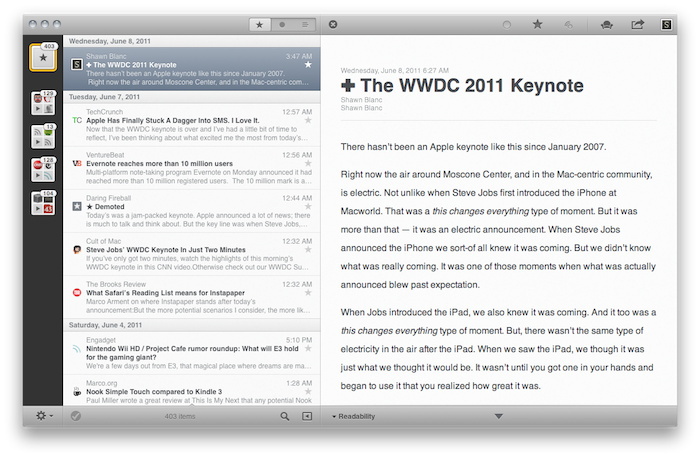
Over the past eight months, I’ve been following very closely the development of Reeder for Mac, a port of the popular Google Reader client for iOS to the OS X platform. As I was one of the first people to try the original Reeder for iPhone back in 2009, I immediately accepted Silvio Rizzi’s invite to join the beta testing group of Reeder for Mac in September 2010. Lots of things have changed since then. Sure, I never stopped using Reeder for Mac as my default desktop client, but there’s no doubt the app has gone through so many interface changes, design overhauls and feature additions I had to re-calibrate my workflow every time the developer updated something. That’s what you get by beta-testing things, but the evolution of Reeder for Mac was different: from our exclusive preview, to the first public beta and the one we reviewed last month, you can see how the app turned into something completely different from the experience I initially fell in love with. And that’s a good thing – the last full rewrite made Reeder for Mac insanely fast on Snow Leopard and ready to go on Lion. But enough with the beta talk. Read more