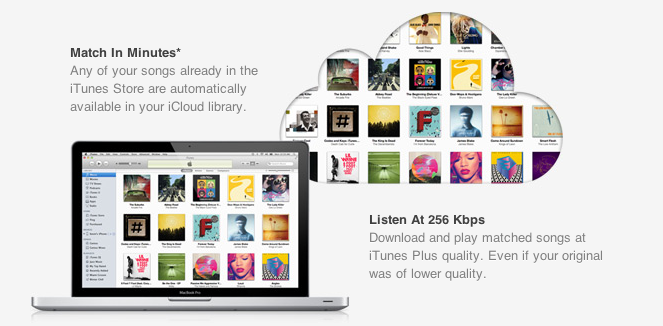
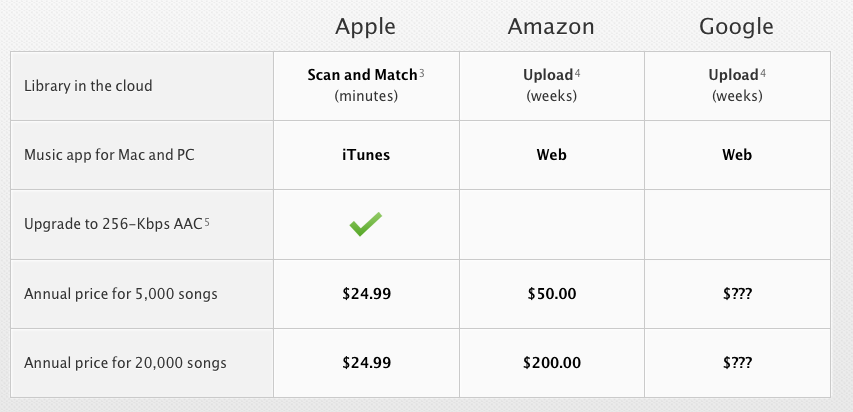
With the launch of the first iTunes Match beta for developers last night, Apple unveiled the last piece of the iCloud puzzle that was originally previewed at the WWDC in June, when Steve Jobs announced that iTunes Match would be available this Fall at $24.99 per year for 25,000 songs, allowing customers to download songs stored in their iCloud accounts. Because iTunes Match scans a user’s iTunes library before uploading files, songs compatible with Apple’s iTunes Store catalogue are automatically upgraded to 256 Kbps (even if the original copy was of lower quality) and “matched” with the copy on the server, whilst the ones not found on Apple’s servers are manually uploaded to iCloud. This happens for two reasons: first, Apple cut deals with several music labels and publishers to enable this “scan & match” technology that compares songs on a computer versus the higher quality copy on the servers, and doesn’t upload the original file; second, Apple wanted to eliminate the need of having to wait days for large uploads to finish – something that has affected “cloud locker” services from Google, Amazon, and many others.
The iTunes Match that was announced back in June, however, and promoted on Apple’s website up until today, made no specific mention of “streaming” songs matched/uploaded to iCloud; the way Apple originally explained it, Match was a clever way to fill an iCloud account with songs and albums to later download on iOS devices or a Mac. For as much as the technology behind it seemed intriguing, many were disappointed to find out that Apple couldn’t find a way around streaming songs without having to download the full copy first. Other services like Rdio and Spotify allow users to stream songs they don’t own by hitting “play” and waiting a few seconds for the stream to start (depending on the Internet connection’s speed). iTunes Match is actually a service for songs users own and decide to store in iCloud at $24.99 per year, so many assumed streaming required a different kind of licensing deal that Apple couldn’t make in time for WWDC.
Last night, as developers started subscribing to the first beta of iTunes Match, it turned out that, even in this first version, Apple is allowing for both downloading and streaming of songs, both on the Mac and iOS devices. The interface makes it easy to match and listen: once a music collection is built in iCloud (e.g. iTunes has scanned, matched, and uploaded songs to your account), music will be available on the Mac in iTunes’ Music tab, and on iOS 5 in the new Music app. Once iTunes Match is enabled on iOS it replaces the local music library, and you can tell the difference by a small iCloud icon next to each song.
Whereas Apple’s announcement at WWDC implied users would have to push a button to download songs, and build a music library off a master collection in the cloud, this first beta actually delivers more: users can still hit the button and download songs locally, but they can also tap on songs and start streaming them without a download.
The process is detailed in two videos posted by Insanely Great Mac. Streaming can occur both on the desktop and iOS, and it doesn’t look any different from a local iTunes library except for the aforementioned iCloud library. With this first beta, Apple isn’t accepting iTunes LPs and Extras, some file types aren’t supported and, for testing purposes, Apple will periodically delete developers’ iCloud music libraries to increase iTunes’ performances and reliability.
Streaming is a big deal for Apple, and not just because it increases iTunes’ functionalities to avoid manual downloads and waiting times. With iTunes Match streaming, Apple could directly compete with services like Spotify (recently landed in the U.S.) and Rdio, which let users stream songs over WiFi and 3G and even cache them for offline access. However, as of this beta, Apple’s iTunes Match comes with a unique spin on streaming: it doesn’t need downloads, and it’s based on music libraries made from songs users own. With the combination of local copies (the library), scan & match, iCloud, downloads and streaming, Apple could build a music service like no other in that it’s a combination of “owning your music”, and paying a yearly fee to get online access to it. Spotify is often criticized for being a streaming service that doesn’t let you “own” your library; most recently, the company added the possibility of importing local files and playing them in Spotify, but it’s not the same of being able to take local files and mirror them to the cloud. Reports citing streaming with “iTunes in the cloud” from May are now starting to make more sense, and let’s not forget Apple has patented a technology to make streaming effortless and faster by syncing small bits of data locally.
Still, many questions are left unanswered with this week’s iTunes Match beta. Was iTunes Match supposed to get only song downloads, with the current streaming implementation being just a glitch? Or are we in for a streaming surprise come Apple’s next keynote? Moreover, will Apple further tweak iTunes and iOS 5 to put the focus on streaming, allowing for advanced iCloud-based playlist creation? And how will music labels react to the news that iTunes Match is capable of streaming, too? Perhaps this is already part of Apple’s grand iCloud plan, and music labels knew all along that iTunes Match would stream songs, as Businessweek suggested in May. Or, streaming came unexpected to them as it did to everyone else in this first beta. But more importantly, will iTunes Match be available outside the U.S. once iOS 5 and iCloud are publicly released? Early signs pointed to “no”, with sources claiming the UK wouldn’t see iTunes Match until 2012. Currently, iTunes Match is a developer-only beta (closed at the moment with more openings “over the next days”) that requires a U.S. credit card (not just regular iTunes credit – e.g. promo codes and gift cards) for automatic billing. It’s unclear whether or not Apple will open the final version of iTunes Match to any kind of U.S. iTunes account, or if they’ll keep it exclusive for U.S. iTunes customers with a credit card on file.
As usual with betas, things can change before the final release. There’s a fragmented market out there, and Apple has a chance to disrupt it with iCloud and iOS 5. As it stands now, iTunes Match looks like Apple’s boldest move in the online music space since 2003.
Update: AllThingsD now weighs in writing that, according to an Apple spokesperson, iTunes Match still isn’t streaming. What looks like a stream is actually a simultaneous listen and download, although Apple isn’t providing additional details on the technology behind iTunes Match. AllThingsD speculates that Apple may be using some sort of caching mechanism for when users don’t “download” songs from iCloud, though that’s just an “educated guess”. From the videos posted this morning, indeed it looked like an iPhone was capable of streaming songs off iCloud.
AllThingsD also reports that Apple has the licensing rights to streaming, but they’re not implementing it due to a design choice – Apple apparently doesn’t believe mobile networks are advanced enough to allow for streaming of large music libraries. Check out the full report here.
Read more