


About a month and a half ago, I published a post about the current state of music making and discovery on the iPad. In the first part of that post I listed, described, and analyzed some prominent apps for discovering new music on the iPad. I concluded that these apps are state of the art when it comes to discovering music. Last week, while searching for music integration features for a music blog I run as a side project, I stumbled upon shuffler.fm. And after using it for some days now, I wish I could rewind time and add this service to the list in my music editorial, because it does something the other apps like Aweditorium or even radio apps like Tuner do not offer: it combines genre-specific music discovery with reviews and critical opinion. Read more
Shuffler.fm Is The Perfect Tool For Genre-Specific Music Discovery
Sprinkle a Dash of Cocoa in Your AppleScripts
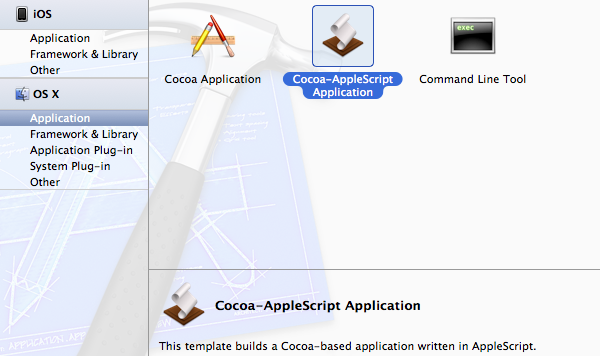
The framework AppleScriptObjC allows users to write scripts with an interesting fusion of the AppleScript and Objective-C languages. Specifically, Apple describes the framework as:
AppleScriptObjC lets AppleScript objects serve as Objective-C objects in the Cocoa runtime
Basically this means that you can use simplistic Objective-C code in an AppleScript with the seemingly easier to grasp syntax of AppleScript. If none of this makes any sense yet then just hang in there and I will explain in a very visual tutorial in which I will build a sample Cocoa-AppleScript app that simply sends a notification to the Notification Center and quits.
#MacStoriesDeals - Tuesday

If you missed our Mountain Lion coverage, be sure to check it out. Here are today’s @MacStoriesDeals on hardware, iOS, and Mac apps that are on sale for a limited time, so get them before they end!
Read more
Ecoute Is The Best Music Player For iOS. Period.
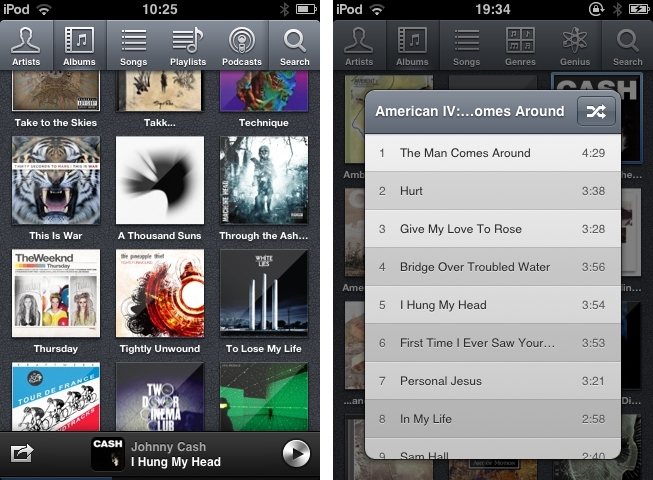
Since I started to write about UI design and iOS apps again 5 months ago, I became more and more disappointed with the native music player on my iPod touch. During my research, I found many innovative modifications of the iOS table view, and I often wished that Apple will integrate some of them into their system apps, especially their music player. But since Apple is a company that believes in radical minimalism and coherence throughout its ecosystem, this never happened and also won’t likely happen in the future. I tried out many alternatives like GoodMusic, but no app was able to satisfy both my design and usability needs on my iPod touch. Until yesterday. Yesterday, Pixiapps released Ecoute for iOS.
Ecoute for Mac has been the app Pixiapps focused on during the last years. It is a minimalist, easy to use iTunes replacement with iconic UI and many cool hotkey and playback features. I’m still an iTunes guy, because I need a reliable solution for managing my over-1100-record digital music collection. But Ecoute for Mac was the first app which really made me think about switching my desktop music player. And now, Ecoute debuts on the iPhone. Although the app is promoted as “Ecoute for iOS”, there is no iPad version available yet. For me this is not really a problem — I like the semi-skeuomorphic design of the iPad music player very much and was never seriously thinking about replacing it. But when I opened up Ecoute on my iPod for the first time, I immediately knew that this was exactly what I’ve been searching for. I basically want three things in a mobile music player: easy navigation, intelligent gesture integration for flawless in-app movement, and a focus on album artwork. Except for some flaws in terms of navigation, Ecoute measures up to all these requirements. Read more
#MacStoriesDeals - Monday

If you missed our Mountain Lion coverage, be sure to check it out. Here are today’s @MacStoriesDeals on hardware, iOS, and Mac apps that are on sale for a limited time, so get them before they end!
Read more
The Rise Of Third Party Services And Fall Of Google In iOS
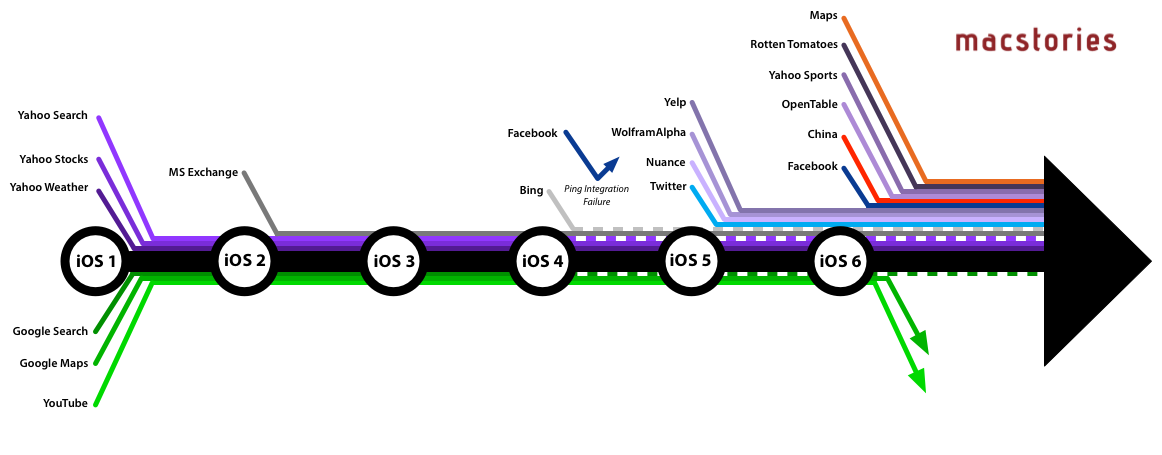
When Apple introduced iOS 6 to the world at this year’s WWDC, one of the most talked about moves was Apple’s decision to step away from their partnership with Google Maps and create their own maps app. In many respects, it wasn’t too surprising given the increasingly strenuous relationship between Apple and Google in the years since the iPhone launched and Google became a competitor with Android, but in recent weeks it was also revealed that YouTube will also no longer be included as a pre-installed app from iOS 6. That leaves Google Search as the only remaining Google service to be integrated into iOS. Yet whilst Apple has been severing its relationship with Google, it has been courting numerous other service providers and integrating them into iOS over the past few years.
Curious to visualise this information, I made a list of every notable service that has been integrated with iOS (and when) and then created the above graphic (click on it to view a larger version). When I had compiled the list, it was pretty compelling (and longer than I had realised), but I think the graphic takes it to the next level and really tells a story about iOS and Apple’s relationship with other services.
Growl 2.0 SDK Gives Developers Access to Mountain Lion’s Notification Center
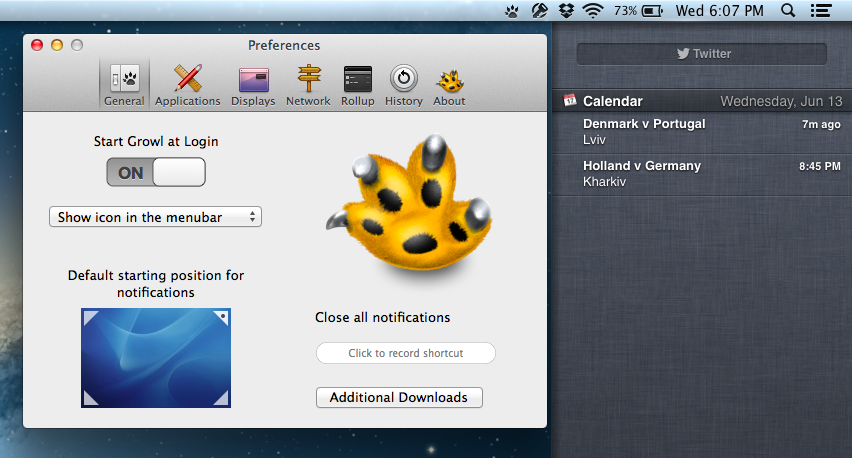
While applications like Hiss have enabled users to route Growl notifications to Mountain Lion’s Notification Center, the stopgap should become an unnecessary appendage provided that developers take advantage of Growl’s new SDK. From Chris Forsythe on Growl’s Posterous blog, the Growl 2.0 SDK will give developers the ability to use the Notification Center if their apps are already using Growl to show alerts on the desktop. While Growl won’t necessarily be supplanted by the new features in Mountain Lion, the Growl team has acted quickly to provide a way for Growl apps to transition into Apple’s new notification system.
The Growl team wants to give developers the ability to “transition from Growl to Notification Center on their own terms,” responsibly embracing Apple’s latest features while helping developers answer the needs of their users. The team also makes the case that users who will remain on older operating systems can still get notifications on their own terms — theming, frequency of notifications, and what apps send notifications are all still definable in Growl’s preference pane and are still accessible without the Notification Center. And as mentioned back in June, Growl plans to supplement the Notification Center for those with Mountain Lion by handling actions and visual notifications separately.
Developers can download the Growl 2.0 SDK from Growl’s downloads page.
[Growl 2.0 SDK via The Verge]
Instagram 3.0: Maps. New User Profiles. Infinite Scrolling.

Instagram’s updates aren’t just about iterating on capturing — adding filters and giving you more ways to take photos is one thing, but the service has bigger aspirations than just sharing and socializing with friends in the moment. For the Instagramers (that’s okay to say right?) who are documenting their lives everyday through the iPhone or Android app, Instagram becomes a sort of timeline or memoir, i.e. a daily journal that can be dated back to when Instagram was first downloaded from the App Store. As new photos are added to the top of your profile, and as new photos bubble up through activity feeds, older photos may simply fade away. They’re forgotten. But old “polaroid” photos don’t simply have to disappear into the nether — every previous photo taken is likely to be just as special or just as important as the one taken moments ago.
#MacStoriesDeals - Thursday

If you missed our Mountain Lion coverage, be sure to check it out. Here are today’s @MacStoriesDeals on hardware, iOS, and Mac apps that are on sale for a limited time, so get them before they end!
Read more