

Rumors of a 7” iPad have been rampant for months, but this week they’ve really picked up steam as stories at the Wall Street Journal and Bloomberg have all but confirmed it. But despite everyone calling it “the iPad Mini”, I remain unconvinced. A 7” iPad has never made sense to me for one reason and one reason alone: interface. Read more
The Case For A 7” iPod [Updated]
Guitar Pitch Pipe Lets You Quickly Tune Your Guitar
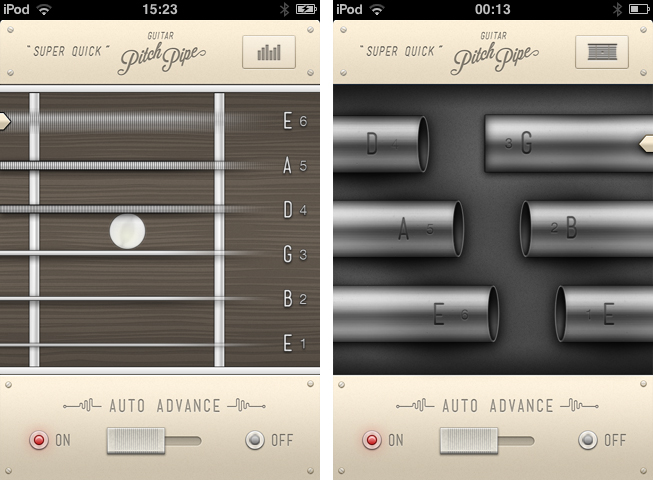
News from Hypercompact, the software company whose logo has inspired designer Evgeny Skidanov to create one of the most beautiful 3D animations I’ve ever seen. If they had published their app Guitar Pitch Pipe just one week earlier, I definitely would’ve integrated it in my story about the current state of music-making on the iPad — filed in the “small tools” sections. This guitar tuner is a perfect example for a small, reliable companion for guitarists on the road.
The App Store is flooded with guitar tuners. Apps like the UltimateGuitar tuner or Gibson’s effort are very prominent and elaborate apps — why considering this one then? Well, because it has one thing these other apps most of the time do not have: an innovative and simple UI. Guitar tuner apps are generally cluttered with features just a few percent of guitar players need like alternative tunings or the ability to change the tuning frequency; unfortunately, they are placed as prominently in the app as the standard tuning. This makes many tuner apps unnecessarily complex.
Guitar Pitch Pipe is different from that. Using a single main window, it plays back the six notes of the basic, 440Hz EADGBE guitar tuning with two different sounds: pipes (being the more unusual sound, and therefore integrated in the app name) and “classic” strings. The selected one is displayed in a visual interface, including tappable strings or pipes with the note characters on them. The currently playing pipes or strings are indicated by a closed pipe illustration or a cool 3D movement respectively. You can switch between these two layouts using the button in the top right corner.
You can either let Guitar Pitch Pipe play a note twice with a little pause in between for tuning, and then move on to the next one, or manually choose a string using the on/off switch at the bottom. The app then plays it until you move to the next one by tapping the respective string or pipe. The app constantly plays a note, there is no way, you could make it silent. Because of this you are more or less forced to only open it up when you really want to tune a guitar, otherwise it quickly becomes pretty annoying. This ensures a quick and focused use of the tuner, and makes it unobtrusive and functional.
The output sounds are very accurate, fitting to tuning both electric and acoustic guitars, and therefore make the app a very useful tool. The second reason for me using the Guitar Pitch Pipe guitar tuner from now on is its UI. We recently covered WTHR, a Dieter Rams inspired, minimalist weather forecast app for the iPhone. Guitar Pitch Pipe is quite similar to it. The app features no instructions or settings (because it doesn’t need any in its current state), it is colored beige, and uses skeuomorphed, plastic switches. The fretboard with strings and the pipes are crafted with love for detail; they are gloomy and very polished. It also features a cool icon but has a confusing description: “Super Quick”. The user could believe that the app is super quick, but without remembering which kind of app is behind the icon, it is very confusing.
However, while using the app for the first time, I immediately thought “Man, you could do much more with this design”. Retrospectively, this is still totally true: this app has potential to be enhanced with many new features while still maintaining its usability and simplicity. You could just add a second button, let’s say in the top left corner, make it trigger a pop down menu (which obviously needs to correspond with the rest of the app’s design), and let the user switch to alternate tunings like Drop D or C, or maybe even let them change the frequency. You wouldn’t need to change anything in the main screen design, just the sounds and the letters on the pipes or next to the strings to indicate different notes. This would make the app an even more complete and functional guitar tuner, suited for every type of guitarist — traditional (using standard tunings), metal and rock (dropped tunings) and progressive and experimental players (open and alternate).
But don’t get me wrong — Guitar Pitch Pipe already is a very good guitar tuner for the iPhone. Its output quality is outstanding, it’s fast and reliable, perfect for quick access, and does everything you need for tuning your guitar in standard tuning. There is just one thing that really annoyed me in its current version: sometimes, for instance when you use dropped tunings (which I personally use very often), you need some time to get back to standard tuning, especially on the lower E string. When you’re using Guitar Pitch Pipe’s automatic mode for that, the app plays each string just twice and then moves on to the next one, which is way too short in such situations. Users definitely must have the option to adjust how often single notes should be played back in auto mode. Otherwise, I absolutely recommend Guitar Pitch Pipe for any guitarist who is still searching for a good guitar tuner for his iPhone. Get Guitar Pitch Pipe for $0.99 on the App Store.
Some App Updates Resulting In Instant Crashes Due To Presumed Apple CDN Issue

In the last 24 hours or so, a number of apps that have been updated by users have crashed on launch due to a problem presumed to be connected to the App Store’s content distribution network (CDN). A number of popular apps from Instapaper, Readdle Scanner Pro, Angry Birds Space HD Free and CommBank Kaching amongst others have been just some of the affected apps. The issue, not affecting every customer, occurs when a user updates their apps and goes to launch them but instead the app crashes before it can load.
Instapaper was one of the first to be affected by the issue with an update that went live late on July 3rd. Developer Marco Arment was instantly “deluged” by support requests complaining of instant crashes with the latest version. After a bit of digging and looking at his support requests, Marco believes it comes about due to a corrupt version of the updated app being distributed by the App Store CDN in some regions. For Instapaper the issue was resolved (a non-corrupt version propagated to all regions) within two hours but it isn’t known if it was due to Marco’s emails to the App Review team or just an issue resolved with time.
If you’re a developer, and you have a non-critical update pending release, I suggest waiting a few days for this to presumably get sorted out before releasing it. [Marco Arment]
Apple has yet to make any statement on the issue and Marco and the other developers affected by the issue have yet to receive responces from any of the developer relations groups at Apple either. You can view a tentative list of apps affected by the issue over at The Next Web and at Marco’s personal blog which also goes into detail about the issue.
It may be wise to hold off from updating any apps for the time being as well, with the issue affecting people across all regions and all different apps. If you’ve already been affected by the issue, the only real way to fix it is to delete the app and try re-installing the app - but this will only work if the app is no longer corrupted on Apple’s side.
[Sources: Marco.org and The Next Web]
Grab Key Codes Directly From Your Dashboard With “KeyCodes”
Designer Tobas Ahlin (@tobiasahlin), working as a UI designer at Spotify, is known for his simple and useful OS X dashboard widgets for web developers. His widgets Loremify and Minicodes (both available for free) are well-known within the community. Loremify automatically generates “Lorem Ipsum…” placeholder text, with the option to specify the amount of characters and paragraphs — perfect for testing various text layouts on websites. And if you coded large CSS or JavaScript files, you can use Minicodes to “minify” them into smaller file sizes using the YUI compressing algorithm for faster upload and transfer. Both widgets feature minimalist, very polished UIs. And today, they are joined by a third one: KeyCodes.
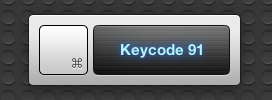
When you develop a web application, you sometimes want to bind functions to single or multiple keys (for example to quickly toggle actions). For that purpose, you need their so-called key code (a specific number each key has) to make sure you adress the right one. KeyCodes makes it easy to get this code. Just open your dashboard, click on KeyCodes, and press the key whose code you need, and both the key and its key code number are instantly displayed using a neon-styled, stainless steel UI (similar to Loremify’s look; see header image).
Simple, fast, intuitive, and free of charge. Go ahead and download KeyCodes for free from Ahlin’s website.
The Current State Of Music-Making and Discovery On The iPad
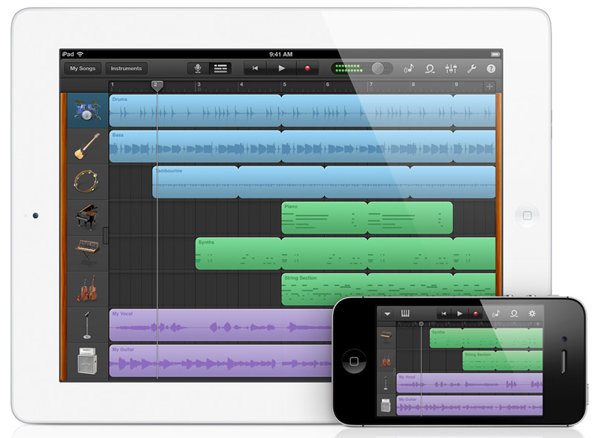
I have a confession to make: I’m a nerd. Yes, and I’m proud of it, because I think being a nerd means two things: I’m constantly curious about details, and I don’t hesitate to try out new stuff. To satisfy my curiosity, I’ve always dived into Apple’s ecosystem and the latest hardware related to it. Fortunately, my passion for Apple correlates with my love for discovering new music. I’ve been playing guitar since I was eight years old, and I love electronic music from the bottom of my heart as well. I’ve always found myself interested in both the traditional (perhaps organic) hardware side of music, and the more modern, digital software production process.
When the iPhone came out, many blogging colleagues and people around me predicted that its new software system, combined with the mobility of the device itself, would change the way people produce music and think about audible art as a whole. Three years later Apple unveiled the iPad. iPhone music software was indeed present at the time, but people soon recognized that the device’s screen was too small to create usable professional software for it — playing on-screen keyboards was nearly impossible and attempts to build high-end software synths like ReBirth or drum machines ended up in cluttered, untidy screens.
This problem seemed to get solved with the large screen of the iPad. Professional software retailers like KORG immediately started coding software versions of their most successful hardware. For instance, the iElectribe was one of the first apps available after the device’s launch. Over the years, I constantly tried out music apps for the iPad, tested hardware accessories (made possible with the release of iPhone OS 3), and never stopped investigating advantages, problems, and future possibilities of all those apps. Now, five years after the launch of iOS and the iPhone, I think it’s time to look back at how Apple’s mobile devices, with the focus clearly on the iPad, have changed the world of music and how they’ll continue to affect the future.
To do this, I recently went through my app archive and analyzed which kind of music apps remained installed on my devices, and which ones I liked when I tested them, but didn’t gain a place in my personal workflow. I discovered that I had to clearly divide music apps in several areas when discussing them. I distinguished between eight types of available music apps: promotion, discovery, entry level playing apps, handy/learning tools, sketching apps, recording, and professional software.
Throughout this post, I will cover each of those areas separately and point out their current state by discussing the most elaborate app(s) in their respective areas. I will point out the advantages and problems iOS brings to them, and predict — as far ahead as possible — what the future might hold.
Ars Technica Investigates The Future Of Thunderbolt Cables→
Ars Technica Investigates The Future Of Thunderbolt Cables
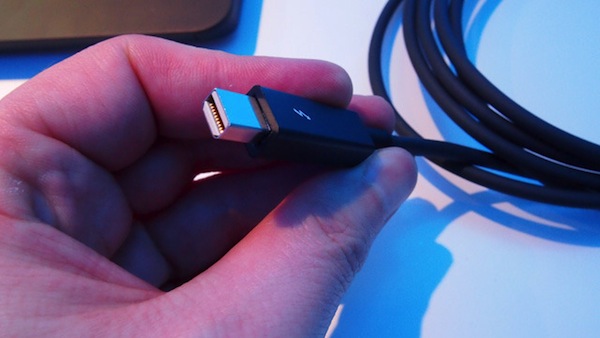
In an investigation for Ars Technica, Chris Foresman explores why Thunderbolt cables, more than a year after Thunderbolt debuted, remain at the expensive $50 and greater price range. Foresman dug into what the current situation was and discovered that apart from Apple, there is currently only one volume supplier of Thunderbolt cables that are likely rebranded by Belkin, Elgato, Kanex and others that offer Thunderbolt cables.
While other vendors are now offering their own Thunderbolt cables, prices have mostly stayed the same—in fact, some have gone up. We found this surprising; typically more vendors offering competing products leads to lower prices. And as the high cable price represents a fairly high barrier to entry for Thunderbolt devices, it relegates the standard to niche, early-adopter territory.
Foresman found that prices won’t really drop until early 2013 when a second generation design by Intersil will enter production. The current “first-gen cables” are based on a Genum transciever from Semtech that is built with silicon germanium which makes it much more expensive to produce.
It’s likely that Intel and Apple chose the Semtech part because it was either an already existing part that fit the requirements for Thunderbolt’s high 10Gbps bi-directional data rate, or Semtech had something similar that was easily adaptable.
The new design from Intersil does things differently by combining the cable’s microcontroller and transciever into a single processing chip and the power management and voltage regulators into another single chip - meaning the number of integrated circuits in the cable will go from 4 to 2. Intersil’s John Mitchell says to Ars that their solution is “half the chips, half the size, uses half the power, and cheaper conductors can be used. By the end of the year, cables will be less expensive.”
The chips are manufactured on a lower cost, 40nm CMOS process, improving yields and lowering costs significantly. The 40nm process also dissipates less heat, reducing the need for bulky heat sinking within the cable plug.
MacStories Interviews: Brett Kelly

In our ongoing series of interviews with developers and creators in the Apple community, I recently had the chance to talk with Brett Kelly, Evernote extraordinaire, founder of NerdGap, and creator of Evernote Essentials. When he’s not making things with words and computers, Brett tweets as @inkedmn.
The interview below was conducted between February 3 and July 3, 2012.
MacStories: Hey Brett! Could you introduce yourself to the readers who haven’t heard about you before?
Brett Kelly: Ahoy Federico! I sure can…
My name is Brett Kelly. I’m a writer, podcaster and software developer from Southern California. By day, I’m the Technical Communications Manager for Evernote where I write user documentation and build cool software tools. I write a blog at nerdgap.com and I’m probably best known as the author of the popular getting started guide for Evernote, Evernote Essentials. I’m happily married to my first wife and we have two crazily wonderful children who are crazy.
MS: I’m a proud Evernote customer myself – I use the service every day – and I have read your Evernote Essentials guide. How did you get started with Evernote in the first place? Getting to work for the company you’re already passionate about sounds like a dream job.
BK: Always nice to meet a fellow Evernote user.
Back in early 2008, a friend of mine send me an invite to the private beta for this thing called “Evernote”. I gave it a brief spin and, as soon as I realized that I could stick stuff in there and it would sync between my work and home computers, I was hooked. Remember this was before the iPhone app, as well as the App Store!
I immediately started using the crap out of it; work stuff, personal stuff, it all ended up in Evernote. Almost four years and over 10,000 notes later, I’m a bigger fan of the product than I was last week and I’m both proud and humbled that I get to work with such a ridiculously smart group of people. Read more
Quickly Send Webpages To Evernote with EverWebClipper
As I explained in my previous look at my writing workflow, I use a selection of tools to save notes and other bits of text to Dropbox and Evernote. While such array of applications and utilities is ever-changing due to the very nature of the App Store, the core intent of being able to distinctively store text in separate locations stays true regardless of app updates and new releases.
I use Evernote as long-term storage for a variety of text and media that isn’t necessarily an article I need to work on inside a dedicated text editor. I keep images and PDFs that I may want to reference in the future in Evernote; I archive my own tweets and favorite tweets in two separate notebooks using IFTTT (thanks to Evernote’s search, I consider this a DIY alternative to Cue, which I also use); I keep digital scrapbooks with screenshots, design inspiration material, and app documentation stored inside Evernote, and often shared with colleagues. Dropbox is for text; Evernote is for other kinds of text and more.
It doesn’t happen very often, but sometimes I want to archive webpages or links in Evernote as well. On my Mac, I use a couple of AppleScripts put together by our Don Southard to quickly archive URLs or text-based versions of webpages in my Evernote inbox for later processing. On iOS, I have been using a simple tool called EverWebClipper to instantly beam webpages from Safari to my Evernote account.
EverWebClipper isn’t pretty but it’s functional. Furthermore, it’s one of those tools that you don’t really need to look at, as much as you need to ensure it can work reliably in performing the functionality it was made for.
The app can be used to save webpages as URLs, styled pages, or “simple” ones. The styled option will try to preserve the original design of a webpage while allowing you to still edit text and other elements in Evernote; the “simple” clip style will strip out graphics and other elements from webpages, trying to focus on text and hyperlinks.
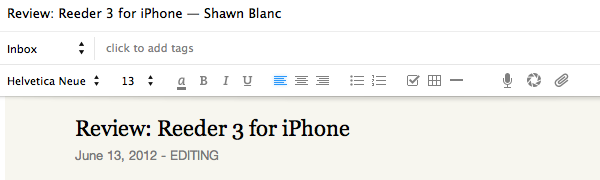

In actual testing, I found the styled setting to work reliably for minimalist sites like ShawnBlanc.net and Marco.org, suffering a bit in rendering graphics afterwards with sites like ours, or The Verge. However, it’s very convenient to be able to archive webpages “as they are”, even if some icons may be misaligned or missing. I’m not the biggest fan of Evernote’s “simple” mode for webpages, so I was bummed to see the app has some issues in saving the styled version of Instapaper-mobilized articles, which I prefer (and often convert to PDF on my iPad using Save2PDF).
Overall, I welcome the URL option; I like the possibilities offered by styled clips (though they’re hit or miss depending on the website); but I wish the “simple” setting would use a more capable parser like Instapaper’s.
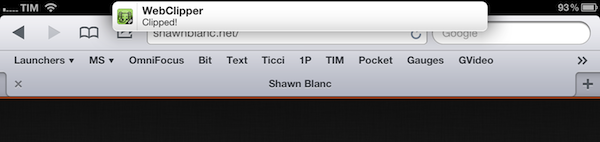
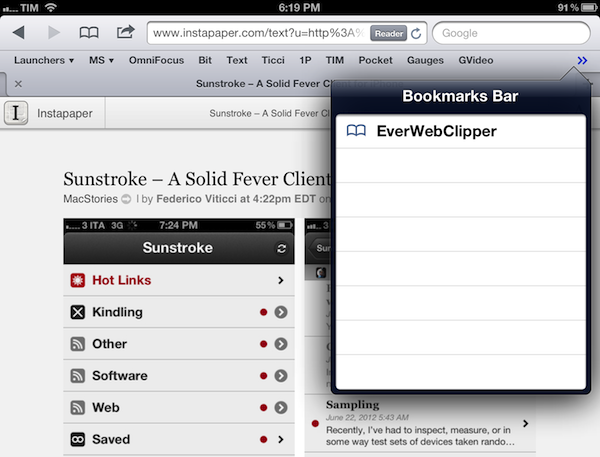
Where EverWebClipper really wins over Evernote’s standard clipper (not optimized for mobile and terrible to use in Safari) is the actual clipping process. It’s entirely automated: you can install a bookmarklet in Safari and save webpages with one tap. This happens thanks to the app’s Automation settings, which enable you to tap on the bookmarklet, and have Safari automatically return in the foreground while EverWebClipper completes the saving process. You can return to Safari “immediately” or “after clipping” – if you choose immediately, the app will send a local notification when it’s done clipping.
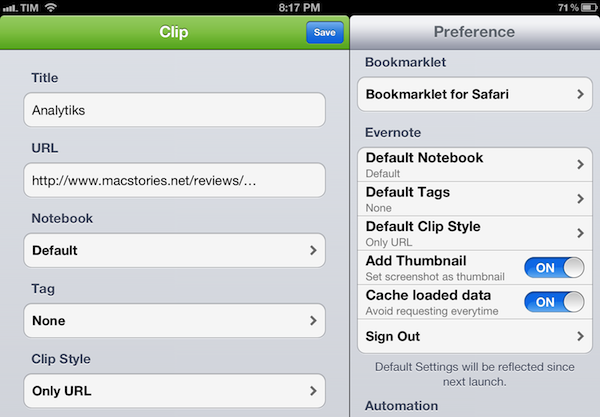
There are other settings available in the app, as well as a manual mode to paste URLs and specify notebooks and tags every time, rather than through the bookmarklet.
At $3.99 for the iPad version and $2.99 on the iPhone, I don’t like EverWebClipper’s pricing scheme, and I think the developer should consider making a single universal version – especially considering the minimal differences in terms of features and design between the two. However, EverWebClipper provides a better experience than Evernote’s own bookmarklet for grabbing entire webpages (not portions of them) on iOS, so you should check it out if you’ve been looking for a solid mobile Evernote clipper.
#MacStoriesDeals - Tuesday

Independence Day in the USA is tomorrow (July 4th) and there are many great deals rolling in! Here are today’s @MacStoriesDeals on hardware, iOS, and Mac apps that are on sale for a limited time, so get them before they end!
Read more